


The toy looks familiar, the price is unusually low, and the page appears to carry a brand parents have trusted for years. Nothing about the first glance feels especially risky.
The concern begins after checkout, when the confirmation never arrives or the card statement shows an unrelated merchant. The Melissa & Doug scam uses a copied storefront to turn a believable bargain into a payment and identity trap.
Overview
The real toy brand is being impersonated
Melissa & Doug is a legitimate company known for children’s toys, puzzles, and play sets. The scam is carried out by unrelated operators who copy the brand’s name, product images, descriptions, colours, and sale graphics onto an unauthorized website.
A fake store may use a domain containing words such as Melissa, Doug, toy, outlet, sale, clearance, or shop. Those words create recognition, but they do not establish any connection to the real company.
Deep discounts push shoppers past the domain check
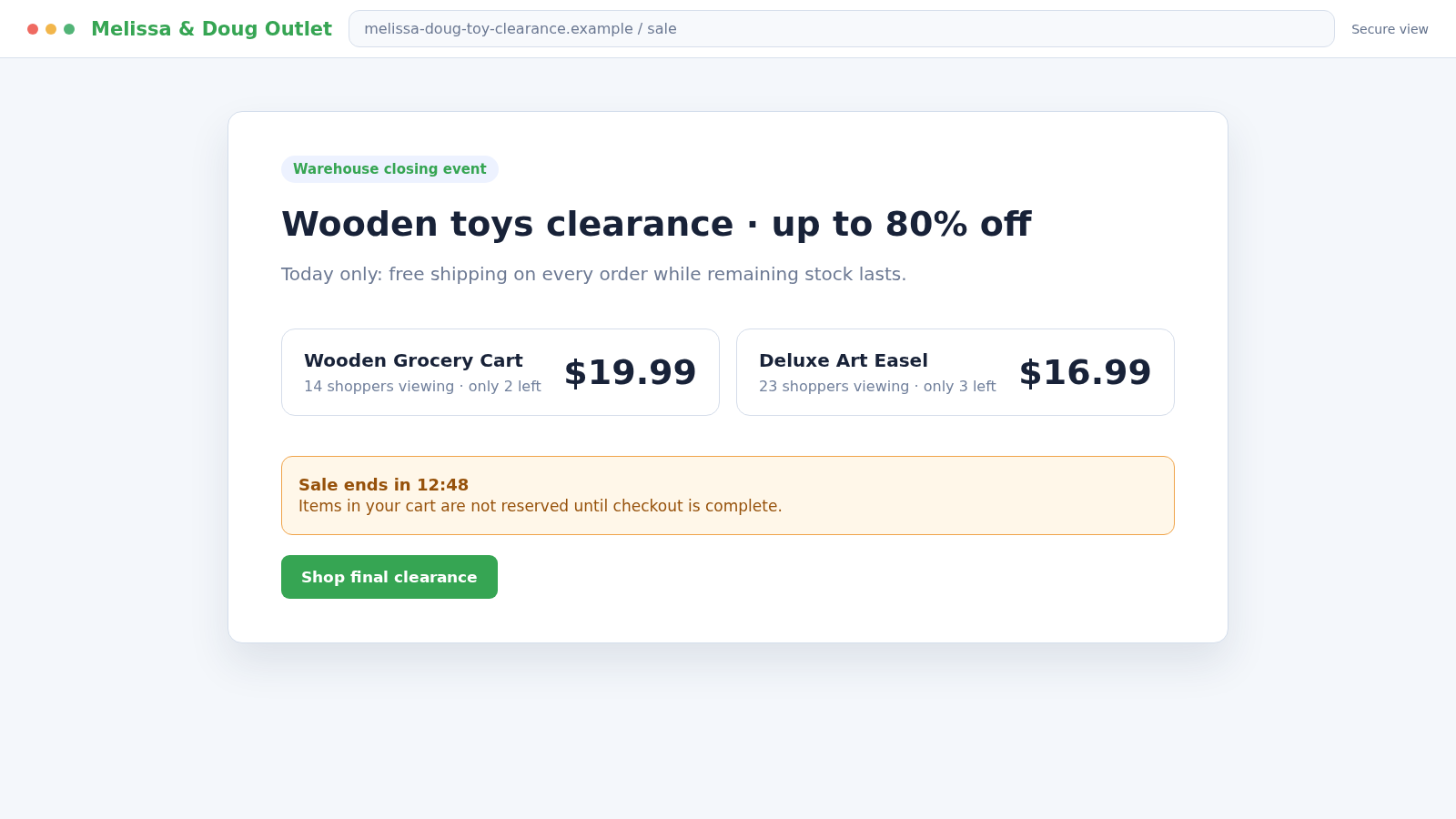
Copycat shops advertise popular toys at prices far below established retailers. Social-media ads and sponsored search listings can place the imitation page in front of people who are already looking for a birthday or holiday gift.
The offer is presented as a closing sale, warehouse clearance, anniversary event, or limited inventory release. A timer or low-stock message gives the shopper a reason to buy before comparing sites.
The checkout can produce several kinds of loss
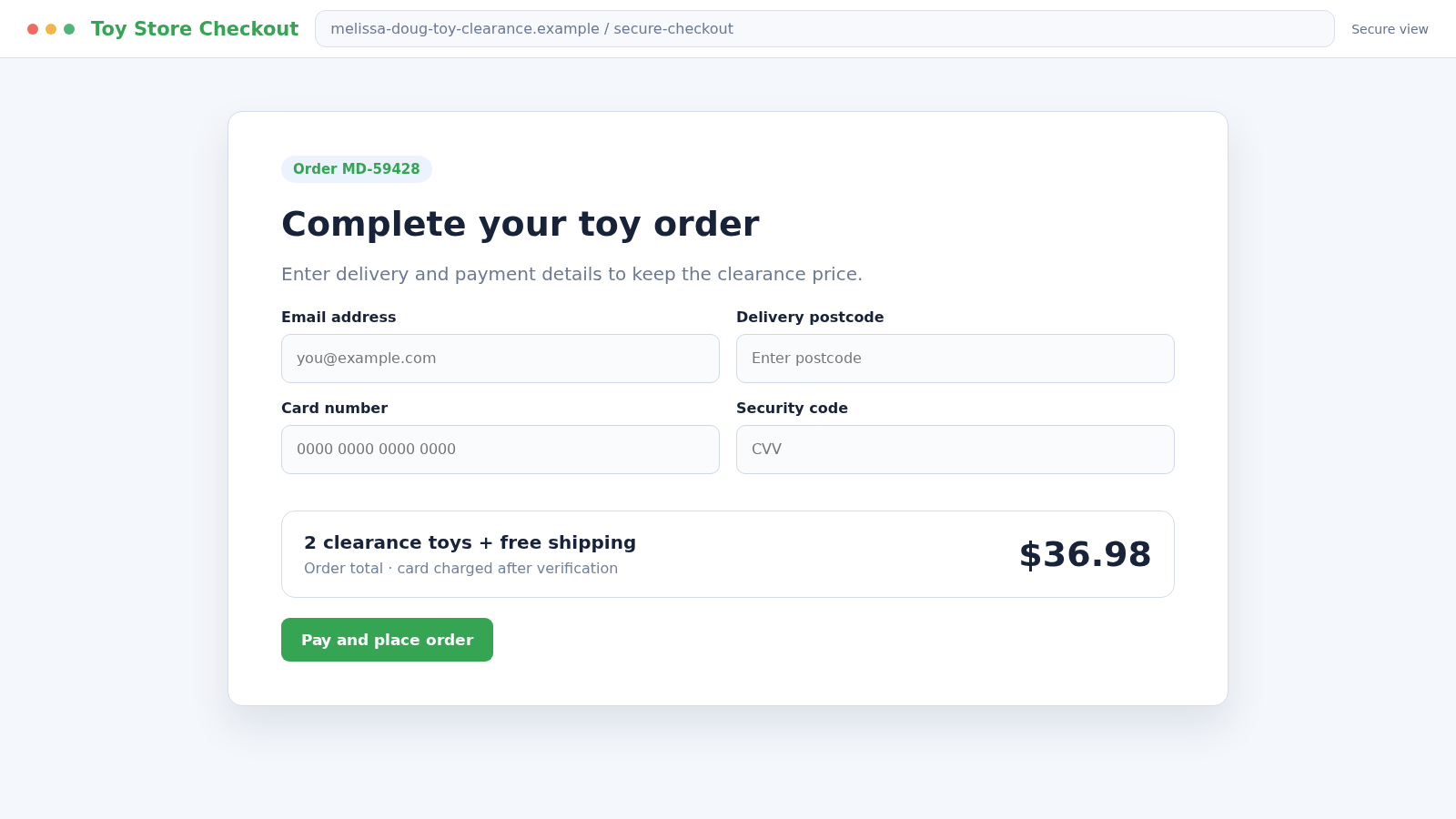
The order form may collect everything a criminal needs for payment fraud and follow-up impersonation, including:
- Full name, email address, phone number, and delivery address
- Credit or debit card number, expiry date, and security code
- A password created for the fake customer account
- Bank authentication codes entered during a supposed card check
- Money paid for products that never arrive
- Extra charges hidden behind shipping, warranty, or membership offers
Some victims receive nothing. Others may receive a cheap substitute, counterfeit item, or unrelated package used to generate tracking and complicate a card dispute.
What the Fake Toy Store Usually Looks Like
The homepage is built to feel busy and established. It may display hundreds of products, polished category menus, customer reviews, a newsletter box, shipping promises, and banners for several seasonal promotions.
Most of that material can be copied from the real brand or other retailers. Product photography is especially easy to reuse, so a sharp image cannot prove that the seller owns the stock shown.
Prices are the main attraction. A play set that normally costs much more may be marked 70% or 80% off, with free shipping added to make hesitation feel expensive.
The footer often contains privacy, returns, shipping, and contact pages. Their presence looks reassuring, but the text may refer to another company, contradict the checkout, or contain placeholders left by a recycled store template.
Why Shoppers Mistake the Copy for the Real Store
Parents and gift buyers often search by product name rather than by retailer. A result using the exact toy title can seem like the fastest route to the item, especially when the official product image appears beside it.
Sponsored placement is also misunderstood. An advertisement appearing above normal search results means someone paid for visibility; it does not mean the advertiser was endorsed as an authorized seller.
HTTPS is another weak signal. The padlock protects data while it travels to the site, but a scammer can obtain a certificate for a newly registered domain and securely receive stolen card information.
The checkout may use familiar card logos and a polished payment animation. Those design elements can be static images, while the form itself sends details to an unknown operator.
How the Melissa & Doug Scam Works
Step 1: A copycat domain is registered
The operator chooses a domain that resembles the brand without matching its official address. Added words, removed punctuation, doubled letters, and different domain endings help the name pass a quick glance.
The domain may be only days or weeks old. Registration privacy is common on legitimate sites too, but a very new address combined with aggressive discounts and no verifiable business history is a serious warning.
Step 2: Real product material is copied into a store template
Photographs, names, age ranges, descriptions, reviews, and logos are taken from legitimate pages. The criminal does not need to manufacture or possess any of the toys.
A large copied catalogue creates the impression of inventory and history. In reality, every product button may lead to the same generic checkout system.
Step 3: Ads target people already searching for toys
The fake shop is promoted through social posts, short videos, display advertising, or sponsored search results. The ad may mention a holiday, bankruptcy sale, warehouse closure, or one-day coupon.
Targeting can place the offer before parents, grandparents, teachers, and childcare workers. Relevance makes the ad feel discovered rather than delivered by a stranger.
Step 4: Urgency and discounts shorten the research window
A countdown, viewer counter, or “only two left” label suggests that waiting will lose the bargain. These numbers can reset whenever the page reloads and may have no connection to real inventory.
The shopper is encouraged to focus on the amount saved rather than the seller. A discount is not evidence that a store has products, authorization, or a workable return process.
Step 5: The checkout collects personal and card information
The form asks for a delivery address, phone number, email, and complete payment details. It may offer a small additional discount for creating an account and reusing a familiar password.
A payment error can appear after submission even when the information was captured successfully. The shopper may then enter another card, giving the operator multiple accounts to test.
Step 6: The charge appears under an unrelated description
The statement may show a foreign processor, unfamiliar shop, random abbreviation, or amount slightly different from the order total. The mismatch can be blamed on currency conversion or a “warehouse partner.”
Some cards are tested with smaller transactions before larger attempts. Others are used later, after the victim has stopped connecting new activity with the toy order.
Step 7: Tracking or support messages delay the dispute
A fake confirmation may promise dispatch within several days. Support replies then blame seasonal volume, customs, weather, or a logistics partner while the card-dispute window continues to run.
A low-value parcel can create a real tracking event without containing the purchased product. The operator may point to delivery status even when the package, address, weight, or item does not match.
Step 8: The stolen data is reused
The email address and phone number may receive more fake-store promotions, delivery-fee texts, refund messages, or calls from supposed fraud investigators.
A reused account password can expose other services. Card and identity details may also be sold, which means suspicious activity can continue after the original domain disappears.
Company, Address, and Fulfillment Checks
The domain should match the company you intended to visit
The official US brand store uses melissaanddoug.com. Type the address yourself or follow a bookmark rather than trusting an advertisement whose visible text can hide a different destination.
Read the registered domain from right to left and look for added shopping words, misspellings, unfamiliar endings, or brand text placed only in a subdomain.
The company identity must be consistent across the site
Compare the business name in the terms, privacy policy, returns page, payment page, and card descriptor. A copied store often changes identity as the shopper moves between these areas.
A legitimate street address copied into the footer does not prove that the operator is located there. Search the address independently and see whether it belongs to the claimed business.
The seller should be verifiably authorized
Melissa & Doug states that its product-care commitment may not cover purchases from unauthorized internet sellers. The company provides official contact routes for questions about seller authorization.
If an unfamiliar shop claims to be an outlet or liquidation partner, ask the real brand using contact information from its official site. Do not rely on a badge or authorization statement displayed by the seller itself.
The delivery and return promises must be workable
Read where returns must go, who pays postage, how long refunds take, and whether a reachable support team exists. A policy that promises easy returns while hiding the destination is not meaningful protection.
Look for independent evidence that customers received the advertised products, not only reviews shown on the store. Copied testimonials and invented star ratings can be published by the same person running the checkout.
Warning Signs of a Fake Melissa & Doug Store
- The domain is close to the brand name but not the official address.
- Most popular toys are marked 70% or 80% off at the same time.
- A countdown or low-stock counter resets when the page reloads.
- Every product appears available despite shortages elsewhere.
- The contact page offers only a form or generic mailbox.
- Policies mention a different company, country, currency, or product type.
- The checkout asks for a bank code that does not match the displayed purchase.
- The card is rejected and the site immediately requests another.
- The merchant name on the statement does not match the store.
- Order updates contain vague excuses but no verifiable shipment details.
No single shortcut can authenticate a shop. The useful question is whether the domain, company, seller status, price, payment, and delivery evidence all describe the same real business.
How to Check the Store Before Placing an Order
Begin at the official brand website and search for the product there. Even if you later buy from another retailer, this gives you a reliable description, usual price range, and point of comparison.
Search the unfamiliar domain name with terms such as reviews, scam, contact, and returns. Pay attention to specific experiences and dates rather than a single rating score that may combine unrelated businesses.
Check when the domain was created and whether older versions of the site exist. A store claiming years of service should not have a brand-new web history with no consistent company footprint.
Test support with a product or returns question before paying. A functioning mailbox does not prove legitimacy, but a bounced message, copied response, or refusal to identify the company is useful evidence.
If the seller cannot be verified, buy through the official site or an established retailer. A slightly higher price is easier to absorb than a stolen card, missing gift, and weeks spent disputing transactions.
What to Do if You Have Fallen Victim to This Scam
- Stop interacting with the store. Do not retry payment, enter another card, pay a reshipping fee, or use a refund link sent by its support team.
- Contact the card issuer immediately. Use the number on the card or official banking app. Explain that the purchase was made on an impersonation site and ask about blocking the card and disputing the charge.
- Describe every payment attempt. A rejected checkout may still have captured the card. Tell the issuer about each card entered, authentication code submitted, and unfamiliar merchant descriptor.
- Save the evidence. Keep the URL, order page, confirmation, product listing, advertised price, support messages, statement entry, and tracking details. Screenshots help after the website disappears.
- Change reused passwords. If an account was created with a password used elsewhere, replace it on every affected service. Secure the email account first and enable multifactor authentication.
- Watch for identity misuse. Review statements and credit reports for unfamiliar activity. If sensitive identity data was exposed, create a recovery plan at IdentityTheft.gov.
- Report the ad and domain. Use the advertising platform’s scam controls and notify the hosting or domain provider if its reporting route is available. This may help limit additional victims.
- Notify the impersonated brand. Send the suspicious domain and screenshots through contact details found on the real Melissa & Doug website. Do not use contact information copied from the fake store.
- File a fraud report. Submit the incident at ReportFraud.ftc.gov. If a substantial loss occurred, ask local police what evidence is needed for a report.
- Scan after unexpected downloads. If the store delivered a file, browser extension, or app, run Malwarebytes and investigate anything it detects.
- Block known malicious pages. AdGuard can reduce exposure to deceptive ads, trackers, and known scam destinations. It cannot confirm inventory or seller authorization.
- Distrust recovery offers. Someone promising a guaranteed refund for an upfront fee may be using the same stolen order data to target you again.
Frequently Asked Questions
Is Melissa & Doug a legitimate company?
Yes. The warning concerns unrelated websites impersonating the real toy brand, not the legitimate company or every established retailer selling its products.
What is the official Melissa & Doug website?
The official US brand store uses melissaanddoug.com. Type it directly and verify regional or retailer links through that site when in doubt.
Does a padlock mean the toy store is safe?
No. HTTPS encrypts the connection but does not prove that the business owns inventory, honors refunds, or has permission to use the brand.
What if the fake store sent a tracking number?
Check the carrier independently and compare the destination, weight, dates, and delivered item. Tracking can be unrelated, recycled, or attached to a low-value parcel.
Should I wait for the promised delivery before disputing?
Contact the card issuer as soon as the seller appears fraudulent. The issuer can explain deadlines and the evidence required without forcing you to rely on the scammer’s delay.
Can the real company refund an order placed on a fake site?
Usually the real brand did not receive the order or payment. Recovery should begin with the card issuer, while the brand can be notified about the impersonating domain.
The Bottom Line
The Melissa & Doug scam succeeds by placing a familiar name around an unfamiliar seller. Copied toys, polished policies, and deep discounts can make a new domain feel like an official clearance store.
Verify the domain and seller before entering payment details. If the company identity, price, merchant name, or delivery promise does not line up, leave the site and buy through a channel you can independently confirm.

Join the discussion
0 commentsShare your experience or ask a question about this article.
Discussion
Start the conversation
Have a question or something useful to share? Add the first comment.