


You search for the employee portal you use every payday. The first result carries the right words, promises access to pay stubs and benefits, and looks like the quickest route back to work.
Fake payroll login ads exploit that ordinary habit. The danger is not a strange attachment or an unbelievable prize. It is a paid result placed exactly where a busy employee expects the real login.
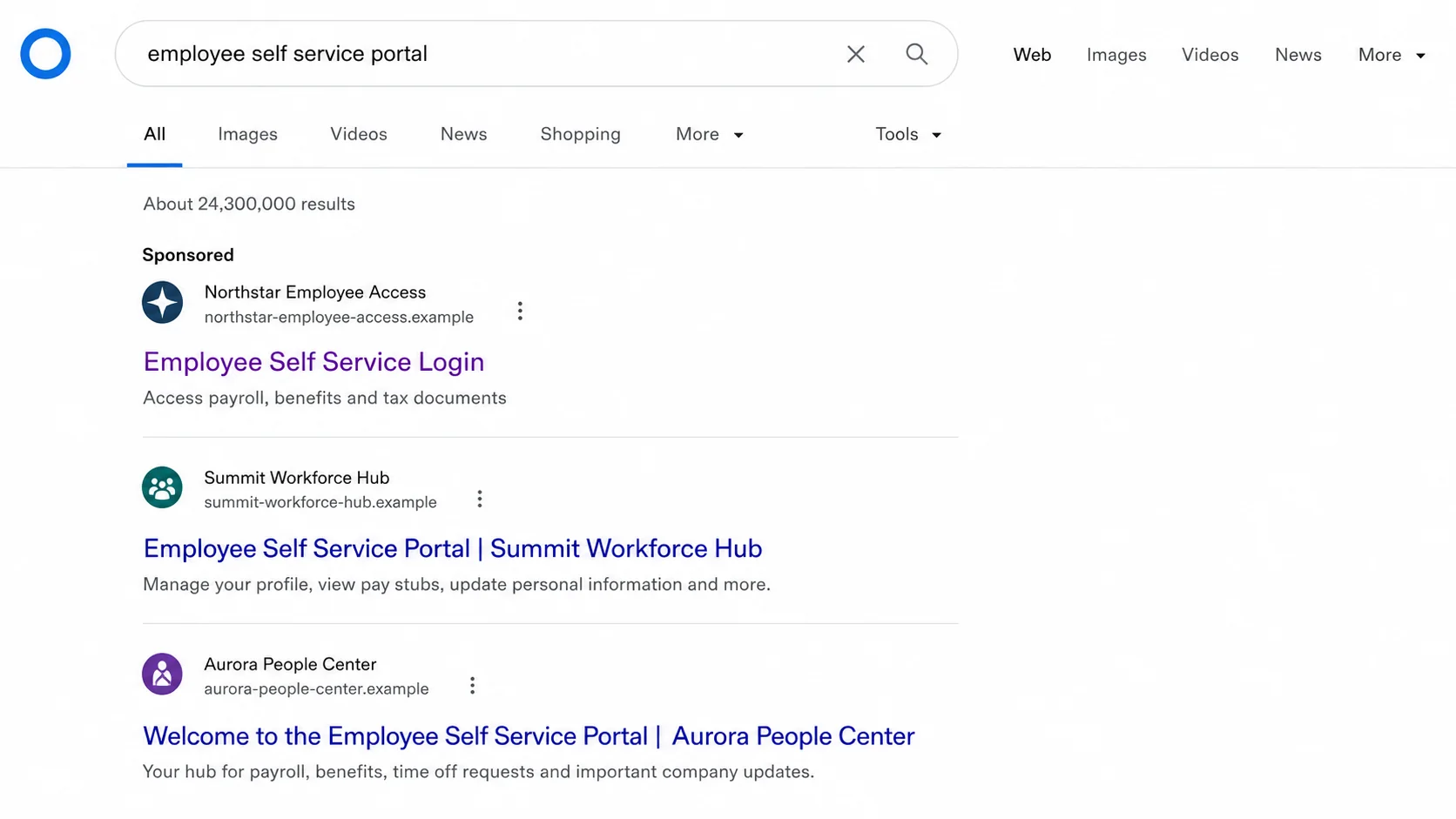
The imitation may differ from the genuine address by one letter, an extra word, or a different ending. On a small screen, that can be easy to miss.
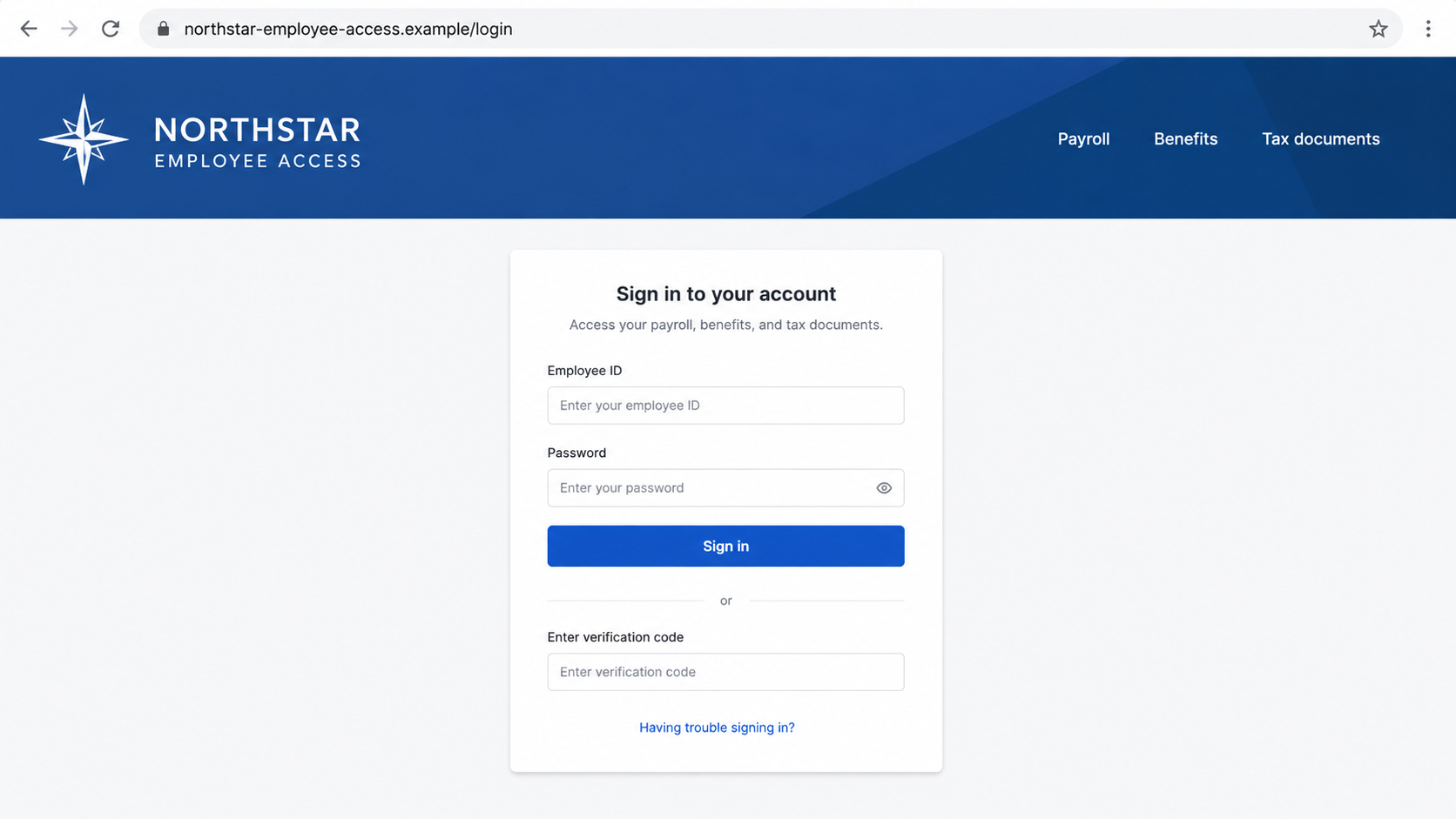
After the click, the page copies a familiar sign-in card. It asks for the same username, password, and verification code the real service would request.
The employee sees a login failure and tries again. Behind the page, someone else now has enough information to enter the real portal and change where the next paycheck goes.
Overview
The phishing page waits at the top of a normal search
The FBI has warned that criminals are buying search advertisements that impersonate employee self-service websites. These portals are used by companies and government programs for payroll, benefits, unemployment, health savings accounts, and retirement services.
The ad can appear before the real result. A person who searches the service name instead of using a bookmark may enter a carefully copied website without noticing the address change.
The login form is built to capture the whole session
The false portal records the credentials entered by the victim. Some versions then ask for a multifactor authentication code or trigger a phone call from someone pretending to be a bank or support representative.
Common targets include:
- employee usernames and passwords;
- one-time verification codes;
- payroll direct-deposit settings;
- unemployment benefit accounts;
- health savings and retirement balances;
- tax forms and personal identity information.
The theft may not appear until payday
A fake store usually produces an immediate charge. Payroll theft can stay quiet. The attacker changes a routing number, account number, or payment destination and waits for the employer’s next processing cycle.
The victim may not learn what happened until the expected deposit is missing. By then, the transfer may have passed through another account or been withdrawn.
Why Sponsored Placement Creates False Trust
Search ads are not ranked only by reliability. They are paid placements. A criminal who passes an advertising platform’s checks, uses a compromised advertiser, or changes the destination after approval may appear above the real organization.
The word Sponsored is disclosure, not a security guarantee. It tells you that someone paid for placement. It does not tell you who controls the final site.
Payroll searches are especially useful to attackers because the query reveals intent. Someone typing an employee portal name is likely ready to enter credentials within seconds.
The page does not need to fool the victim for an hour. It only needs to survive the brief distance between the search result and the Sign in button.
The FBI says fraudulent ads may use a URL with a small spelling difference. Some also redirect after the click, so the address shown in the ad may not be the final hostname.
This is why reading only the headline is not enough. The destination address, certificate, page design, and requested information must be considered together.
How the Fake Payroll Login Ads Scam Works
Step 1: Criminals identify a portal people search for
The target can be a payroll provider, employer login, government unemployment program, HSA administrator, or retirement service.
The attacker studies the real branding and the words employees use when searching for the sign-in page.
Step 2: A sponsored result is placed above the real page
The advertisement uses the service name in its headline and a familiar description. The visible address may contain a typo, added hyphen, extra login word, or unrelated domain ending.
On mobile search results, the hostname may receive far less attention than the large blue headline.
Step 3: The landing page copies the employee portal
The false site reproduces colors, logos, navigation, and a centered login box. It may include links for payroll, benefits, tax documents, and password recovery to look complete.
Those surrounding links can be decorative. The credential fields are the part that matters to the attacker.
Step 4: The victim enters credentials and an MFA code
The first submission is captured. The page may say the password was incorrect, ask the user to try again, or display a verification screen.
If the attacker is logging in at the same time, the one-time code can complete the real session. Multifactor authentication cannot help when a victim deliberately hands the current code to the phisher.
Step 5: Payment details are quietly replaced
After entering the real account, the attacker changes direct-deposit information or attempts a wire. In unemployment, HSA, or retirement accounts, the same access can be used to redirect benefits or request withdrawals.
Personal data from tax documents can support identity theft beyond the original account.
Step 6: An email flood hides the warning
The FBI identifies a sudden burst of thousands of spam emails as one possible compromise sign. The noise is designed to bury a genuine alert about a password change, new bank account, or transfer.
Deleting the spam without searching for security notifications can give the attacker more time.
Company, Address, and Fulfillment Checks
The employer name in the headline proves nothing
Ad text can contain a company name the advertiser does not own. Compare the destination with the link published by your employer, benefits paperwork, or a trusted bookmark.
If the organization has an internal app launcher, use that instead of a general web search.
A near-match domain is still the wrong domain
Look for inserted words, transposed letters, extra hyphens, and unfamiliar endings. A padlock only means the connection to that site is encrypted.
It does not certify that the site belongs to your employer or payroll provider.
Real support can verify the portal independently
Call the HR or payroll number already stored in company records. Do not use a number printed on the suspicious page or supplied by a caller who appeared after the login attempt.
Ask whether the direct-deposit record changed and when the next payroll file will be processed.
The fake site may vanish while the account remains changed
Phishing domains and ads are disposable. A missing page tomorrow does not reverse a bank change made today.
The useful evidence is the full URL, ad screenshot, browser history, login time, email alerts, and the destination account shown in payroll records.
Checks to Make Before Entering a Payroll Password
A payroll portal deserves stricter habits than an ordinary website. Use the same known path every time.
- Open the employer’s internal homepage or saved bookmark.
- Do not use a sponsored search result for payroll or benefits.
- Read the entire hostname before entering an employee ID.
- Be suspicious if the page asks for a code before a valid login.
- Stop if a caller requests the code generated by your authenticator.
- Turn on alerts for changes to direct deposit and recovery details.
- Review the bank account shown in payroll before each processing deadline.
Password managers provide another useful signal. A manager that normally fills the real portal may refuse to fill a lookalike domain. Do not override that warning until the address is verified.
What a Redirected Paycheck Usually Looks Like
The first visible symptom may be a missing deposit rather than a strange login. The pay statement can show that wages were processed normally while the destination account no longer belongs to the employee.
Some payroll systems send a confirmation after bank details change. Criminals know this, which is why they may alter the email address, create an inbox rule, or flood the victim with subscriptions and junk.
Search the inbox for terms such as direct deposit, banking change, profile update, new device, password reset, and verification. Check deleted messages and forwarding rules as well.
A small test change may come first. The attacker could replace only one allocation, add a secondary account, or wait until a bonus or larger payroll run.
Employers should compare the following records:
- the time and IP address of the bank change;
- the previous and current routing information;
- recent password and MFA resets;
- email notices sent by the payroll platform;
- the payroll file’s submission deadline;
- the bank’s trace number for the deposit.
That timeline determines whether the employer can stop the file, reverse an internal change, or ask the receiving bank to freeze transferred funds.
Unemployment and benefit theft can look similar. A legitimate claim remains in the victim’s name, but payment instructions, contact information, or login recovery details have changed.
Health savings and retirement accounts require an additional review. Check beneficiaries, linked banks, distribution requests, investment changes, and mailed documents.
Why Calling the Number on the Page Is Dangerous
A fake portal can display a support number controlled by the same operation. The caller already knows which site the victim opened and can sound prepared to solve the login problem.
The agent may ask for a one-time code, claim the account must be synchronized, or direct the employee to install remote-access software. That moves the attack beyond the browser.
Use a number from the employer directory, pay statement, benefits card, or previously verified provider record. Do not let caller ID replace independent verification.
If the person who answers refuses to let you call back through the organization’s main number, end the conversation. A real payroll team can document the case without keeping you trapped on one call.
Employees working remotely should be especially careful with search results. A familiar office bookmark may not exist on a personal computer, and the attacker is counting on that gap.
Employers can reduce the risk by publishing one memorable portal route, monitoring lookalike domains, and requiring an out-of-band confirmation before direct-deposit changes take effect.
A notification sent to both the old and new contact methods gives the real employee another chance to stop an unauthorized update.
What to Do if You Have Fallen Victim to This Scam
- Contact payroll or HR immediately. Use a known internal number. Ask the team to freeze changes, confirm the current direct-deposit account, and stop a pending payroll file if possible.
- Change the real portal password. Navigate through the employer’s official site or app launcher. Do not return through the search ad. End other sessions and replace any reused passwords.
- Reset multifactor authentication. Tell support if you entered a one-time code or approved a prompt. Remove unfamiliar phones, authenticator registrations, security keys, and recovery addresses.
- Call the financial institution involved. If a paycheck or benefit was redirected, ask the employer and bank to trace and recall it. Record case numbers, dates, amounts, and destination details.
- Search through any email flood. Look for legitimate notices about password resets, bank changes, tax forms, wires, or new devices. Preserve those messages instead of clearing the inbox immediately.
- Secure the device and browser. Run a full Malwarebytes scan in case the page delivered unwanted software. Review extensions and downloads. AdGuard can reduce exposure to malicious search ads and known phishing destinations, but a bookmark remains safer for payroll.
- Protect your identity. If tax forms, a Social Security number, or other personal records were exposed, place a credit freeze or fraud alert and follow the steps at IdentityTheft.gov.
- Report the advertisement. Report it to the search platform and the FBI’s IC3. Give your employer the exact query, ad text, URL, and time so other employees can be warned.
Frequently Asked Questions
Can a fake payroll page appear above the real website?
Yes. Criminals can purchase sponsored placement or abuse advertising accounts. Paid position is not proof that the advertiser owns the name shown in the headline.
Will multifactor authentication stop this scam?
It helps when the code stays with you. It may fail if the phishing page or a follow-up caller persuades you to provide the current code or approve a login prompt.
Why would the fake page say my password is wrong?
An error can collect a second password attempt, delay you while the attacker logs in, or make the following verification-code request feel normal.
What does an email flood have to do with payroll theft?
Attackers may subscribe an address to large amounts of junk mail so a real account-change or transfer notice becomes difficult to spot. Search the inbox carefully for security alerts.
How quickly should I contact payroll?
Immediately. Payroll teams work to processing deadlines. A change caught before the file is transmitted is easier to stop than a deposit that has already reached another account.
What is the safest way to open an employee portal?
Use the employer’s internal homepage, approved app launcher, or a verified bookmark. Avoid search advertisements for any account that controls salary, benefits, savings, or tax records.
The Bottom Line
Fake payroll login ads turn a routine search into an account takeover. The sponsored result copies a trusted portal, captures credentials and codes, and can give a criminal time to redirect a paycheck before payday.
Never judge a payroll result by position. Enter through a verified employer link, check the hostname before every login, and call payroll quickly if anything was submitted to the wrong page.

Join the discussion
0 commentsShare your experience or ask a question about this article.
Discussion
Start the conversation
Have a question or something useful to share? Add the first comment.