


The email looks safer than ordinary phishing. It appears to come from Facebook, uses familiar Meta Business language, and says an invitation or verification request needs attention.
The uncomfortable part is that the sender address can look right. That is exactly why this Meta Business phishing email is catching experienced page owners as well as casual users.
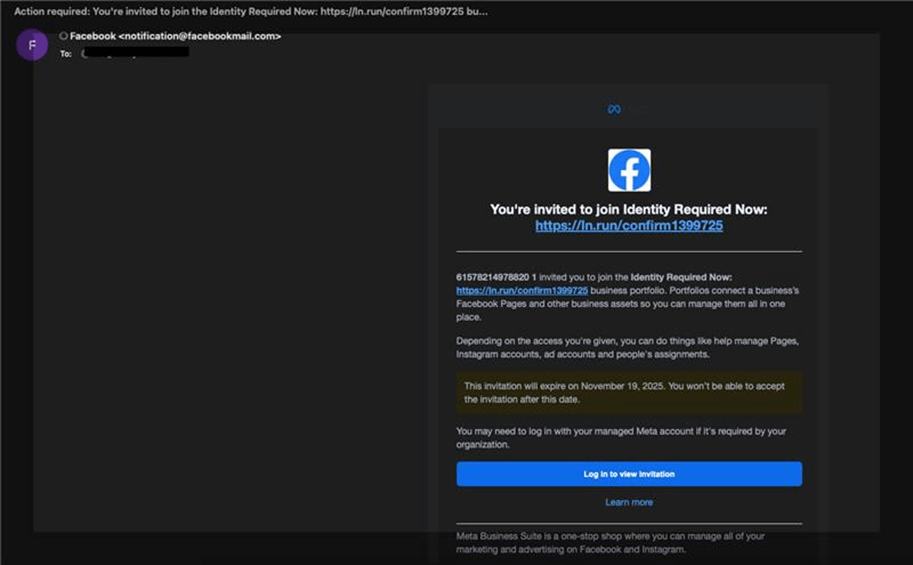
The button does not have to say anything outrageous. It may offer advertising credit, an agency partnership, account verification, or access to a business portfolio.
Those are routine events for people who manage pages and advertising accounts. A busy employee may click because the message fits the workday, not because the promise is spectacular.
What follows depends on the version. The invitation can contain an attacker-written link, a page name that doubles as an instruction, or a destination outside Meta that asks for login details.
Overview
A real notification system carries the false message
This campaign does not rely only on a forged sender line. Attackers create Facebook Business pages and abuse the platform’s invitation feature to send messages that can arrive from the legitimate facebookmail.com domain.
Check Point researchers reported roughly 40,000 phishing emails across more than 5,000 customers. One organization received more than 4,200 messages, which makes this a mass campaign rather than a dispute involving one page owner.
The invitation is the envelope, not the proof
A legitimate system generated the envelope, but an attacker supplied the page name, invitation wording, or link inside it. The distinction matters. Email authentication can confirm which service transmitted a message without proving that every piece of user-generated content is trustworthy.
The common lures include:
- an invitation to a Meta agency partner program;
- free advertising credits supposedly waiting for activation;
- an urgent account verification request;
- a warning that business access may expire;
- a page name containing a shortened or external link.
The destination wants control of a valuable account
The click can leave Meta and open a convincing login page hosted on unrelated infrastructure. The page asks for an email address, password, and sometimes a one-time verification code.
A stolen personal profile is useful, but a business administrator is more valuable. That account may control pages, advertising accounts, stored payment methods, audiences, pixels, customer messages, and other people who trust the brand.
Why the Sender Address Can Look Legitimate
Most phishing advice starts with the From address. That remains useful, but it is not enough for a message created through a real platform feature.
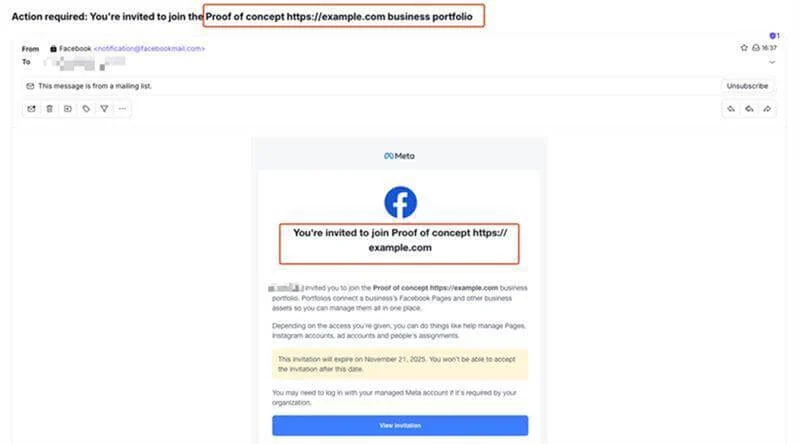
Facebook Business tools let organizations invite people to portfolios and assets. A genuine invitation email has to display information chosen by the inviting account. Attackers exploit that space by giving a fake page or portfolio a name that reads like an official instruction.
The surrounding email can therefore be authentic platform output. The dangerous sentence and destination were still placed there by someone Meta did not authorize to handle your account.
This resembles a fraudulent marketplace listing on a legitimate marketplace. The marketplace domain is real. The seller and offer can still be dishonest.
Check Point’s controlled test reproduced the technique. Its researchers created a business page, placed a message and link in the name, and used the invitation system to deliver a notification.
Their telemetry also showed repeated templates rather than a small set of carefully researched targets. Automotive, education, real estate, hospitality, and finance organizations appeared among the recipients.
How the Meta Business Phishing Email Scam Works
Step 1: The attacker creates a disposable business identity
The campaign begins with a Facebook page, portfolio, or business identity designed to resemble Meta support. Its name may contain words such as verification, partner, advertising credit, or account review.
A logo and official-sounding wording provide the costume. Neither proves that Meta created the page.
Step 2: A real invitation feature sends the bait
The attacker uses Meta’s own invitation workflow. That can cause the resulting email to pass ordinary sender checks and arrive from a domain the recipient recognizes.
The message may also survive filters that would block a newly registered phishing domain. To the mail system, it resembles a normal service notification.
Step 3: Urgency turns the page name into an instruction
The subject or invitation says action is required. It may claim an offer expires soon or that verification is necessary to protect advertising access.
The recipient is pushed to treat the embedded text as Meta’s instruction. In reality, the inviting account chose it.
Step 4: The click leaves the trusted platform
A visible link, shortened address, or button sends the victim to an external page. Some destinations use common hosting services, which can make the address look less alarming at first glance.
The important question is not whether the page has a padlock. It is whether the final hostname is an official Meta property you deliberately opened.
Step 5: The fake login collects credentials and codes
The destination copies Meta’s colors and sign-in layout. It asks for a username and password, then may report an error and request a fresh one-time code.
That second screen can let the attacker use the code immediately against the real service. A code is not safe to share merely because the page asked after a password.
Step 6: The stolen account becomes the next delivery channel
Once inside, the attacker can add an administrator, change recovery details, create ads, message customers, or send more invitations from a trusted business identity.
The original victim may later see unauthorized advertising charges or discover that followers are receiving scams from the compromised page.
Company, Address, and Fulfillment Checks
The displayed Meta name belongs to the costume
A page called Meta Verification Center is not automatically operated by Meta. Check the actual page history, transparency information, business relationship, and the request inside your own Business settings.
Do not treat a logo, capitalization style, or blue color scheme as ownership evidence.
The sender domain proves delivery, not authorship
A message from facebookmail.com can be a real Facebook notification containing attacker-controlled invitation text. Inspect every external destination before opening it.
If the button leads to a shortened link, an unrelated host, or a generic app-hosting domain, stop there.
Real support does not need your password in a message
Open Facebook or Meta Business Suite independently. Check Account Status, Support Inbox, Business Settings, and pending invitations from there.
A person who contacts you through Messenger and asks for a password, recovery code, cookie, or remote-access session is not completing a normal appeal.
The campaign infrastructure is deliberately replaceable
Individual pages and landing domains can disappear quickly. The reusable part is the delivery method: create another page, send another invitation, and point it at another credential form.
That is why one blocked URL does not end the campaign. Defenders must recognize the invitation pattern and verify requests inside the account.
Warning Signs Inside an Apparently Real Email
Do not dismiss the message simply because it feels familiar. Instead, look for a mismatch between the platform action and the request being made.
- The invitation name contains a URL or a sentence that reads like support.
- The offer promises free ad credit without appearing in your Ads Manager.
- The message sends you to a shortened link or non-Meta hostname.
- The page asks you to re-enter credentials after you were already signed in.
- The destination requests a one-time code, recovery code, or browser cookie.
- The alleged problem is absent from Account Status or Support Inbox.
- The invitation comes from a business you have never worked with.
The safest verification method is boring and effective. Close the email, open the official app or a saved bookmark, and inspect pending business requests there.
What a Business Account Takeover Can Expose
A Facebook login can be the beginning rather than the final target. Business administrators often have access to several connected assets, and the attacker will look for whichever one can be monetized fastest.
The page itself provides reach. A hijacked administrator can publish links, answer customer messages, change contact details, or remove other people who could stop the activity.
An advertising account provides spending power. A criminal may launch high-budget ads for fake stores, investment schemes, or additional phishing pages while charging the victim’s stored card.
A business portfolio can also connect multiple pages, Instagram accounts, catalogs, and data sources. Access that appears limited on the first screen may lead to assets belonging to clients or partner companies.
Customer conversations create another opportunity. A message sent from a page people already follow is more persuasive than an unsolicited note from a new profile.
The attacker may ask customers to pay an invoice, move to WhatsApp, confirm an order, or open a replacement website. That turns one stolen login into a trusted delivery network.
Review these areas after any suspicious login:
- people and partners with business access;
- page roles and ownership requests;
- active and scheduled advertising campaigns;
- billing methods and recent charges;
- connected Instagram accounts and catalogs;
- new apps, integrations, pixels, and datasets;
- messages or posts created without approval.
Do not remove evidence before recording it. Campaign IDs, added administrators, destination URLs, and billing records can help Meta, the card issuer, and law enforcement understand what happened.
If several employees manage the business, use a known channel to warn them. A phisher may contact another administrator while the first person is changing passwords.
The business should also tell customers if unauthorized posts or messages were sent. A clear warning can prevent followers from trusting the compromised page’s earlier instructions.
How to Verify a Meta Notice Without the Email
Open the official Facebook app or type the known address yourself. A real enforcement issue should have a corresponding record inside Account Status, Page Status, or Support Inbox.
For business invitations, inspect the inviting organization, requested permissions, and assets from Business Settings. Ask the supposed partner through an existing contact before accepting.
If an email promises advertising credit, check Ads Manager and official promotion notices. A promotion that exists only behind an external link should not receive a password.
This independent path removes the attacker’s strongest advantage. You can investigate the request without loading the destination the message was designed to make you trust.
What to Do if You Have Fallen Victim to This Scam
- Stop interacting with the email and external page. Do not submit another code to test whether the page works. Save the message, full headers, destination address, and screenshots before reporting it.
- Change the Facebook password from the official app or site. Use a new password that is not shared with email or any other service. If the same password was reused, change those accounts too.
- End unfamiliar sessions. Review where the account is logged in and sign out devices you do not recognize. Remove unknown email addresses, phone numbers, passkeys, and recovery methods.
- Audit business access immediately. Check every page, business portfolio, ad account, dataset, pixel, catalog, and Instagram connection. Remove unknown administrators and partners. Tell other administrators what happened.
- Review advertising and payment activity. Pause unfamiliar campaigns, preserve their IDs, and contact the card issuer if an unauthorized charge appears. Ask Meta support through the official interface to document the takeover.
- Secure email and scan the device. Change the email password first if it was reused or exposed. Run a full scan with Malwarebytes to check for credential stealers or unwanted software. AdGuard can help block known phishing destinations and malicious advertising during future browsing.
- Report the invitation and phishing page. Report the page inside Facebook, send the email through your organization’s security channel, and file a report with the FTC or local cybercrime authority if money or identity data was taken.
- Ignore recovery strangers. After a public complaint, scammers may offer an insider who can restore the page for a fee. Use only support reached from the official Meta interface. Do not pay anyone through crypto, gift cards, or a private chat.
Frequently Asked Questions
Can a phishing email really come from facebookmail.com?
Yes. In this campaign, attackers abused a legitimate invitation feature, so the platform could transmit an email containing attacker-controlled text. The sender domain alone does not approve the invitation or external link.
Does a Meta Business invitation mean my page has a violation?
No. An invitation is not an enforcement notice. Check Account Status and Support Inbox directly. If the alleged violation appears only inside an unexpected invitation, treat it as suspicious.
Is it safe if the link eventually opens a Meta login screen?
Only if you independently confirm the exact hostname and opened the official service yourself. A copied login screen can look identical, and redirect chains can hide the final destination.
What if I entered my password but not the verification code?
Change the password immediately and end other sessions. The attacker may try the password elsewhere, send another code request, or use a reused password against your email.
Can the attacker charge my advertising card?
Account access may expose ad accounts and stored payment methods. Review campaigns, billing activity, administrators, and spending limits. Contact the card issuer promptly about any unauthorized charge.
Where should I verify a real Meta request?
Open Facebook or Meta Business Suite without using the email link. Review Account Status, Support Inbox, Business Settings, and pending invitations from the authenticated account.
The Bottom Line
The Meta Business phishing email is dangerous because part of it can be genuine platform mail. Attackers turn a legitimate invitation system into a carrier for their own page name, urgent message, and external link.
Do not approve the request from the inbox. Open Meta Business Suite directly, verify the invitation there, and keep passwords and one-time codes out of any page reached through an unexpected message.

Join the discussion
0 commentsShare your experience or ask a question about this article.
Discussion
Start the conversation
Have a question or something useful to share? Add the first comment.