


Five messages you haven’t seen, three days left. That’s the kind of alert that makes you wonder which reply you might already have missed.
Before you try to release the mail, find out who says it’s being held. The answer should come from somewhere other than the alert itself.
Overview
The email gives you an inbox count you can’t see
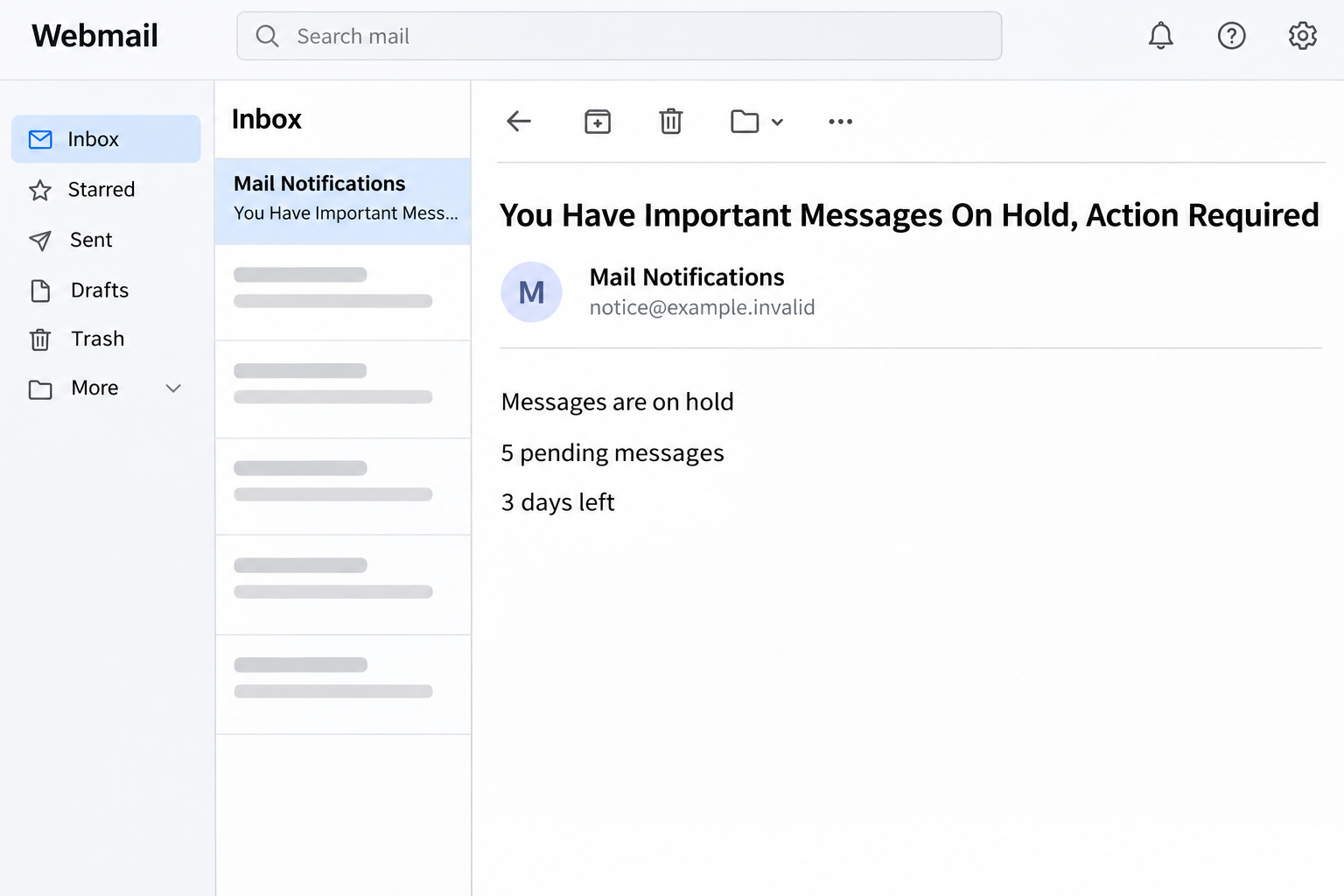
The Messages Are On Hold email scam claims a security system has paused delivery of five incoming messages. The email gives the recipient three days and offers a queue review.
The notice describes one quick step to release the messages. It says you can preview sender details once you reach the alleged message center.
The reconstruction above shows the promise and the countdown. It is not a picture of a genuine mail queue, and the numbers don’t reflect your inbox.
A small, specific count makes a useful lure. You can picture precisely enough missing messages to worry, but the alert doesn’t show one you can verify.
The promised queue review opens a sign-in page instead
The reported queue link went to an unrelated website displaying a fake Google sign-in dialog. It asked for the information used to enter a mailbox.
That is a different action from reviewing a list of held messages. The page’s branding doesn’t establish that Google received or quarantined any mail for you.
The case confirms a lookalike credential prompt. It doesn’t confirm a real quarantine, the identity of an affected account, or a successful takeover.
If you see a username you recognize on a page like this, don’t treat that as proof. A site can display your address without being your email provider.
Real quarantines are worth checking through the right service
Some mail systems hold messages for security or policy reasons. A real quarantine alert can exist, and organizations may have different procedures for examining or releasing mail.
The question is where your own provider or workplace handles that process. The link in an unsolicited email is not the way to establish it.
Try these checks without opening the queue link:
- Open the actual mailbox or security portal using a route you already know.
- If you were waiting for something, ask the known sender to check the address and confirm they sent it.
- Use your organization’s official quarantine or support process if there is one.
- Don’t supply a password to identify a message you have not independently confirmed exists.
How the Messages Are On Hold Scam Works
Step 1: The warning borrows urgency from whatever you’re waiting for
A real inbox is full of unfinished conversations. There might be a quote, an interview time or an appointment confirmation you expect to receive.
The scam doesn’t need to name any of them. By saying five messages were held, it invites you to imagine that one must be the important one.
The reader is doing the linking. The message hasn’t identified an actual sender, subject or delivery event it can tie to the claim.
Start with the real conversation. If the sender hasn’t sent the message yet, there’s nothing for a supposed queue review to release.
Step 2: The countdown makes a missing reply feel like a deadline
The three-day counter gives an unspecific warning a sense of progress. It makes the decision seem to be whether you can act before time runs out.
A real mail system can retain quarantined items for a limited time. The fact that expiration is possible is not proof that this email reflects your account.
If there is a legitimate deadline, your actual mail system or administrator can tell you which items it affects. Find that information without signing in from the message.
The endpoint’s convenience is part of the pressure. Checking the recognized portal might take another minute, but it starts from evidence the alert does not control.
Step 3: The word “review” makes the interaction seem low-risk
A queue review sounds like looking at records, not changing account access. You’re invited to think you’ll merely see who tried to contact you.
If the next page requests a password before showing any item, the task has changed. You aren’t deciding whether a message should be released anymore.
Your actual quarantine may also require an authenticated session. The difference is starting from a service you independently know handles your mailbox.
For a work address, some items may require an administrator rather than the recipient to release them. Check the organization’s process instead of trying to force a release.
Step 4: The next page resembles a Google sign-in
The reported link landed outside the real service but displayed familiar Google login elements. The copied appearance makes the password request feel like an everyday interruption.
Seeing a normal-looking email field does not establish who controls the site. A familiar color, logo or address only tells you what the page is showing.
Don’t try a test password to see whether a message list appears. Close the page and investigate through your own account or organization.
If you typed a credential, focus first on access to the account it belongs to. The fake queue is less important than the information you gave to it.
Step 5: The harm can extend beyond the inbox without affecting delivery
Mailbox access can expose correspondence and password resets for other services. An intruder may also send mail as you, even though the queue claim was false.
Your email can still send and receive normally while someone else has an open session. Getting the expected reply later does not resolve an account disclosure.
Work accounts may also hold shared mail or sign-in links. Before changing anything beyond your own credentials, ask the administrator which access the affected account had.
If you didn’t enter anything, tell support that too. Accurate reporting lets it distinguish a suspected email from a possible exposure without asking you to reopen the page.
How to Check Whether Mail Really Is on Hold
Look for one actual missing message
Open your inbox through its ordinary app or website. Search for the sender, subject and any other identifier you already know.
Look in spam and other relevant folders, but remember that a filter or quarantine can be controlled outside the visible mailbox. An empty folder doesn’t settle every delivery question.
If you know who was supposed to write, contact them independently. Find out whether they sent it, when they sent it and which address they used.
Don’t ask somebody to send proprietary or personal information to a new address just to see if it works. Agree on a verified alternative if a message is urgent.
Use the quarantine controls your provider actually offers
Microsoft describes how users work with quarantined messages for eligible Microsoft 365 environments. Available actions can depend on the organization’s policy.
Your service may use a different portal or allow only administrators to act. Ask your provider where it expects you to see held items.
A real record normally gives you something to evaluate about the actual message. Keep expected senders and subjects separate from any count claimed by the phishing email.
If a genuine quarantine contains a suspicious attachment, releasing it doesn’t make it safe. Follow your organization’s rules for what should stay blocked.
Give support details it can use
For a specific missing note, record the intended sender, recipient and approximate time. This can help an administrator check a real delivery event if it has the relevant logs.
If other staff received the same queue email, tell the help desk how many people reported it. That’s evidence about the campaign, not the number of held messages.
Keep genuine mail delivery tickets separate from phishing reports. Both can exist at once, and their order of priority changes if somebody supplied a password.
Know what a quarantine result actually tells you
A recipient-facing quarantine list might not expose every message your organization stops. If the exact email isn’t there, ask whether the security team can check its delivery records.
Some systems let you request a release rather than approve it yourself. Don’t assume a disabled control is a reason to look for another login page.
An administrator can tell you whether to request a release, ask the sender to retry, or leave the item blocked. Those decisions depend on the verified message.
If only one expected sender is affected, give support one example rather than requesting a change to spam settings. A broad exception may let unrelated unwanted mail through.
If you administer a shared mailbox, check which person reported the problem and which address actually received the notice. Access to a shared address may differ from a personal login.
Do not paste a new rule into a mailbox because a notice says an incoming message was delayed. That is a configuration change, not a way to verify a claim.
If the genuine service later surfaces the expected message, check its contents and origin before acting. Even a confirmed delivery doesn’t make a suspicious request inside it safe.
On a time-sensitive request, tell the known sender you’re checking delivery separately. If there’s a verified second route, using it can remove the pressure created by the countdown.
What to Do If You Fell Victim
-
Close the sign-in screen and report the email.
If you only opened the message or link and submitted nothing, leave the page closed. Use your provider’s phishing report feature or your employer’s normal process.
Write down the subject, time and the count shown if needed. Don’t circulate the link to see whether anyone else recognizes the portal.
Check genuine quarantine using an official route if you still suspect a particular message is missing.
-
If you typed a password, replace it from the real service.
Use your normal portal or speak with your administrator. For a personal Google account, start with Google’s compromised account instructions if access is in question.
Choose a unique password and replace any reused copies. Start with accounts that use the same address for important access or recovery.
If you gave out a one-time code or approved an unexpected sign-in, tell the provider. Don’t put the code itself in a report.
-
Look for access that might survive a password change.
Check sign-ins and connected devices through the real account if available. Ask IT or the provider to revoke unfamiliar sessions and verify recovery details.
Review forwarding, filters and delegates. Preserve details of unexpected rules for the incident handler before removing them, especially in an organization.
If your mailbox is still working and nothing obvious changed, don’t assume that makes a disclosed password harmless. Report the disclosure anyway.
-
Warn affected contacts through a channel you already know.
If the mailbox sent unfamiliar requests, tell recipients which message not to trust. Send a separate warning without forwarding the suspicious link.
If payment details or account changes were involved, contact the responsible department through an established route. A restored inbox won’t automatically stop a payment already authorized.
If you ran an unknown file in a separate interaction, tell support what happened. The recorded queue page was a credential lure, not evidence of a malware installation.
-
Return to the real mail problem after protecting access.
Give your provider an example of the missing message if one exists. Ask whether there is an actual hold, where it occurred and what the policy allows.
If the trusted sender resends it, confirm you received the expected version before acting on its content. A compromised thread can create a new risk.
Save the incident reference so you can check any future claim through support. Don’t rely on a fresh email claiming a new set of messages is being held.
Frequently Asked Questions
Does this email mean I have five messages in quarantine?
No. Five is the number printed in the fake notice. Your verified mail provider or organization’s quarantine controls can tell you what is actually held.
Why does the queue link show a Google login?
The recorded page copied Google’s sign-in appearance. It was not the real quarantine service. If you use Google, open your account independently.
Can real quarantine notifications have a deadline?
Yes, some systems have retention limits. Check the actual message and policy through the real provider rather than timing your response from the email.
Does seeing my address already filled in prove it’s genuine?
No. A page can display an address without authorization to handle its password. Check where you accessed the service, not whether the address looks familiar.
If I only clicked, do I need an account reset?
A click alone is different from supplying credentials or approving access. Report what happened and follow your provider’s process if anything unexpected occurred.
Can I ask the sender of a real message to resend it?
Yes, if you have confirmed the sender independently and it’s appropriate to resend. You can then check the actual receiving address and delivery records if needed.
The Bottom Line
Don’t sign in through the message queue email. Check any real quarantine or missing message from the mailbox or provider you already trust.
If you entered a password into the copy, secure that account before trying to find the missing mail. The number in the alert can wait.

Join the discussion
0 commentsShare your experience or ask a question about this article.
Community experiences
Did this happen to you?
Your experience could help someone recognize the same scam. Submit a private report for our team to review.
I experienced this tooReports are reviewed before publication. Sharing publicly is always your choice.
Discussion
Start the conversation
Have a question or something useful to share? Add the first comment.