


An email says your domain could be suspended in three days. It mentions ICANN and looks like a routine notice from a service you might already use.
If you manage the website or its email, that’s worth checking. Start by finding out which account could actually make the change the message threatens.
Overview
The email presents a deadline as an ICANN rule
The Zoho email address verification scam claims that domain owners have to confirm an address within three calendar days. It warns that the domain and mail could become inaccessible.
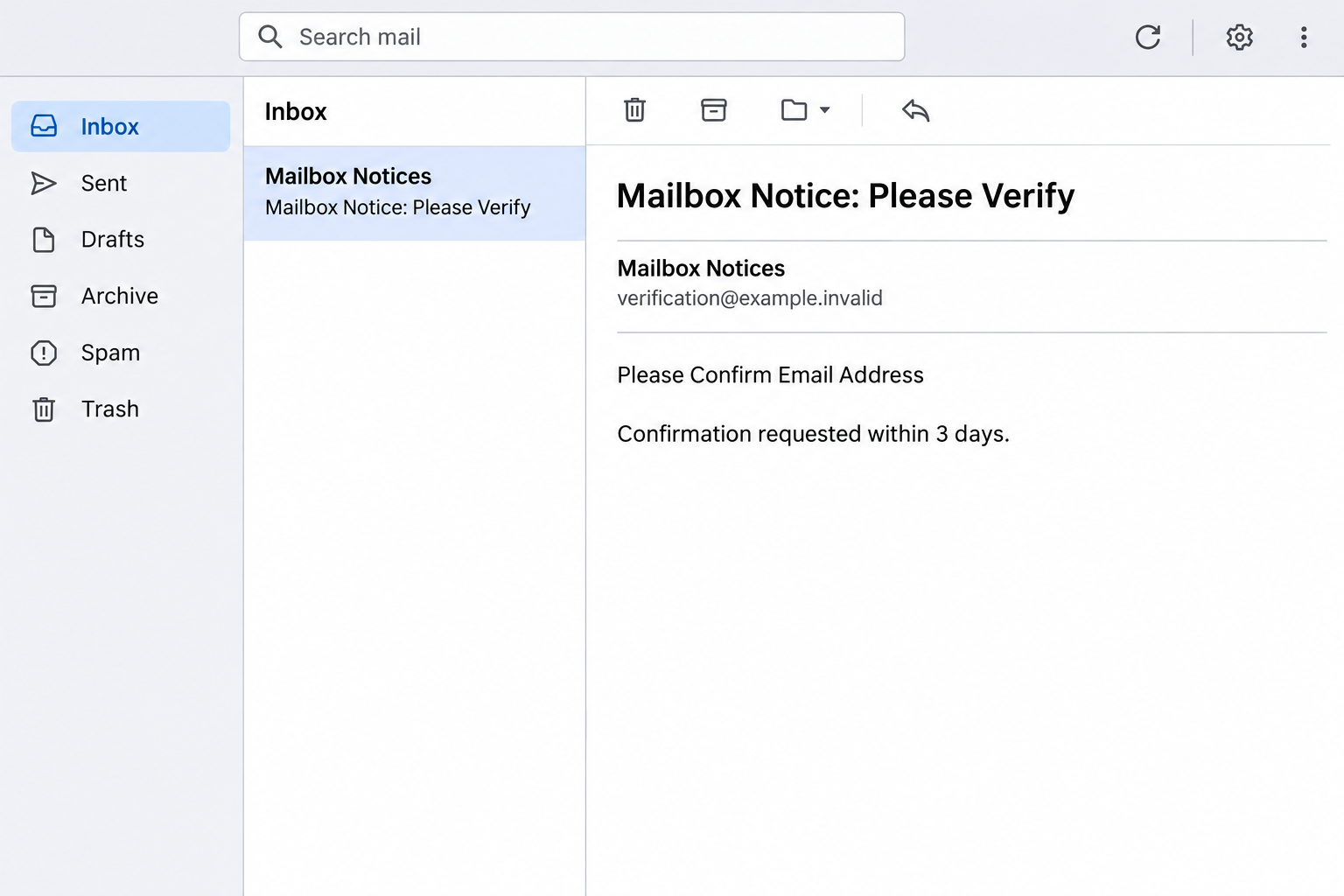
The sample uses a mailbox verification subject and describes itself as a secure, encrypted message. That wording doesn’t establish who sent it or which system issued it.
The image above recreates the opening request. It isn’t a notice from an actual registrar or a record of a suspension.
The lure works because it mixes two services people often manage together. Keeping a mailbox active and keeping a domain registration in good standing are different tasks.
The real rules concern registration contact data
ICANN’s guidance on accurate registration data explains why the contact information held by your registrar matters.
A registrar may legitimately request verification or follow up on contact problems. That doesn’t mean ICANN sent the email or requires this particular three-day button.
The observed message claims Zoho is handling that process. Zoho can host your mail, but you need to establish which company is actually responsible for your registration.
One organization can manage several roles for a customer. Check the role involved rather than deciding what to trust from the brand name alone.
The button’s destination is not the place to resolve the question
The website promoted in this report was unavailable. It is not possible to confirm what that exact page asked for, which brand it showed, or whether it accepted information.
The verified evidence is the impersonation notice and the domain suspension claim. Treat credentials or codes as separate exposures if you actually gave them away.
Check the following from independent records:
- The domain name you manage and the company that registered it for you.
- The registrar’s contact details and any verification status inside the real account.
- The service that actually runs your mailboxes.
- Any separate request to change contact information, sign in or approve access.
How the Zoho Email Address Verification Scam Works
Step 1: The email makes two related systems sound like one
Many domain owners set up a website, register its name and arrange business email during the same project. It can be hard to remember who handles each part.
The lure makes that confusion convenient. It puts a domain registration warning inside a notice that looks like it came from a mailbox provider.
That gives readers a plausible reason to worry about both their site and email. It also makes it harder to tell which account they should check.
Start with the company listed on your actual registration receipt. Then check where the affected address receives mail rather than assuming both services share one login.
Step 2: Invoking ICANN makes a short ultimatum sound official
ICANN has a real role in the domain name system, and registration contact details do need to be accurate. Those facts are part of why the message sounds plausible.
The email borrows that authority to announce a specific three-day deadline. It does not give you independent evidence of the action or show that your registrar issued it.
The appropriate question isn’t whether ICANN exists or has rules. It’s whether the real registrar reports a verification request for the domain you own.
A deadline shown in your real account is worth addressing. A deadline shown only in an unsolicited email isn’t a safe reason to sign in from its link.
Step 3: “Secure and encrypted” suggests the request has already been authenticated
The message calls itself secure and encrypted. A label in a message cannot tell you who controls the link you would follow.
Recipients who deal with sensitive information are used to seeing extra steps. The claim can turn an odd request into something that feels like a normal account check.
Even an encrypted connection to a website would not establish that the site is your registrar. Work from the correct account and provider first.
If you were already expecting a verified email from the registrar, compare the request without granting the suspicious message any extra trust. Timing can match by coincidence.
Step 4: Contact confirmation is used to get you onto an unverified route
The action in the email is to confirm an address. That can sound much less sensitive than signing into a full administrative account.
The destination was reported offline. We don’t have a documented view of any password, code or settings request that appeared after this exact message.
If the next screen you saw asked for a mailbox password, don’t assume your registrar needs it. A mailbox password grants access to email, not authority over the domain’s registration.
Stop using the page and verify the real request through your registrar. If your version did ask for sensitive data, report exactly what you entered.
Step 5: A real mailbox or domain problem can still need separate attention
The fake email should not be your route into either service. That doesn’t mean you should ignore genuine problems found in your own accounts.
If you have a real registration issue, follow the registrar’s verified process. If a mailbox password was leaked, protect the actual email account as a separate task.
A person who gains access to email may see reset messages. A person who gains access to the registrar might have different capabilities. Don’t treat those exposures as interchangeable.
Tell support whether you used a mailbox password, a hosting password or a registrar login. If you aren’t sure, explain which account you believed you were signing into.
How to Check Who Can Suspend Your Domain
Identify the registrar before checking verification status
Start with the company that bills you for registration. If an agency handles renewals, ask it to confirm who is responsible for the registry contact and account.
A company that hosts your website or mail may not be the registrar. An invoice for hosting is not enough to confirm who can resolve a registration issue.
Find the domain in the provider’s established account and check for a contact-verification task. If you cannot see it, use independently verified support.
If you recently transferred the domain or changed contact details, tell the registrar. Those changes provide more useful context than a countdown from an unknown sender.
Keep the contact address separate from its password
A registrar can ask you to show you can receive a message at the address on file. That should not mean sharing the password that opens the mailbox.
Check which contact address is registered. It can be different from the business address that received the lure, especially when an agency or a former administrator set things up.
If the address is outdated, ask the verified account owner how to update it. Don’t attempt the change through a form found in the suspicious message.
A business may need an administrator and the current registration contact to coordinate. Confirm who is authorized before moving ownership or changing where reset messages go.
Treat a site outage as its own evidence
If the website no longer loads, note the error and time before making changes. An expired registration, a hosting fault and a mail delivery problem can present differently.
Use the actual provider’s status and account records to decide which service needs attention. A fake email can coincide with a real outage without causing it.
Don’t edit DNS or move the domain just to see whether the warning goes away. Ask what the real system shows and make only the change it actually requires.
If your business depends on the domain, keep an independent record of the registrar, renewal contact and authorized support route. You may need it when the mailbox itself is unavailable.
Look at the difference between the deadline and the account record
If you bought the domain through a reseller, the brand on your invoice may differ from the registrar shown in the registration record. Ask the reseller which support route applies.
A public lookup can help identify a registrar, but it won’t necessarily show private contact details. Don’t assume a hidden contact address is evidence that verification failed.
Separately check the registration expiry date and any account notification about inaccurate contact information. They are two different things even when both need the registrar’s attention.
If a colleague originally bought the name, ask whether notices still go to that colleague. Having a working company mailbox does not mean its address is the registration contact.
Check the actual domain spelling before acting. A similar name or different ending can send you into the wrong account records, especially if the business owns several names.
Once the issue is resolved, confirm who will receive the next genuine notice. That small administrative step can prevent a future surprise from becoming an emergency.
You do not have to put your private registration details into a forwarded email just to compare notes. Use the provider’s approved process if documentation is genuinely needed.
What to Do If You Fell Victim
-
Stop using the link and report what you saw.
If you only read the notice or opened a page without submitting anything, keep it closed. Check the actual registration status from a known account.
Save the subject, time and name of the affected domain if you need to report it. Don’t publish any private registration contact details.
If this reached a team mailbox, send a separate warning without the suspicious URL. Give others the actual person or service to contact.
-
If you entered a password, identify which account it opens.
Change it through the real provider. For an affected Zoho account, follow Zoho’s account security instructions if they match your setup.
Change copies of the same password used on other services. Give priority to access that controls registration, business email or account recovery.
Tell the provider if you also supplied a verification code or approved access. Use an independently verified contact if the usual sign-in no longer works.
-
If a registrar or hosting login was exposed, tell its owner.
Ask the provider about recent access, owner and contact changes, and unexpected domain actions. Do not assume that restoring mailbox access resolves the registrar risk.
Check for pending changes you do not recognize before making any new ones. Preserve evidence and let the account owner coordinate with support.
If you are not the authorized owner, report promptly and hand off rather than trying to reset another person’s account.
-
Check the security of any mailbox involved.
Review active sessions, forwarding, recovery contacts and any rules you didn’t create. Ask IT for help if the account is managed or the controls are unfamiliar.
If the inbox receives password reset messages for other services, review those accounts separately. Warn colleagues if the account sent unexpected instructions.
If you separately ran an unknown file or installed anything, report that action. The original suspension notice by itself does not establish infection.
-
Resolve a confirmed registration issue from the official account.
Ask the registrar exactly which domain and contact are involved. Follow its known verification path, and keep a record of the result.
If the actual registrar confirms a suspension, ask what is required to restore service and which systems are affected. Don’t assume a mailbox password can reinstate it.
Keep the case number somewhere you can reach even if mail is down. Treat later offers to unlock the domain for a fee as new claims to verify independently.
Frequently Asked Questions
Does ICANN require me to use the three-day email link?
No. The recorded alert uses ICANN as a pretext. Confirm any real request about your registration through the registrar you already use.
Can a registrar legitimately ask me to verify contact information?
Yes. Contact verification can be part of legitimate domain administration. Open the registrar’s official account or contact its support before supplying anything.
Is Zoho responsible for the domain if my mailbox uses it?
Not necessarily. The company that runs your mail may not be the one that registered your domain. Check your original records and current account.
What if the email says it is encrypted?
That is a claim in the message. It doesn’t prove that Zoho sent it or that the destination can handle your credentials.
Did the exact notice lead to a verified password form?
The promoted page was reported unavailable. If you entered a password or approved a prompt in any version you saw, secure the affected account based on that actual action.
What if my website or mail is already down?
Check with the real registrar, website host or email provider according to what stopped working. A genuine outage does not authenticate the email.
The Bottom Line
Don’t confirm your address through the three-day Zoho notice. Ask the actual registrar whether your domain needs verification and handle any real request there.
If you supplied a password, secure the service that uses it. A mailbox and a domain can need different recovery steps even when a single email mentions both.

Join the discussion
0 commentsShare your experience or ask a question about this article.
Community experiences
Did this happen to you?
Your experience could help someone recognize the same scam. Submit a private report for our team to review.
I experienced this tooReports are reviewed before publication. Sharing publicly is always your choice.
Discussion
Start the conversation
Have a question or something useful to share? Add the first comment.