

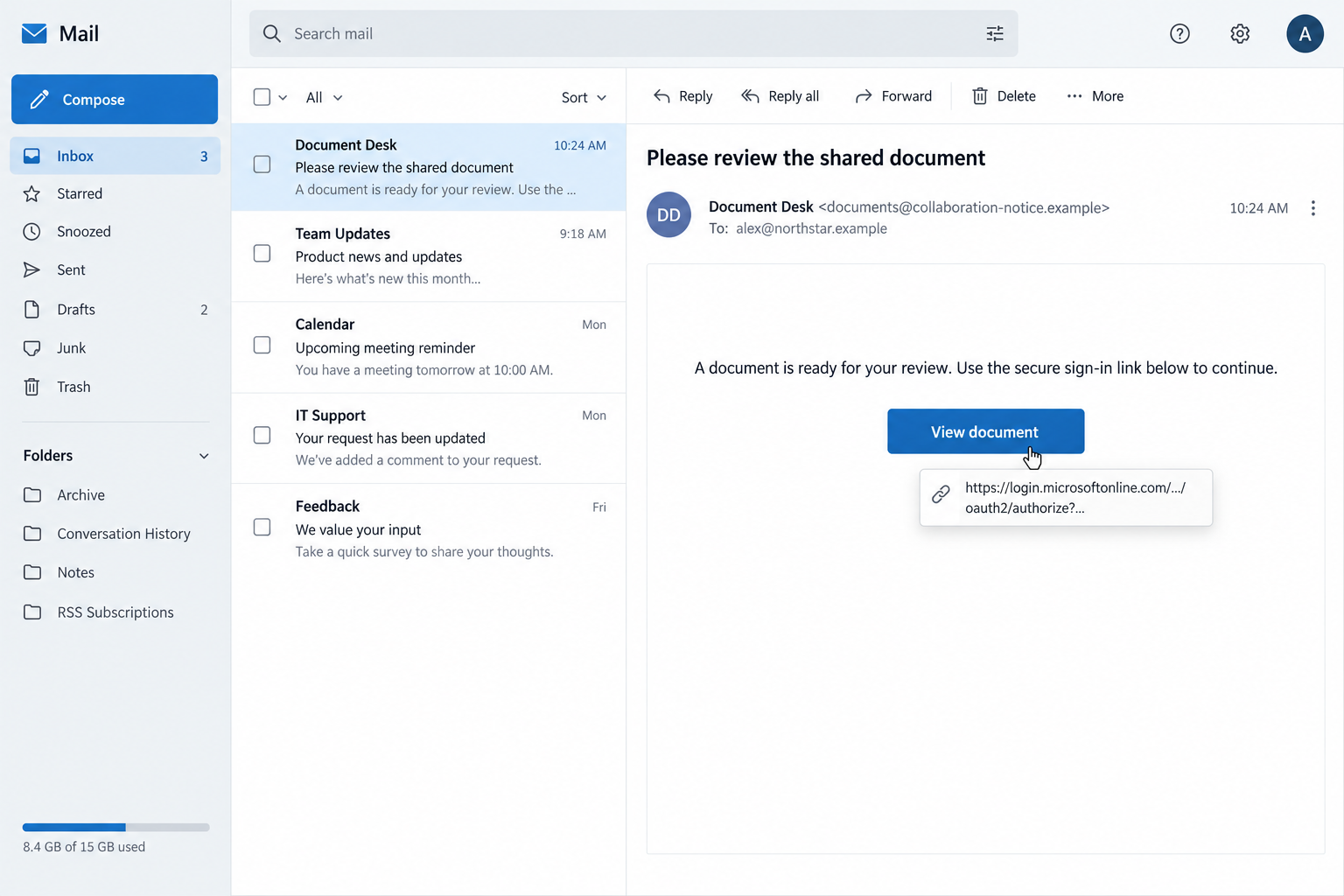
A shared-document email offers a Microsoft login link, and the address looks right. You have checked the part most phishing warnings tell you to inspect.
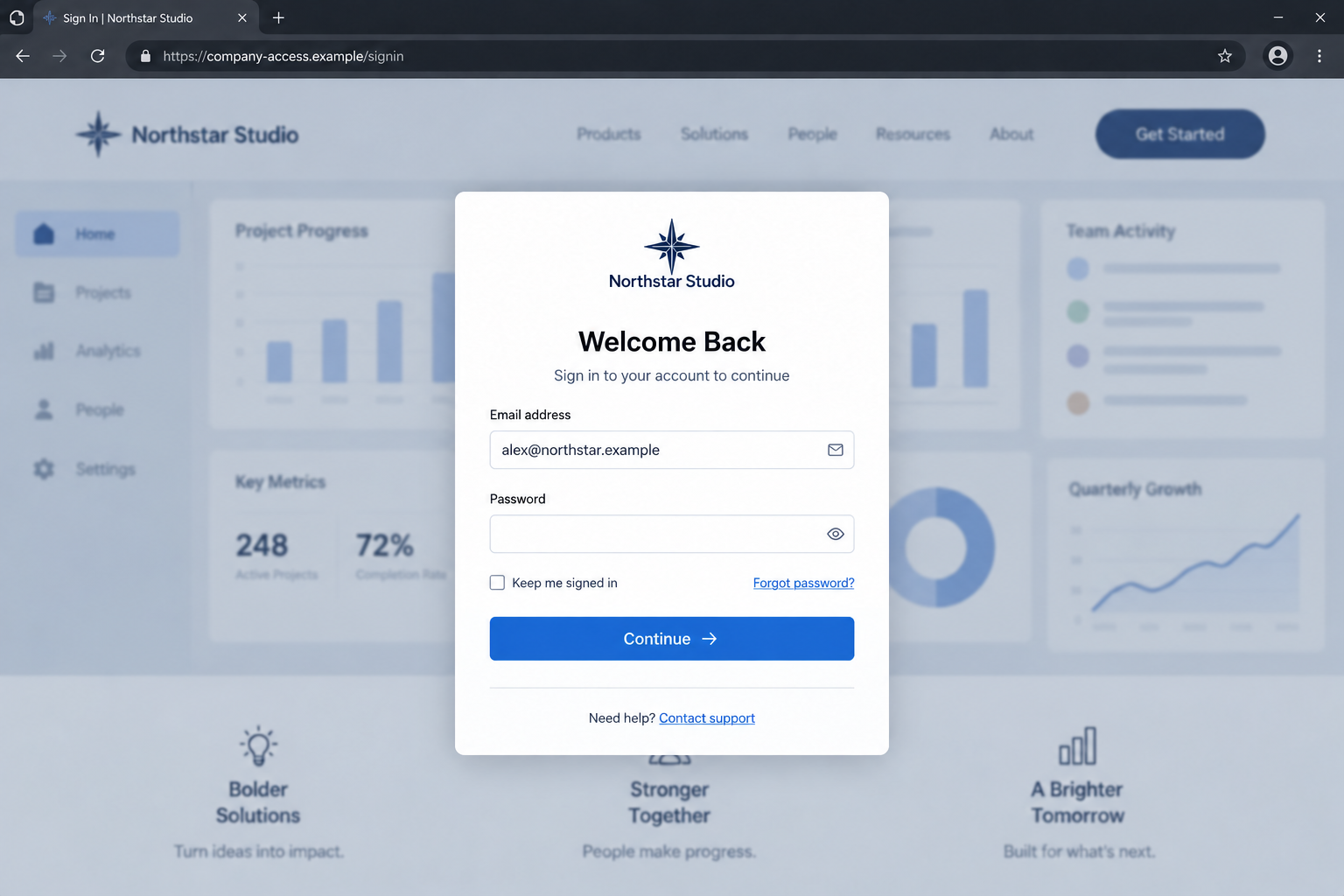
Then the browser moves on. A familiar company sign-in screen appears, already showing your email address. Is the first address enough to trust the next page?
Overview
A genuine starting address can lead to a fraudulent destination
The Microsoft login link scam abuses a trusted starting point to deliver a credential-stealing page. It does not mean Microsoft itself is sending fraudulent account requests.
Bolster’s October 1, 2026 investigation documented an email link beginning at Microsoft’s real authentication service and continuing through a six-stage attack chain.
The final form was designed to copy the recipient’s organization. Its purpose was to capture login information, not provide access to a genuine company service.
The lesson is specific: checking the initial hostname cannot authenticate every page that follows. The current sign-in destination needs its own verification.
The copied company page supplies a second layer of reassurance
A company name, recognizable visual style, and prefilled email address can make a login feel personal. None proves the operator has authority to collect your password.
Such information can be supplied by the link or copied from public material. Personalization should not be mistaken for a successful identity check.
This campaign is also different from consent phishing, where a deceptive application asks you to approve access. Here, researchers identified a separate credential-harvesting form.
Both involve authentication services, but they require different explanations. We should not assume that every Microsoft-related phishing attempt steals the same information.
Verify the task, then open your normal company portal
- Ask the supposed document sender about the request through an established conversation.
- Use your usual work portal rather than the email’s sign-in route.
- Pause when a redirect introduces a new or unfamiliar destination.
- Report credentials entered on a questionable page to your security team promptly.
The document email and Northstar screens shown here are fictional illustrations. Their names and addresses explain the transition without reproducing a live phishing link.
Why the First Safe Address Can Mislead You
Many people learn a sensible rule: examine a link before entering a password. A scam becomes harder to recognize when that first check appears to pass.
You may feel the question is settled once you see the familiar authentication domain. That confidence can carry over to the page loaded afterward.
But browsing is a sequence, not a single address. The service receiving the first request and the service displaying the final form may be different.
That difference matters even when the journey looks ordinary. Modern work tools often redirect between login services and applications, so movement alone is not suspicious.
The difficulty is deciding whether this particular journey belongs to a task you expected. A legitimate redirect pattern can be imitated or abused.
You do not need to solve that question by entering your password. Your normal work portal and a separate conversation provide cleaner checks.
Nor should you conclude that all Microsoft links are dangerous. The fraud lies in the malicious request and destination assembled around legitimate infrastructure.
A useful comparison is a real road leading to the wrong building. The road’s authenticity does not verify whoever is waiting inside.
For passwords, the building is the page currently collecting them. Look at that destination before treating the earlier safe address as reassurance.
How the Microsoft Login Link Scam Works
Step 1: An email gives you a reason to start the journey
A phishing message needs a task that makes signing in feel necessary. Shared files, account notices, and workplace requests provide plausible reasons to continue.
The published investigation does not establish that every recipient saw the same subject. Our document example illustrates the concept rather than quoting its observed email.
Check the task first. Were you expecting this file? Is the sender someone you know? Can you confirm the request without using its contact instructions?
Do not forward your password question to a new address supplied inside the message. That would keep the verification inside the sender’s chosen route.
A separate conversation can expose a false request before you need to examine the technical details of the link.
Step 2: The first link uses a trusted authentication service
Microsoft’s authentication service supports applications that send users onward after an authentication request. Seeing its hostname does not identify every application involved.
In ordinary use, this helps different services work together. In the documented attack, the configured application path became the front door to the phishing chain.
The recipient therefore did not have to click an obviously counterfeit Microsoft domain. That is what distinguishes this route from a straightforward lookalike-address email.
A genuine authentication endpoint can process a request without endorsing the sender’s claim or the downstream page’s content.
Keep that distinction in mind whenever a message says its link is safe simply because a large technology company’s name appears first.
Step 3: Redirects carry the browser away from the starting page
Each redirect tells your browser to request another location. The transitions can happen rapidly, leaving the final destination as the most visible part.
Bolster identified a Northflank-hosted intermediate redirect and Arweave-hosted components. Those legitimate services were being used within the attack, not shown to be its perpetrators.
For an ordinary reader, memorizing those infrastructure names is less useful than recognizing that the original domain may no longer be the current one.
Pause before entering information after the transition. If the destination is unfamiliar, return to the task through your normal application instead.
You do not need to trace the chain yourself or click backward through every stage. Security teams can investigate the saved link safely.
Step 4: The final form looks like your own organization
The investigated kit personalized the page using the recipient’s email domain and publicly obtainable branding. A single underlying kit could therefore present different company identities.
That helps explain why a generic fake login can still feel tailored to you. The criminal does not necessarily need a separate design for every employer.
A prefilled email field is particularly persuasive because it resembles a remembered session. But an address embedded in a link can populate a form too.
Do not count recognition twice. Your company name and email may both come from the same unverified source rather than two independent checks.
The question remains whether this is an approved sign-in destination for the task. Your saved company portal provides a better starting point.
Step 5: The password goes to the collector instead of the work service
Typing into a page gives its operator information. The design cannot tell you whether the form submits to your employer’s authentication system or somebody else’s receiver.
The research identified credential relay through a Cloudflare Worker to Telegram. It did not establish a universal theft of Microsoft session cookies or an identical MFA bypass.
A false page may display an error after a submission. That does not establish that the password failed to reach the collector.
If you entered credentials, stop there. Trying an alternative password or a second account would add exposure without verifying the first attempt.
Report what you supplied and when. A precise account of the interaction helps responders distinguish credential exposure from additional access.
Step 6: Access must be checked beyond the visible page
A stolen password may be used later. Closing the browser removes the page from view, but it does not invalidate information already submitted.
That is why recovery belongs in the genuine account and your organization’s security process, not inside the suspicious form.
Reviewing sessions, authentication methods, and account activity may be necessary, depending on what was entered and what your administrators find.
Do not assume a password change alone answers every question. Your security team can determine whether existing access also needs to be revoked.
Equally, do not announce a company-wide breach from one questionable click. The evidence should determine the response and its scope.
Three Addresses That Should Not Be Confused
The sender address identifies where the message claims to originate. It does not automatically identify the organization operating a linked page.
The clickable address is where the browser starts. In this case, the trusted starting point was a central part of the deception.
The final address identifies the page currently asking for information. That is the location requiring careful attention before you submit a password.
Security products may wrap links for inspection, adding another visible address. A wrapper’s presence is not a personal guarantee that every downstream page is authorized.
Likewise, a service’s login domain may differ from its everyday website. That can be legitimate, but it should be something your organization can verify.
If you are uncertain, avoid guessing from branding. Ask your help desk for the approved sign-in route through contact details already available to you.
Do not paste full work links into public forums. Some contain email addresses or other identifiers that your security team can handle privately.
Preserve the original message for internal investigation instead. Responders can distinguish the sender, redirect chain, and collecting page without publicizing your information.
What to Check Before Trying the Login Again
First, establish whether the task is real. A colleague can confirm a shared file using a conversation you already have, rather than a newly supplied number.
Next, open the application directly. If the file is genuinely assigned to your account, look for it inside the normal workspace.
An absent file is a reason to ask questions, not proof by itself. Permissions and sharing mistakes happen, but they should be resolved through normal channels.
If the sender insists the unusual page is the only route, ask your IT team to check it. Do not let urgency replace that review.
A deadline cannot authenticate a destination. Neither can a message saying the company requires you to bypass your normal access method.
If you already have a work session open, be cautious about an unexpected demand to sign in again. Session expiry can be real, but the request still needs context.
Keep the browser address visible while reviewing a form. A large login card can draw your eyes away from the location above it.
You should not have to inspect encrypted scripts to make a safe decision. Confirming the task and returning to approved access is enough to stop participating.
What to Do if You Have Fallen Victim to This Scam
-
Leave the false form and stop testing it. Write down whether you only clicked, entered a password, approved a prompt, downloaded a file, or installed software.
-
Notify your employer’s security or IT team immediately. Give them the original email and the time of the interaction through the normal reporting process.
-
Change the exposed password from an independently opened, approved account page. If the password was reused elsewhere, secure those accounts separately.
-
Ask administrators to review account activity and invalidate suspicious sessions. They should also check authentication methods and unexpected access changes where appropriate.
-
Report any unusual MFA or permission request you accepted. Do not assume those approvals are harmless because the first page belonged to a trusted service.
-
Keep messages and screenshots intact for the investigation. Avoid sending a live phishing link to coworkers with instructions to try it themselves.
-
If a work mailbox was accessed, let the response team assess forwarding rules, sent messages, and affected conversations. Further notifications should follow verified findings.
-
If software was installed, follow your organization’s device-response instructions. Do not erase the machine or remove evidence before responders decide what to preserve.
For a personally managed device, Malwarebytes can help examine suspicious software. Its browser protection can also block known malicious destinations.
AdGuard provides filtering that can reduce some risky web exposure. Neither tool can authenticate every redirect or replace account-session remediation.
If you only viewed the page and supplied nothing, report the attempt without assuming theft occurred. Your team can evaluate the actual exposure.
Frequently Asked Questions
Can a real Microsoft link be part of a phishing attack?
Yes. The documented campaign used Microsoft’s genuine authentication endpoint as a starting point before redirecting to a credential-harvesting page.
Does this mean Microsoft’s login service was hacked?
No such conclusion follows from the report. The attack abused an authentication and redirection route assembled around legitimate services.
Is this the same as approving a malicious application’s permissions?
No. Consent phishing concerns deceptive access approvals. This investigation identified a downstream fake form collecting credentials, a different mechanism.
Why did the page already know my work email?
A link can carry an email address and use it to fill a page. Prefilled information does not establish an authorized company session.
Should I investigate every redirect myself?
No. Preserve the email and let security staff inspect it. Confirm the task separately and use your usual approved portal.
What if I entered a password but never approved MFA?
Report the password exposure anyway. MFA may reduce risk, but your credentials still need securing and the account may require review.
The Bottom Line
The Microsoft login link scam relies on trust surviving a change of destination. A genuine starting address does not authenticate the final password form.
Verify the request through your normal work channels. If credentials were entered, involve your security team and secure the genuine account immediately.

Join the discussion
0 commentsShare your experience or ask a question about this article.
Discussion
Start the conversation
Have a question or something useful to share? Add the first comment.