


An email saying “Your MyChart Medicare Kit Awaits” can look like a useful patient benefit. Other messages claim a medical bill is overdue, an appointment changed, test results are ready, or access to a MyChart account will be locked.
These messages do not necessarily come from the hospital or clinic that manages your portal. Scammers use the familiar MyChart name to send victims to fake sign-in, insurance, survey, and payment pages.
Overview
MyChart is a real patient portal created by Epic and provided through participating hospitals, clinics, and health systems. Patients may use it to view results, communicate with care teams, manage appointments, request refills, and pay medical bills.
That relationship makes MyChart an effective impersonation target. A message about an appointment or result can feel urgent and personal, while a free Medicare kit or medication offer appeals to someone seeking practical health support.
The scam can arrive by email, text message, social-media advertisement, or telephone call. It may display a MyChart logo, the name of a nearby hospital, a realistic appointment date, or a notice that appears to be connected to Medicare.
MyChart accounts are operated by individual health organizations. A genuine notification normally points back to the health system with which the patient already has a relationship. A random “MyChart Benefits” sender or generic health-rewards domain is not made official by the MyChart name.
The safest way to check any claim is to open the known MyChart application or type the hospital’s official website independently. If a bill, message, appointment, or result is real, it should be visible after a normal sign-in.
What the Medicare Kit email may say
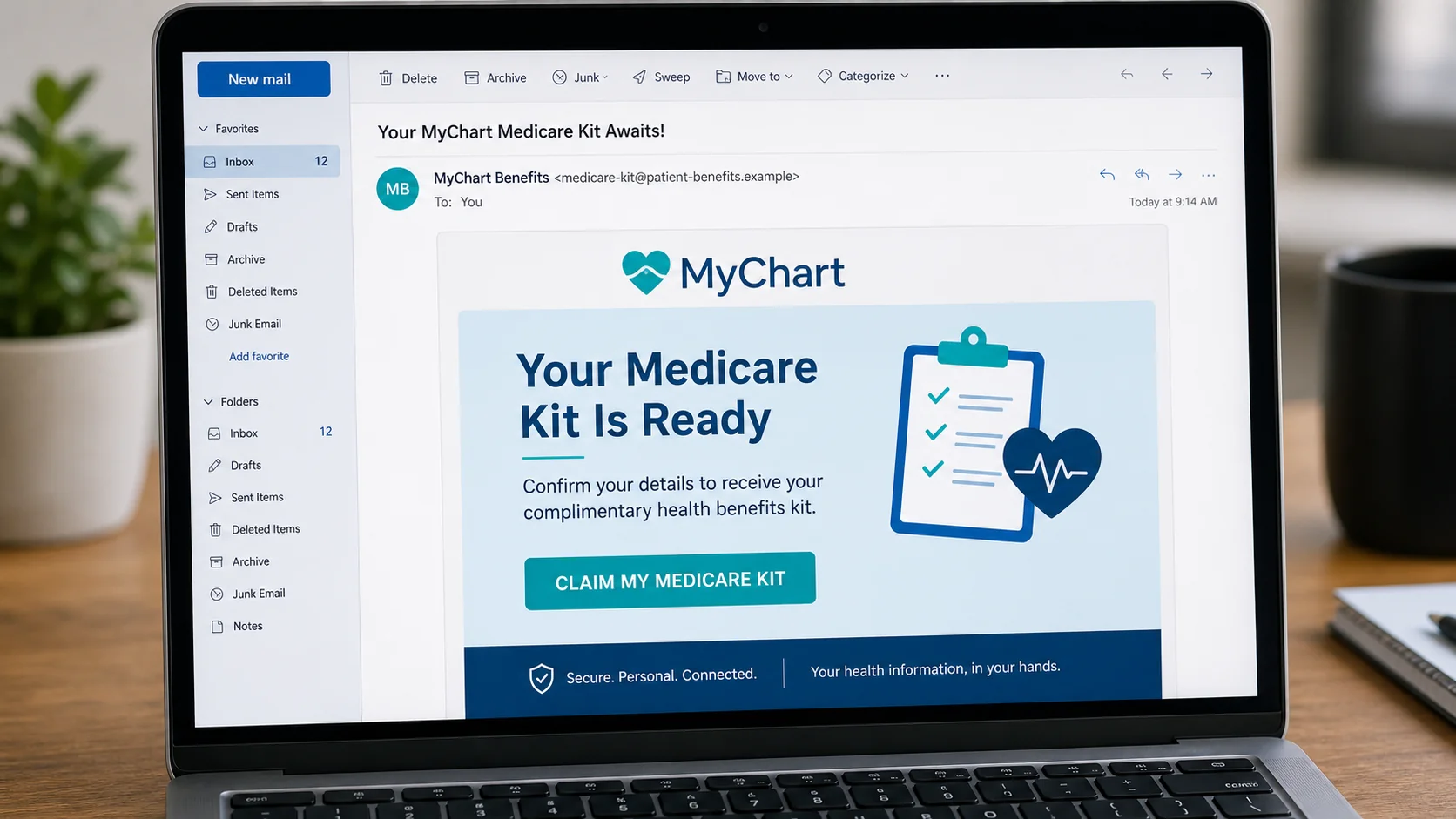
Subject: Your MyChart Medicare Kit Awaits!
Your Medicare Kit is ready.
Confirm your details to receive your complimentary health benefits kit. Complete the short eligibility form to arrange delivery.
CLAIM MY MEDICARE KIT
The message blends two trusted concepts, MyChart and Medicare, without clearly identifying the hospital, insurer, or government agency responsible for the supposed kit. The button usually leads to a lead-generation funnel, phishing form, or subscription offer rather than a patient portal.
Common variations of the email
- “Your MyChart Medicare Kit Awaits”
- “New Test Result Available in MyChart”
- “Your MyChart Account Will Be Locked”
- “Unpaid Balance: Immediate Payment Required”
- “Your Appointment Has Been Rescheduled”
- “Confirm Your Insurance Before Your Visit”
- “You May Qualify for a GLP-1 Prescription”
- “Ozempic Eligibility Through MyChart”
- “Medicare First Aid Kit: Confirm Delivery”
- “You Have a New Secure Message From Your Doctor”
- “Patient Portal Verification Required”
- “Refund Available for a Recent Medical Payment”
Text versions are shorter and often hide the destination behind a shortened link. A typical message says, “MyChart alert: Your account will be disabled today. Verify now,” followed by a domain that does not belong to the provider.
Why these messages are dangerous
A patient portal password can expose highly private information, including diagnoses, medications, laboratory results, addresses, insurance details, and conversations with clinicians. The same account may also support bill payment and proxy access for family members.
Medical identity information can be used for targeted fraud, fraudulent insurance claims, prescription scams, and convincing follow-up calls. The data is valuable because much of it cannot be replaced as easily as a card number.
Even a survey that never requests a MyChart password can collect a useful profile. Age, medical conditions, insurer, medication interests, telephone number, and address help operators identify vulnerable targets and sell high-value marketing leads.
Warning signs to check
- The sender is not your health organization. Look at the full domain, not only “MyChart” in the display name.
- The message names no real provider. A generic national MyChart department is suspicious because portals are tied to participating organizations.
- A free item requires sensitive data. A simple kit should not require a portal password, Social Security number, Medicare identifier, or card details.
- The link opens a different domain. The hospital name may appear in the path or subdomain while the registered domain belongs to someone else.
- The email asks for a security code. A one-time code is meant to complete your sign-in, not verify a promotion.
- The message creates a short deadline. Threats that results disappear or care will be canceled within hours are designed to stop verification.
- The offer makes a medical promise. Guaranteed prescription eligibility or effortless access to a specific medication is not a substitute for clinical assessment.
How The Operation Works
1. The campaign chooses a health-related pretext
Scammers select a story likely to earn immediate attention. Test results and appointment changes create concern. An unpaid bill creates fear of collections. A free kit, refund, or popular medication creates hope.
The campaign does not need access to the recipient’s medical record. Because MyChart is widely used, mass messages will reach many real users by chance.
2. The message borrows trusted branding
The email uses blue or teal colors, a heart or medical cross, privacy language, and phrases such as “secure message.” A local hospital name may be copied from public information or selected according to the recipient’s region.
Logos and legal text are not proof of origin. They are public images that can be reproduced on a fake page without permission.
3. The link passes through tracking redirects
Clicking can first open an advertising tracker or compromised site. The visitor may then be redirected according to location, device, or browser. Security researchers and repeat visitors can be shown harmless content while new targets see the phishing form.
This filtering helps the campaign remain online and makes the final destination harder to associate with the original message.
4. A fake portal requests the MyChart login
The page may copy the sign-in design of a health system and ask for a username and password. It can then display a fake error and request the information again.
If the account uses a security code, the kit may relay a real login attempt and ask for that code. A victim who provides it can give the attacker immediate access.
5. A benefits form collects identity and insurance data
The Medicare-kit version often asks for a name, age, address, telephone number, Medicare status, insurer, and health conditions. It may claim these questions determine eligibility or shipping.
The information can be sold as a marketing lead, used in identity fraud, or handed to a call center that pushes insurance products, medical devices, or unproven treatments.
6. A shipping or verification fee captures the card
After the survey, a small fee may appear. The site says the kit is free but requests $1.95 or $4.95 for shipping, identity verification, or reservation.
The real value is the card number and the agreement hidden in fine print. Victims may later see recurring charges for memberships, wellness programs, or discount clubs they did not knowingly choose.
7. The bill-payment version asks for a larger amount
A fake outstanding-balance notice can display a specific amount and warn that the account will go to collections. The payment page captures the card and billing address without paying any genuine provider.
Some messages provide a fake billing number. The caller is asked for date of birth, insurance information, a card number, or remote access under the excuse of locating and reversing the charge.
8. Stolen information supports follow-up fraud
Operators can use the collected details to send more believable messages. A person who expressed interest in diabetes medication may receive calls about a prescription program. Someone who entered an insurer can receive a fake coverage alert.
The second approach may look unrelated, but it can be based on the first form. Treat unexpected follow-up calls as part of the same exposure.
How a real MyChart notification differs
A real notification generally identifies the health organization and directs the patient to its established portal. It does not ask for a password by reply, promise a medication without evaluation, or demand a card number to release test results.
Patients should use the app they already installed, a saved portal bookmark, or the provider’s official website. Calling the provider using a number from an insurance card, statement, or known site is safer than calling a number inside an unexpected message.
Why medical identity data needs a broader response
A stolen card can be replaced, but a medical history, date of birth, and insurance identifier remain useful for years. Operators combine those details with public records and breached data to impersonate a patient convincingly.
Fraud may first appear on an explanation of benefits rather than a bank statement. Watch for unfamiliar equipment, laboratory work, prescriptions, telehealth visits, or providers. Report discrepancies to the insurer and health organization promptly so the record can be reviewed.
Incorrect medical information also matters for safety. If fraudulent services or medications enter a record, ask how the provider documents identity theft and corrects disputed information. Do not assume closing a card resolves the health record.
How to check a real appointment, bill, or result
Open the app already associated with the provider. Check the Messages, Visits, Test Results, and Billing areas without using the email. A genuine event should have matching details and a known organization.
If the account shows nothing, call the provider through a number on its official site, insurance directory, or prior statement. Give the staff the subject and claimed event, but do not forward sensitive documents to an address supplied by the suspicious message.
Some health organizations use outside billing or reminder vendors. That possibility is a reason to verify, not a reason to trust. The provider can confirm whether a vendor and domain are authorized.
What To Do If You Clicked or Replied
- Leave the site and do not complete more steps. Do not call a number displayed after the form or accept an offer to “finish verification.”
- Write down what was shared. Record whether you entered a portal password, security code, Medicare number, insurance data, card details, Social Security number, or medical information.
- Change the MyChart password through the real portal. Use a trusted device and official app or provider site. If the password was reused, change it everywhere else.
- Contact the health organization. Ask its MyChart support or privacy office to review recent access, terminate unfamiliar sessions, and check for changes to contact or proxy settings.
- Secure the connected email account. Patient portals often use email for password recovery. Change the email password if it was exposed and enable multifactor authentication.
- Call the insurer or Medicare through an official number. If an identifier was disclosed, ask what fraud monitoring, account notes, or replacement steps are appropriate.
- Contact the card issuer. Report that the card was entered on a deceptive health-benefits or billing page. Ask about replacement and blocks on recurring charges.
- Review medical and insurance records. Watch explanations of benefits for services, equipment, prescriptions, or providers you do not recognize.
- Scan the device if anything was downloaded. Remove unknown apps and profiles, update the operating system and browser, and run a trusted security scan.
- Save and report the message. Keep screenshots, headers, URLs, receipts, and caller details. Report the impersonation to the provider and appropriate fraud-reporting service.
Do not avoid your real provider because of embarrassment. Health systems deal with phishing regularly, and early notice gives them a better chance to protect the account and document possible misuse.
Continue monitoring after passwords are changed. A scammer who collected insurance or medical-interest data may wait weeks before making a claim or arranging another sales call. Tell family members with proxy access what happened so they do not trust follow-up messages that refer to the incident.
The Bottom Line
MyChart scam emails and texts turn familiar patient tasks into phishing lures. The message may offer a Medicare kit, announce a result, change an appointment, demand a bill payment, or promise access to a popular medication.
Do not use the message to decide whether the claim is real. Open your known MyChart app or provider website, check the account directly, and call the health organization through a trusted number. A logo cannot protect the password, but an independently opened portal can reveal the truth in seconds.

Join the discussion
1 commentShare your experience or ask a question about this article.
Discussion
I got a phone call asking if I received my Medicare grocery card. I said I had no need for that. As I was hanging up the person said “not insurance, its a Medicare kit.” Later it was a text and today an email. I rarely get these but online shopping is picking up so any way of contacting you for private info is up for grabs.