

A Navy Federal profile restricted email can interrupt an ordinary afternoon. Suddenly, a banking notice feels more urgent than everything you were doing.
Before pressing the button, take a breath. The details around that notice matter more than how official the message looks.
Overview
What the profile restriction email is claiming
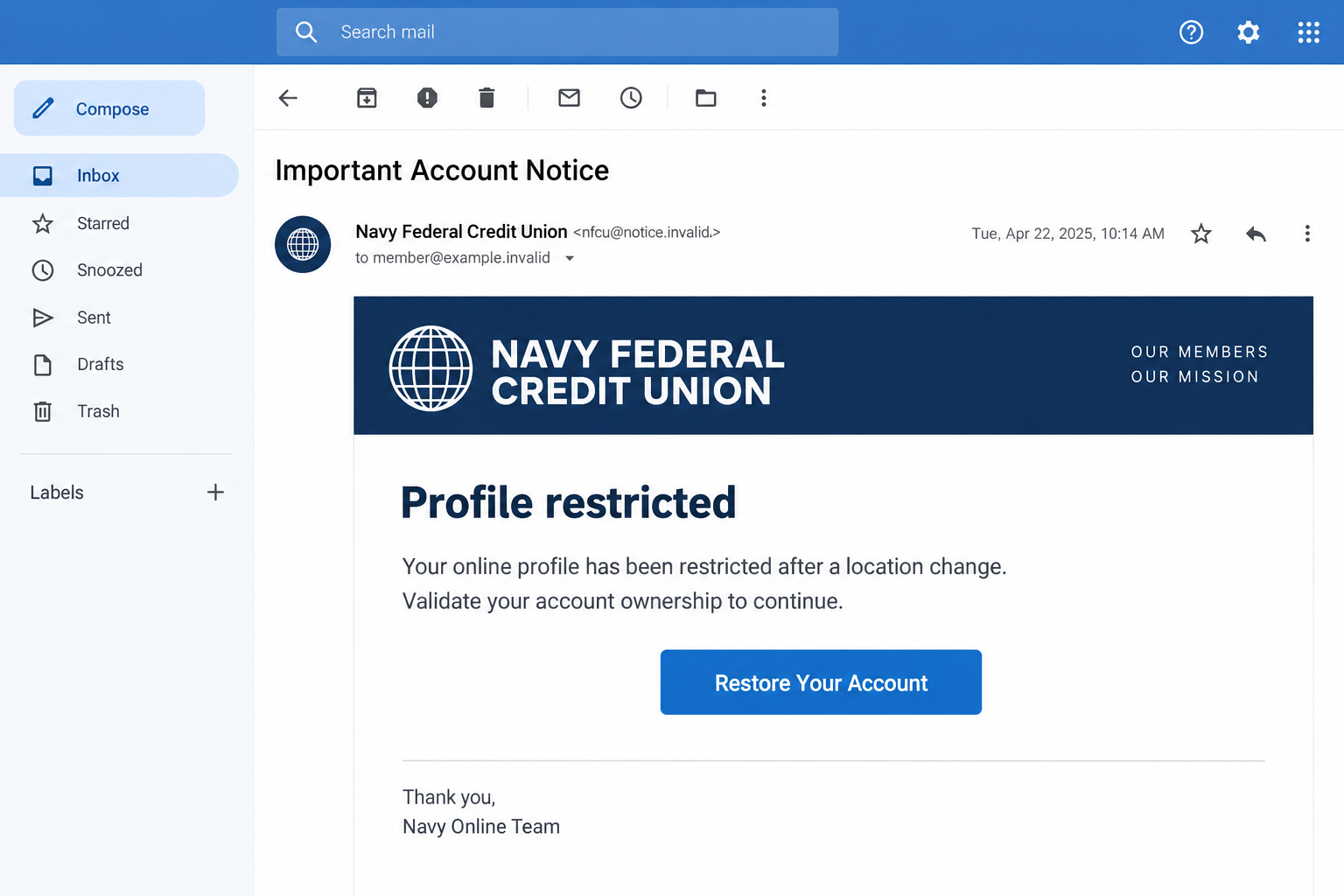
The Navy Federal profile restricted email scam impersonates the credit union and uses an alleged account problem to steer recipients toward a fraudulent verification process.
A documented November 2023 example carried the subject “Important Account Notice.” It blamed the supposed restriction on changes in the recipient’s location or IP address.
That explanation sounds plausible because financial institutions do monitor suspicious activity. The email borrows a real security concern without establishing that a real restriction exists.
Its central instruction is a “Restore Your Account” button. Following the sender’s route, rather than checking independently, is where the danger begins.
This is an impersonation scam, not evidence that Navy Federal Credit Union is fraudulent. The legitimate institution is the brand being exploited.
Which details deserve a closer look
In the reported sample, the visible sender used an address outside navyfederal.org. That mismatch is a warning, although sender text alone cannot identify the operator.
The message also used security-themed branding and an ownership-validation request. Neither a logo nor a technical explanation demonstrates permission to collect your banking credentials.
- An unexpected restriction notice arrives without an action you initiated.
- The sender wants you to restore access through its own button.
- The destination asks for information that would let another person enter your account.
- The message discourages a slower, independent check with the credit union.
- A familiar brand name appears beside an unrelated email address or website.
A convincing notice can contain some correct details. Your name, an account fragment, or a familiar color scheme should never replace an independent account check.
What is established, and what remains uncertain
The archived email shows the restriction claim and restoration lure. It does not tell us whether the same sender or destination is still active.
We also cannot treat every possible later request as a captured feature of that email. Additional verification-code requests are a risk to recognize, not a documented certainty.
Navy Federal’s phishing guidance warns about impersonators seeking sensitive information. Its advice supports checking through trusted channels instead of the unexpected message.
A genuine security restriction is possible. The safe conclusion is not “ignore account problems,” but “investigate them without letting this email choose the route.”
How the Navy Federal Profile Restricted Email Scam Works
Step 1: The notice creates a problem you want to fix
The opening claim is carefully chosen. A restricted online profile suggests your money might still exist, but ordinary access could disappear when you need it.
That uncertainty is enough to make a routine email feel important. You may think about an upcoming payment, a paycheck, or a card purchase.
The IP-address explanation adds a technical detail that many people cannot immediately verify. A recent trip or different internet connection can make it feel personally relevant.
However, a plausible explanation is not an authenticated finding. The sender has supplied both the alleged problem and the proposed solution.
Pause before connecting the story to something in your own life. Otherwise, an ordinary change in location can become apparent proof for an invented alert.
The message does not need to shout. A calm, administrative tone can be more effective than obvious threats because it resembles an everyday account notification.
Step 2: Familiar branding makes the proposed repair feel routine
The email presents itself as a security communication rather than a sales pitch. Familiar words and bank-style formatting make the request seem procedural.
People often expect identity checks when an account is locked. The scam turns that expectation into a reason to follow instructions without questioning the destination.
Here, the important distinction is who initiated the check. Opening your established banking app is different from entering information through an unsolicited restoration link.
A copied footer, member greeting, or account reference does not create that distinction. Those details decorate the request; they do not authenticate it.
Even the absence of obvious spelling mistakes proves little. Treat the requested action as the main evidence, rather than grading the message’s design.
If the email seems familiar, compare it with messages inside your independently opened account. Do not compare two emails and assume both are genuine.
Step 3: The restoration button moves you into the sender’s chosen environment
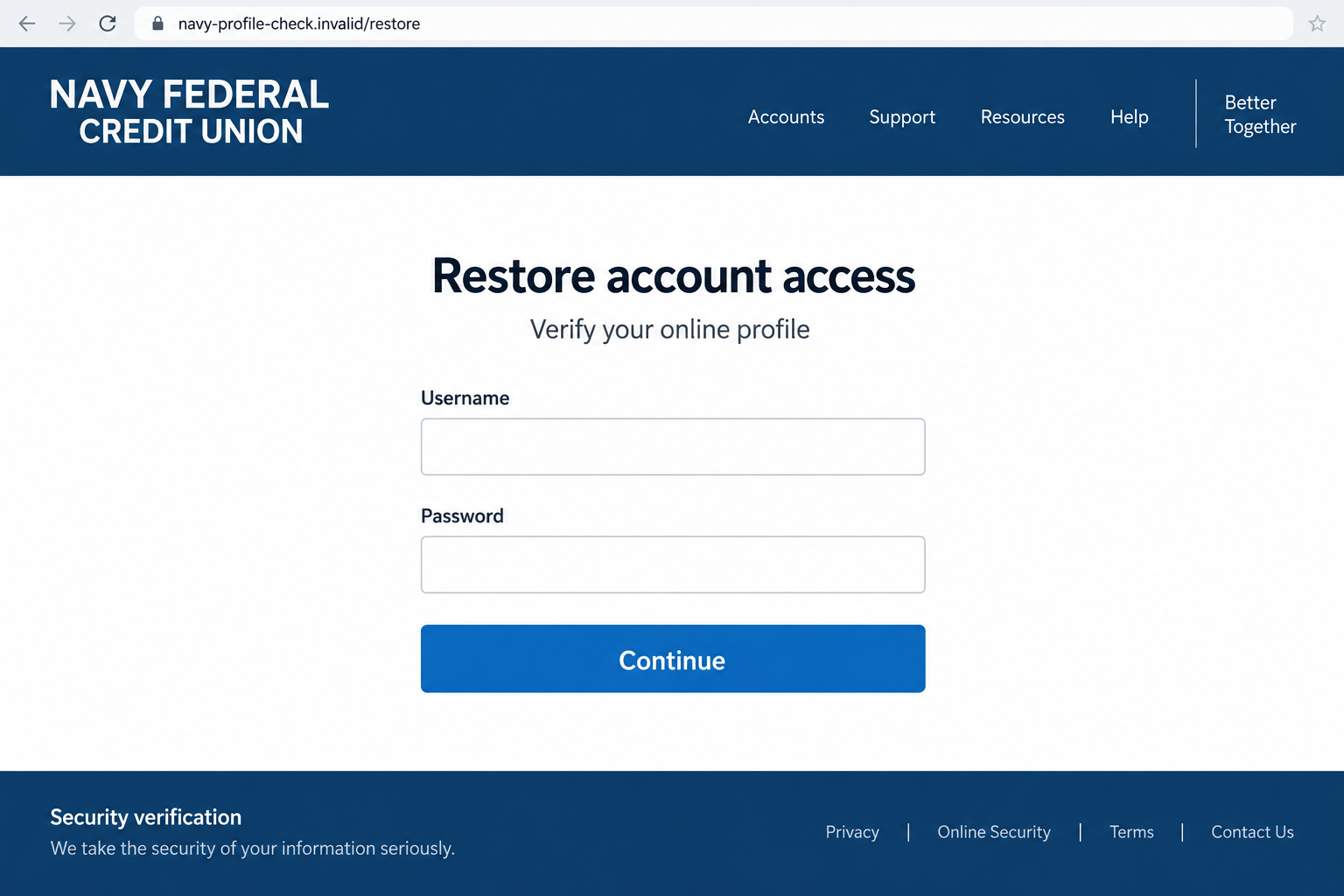
Once clicked, the button can send the recipient to a page that imitates online banking. A familiar-looking login form encourages the next small action.
The visible wording on a button is not its destination. A label promising restoration can conceal an unrelated address underneath.
On a small screen, the full address may be difficult to see. That inconvenience favors the scam because the branding remains prominent while the hostname stays hidden.
Do not open the page just to investigate its appearance. You can resolve the account question through the official app or a trusted bookmark instead.
If you already opened it, avoid typing, granting permissions, or downloading anything. Closing the page ends that interaction, although it does not undo information already submitted.
A padlock or HTTPS connection only concerns the connection to that website. It does not establish that Navy Federal owns or endorses the page.
Step 4: Account ownership becomes an excuse to collect access information
A phishing form can request a username and password under the guise of confirming ownership. Those are not harmless administrative details.
They are information an attacker may attempt to use elsewhere. Entering them on the wrong page creates risk even if the page then displays an error.
Some phishing operations may ask for additional personal details or a one-time code. Do not assume the first form represents the full extent of the request.
A code arriving from the real institution can be especially confusing. It may relate to a login or transaction someone else is attempting.
Read the code’s context rather than the fake page’s explanation. Never pass it to a caller or website whose legitimacy you have not independently established.
The exact follow-up screens for the historical message are not verified here. These are possible escalation points that help you recognize when to stop.
Step 5: The recipient can be left unaware of the exposure
A fraudulent page may appear to complete the check, fail unexpectedly, or send you elsewhere. None of those outcomes demonstrates that your credentials stayed private.
Waiting for missing money is therefore the wrong threshold for action. Contact the institution after sharing access information, even if your balance looks normal.
Account compromise can involve more than an immediate withdrawal. Ask the credit union about changes to contact information, access settings, and payment arrangements.
These checks address possible consequences; they do not mean every recipient experiences them. What matters is reducing uncertainty with the institution’s help.
Do not trust a second message simply because it refers to the first. A caller offering to repair the restriction could extend the same deception.
The practical exit is an independent conversation, not another restoration attempt. You do not owe an unsolicited sender a completed verification process.
How to Check a Restriction Without Following the Email
Start somewhere you already trust
Open the Navy Federal app you normally use, or type the institution’s address yourself. Avoid a search advertisement promising account-unlocking assistance.
Look for an account message or an access problem there. If you cannot sign in, use support information obtained independently, not the email’s contact details.
For members in the U.S., Navy Federal lists 1-888-842-6328 for help after suspected exposure. You can also verify the number on your card.
Describe the notice without assuming it is correct. Say that you received a restriction email and want to check whether any actual action is required.
Separate a real account problem from a fake repair route
You might genuinely have trouble signing in on the same day a phishing email arrives. Coincidence does not make the email’s restoration button trustworthy.
Let the official support channel diagnose the problem. An independent password reset or security review can address legitimate trouble without relying on the suspicious message.
If support confirms a restriction, follow the instructions delivered through that authenticated interaction. You still have no reason to return to the original link.
Keep routine account alerts enabled. The goal is to recognize legitimate warnings safely, not to abandon useful notifications because criminals imitate them.
What to Do If You Have Fallen Victim to This Scam
Choose the response that matches what happened. Receiving an email, opening its link, and entering a banking password are different levels of exposure.
- Stop using the email’s route.
Close the suspicious page and end any related call. Do not finish another form because someone says the previous information was incomplete.
If you only received the notice, you have not demonstrated account compromise. Preserve it for reporting, then remove it from your inbox.
- Contact Navy Federal promptly after sharing information.
Call the trusted number and explain exactly what you entered. Mention passwords, codes, card details, and any transfer you approved separately.
Ask what access controls or account protections are appropriate. Let the institution determine whether restrictions, replacement credentials, or other measures are needed.
Keep a record of the conversation and any case reference. Accurate details help the next representative understand what has already been addressed.
- Replace exposed credentials through a clean, trusted route.
Use the official app or website, preferably from a device you trust. Do not reset the password using a link sent by the suspected scammer.
If that password was reused, replace it on other affected services. Prioritize your email account because it may receive banking recovery messages.
Ask about existing sessions and recently changed security settings. A new password alone may not address every possible account change.
- Review money movement and account changes.
Check recent and pending activity with the credit union. Identify unfamiliar transfers, payment recipients, or contact details rather than looking only at the current balance.
Report anything suspicious immediately and request the relevant dispute or fraud process. Do not assume recovery is guaranteed or that a missing transaction is harmless.
If you authorized a payment under deception, say so clearly. Describe the circumstances honestly instead of mislabeling what occurred.
- Save useful evidence without spreading private information.
Retain the original email, timestamps, and the destination address if already available. Avoid reopening the site to gather material.
Forward the suspicious email to phishalert@navyfederal.org following the institution’s instructions. Do not add your password, full account number, or verification codes.
Keep sensitive supporting documents private. A public comment thread is not an appropriate place to post an account screenshot.
- Check the device if the interaction went beyond a form.
If you downloaded a file, installed software, or granted unexpected permissions, stop using that device for banking until you have reviewed the exposure.
A Malwarebytes scan can help detect supported device threats. AdGuard’s relevant protection features can help reduce encounters with some malicious pages and advertisements.
Neither tool reverses a transfer, resets a compromised account, or guarantees protection from every phishing site. Banking recovery still requires the institution.
- Address identity exposure and follow-up fraud.
If you supplied identity information, use IdentityTheft.gov for a tailored recovery plan. Record precisely which details were exposed.
Be wary of anyone demanding a payment to recover your money. A convincing follow-up caller may know details you already gave away.
Tell a trusted person what happened if that helps you pause and organize the response. Embarrassment should not delay practical account protection.
Small Habits That Make the Next Email Easier to Judge
Save a trusted route to banking support before an emergency. A bookmark and the number on your card are easier to use than hurried searches.
Keep banking credentials unique and store them securely. A password manager that refuses to fill on an unfamiliar hostname can provide another useful warning.
Learn what your own alerts normally contain, but avoid memorizing only their appearance. The requested action and independently verified destination remain more important.
For related text-message traps, our NFCU Free Alert scam text guide explains a different suspicious-transaction and callback pretext.
This email story is different: the sender offers to restore a restricted profile. Both deserve independent verification, rather than automatic obedience to a familiar brand.
You can make that rule simple for your household: account problems are checked in the app or through a saved number, never repaired inside unexpected messages.
Frequently Asked Questions
Is the Navy Federal profile restricted email a scam?
The documented restoration email is a phishing impersonation. A restriction claim alone cannot verify any message; check your account through an independent Navy Federal channel.
Can Navy Federal genuinely restrict an account?
Yes. Protective restrictions can be legitimate. That possibility is why you should verify the situation, rather than trust an unsolicited button or ignore everything.
Does opening the email mean my account was stolen?
Not by itself. The response depends on whether you clicked, entered information, approved an action, or downloaded something. Report sensitive information exposure promptly.
Why might a genuine verification code arrive during the scam?
Someone could be attempting a real account operation using information you supplied. A genuine code does not authenticate the person or page asking for it.
Where should I report the suspicious message?
Navy Federal directs suspicious emails to phishalert@navyfederal.org. If you disclosed information, also contact the credit union through its independently verified support number.
Will antivirus software recover my banking account?
No. Device scanning addresses possible malware, not banking access or transactions. Contact Navy Federal and secure exposed credentials even if a scan finds nothing.
The Bottom Line
The Navy Federal profile restricted email scam turns an account-access worry into a restoration request. The branding is not permission to collect your credentials.
Leave the email’s route behind and check independently. If you already shared sensitive information, tell Navy Federal promptly and follow its account-protection process.

Join the discussion
0 commentsShare your experience or ask a question about this article.
Discussion
Start the conversation
Have a question or something useful to share? Add the first comment.