


A text says you owe a small North Carolina toll. Pay it now, the message warns, or a much larger late fee will follow.
Even if you’ve driven through the state recently, the text hasn’t established a bill. Its convenient payment link is the part that needs your attention.
Overview
The NC Quick Pass text scam turns a supposed toll into a payment trap
Criminals impersonate North Carolina toll services and demand payment through an unsolicited text. The message borrows a real travel expense to make an unfamiliar link seem necessary.
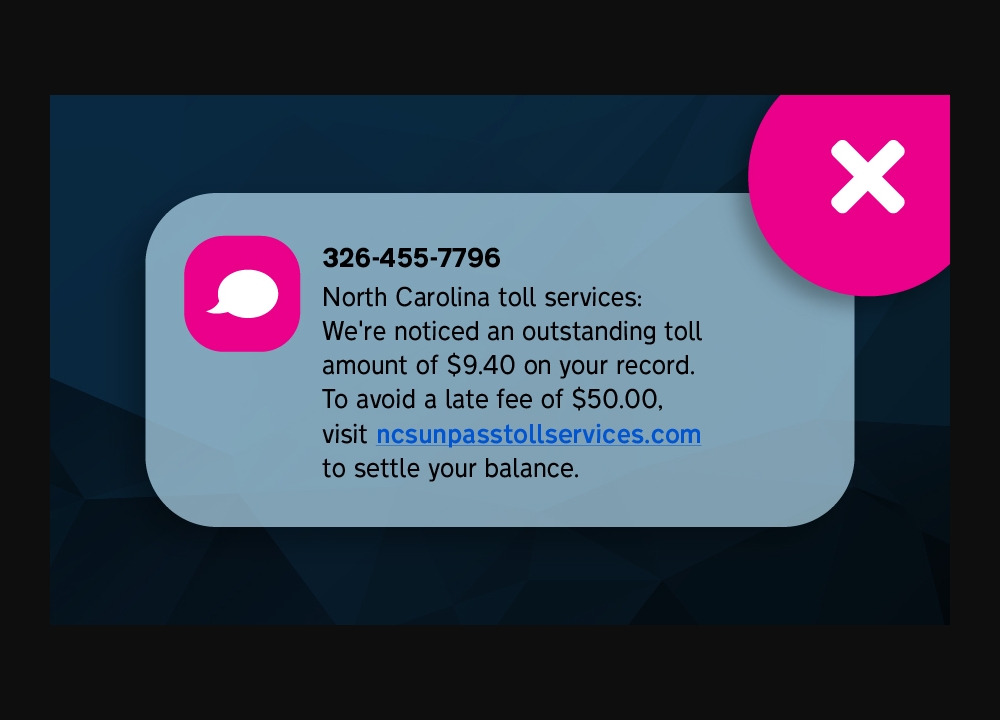
The image is an example published by NC Quick Pass itself. Its claimed $9.40 balance and $50 late fee belong to that example, not your account.
Don’t visit the pictured domain to test it. The useful evidence is the payment demand and its attempt to pressure someone into using an unofficial route.
Real notifications do not make every toll text legitimate
NC Quick Pass says it never requests payment by text and sends valid text notifications only from the short code 696277.
It identifies ncquickpass.com and secure.ncquickpass.com as its associated web destinations. A different hostname containing similar words is not the same address.
Use those details to spot problems, but verify the actual bill through a service you opened independently. A familiar sender label should not override an unsafe request.
You can reject the text without ignoring a real toll
Open the genuine NC Quick Pass website or your existing app and check there. If the record is unclear, contact the service through its verified support details.
- Do not pay through an unexpected text’s link.
- Do not assume a low amount makes card entry low-risk.
- Do not treat a failed payment screen as a reason to submit another card.
- Do check a separate genuine invoice if your travel or vehicle records suggest one may exist.
How the NC Quick Pass Text Scam Works
Step 1: An ordinary toll becomes an unexpected obligation
The text claims a balance is attached to your travel or vehicle record. It may use a toll-service name that sounds close enough to something you’ve seen roadside.
You don’t need to remember the exact road for the demand to feel plausible. Recent travel, a rental car, or a family member driving can supply an explanation.
That uncertainty is useful to the sender. Instead of producing a verified invoice, the message encourages you to fill in the missing story yourself.
Pause at that point. Which vehicle, trip, invoice, and account does the demand actually identify, and can the genuine service confirm them?
Step 2: A small balance makes quick payment seem reasonable
A modest toll is easy to dismiss as an administrative nuisance. You may decide that paying is faster than working out whether a fee was missed.
The threatened penalty changes the comparison. A small payment begins to look like a sensible way to avoid a larger bill.
But the risk isn’t limited to the displayed toll. The page may ask for a reusable card number, security code, contact information, or banking approval.
Consider what you’re handing over, not just what the message says it costs. A low advertised amount doesn’t limit how exposed payment details might be used.
Step 3: A deadline replaces independent verification
The sender wants you to act while the penalty still feels avoidable. Formal wording can make the message seem like the final step in an established process.
You may feel that asking questions is less responsible than simply settling the balance. That’s the wrong comparison when the obligation hasn’t been authenticated.
Checking a genuine account is not the same as ignoring a debt. It is how you distinguish an actual toll from an invented demand.
Don’t let an unsolicited text define what counts as an emergency. Keep the verification route separate from the request.
Step 4: A toll-like address opens an unofficial payment page
The link can contain words such as “NC,” “pass,” “toll,” or “invoice.” Familiar fragments make a web address look relevant without establishing who controls it.
Read the hostname as a whole. An address that merely includes the official name before another domain is not automatically part of the official service.
A padlock also doesn’t settle the issue. It doesn’t show that the page belongs to the toll authority or that its payment request is authorized.
The easiest safe check doesn’t require investigating that site. Leave it and type the real NC Quick Pass address yourself.
Step 5: The payment form collects information beyond the claimed toll
A copied payment design may ask for your name, address, phone number, and card information. Those fields can feel ordinary because legitimate checkouts request similar details.
The difference is the recipient. A normal-looking form is not safe if the business behind it has not been authenticated.
A later code or banking prompt may approve an action different from the toll described in the text. Read the actual amount, payee, and purpose before approving anything.
Stop if the request changes or an error asks you to try more cards. Don’t troubleshoot an unverified payment route by exposing additional accounts.
Step 6: A confirmation screen hides the unresolved problem
The page may display success, fail, or redirect elsewhere. None of those outcomes tells you whether a genuine toll record was settled.
If you paid a criminal, an actual invoice could remain unpaid. Conversely, receiving the scam does not prove you have a legitimate toll balance at all.
Check the financial transaction and the toll record separately. That prevents the suspicious page from becoming the sole source for both what you owe and what you paid.
Save the message and transaction details for reporting, then stop using the route. A fresh text claiming a remaining balance deserves the same independent check.
What the Real Toll Process Can Look Like
You don’t need a prepaid account to have a genuine invoice
The official Ways to Pay page distinguishes prepaid NC Quick Pass accounts from invoiced toll travel. It describes mailed invoices and optional email delivery.
That matters if you never signed up for an account. “I don’t have an account” doesn’t by itself prove every claimed toll impossible.
It also doesn’t make the text valid. A real invoice should be checked through the official system, not resolved by following an unexpected payment link.
If a rental company or another vehicle owner is involved, review that genuine agreement separately. Don’t supply their details to the sender of the suspicious message.
Real late fees are not validated by a scammer mentioning them
NC Quick Pass publishes an unpaid-invoice process involving later fees, civil penalties, and potential vehicle-registration consequences for unresolved balances.
A scam can borrow that general concern while inventing the particular amount or deadline. The existence of real consequences does not authenticate an unsolicited warning.
Don’t conclude that every penalty is imaginary. Check the actual invoice and ask official support about its status and options.
Likewise, don’t pay simply because the consequences sound serious. The record supporting them must come from the genuine service.
A toll bill and a DMV warning are different records
Some fraudulent messages mix toll collection with license, court, or traffic-ticket threats. Combining several official-sounding consequences can make one payment seem to solve everything.
Keep the underlying obligations separate. A toll account, vehicle-registration matter, and traffic citation aren’t interchangeable merely because a text groups them together.
Start with the real service responsible for the specific claim. Don’t accept one unfamiliar website as a combined portal for every alleged problem.
A Quick Check Before You Enter a Card
Ask whether you arrived from a website or app you intentionally opened, rather than from an unsolicited reminder.
Check whether the record identifies the relevant vehicle and invoice without requiring you to reveal new payment details first.
Compare the amount with the genuine record. The text’s number may be small, but that doesn’t make it more reliable.
Check the full destination, not just its first few characters or a logo. On a small screen, a shortened display can conceal the important part.
If anything remains unclear, stop and contact official support. There is no need to complete a questionable form merely to discover what happens next.
Helping someone else pay? Have them open the genuine account themselves. Forwarding a suspicious link to a family member doesn’t improve its trustworthiness.
What to Do if You Have Fallen Victim to This Scam
A genuine invoice can also contain a problem you need to question. That is different from proving an unsolicited text safe.
If the official record lists an unfamiliar vehicle, date, or charge, ask NC Quick Pass how to dispute that record through its documented process.
Keep your supporting travel, rental, or vehicle documents private. Supply only what official support requests through its verified channel, not a form linked by the suspicious sender.
Record the case reference and any response deadline. Deleting the fraudulent text should not be your only action when a separate genuine invoice remains unresolved.
-
If you received the text but didn’t respond, leave the link unused. Save a screenshot if needed, report it through your messaging service, and block the sender.
Don’t reply to challenge the demand or ask for proof. Verify a possible toll through the genuine service rather than continuing the sender’s conversation.
-
If you opened the page, close it and note your exposure. Write down whether you entered information, downloaded anything, allowed notifications, or approved a banking request.
Simply opening a link doesn’t establish malware infection. The response should match what actually happened, not a blanket assumption about every recipient.
-
If card information was entered, call the issuer promptly. Explain that a toll impersonation page received the details and identify any attempted or completed charges.
Ask about blocking further use, replacing the card, and disputing transactions. Don’t wait for the displayed toll amount to appear before reporting exposed credentials.
-
If a transfer or banking approval occurred, contact your bank’s fraud team. Provide the amount, recipient, time, and any reference shown in the genuine account.
Tell them what the approval message actually said. That helps separate the criminal’s toll story from the action your bank processed.
-
If you reused a password, change it on the legitimate account. Replace it anywhere else it was used and examine recovery settings and recent sessions.
Use a trusted device and an independently opened site. Don’t return to the phishing form to “cancel” or correct the information you supplied.
-
If the page prompted an installation, seek appropriate technical help. Preserve the file or app name without running it again.
Disconnect a device if unauthorized remote access was granted. For a work-managed system, contact IT before changing software or attempting cleanup.
-
Check any genuine toll obligation separately. Use NC Quick Pass’s official website or known app and confirm the vehicle, invoice, payment status, and amount.
Explain the impersonation if you contact support. A payment made to the scammer should not be assumed to have reached the toll service.
-
Report the fraud with a concise evidence trail. Include the sender, URL, screenshot, payment details, and the time of the incident.
The service directs victims to the FTC and IC3. Forwarding an SMS to 7726 can also help your carrier handle spam.
-
Watch for fake corrections and recovery offers. A follow-up may claim a refund is pending or another payment is needed to remove the penalty.
Don’t give strangers card details, approval codes, or remote access to recover a small toll payment. Use the bank and service channels you established yourself.
Frequently Asked Questions
Does NC Quick Pass demand toll payment by text?
No. The service says it never requests payment through text messages. Open the genuine website or your trusted app to check a claimed balance.
Does the official short code make any payment link safe?
No. Treat the message’s requested action as part of the check. A claimed sender doesn’t override the service’s rule against text payment requests.
Is the $9.40 balance in the image my bill?
No. That amount appears in the toll service’s published scam example. It is not a lookup of your account or evidence of your travel.
Can I owe a toll if I never opened an account?
Yes. The official service supports invoiced travel as well as prepaid accounts. Verify any actual invoice independently rather than using the suspicious text.
Should I retry if the payment page rejected my card?
Not on an unverified site. It may already have collected the details. Contact your issuer and check genuine activity before exposing another payment method.
Will reporting the text cancel a real toll invoice?
No. Reporting addresses the impersonation attempt. A separate legitimate balance still needs to be checked and resolved through NC Quick Pass’s actual payment process.
The Bottom Line
Don’t use an NC Quick Pass text scam to settle a supposed toll. The service’s own rule is clear: it doesn’t request payment by text.
Check the real invoice independently so you neither pay an impersonator nor overlook a genuine balance.
If you entered payment information, involve your issuer now, preserve the message, and stop any further attempts through the same link.

Join the discussion
0 commentsShare your experience or ask a question about this article.
Discussion
Start the conversation
Have a question or something useful to share? Add the first comment.