

A text message claims you received a “FORMAL NOTICE OF DELINQUENCY” for unpaid tolls. It may say your vehicle is linked to “outstanding toll arrears,” threaten registration holds or license consequences, and demand payment by the end of the day.
It looks official. It uses legal language. It may mention NC Quick Pass or another toll agency.
It is a scam designed to scare you into clicking a fake payment link and giving away your personal and financial information.
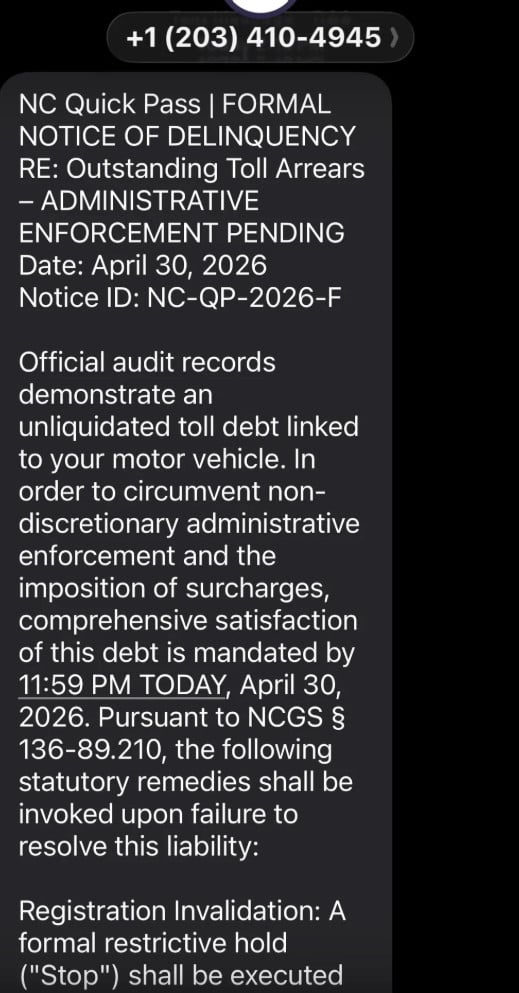
Scam Overview
The Formal Notice of Delinquency text scam is a phishing scam that impersonates toll agencies, DMV-style offices, or government enforcement departments. In our example, the message pretends to be from NC Quick Pass and claims the recipient has an unpaid toll debt that must be paid immediately.
The message uses phrases such as:
- Formal Notice of Delinquency
- Outstanding Toll Arrears
- Administrative Enforcement Pending
- Registration Invalidation
- Official audit records
- Unliquidated toll debt
- Statutory remedies
- 11:59 PM TODAY
This wording is intentionally intimidating. The goal is to make the message feel like a final legal warning rather than a normal payment reminder.
North Carolina officials have warned about widespread text scams falsely claiming to be from NC Quick Pass or other tolling agencies. These scams demand payment for supposed unpaid tolls and are sent broadly, not only to actual toll road users.
What the Scam Text Looks Like
The wording can vary, but this scam often looks similar to this:
NC Quick Pass | FORMAL NOTICE OF DELINQUENCY
RE: Outstanding Toll Arrears
ADMINISTRATIVE ENFORCEMENT PENDING
Date: April 30, 2026
Notice ID: NC-QP-2026-F
Official audit records demonstrate an unliquidated toll debt linked to your motor vehicle. In order to avoid administrative enforcement and the imposition of surcharges, payment is required by 11:59 PM TODAY.
The message may then threaten consequences such as:
- Registration invalidation
- A restrictive hold or “stop”
- Extra fees or surcharges
- Collections referral
- Credit reporting
- Driver-related penalties
Finally, it includes a link that appears to lead to an official payment page.
That link is the trap.
Why This Scam Looks Convincing
It Uses a Real Toll Brand
NC Quick Pass is a real toll payment system, so scammers use the name to create trust. The message may include “NC Quick Pass,” “North Carolina tolls,” “MVD,” “DMV,” or other official-sounding labels.
That does not make the message real.
NC Quick Pass says it will never request payment by text, will only send texts from the secure short code 696277, and legitimate NC Quick Pass links include ncquickpass.com or secure.ncquickpass.com.
It Uses Legal-Sounding Language
The scam text may mention:
- Statutory remedies
- Administrative enforcement
- Toll arrears
- Registration invalidation
- Compliance records
- Restrictive holds
This language is meant to overwhelm the reader. It sounds official, but it is not how a legitimate toll agency would normally communicate a small unpaid toll balance.
The wording is also unnatural. Phrases like “unliquidated toll debt” and “comprehensive satisfaction of this debt” are overly formal and awkward. That kind of inflated language is common in scam messages because it is designed to create fear, not clarity.
It Creates a Same-Day Deadline
The message may say payment must be made by 11:59 PM TODAY.
That deadline is psychological pressure. Scammers want you to believe you have no time to verify the claim.
A legitimate issue should always be independently verifiable through the official toll agency website or customer service number. NCDOT advises people to check their account using the toll service’s legitimate website and contact the toll service’s customer service number if they are unsure.
The Fake Link Is the Main Danger
The link in these scams may look close to a government or toll payment site. It may contain words such as:
- nc
- quickpass
- toll
- gov
- help
- mvd
- payment
- invoice
- arrears
But scammers can place official-looking words inside fake domains.
For example, a fake link may look like it belongs to a government or toll agency, but the actual domain is not the official toll agency domain.
The safest rule is simple: do not use links from unexpected toll payment texts.
NC Quick Pass says legitimate links will include ncquickpass.com or secure.ncquickpass.com.
What Scammers Are Trying to Steal
The fake payment page may ask for:
- Full name
- Address
- Phone number
- Email address
- License plate number
- Vehicle details
- Credit card number
- Expiration date
- CVV
- Billing ZIP code
The toll amount may look small, but that is part of the strategy. A small balance feels easier to pay than to investigate.
The real goal is not the fake toll amount. The real goal is your payment card and personal data.
North Carolina officials warn that clicking links in these toll scam texts can expose victims to financial fraud, giving scammers access to bank accounts and personal data.
How the Formal Notice of Delinquency Scam Works
Step 1: The Text Arrives
You receive a text from an unknown number. It may claim to be from NC Quick Pass, a toll agency, or a government enforcement office.
The message says you have unpaid tolls or “toll arrears.”
Step 2: The Message Creates Fear
The text threatens consequences such as:
- Registration holds
- Administrative enforcement
- Added fees
- Collections
- Credit consequences
- License-related problems
These threats are meant to make you react quickly.
NC Quick Pass-related scam warnings specifically note that recipients should be wary of unsolicited texts, especially those claiming to be from the government or threatening legal action. (NCDOJ)
Step 3: The Deadline Forces Urgency
The text may say you must pay by 11:59 PM today.
That deadline is not there to help you. It is there to stop you from checking the claim through official channels.
Step 4: The Link Sends You to a Fake Payment Page
The link may open a website that looks like a toll payment portal.
It may show:
- A fake notice ID
- A fake toll balance
- A fake deadline
- A payment form
- A warning about penalties
The page is controlled by scammers.
Step 5: Your Information Is Captured
Once you enter your details, scammers may collect your card number, billing information, name, address, and vehicle information.
Even if the payment “fails,” the data may already be stolen.
Step 6: Fraud May Happen Later
Scammers may:
- Run small test charges
- Attempt larger purchases
- Sell your card data
- Send more fake toll texts
- Use your personal details in future scams
The damage may not appear immediately, so do not wait for fraud to show up before acting.
Red Flags in Formal Notice of Delinquency Texts
The Message Demands Payment by Text
NC Quick Pass states that it will never request payment by text.
The Sender Is Not the Secure Short Code
NC Quick Pass says valid texts come from the secure short code 696277. A random phone number is a warning sign.
The Link Is Not Official
Legitimate NC Quick Pass links include ncquickpass.com or secure.ncquickpass.com. Anything else should be treated as suspicious.
The Message Threatens Legal Action or License Loss
North Carolina officials state that NC Quick Pass will not threaten legal action for an unpaid toll, and drivers will not lose their license for not paying an unpaid toll.
The Language Is Overly Formal
Phrases like “unliquidated toll debt,” “non-discretionary administrative enforcement,” and “statutory remedies shall be invoked” are designed to intimidate.
The Deadline Is Extremely Short
A same-day deadline is a pressure tactic.
What To Do If You Receive This Text
Do Not Click the Link
Do not open the link to “check.” That is how the scam starts.
Do Not Reply
Replying may confirm your number is active.
Do Not Pay
Do not enter credit card details through a link from a text message.
Check Your Account Directly
Go to the legitimate toll agency website yourself. Do not use the link in the message.
NCDOT recommends checking your account using the legitimate toll service website and contacting the toll service’s customer service number if needed.
Report and Delete the Message
NC Quick Pass tells users to report scam texts and suspicious communications to the FTC and/or the FBI’s Internet Crime Complaint Center.
What To Do If You Already Clicked or Paid
1. Call Your Card Issuer Immediately
If you entered card details, call the number on the back of your card.
Tell them:
- You entered payment information on a fraudulent toll payment website
- The link came from a scam text
- You need the card blocked and replaced
- You want recent transactions reviewed
2. Dispute Unfamiliar Charges
NCDOJ advises people who clicked a link or provided information to secure their personal and financial accounts and dispute unfamiliar charges.
3. Turn On Transaction Alerts
Enable alerts for all card activity so you can spot fraud quickly.
4. Change Passwords if Needed
If the fake site asked you to create an account or enter login details, change that password immediately.
5. Save Evidence
Take screenshots of:
- The original text
- The sender number
- The fake link
- The fake website
- Any payment confirmation
- Any suspicious charges
6. Watch for Follow-Up Scams
Once scammers know you interacted, they may send more texts pretending to be:
- A toll agency
- A collections office
- A DMV or MVD
- A refund department
- A bank fraud team
Do not trust follow-up messages just because they mention the same fake toll debt.
The Bottom Line
The Formal Notice of Delinquency text scam is a fake toll payment warning designed to look official and urgent.
It may use the NC Quick Pass name, legal-sounding language, a same-day deadline, and threats of registration or enforcement action. But the purpose is not to collect a real toll. The purpose is to steal your credit card details and personal information.
NC Quick Pass says it will never request payment by text, and official links must use ncquickpass.com or secure.ncquickpass.com.
If you receive one of these texts, do not click, do not reply, and do not pay.
Verify only through the official toll service website or customer service number you access yourself.
FAQ
What is the Formal Notice of Delinquency text scam?
It is a phishing scam where criminals send fake toll or vehicle-related delinquency notices by text. The message claims you owe unpaid tolls or fees and pressures you to pay through a suspicious link.
Is the Formal Notice of Delinquency text real?
No. These messages are designed to look official, but they are not legitimate payment notices. Scammers use legal-sounding language, fake notice IDs, and urgent deadlines to make the scam feel believable.
Why does the message mention NC Quick Pass?
Scammers use real toll agency names like NC Quick Pass to make the text seem trustworthy. A real brand name in the message does not prove the text is legitimate.
Why does the scam say payment is due by 11:59 PM today?
That is a pressure tactic. Scammers use same-day deadlines to make you panic and click before verifying the claim.
What happens if I click the link?
You may be taken to a fake toll payment website that asks for your name, address, vehicle details, and credit card information.
What information are scammers trying to steal?
Usually:
- Full name
- Address and ZIP code
- Phone number and email
- License plate or vehicle details
- Credit card number
- Expiration date and CVV
- Billing information
I clicked the link but did not enter anything. Am I safe?
Your risk is much lower if you did not submit information. Close the page, do not return, and watch for more scam texts.
I entered my card details. What should I do now?
Call your card issuer immediately, report the card as compromised, freeze or replace it, review recent transactions, dispute anything unfamiliar, and turn on transaction alerts.
Can unpaid tolls really cause registration holds or extra fees?
Real toll agencies may have official collection procedures, but a random text demanding immediate payment through a suspicious link is not how you should verify or pay. Always check directly through the official toll agency website.
How do I verify if I really owe a toll?
Do not use the link or phone number in the message. Go directly to the official toll agency website by typing the address yourself or use the official app or customer service number.
How do I report the scam?
Mark the text as spam, block the sender, forward it to 7726 (SPAM) if your carrier supports it, and keep screenshots of the text and fake website.

Join the discussion
0 commentsShare your experience or ask a question about this article.
Discussion
Start the conversation
Have a question or something useful to share? Add the first comment.