

A text message claims you received a Formal Notice of Delinquency for unpaid tolls, traffic fees, or vehicle-related charges. It may threaten registration holds, license problems, collections, credit damage, or legal enforcement unless you pay immediately.
The wording sounds official. The deadline feels urgent. The link may look like a toll agency or government website.
But the message is a phishing scam designed to steal your payment card details and personal information.
Scam Overview
The Formal Notice of Delinquency text scam is a nationwide toll and vehicle-payment phishing scheme. Scammers impersonate toll agencies, DMV-style offices, highway authorities, court systems, or traffic enforcement departments and claim the recipient owes money for unpaid tolls or violations.
The Federal Trade Commission has warned that scammers are pretending to be tolling agencies “from coast to coast” and sending texts demanding money for supposed unpaid tolls.
The FBI’s Internet Crime Complaint Center also warned about toll-service smishing scams. According to the FBI, the messages often claim the recipient owes money for unpaid tolls, use similar wording across complaints, and include links designed to impersonate state toll service names. The FBI also noted that the scam spreads across state lines and changes details based on location.
The wording may vary, but many versions use legal or administrative language such as:
- Formal Notice of Delinquency
- Outstanding Toll Arrears
- Administrative Enforcement Pending
- Final Notice
- Nonpayment Warning
- Immediate Action Required
- Registration Hold Pending
- Statutory Penalties Will Apply
- Payment Required by 11:59 PM
These phrases are chosen to make the message feel like a real government or toll-enforcement notice.
It is not.
How the Scam Is Customized Across the United States
Scammers do not use one single brand name. They adapt the message to the state or region being targeted.
Depending on where the victim lives, the text may impersonate or reference toll systems and agencies such as:
- E-ZPass
- SunPass
- FasTrak
- Peach Pass
- TxTag
- I-PASS
- Good To Go
- NC Quick Pass
- Tolls by Mail
- State DOT or DMV-style agencies
- Local toll roads, bridges, or express lanes
The FCC has warned consumers about toll road payment scam texts that claim the recipient has an unpaid toll balance and must pay immediately to avoid additional penalties or account problems. The FCC advises people not to click links or respond to suspicious toll-payment texts.
The important point is this: the scam is not limited to one toll agency or one state. The same basic message can be modified for California, Texas, Florida, New York, Illinois, North Carolina, Georgia, Virginia, Pennsylvania, Massachusetts, New Jersey, and many other places.
Scammers simply change the agency name, deadline, fake notice ID, state law reference, or payment link.
What the Scam Text Usually Says
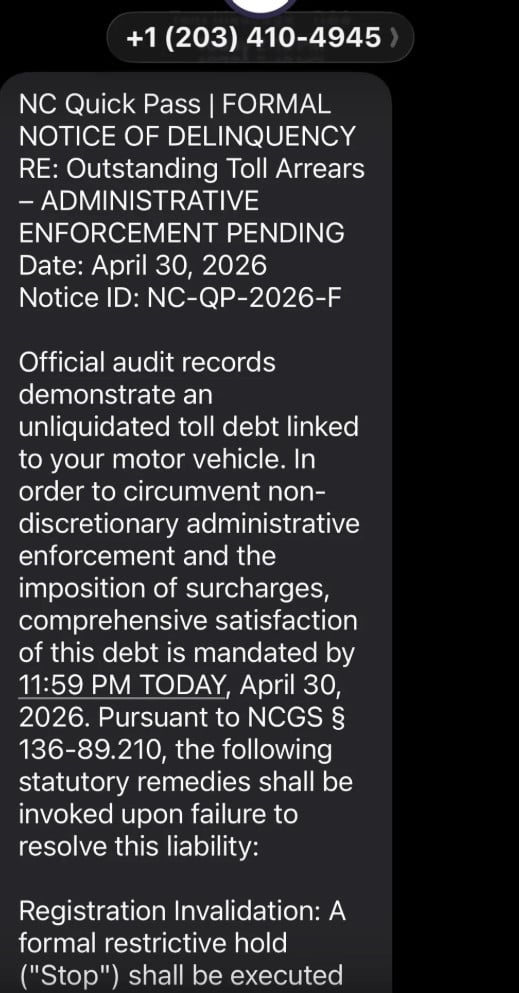
A Formal Notice of Delinquency scam text may look something like this:
FORMAL NOTICE OF DELINQUENCY
RE: Outstanding Toll Arrears
Administrative Enforcement Pending
Official records indicate an unpaid toll debt linked to your vehicle. Payment must be completed by 11:59 PM today to avoid administrative enforcement, surcharges, registration restrictions, collection action, or further penalties.
Settle your outstanding balance here:
[fraudulent link]
Other versions may say:
- “Your vehicle has unpaid tolls.”
- “A registration hold will be placed on your vehicle.”
- “Failure to pay will result in administrative enforcement.”
- “Your account is delinquent.”
- “A late surcharge will be applied.”
- “Your unpaid toll balance must be resolved today.”
- “Click the secure portal to avoid penalties.”
The message may also include a QR code instead of a visible link.
A QR code is not safer. It is simply another way to send you to a website.
Why This Scam Works
It Uses a Realistic Problem
Many people use toll roads, bridges, tunnels, express lanes, or automated plate billing systems. Even people who do not regularly use toll roads may wonder whether they missed a bill while traveling.
That uncertainty makes the scam effective.
The message does not need to prove anything. It only needs to make you think:
- “Maybe I forgot a toll.”
- “Maybe this came from a rental car trip.”
- “Maybe my license plate was billed.”
- “Maybe I should just pay before it becomes worse.”
That small doubt is enough to push some people toward the link.
It Uses a Same-Day Deadline
Many versions demand payment by 11:59 PM today.
That deadline is a pressure tactic.
Scammers want you to act before you verify the claim through an official toll agency website or customer service number.
Real agencies provide ways to check your account directly. Scam messages try to trap you inside their link.
It Uses Legal-Sounding Language
The text may use phrases like:
- “Statutory remedies”
- “Administrative enforcement”
- “Delinquent toll arrears”
- “Registration invalidation”
- “Compliance records”
- “Non-discretionary penalties”
- “Collections referral”
This language sounds official, but it is often awkward and exaggerated.
Scammers use it to intimidate you, not to inform you.
It Uses Small Balances
Many scam toll messages ask for small amounts, such as:
- $6.99
- $9.99
- $11.69
- $14.95
- $19.99
The amount is intentionally low.
A small fee feels easier to pay than to investigate. But the fee is bait. The real target is your credit card information, billing details, name, address, phone number, email, and possibly vehicle information.
The Fake Website
If you click the link, you may land on a fake toll payment page.
It may look like:
- A toll agency portal
- A DMV payment page
- A state transportation website
- A violation lookup page
- A secure billing portal
The fake website may ask for:
- Full name
- Address
- Phone number
- Email address
- License plate number
- Vehicle information
- Credit card number
- Expiration date
- CVV
- Billing ZIP code
Once entered, that information can be stolen immediately.
E-ZPass Virginia has warned that smishing messages may be sent even to people who are not E-ZPass customers, and that receiving one does not mean the agency suffered a breach. This is important because many victims assume the scam must be real if it names a toll brand they recognize.
Red Flags of the Formal Notice of Delinquency Text Scam
The Message Arrives Unexpectedly
If you did not request a payment link or log into your toll account, treat the message as suspicious.
It Demands Immediate Payment
Same-day deadlines and “pay now” threats are common scam tactics.
The Link Looks Strange
Scam links may contain words like:
- toll
- gov
- payment
- invoice
- arrears
- quickpass
- ezpass
- sunpass
- txtag
- violation
But a domain can include official-looking words and still be fake.
It Threatens Severe Consequences
The message may threaten registration holds, license suspension, legal action, collections, or credit damage. Scammers stack consequences to create panic.
It Uses Overly Formal Language
Phrases like “unliquidated toll debt” or “comprehensive satisfaction of this debt” are signs of scam writing.
It Asks for Card Details Through a Text Link
Never enter payment details through a link in an unsolicited toll or delinquency text.
It Comes From a Random Phone Number
Many scam messages come from unfamiliar numbers, international senders, or phone numbers that do not match official agency communication channels.
How the Scam Works
Step 1: The Text Is Sent in Bulk
Scammers send thousands or millions of messages at once.
They do not necessarily know whether you owe a toll. They rely on volume.
Some recipients will ignore it. Some will be unsure. A small percentage will click.
That is enough for the scam to work.
Step 2: The Message Creates Fear
The text claims you have unpaid toll arrears or a delinquent vehicle-related debt.
It warns that failure to pay may result in:
- Administrative enforcement
- Added fees
- Registration holds
- Collections
- License-related consequences
- Credit reporting
- Legal escalation
The goal is to make you feel that doing nothing is risky.
Step 3: The Link Offers an Easy Way Out
After creating fear, the message provides a link or QR code.
It may say:
- “Settle now”
- “Pay here”
- “Resolve immediately”
- “Avoid enforcement”
- “Access secure portal”
This turns panic into action.
Step 4: The Fake Site Collects Your Information
The fake site may ask you to verify your identity or vehicle before showing the payment page.
That step makes the process feel legitimate, but it also gives scammers valuable personal data.
Step 5: The Payment Page Steals Your Card Details
Once you enter your card number, expiration date, CVV, and billing address, the card should be treated as compromised.
The website may show a fake confirmation page or a fake payment error. A fake error can be used to make victims try another card.
Step 6: Fraud May Happen Later
The stolen information may be used immediately or saved for later.
Scammers may:
- Run small test charges
- Attempt larger purchases
- Sell card details
- Send more fake toll texts
- Use your personal data in future phishing scams
A small fake toll balance can turn into a much larger financial problem.
What To Do If You Receive a Formal Notice of Delinquency Text
Do Not Click the Link
Do not open the link to check whether it looks real.
Do Not Scan the QR Code
A QR code from an unexpected toll or vehicle notice is unsafe.
Do Not Reply
Replying can confirm that your number is active.
Do Not Pay
Do not enter card details through the text message link.
Verify Directly
If you think the toll might be real:
- Go directly to the official toll agency website
- Use the official toll agency app
- Call the agency using a verified phone number
- Check your account manually
- Search for the agency website yourself instead of using the text link
The FTC advises people who are concerned about a possible unpaid toll to contact the tolling agency using a phone number or website they know is real, not the information in the text.
Report the Message
You can:
- Mark it as junk or spam
- Block the sender
- Forward it to 7726 (SPAM) if your carrier supports it
- Report it to the FTC
- Report it to the FBI’s IC3 if you lost money or shared sensitive information
The FBI recommends filing a complaint with IC3 if you receive or interact with one of these toll smishing messages.
What To Do If You Already Clicked or Paid
1. Call Your Card Issuer Immediately
If you entered credit or debit card details, call the number on the back of your card.
Tell them:
- You entered your card details on a fraudulent toll payment website
- The link came from a scam text
- You need the card blocked and replaced
- You want recent transactions reviewed
2. Review Transactions
Look for:
- Small test charges
- Unknown online purchases
- New subscriptions
- Repeated declined attempts
- Charges from unfamiliar merchants
Dispute anything suspicious immediately.
3. Turn On Transaction Alerts
Enable alerts for all purchases, online payments, and charges over $1.
4. Change Passwords if Needed
If the fake site asked you to create an account or log in, change that password immediately.
Also change it anywhere else you reused it.
5. Watch for Follow-Up Scams
Scammers may contact you again pretending to be:
- A toll agency
- A collections office
- A DMV or state motor vehicle office
- A refund department
- A bank fraud team
Do not trust follow-up messages just because they mention the same fake toll debt.
6. Save Evidence
Take screenshots of:
- The original text
- The sender number
- The link
- The fake website
- Any payment confirmation
- Any suspicious charges
The Bottom Line
The Formal Notice of Delinquency text scam is a nationwide phishing scheme that impersonates toll agencies and vehicle enforcement offices. It uses urgent legal-sounding language, fake deadlines, official-looking links, and threats of registration or collection action to make victims pay quickly.
The message may mention NC Quick Pass, E-ZPass, SunPass, TxTag, FasTrak, Peach Pass, I-PASS, or another regional toll system. The name changes, but the scam is the same.
If you receive one of these texts, do not click, do not scan, do not reply, and do not pay.
Verify any toll balance only through the official toll agency website, app, or customer service number you access yourself.
FAQ
What is the Formal Notice of Delinquency text scam?
It is a phishing scam where criminals send fake toll or vehicle-related delinquency notices by text. The message claims you owe unpaid tolls, traffic fees, or vehicle charges and pressures you to pay through a suspicious link or QR code.
Is the Formal Notice of Delinquency text real?
No. These messages are designed to look official, but they are not legitimate payment notices. Scammers use legal-sounding language, urgent deadlines, fake notice IDs, and threats of enforcement to make the scam feel believable.
Why does the message mention toll arrears or administrative enforcement?
Those phrases are used to scare you. Scammers want the text to sound like a serious government or toll agency notice so you act quickly without checking.
Which toll agencies are scammers impersonating?
Scammers may impersonate many regional toll systems, including E-ZPass, SunPass, FasTrak, TxTag, I-PASS, Peach Pass, Good To Go, NC Quick Pass, Tolls by Mail, and other state or local toll services.
Why does the scam say payment is due by 11:59 PM today?
That is a pressure tactic. A same-day deadline is meant to make you panic, click the link, and pay before verifying the claim through an official toll agency website.
What happens if I click the link?
You may be taken to a fake toll payment site that asks for your name, address, phone number, email, license plate, vehicle details, and credit card information.
What information are scammers trying to steal?
Usually:
- Full name
- Address and ZIP code
- Phone number and email
- License plate or vehicle details
- Credit card number
- Expiration date and CVV
- Billing information
I clicked the link but did not enter anything. Am I safe?
Your risk is much lower if you did not submit information. Close the page, do not return, and watch for more scam texts or calls.
I entered my card details. What should I do now?
Call your card issuer immediately, report the card as compromised, freeze or replace it, review recent transactions, dispute anything unfamiliar, and turn on transaction alerts.
Can unpaid tolls really lead to penalties?
Real toll agencies may charge fees or use official collection procedures, but you should never verify or pay through a random text link. Always check directly through the official toll agency website, app, or verified customer service number.
How do I verify if I really owe a toll?
Do not use the link or phone number in the text. Go directly to the official toll agency website by typing the address yourself, using the official app, or calling a verified number.
How do I report the scam?
Mark the text as spam, block the sender, forward it to 7726 (SPAM) if your carrier supports it, and keep screenshots of the message and fake website.

Join the discussion
0 commentsShare your experience or ask a question about this article.
Discussion
Start the conversation
Have a question or something useful to share? Add the first comment.