

Have you received a text message from “NC Toll Services” claiming you owe money for unpaid tolls? Beware – it’s a scam designed to steal your personal and financial information. Here’s what you need to know about this deceptive scheme.
Scam Overview
The NC Toll Services text scam has become widespread throughout North Carolina and surrounding states. Scammers posing as a state toll collection agency send a text message stating that your vehicle has an unpaid toll balance. The message urges you to click on a link to pay the balance and avoid additional late fees.
However, NC Toll Services is not a real agency. The text message is simply a ploy to get your personal information and steal your money. If you click the link, you’ll be taken to a convincing but fake website asking you to enter credit card and personal details. The scammers capture these details to commit identity theft and drain your bank account.
This toll collection scam follows the model of many successful phishing campaigns. The message tricks you into panicking about late fees so that you’ll click without thinking it through. And the fake website looks authentic enough to dupe many victims into entering sensitive information.
How the Scam Works
Here is a step-by-step look at how the NC Toll Services text phishing scam operates:
1. You Receive a Text Message
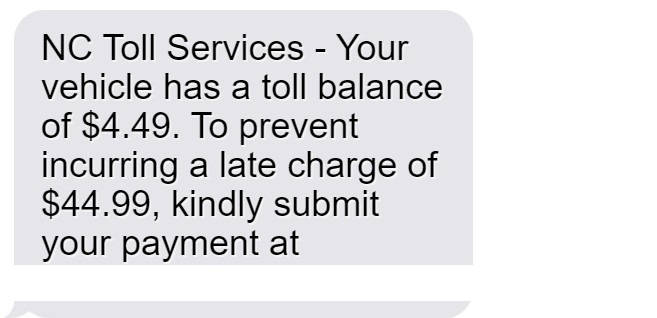
Out of the blue, your phone dings with an urgent text about owing money for tolls. The message says something like:
“NC Toll Services – Your vehicle has a toll balance of $4.49. To prevent incurring a late charge of $44.99, kindly submit your payment at invoicenctolls.com.”
The message sets up a stressful scenario where you supposedly owe money and have a short window to pay before getting penalized with high fees. This sparks fear and urgency to act quickly.
2. The Text Includes a Link to a Fake Website
If you click the link in the message, it takes you to a website that looks like a legitimate toll payment portal. The site has the state’s logo andcolors, claims to be the “NC Toll Transponder Customer Service Portal,” and so on.
In reality, scammers have fabricated this fake website to steal your information. But the sophisticated design tricks many people into believing it’s the real toll payment site.
3. The Website Asks for Personal and Financial Details
On the website, you’re prompted to enter your name, address, phone number, email address, and other personal details to “verify your account.” You’re also asked for credit card information to process the $4.49 toll payment and avoid the $44.99 late fee.
If you enter this sensitive data, you’re handing it directly to scammers. There is no toll balance, but they can use your details to commit identity fraud.
4. Scammers Steal Your Information for Criminal Activity
With your name, address, date of birth, and especially credit card number in hand, scammers can steal your identity and illegally use your accounts. They may:
- Charge your credit card for phony services or purchases you never authorized.
- Open fraudulent accounts in your name (loans, credit cards, etc), damaging your finances and reputation.
- Access your existing financial accounts using your stolen credentials.
- Sell your information to other cybercriminals on the dark web.
In many cases, victims don’t realize what happened until the damage is already done in the form of fraudulent charges, accounts opened in your name, and accounts emptied of funds. This toll services scam can quickly spiral into a major identity theft nightmare.
What to Do If You Fell for This Scam
If you received the suspicious text and entered any personal or financial information onto the website, take these steps immediately:
- Contact your credit card company or bank to report what happened and request that they freeze your accounts. This should prevent fraudulent charges or access of the accounts.
- Place a fraud alert and credit freeze on your credit reports to lock down your credit and prevent scammers from opening any new accounts in your name.
- Reset all passwords and security questions for any online accounts that may be compromised, such as your email, Amazon, financial accounts, etc. Use completely new, complex passwords.
- Monitor all financial account statements and credit reports closely for any suspicious activity indicating identity theft or fraud. Report any unauthorized charges or accounts opened.
- File a complaint with the FTC at IdentityTheft.gov and your local police department. Provide details on how the scam occurred and what information was exposed.
- Warn contacts who may receive similar phishing texts about this scam. Share details on social media or local news outlets to spread awareness in your community.
The sooner you take action, the less damage scammers can inflict by using your stolen identity and accounts. If you provided credit card details, request a new card number from your issuer as well. Be vigilant about watching for additional suspicious messages or fraudulent activity going forward.
Frequently Asked Questions About the NC Toll Services Text Scam
1. What exactly is the NC Toll Services text scam?
The NC Toll Services text scam is a phishing campaign where scammers send fake text messages claiming your vehicle owes money for unpaid tolls. The message urges you to click a link to avoid late fees. However, the link goes to an imposter website designed to steal your personal and financial details.
2. How do I recognize the NC Toll Services scam text?
The scam text will claim to be from “NC Toll Services,” but this agency does not exist. The message says you owe a specific amount, usually around $5, and that you’ll be charged extra late fees if you don’t pay immediately. There will be a link to click to supposedly pay the balance.
3. What happens if I click the link in the text?
The link goes to a sophisticated fake website that impersonates a state toll payment portal. You’ll be prompted to enter a lot of sensitive personal and financial information, including your full name, address, phone number, email address, credit card number, and more. Scammers capture this info to steal your identity and money.
4. How can I tell the website is a scam?
While the fake website looks professional, there are often small indicators it’s fake, such as spelling errors, unofficial branding, and no legitimate contact info. But the sites can be incredibly convincing. Check the URL for misspellings or unusual domains.
5. What do scammers do with my information if I entered it?
Scammers use your personal info like full name, birthdate, and address to commit identity fraud. Your credit card number allows them to make fraudulent purchases in your name. They may resell your information or use it to access your financial accounts.
6. What steps should I take if I shared any personal details?
Immediately contact your credit card company and banks to freeze accounts. Place a fraud alert and credit freeze with credit bureaus. Reset all account passwords and monitor closely for any suspicious activity. File police reports and alert your contacts about the scam.
7. How can I avoid falling for the NC Toll Services scam?
Remember this agency doesn’t exist. Carefully scrutinize unexpected texts claiming you owe money. Don’t click links or provide info to unfamiliar websites. Keep device and account security up to date. Back up your data regularly. Stay vigilant about phishing scams.
8. How widespread is this toll payment scam?
The NC Toll Services text scam has been reported by victims throughout North Carolina, as well as neighboring states. Scammers may adjust locations and agency names, but follow the same phishing playbook.
9. Are other types of phishing scams using this technique?
Yes, scammers commonly fake urgent payment demands via text to steal data on imposter websites. Other examples include fake package delivery texts and bank/IRS scam texts. Always verify legitimacy before clicking links or entering info.
10. What should I do if I receive a suspicious text about owing money?
Do not click any links. Double check with the supposed company via legitimate contact channels to confirm whether you owe money before providing payment or personal details. Report scam texts to warn others.
The Bottom Line
The NC Toll Services text scam tricks victims into believing they owe toll money and must pay immediately. But in reality, clicking the link leads to an fake website designed to steal your personal and financial information for identity theft and fraud. Protect yourself by never clicking links in suspicious texts, limiting what you enter onto sites, and taking quick action if you did provide sensitive data. Being wary of this scam can help you avoid becoming the victim of a larger identity theft plot.








