

Californians are increasingly receiving phony text messages claiming they owe unpaid tolls and fees to avoid late charges. But it’s really a scam to steal your personal information. Here’s what to know about spotting and avoiding this sneaky phishing campaign.
Overview of the CA FasTrak Scam
The CA FasTrak toll payment scam is a phishing campaign targeting drivers across California with fake text messages about owing unpaid tolls. This cunning scheme aims to steal unsuspecting motorists’ sensitive personal and financial data through malicious links and convincing imposter websites.
This racket has exploded in prevalence throughout the state, with numerous victims reporting receipt of the deceptive texts. Scammers pose as the real CA FasTrak toll program to add legitimacy and trick stressed out drivers into clicking withoutproper scrutiny. But the end goal is identity theft and financial fraud.
The text messages state that you have a small outstanding FasTrak toll balance, usually between $3 to $7. They emphasize you’ll be assessed a much larger late fee, like $40 to $50, if you don’t pay immediately. This sparks panic and urgency in the recipient.
A link is conveniently included to supposedly access your account and settle the bill before penalties apply. However, it sends you to an elaborate fake website controlled entirely by scammers to harvest your details.
Once on the phony site, you’re prompted to enter a trove of sensitive personal and financial information to finalize the payment. Data collected includes your full name, home address, phone number, email address, payment card number, driver’s license details, and more.
With this info in hand, scammers can perpetrate a wide array of fraudulent activities in your name. They may make unauthorized purchases on your credit or debit cards, sometimes maxing them out. Or use your name, address, Social Security number for full identity theft. Criminals can also sell your information on the dark web for profit.
Unfortunately, many victims don’t realize what happened until much later when they notice suspicious transactions or accounts opened fraudulently in their name. By this point, the cybercriminals have had ample time to inflict substantial financial damages through identity theft and account misuse.
This toll payment phishing scam has been rampant across California, particularly targeting populous areas like Los Angeles, San Francisco, San Diego, and Sacramento. But authorities warn it could easily spread to other states as well, with scammers simply changing the name from CA FasTrak to another local toll agency.
With so many drivers relying on toll roads and transponders, this scam has been incredibly successful at catching people off guard. But hopefully this article provides the details needed to recognize and avoid being fooled by this sneaky phishing technique designed to steal your most valuable personal data.
How the FasTrak Scam Unfolds
Here’s a play-by-play of how scammers carry out this toll payment phishing ruse:
1. You Get a Text Message About Owing Toll Money
You’ll receive a text out of the blue claiming you have an unpaid toll balance of around $3 to $7 on your FasTrak account. It emphasizes this small amount ballooning to a $40 to $50 late fee if not addressed immediately. This sparks urgency to act fast.
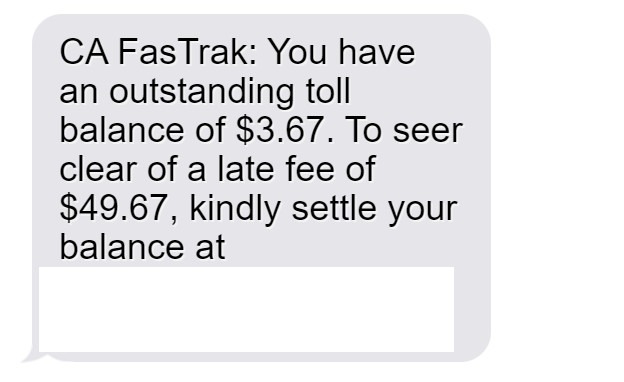
Here is how the text message scam looks:
“CA FasTrak: You have an outstanding toll balance of $3.67. To seer clear of a late fee of $49.67, kindly settle your balance at [scam website]”
2. The Text Provides a Link to Pay the Fake Balance
The message includes a link supposedly to settle the toll balance through the CA FasTrak site before late fees apply. The provided link looks initially legitimate. But when clicked, it leads to an imposter website controlled by scammers.
3. The Site Requests Personal and Financial Information
On the phony CA FasTrak site, you’re prompted to enter a lot of sensitive data to “access your account” and pay the fee. This includes your full name, home address, phone number, email address, payment card details, driver’s license number, and more.
4. Scammers Steal Your Details for Identity Theft
Once you enter any personal or financial information onto the fraudulent website, scammers take this data and use it maliciously. They may drain your bank account via your card number or steal your identity to open fraudulent new accounts.
5. You May Only Realize Once the Damage Is Done
Many victims don’t find out what happened until later when they spot unauthorized charges or strange accounts opened in their name after the fact. This crime can quickly snowball into significant financial loss and security headaches.
What to Do If You Fell for This Scam
If you clicked the link or provided any information to the fake CA FasTrak site, take these steps right away:
- Contact your bank/credit card company to freeze accounts vulnerable to fraud. Request new card numbers as well.
- Place a fraud alert and credit freeze on all three major credit reports to lock down your credit.
- Change passwords, security questions, and pins for any accounts potentially compromised by stolen info.
- Review financial statements closely for any signs of fraudulent charges or activity. Report what you find.
- File police reports regarding the phishing scam to aid investigation efforts.
- Report the scam text to the FTC and local authorities so they can warn others in your area about this phishing con.
Acting quickly helps limit the damage scammers can do with your personal details in hand. But you also need to remain vigilant about any future phishing attempts, as scam artists frequently target those who fell victim once before.
Frequently Asked Questions About the CA FasTrak Text Scam
1. What exactly is the CA FasTrak text scam?
The CA FasTrak scam involves receiving phony text messages claiming you owe unpaid tolls and fees. The texts urge you to click a link to avoid late charges but it leads to a fake website that steals your information.
2. How can I recognize a scam CA FasTrak text message?
The scam texts often say you owe a small balance like $3 to $7 and you’ll be charged much higher late fees like $40 to $50 if unpaid. They include a link to supposedly pay urgently.
3. What happens if I click the link in the text message?
The link goes to a sophisticated fake website impersonating the real CA FasTrak site. You’ll be prompted to enter a lot of personal and financial details that scammers can steal.
4. What are signs the website is an imposter/scam?
Look for misspellings, grammatical errors, and inconsistent branding. But scam sites can appear very real. Check the URL carefully for odd domains.
5. What do scammers do with my stolen personal information?
They may drain your bank account with your card data or steal your identity to open fraudulent accounts and make unauthorized purchases in your name.
6. What steps should I take if I shared any details on the site?
Immediately contact your bank and credit card companies. Place fraud alerts and freezes with credit bureaus. Reset all account passwords and monitor closely for any suspicious activity.
7. How can I avoid becoming the victim of a CA FasTrak scam?
Never click links in suspicious texts. Verify supposed unpaid bills directly with FasTrak before providing any personal or payment details. Use official FasTrak website/app only.
8. Are CA FasTrak text scams common right now?
Yes, many CA drivers have reported receiving these phony texts claiming urgent unpaid toll balances and late fees if not addressed immediately.
9. Are other types of scams using this same technique?
Scammers use fake urgent payment texts often for utility bills, package deliveries, taxes, and more. Always verify independently before clicking links or providing info.
10. What should I do if I get a text about owing CA FasTrak money?
Do not click the link or provide any information. Log into your official FasTrak account to view any legitimate outstanding balances. Report scam texts to help warn others.
The Bottom Line
This FasTrak scam starts with a phony text message insisting you must pay a small toll bill immediately. But the link goes to an imposter website designed solely to harvest your sensitive personal and financial data. Now that you know their tricks, avoid getting phished by verifying any payment demands through official channels first. Staying alert protects you and your hard-earned money.

Join the discussion
0 commentsShare your experience or ask a question about this article.
Discussion
Start the conversation
Have a question or something useful to share? Add the first comment.