

A text offers $75 back from Netflix. It sounds like a welcome correction to a subscription charge, with a short window to collect the money.
The Netflix $75 refund scam uses that small financial surprise as its opening. Before claiming anything, check what the message actually connects to your account.
Overview
The incoming refund is a lure for private information
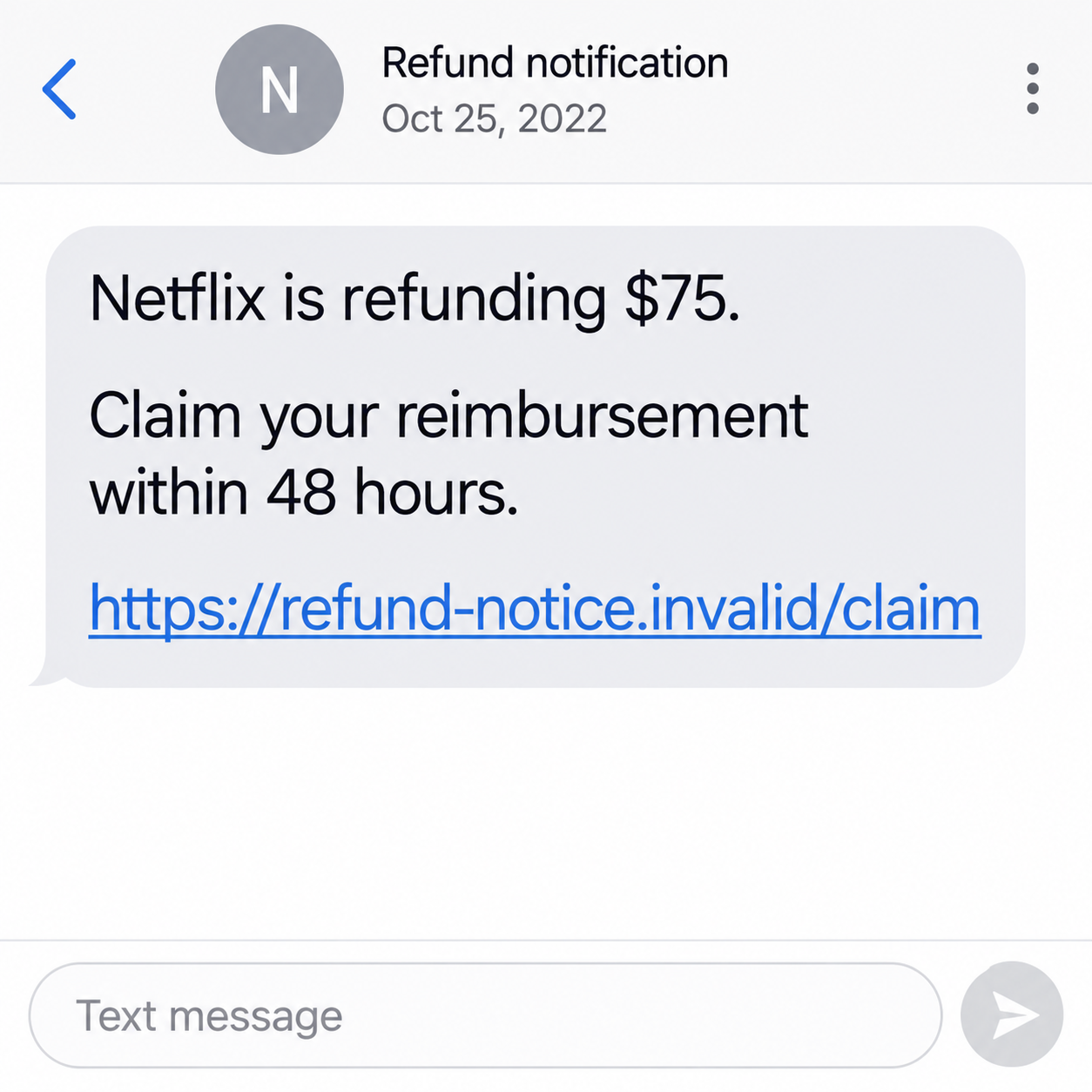
The historical text claims Netflix is refunding $75 and gives the recipient 48 hours. It directs the reader toward a reimbursement claim rather than a verified account record.
The reported October 2022 message displayed ClaimRefund.info. We are not confirming that old address’s current status or advising anyone to visit it.
The scam is the false reimbursement and phishing request, not Netflix itself. A claimed refund does not establish eligibility or prove that the sender knows your billing history.
Netflix’s official phishing guidance warns about unexpected requests for passwords, bank details, or card information. Those requests should not be handled through an unfamiliar message link.
A precise amount does not make the offer personal
The $75 figure is the amount the scam text advertised. It is not an observed victim loss, current subscription price, or reimbursement promised to all Netflix customers.
A number can make a vague offer feel calculated. It does not show which payment, invoice, or account decision supposedly produced the money.
Real billing errors and support decisions can exist. They must be investigated through Netflix or the provider that genuinely bills your subscription, not this historical claim route.
You can reject the suspicious text while still asking about a real charge. The two matters do not need to share a sender or a website.
Check the account before accepting the reimbursement story
- Open Netflix through the app or address you normally use.
- Review your payment history and the particular charge in question.
- Identify whether Netflix or a subscription partner bills you.
- Use genuine support for an unexplained charge or possible credit.
- Do not enter financial data into the text’s claim form.
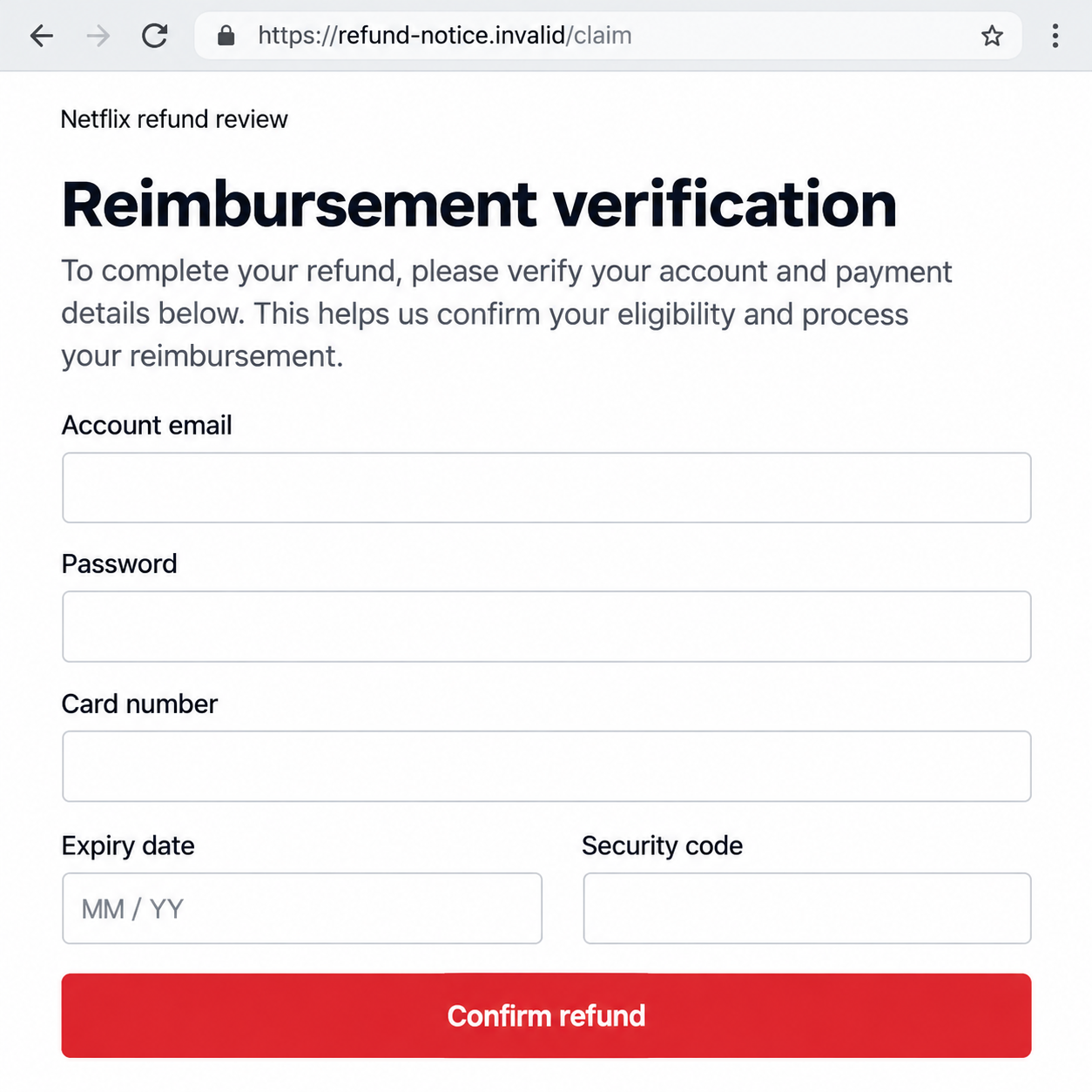
Our images are fictional examples with nonfunctional links. The second illustrates a possible data-collection form; it does not reproduce a captured page from an actual recipient.
Why a Small Refund Can Be an Effective Hook
It looks like money returning, not money leaving
People may scrutinize an unexpected bill but feel less cautious about a refund. The promised benefit draws attention away from the information being requested.
A form can still expose a password or card even when its heading says reimbursement. The direction of the promised money does not limit the collection risk.
Ask why the sender needs the information and who receives it. An explanation such as payment verification is not an independent answer.
You do not have to make a test payment to authenticate a refund. If the process cannot be confirmed through the real service, leave it.
The deadline makes an unverified offer feel temporary
The historical 48-hour claim window encourages a quick decision. A recipient may click because waiting seems to risk losing money they never knew was available.
That deadline comes from the person making the claim. It is not evidence of a real Netflix policy or a current support decision.
Do not let it replace checking the actual account. Even if a genuine matter has a time limit, the responsible provider can explain it independently.
Forwarded texts can also retain an old deadline long after the supposed offer. A recycled message is not a new announcement about your subscription.
How the Netflix $75 Refund Scam Works
Step 1: An unexpected message announces reimbursement
The opening supplies the benefit before establishing any billing problem. It asks the reader to believe that a refund exists without showing the associated transaction.
A displayed Netflix name or reference to a website does not establish origin. Sender labels can be misleading, and the message may reach people who are not subscribers.
If you do use Netflix, that fact can make the story seem plausible. It does not prove that the sender identified your particular account.
Keep the text for reporting if useful. You do not need to reply or open the claim address to preserve what it promised.
Step 2: A claim window pushes the recipient toward the link
The message makes clicking look like the way to avoid missing the money. Verification becomes something the recipient expects to finish inside the claim process.
Separate that expectation from the evidence. A countdown or stated number of hours does not connect the offer to your payment history.
Go to the service separately instead of using the deadline as a reason to trust an unfamiliar page. The account is the place to begin a real billing question.
A link’s text may also differ from its destination. Neither a friendly label nor the word refund inside an address proves Netflix controls it.
Step 3: A reimbursement page may request login or payment details
The reported scam route was intended to collect account, personal, or financial information. Similar forms can present those requests as the necessary steps for receiving money.
A page may ask for a Netflix password, a card, or other information that goes well beyond checking whether you expected a refund.
Do not assume a familiar sign-in design authenticates it. The operator can copy labels and formatting while collecting the answers somewhere unrelated.
The invented form below shows that mismatch. Its fields explain potential exposure, not a genuine refund requirement or an exact historical page we tested.
Step 4: A code or payment approval can introduce a different action
A further request may ask you to confirm a code or authorize something in a banking app. Read the real provider’s description of that action.
An approval for a purchase, login, or account change is not converted into an incoming reimbursement because the page calls it verification.
Stop if the request does not match what you intend to do. Contact the provider directly rather than asking the refund sender to explain the discrepancy.
Not every recipient encounters this additional stage. Record your own actions so the response distinguishes exposed information from an actual approved transaction.
Step 5: The promised refund provides cover for follow-up requests
A confirmation page may say processing is underway. That message is not proof that Netflix accepted a request or that money is on its way.
A later contact can say the refund failed or another detail is missing. Each new instruction creates another opportunity for the recipient to disclose something.
Do not keep correcting a claim that never had verified account support. An unanswered promise should not become a reason to send more information.
If you need to ask about a genuine refund, use official support. You can leave the scam conversation without abandoning a real billing issue.
Check Billing Without the Text Message
Start with payment history, not the advertised amount
Netflix’s billing guidance explains where account payment history can be reviewed. Use your real account to identify charges you actually recognize.
Match the dates, payment method, and provider with your own statement. A claim of $75 does not supply the missing reason for a refund.
If the account email or subscription arrangement is unclear, ask genuine support. Do not fill in the text’s form merely to find out which account it supposedly concerns.
Identify the party that genuinely bills your subscription
Some subscriptions are handled through partners. A recognized partner relationship is different from a third-party website introduced by an unsolicited reimbursement text.
Check the arrangement through the real account and your established billing provider. Use those routes to investigate a duplicate or unfamiliar charge.
This warning does not decide whether a refund is available in your circumstances. It identifies the unsafe route, not a universal policy for every subscription.
Use official help when a charge needs investigation
Contact Netflix or the relevant billing provider from its genuine website or app. Explain the specific transaction rather than treating the text as a receipt.
Keep support replies and case references separate from messages sent by the refund contact. Only one of those conversations has an independently verified starting point.
Do not cancel a working subscription solely because the scam text arrived. Make any account decision through the genuine service on the basis of real records.
Separate a Password Disclosure From a Card Disclosure
The account password affects access and reused logins
If you submitted a Netflix password, protect that account through the actual service. If the same password was reused elsewhere, those accounts need attention too.
A reused email password can be particularly important because the inbox receives recovery messages. Check actual access and activity instead of assuming every service was compromised.
Do not give a follow-up caller another reset link. A person offering to release the refund is not a safe adviser on account recovery.
Card information belongs with the financial provider
Tell the issuer which card fields you entered and whether you approved any charge. It can assess safeguards without guessing from the text’s promised amount.
A password reset does not replace that conversation. Conversely, replacing a card does not resolve an exposed email or streaming-account password.
Keep an accurate exposure list. It is more useful to say exactly what was supplied than to describe an unknown range of possible losses as already confirmed.
What to Do if You Have Fallen Victim to This Scam
-
Close the claim page and stop replying. Reject another reimbursement link, processing fee, or verification request while the sender says it is fixing the payment.
Save the original text and any follow-up messages first. You can report the claim without making the suspicious process work.
-
Contact the issuer after sharing payment information. Open the bank’s established app or use the number printed on the card.
Describe the exposed fields and any actual transaction or approval. Ask about protection, pending activity, and dispute options appropriate to your payment method.
No warning article can guarantee a reversal. A truthful chronology helps the provider investigate the payment instead of the refund story.
-
Change an exposed Netflix password through Netflix. Choose a unique replacement and review the account for unfamiliar changes.
Use genuine recovery support if you cannot sign in or the account email changed. Do not share verification messages with the contact that sent the text.
-
Protect other accounts that reused the password. Start with important recovery channels and financial services where that same combination was used.
Review each service through its own trusted route. Submitting one password creates a reason to act, not proof that every account was successfully accessed.
-
Record personal information separately. Note any address, date of birth, telephone number, or document image you submitted during the claim.
Keep complete identifiers private while asking appropriate official services about identity exposure. Do not publish an unredacted form or bank statement as a warning.
-
Report the impersonation to Netflix. Its official help page gives phishing@netflix.com and explains how suspicious emails or texts can be forwarded.
Device forwarding options vary, and message fees may apply. If an email report is rejected because Netflix already received that specimen, follow its published advice.
Keep the report separate from your bank case. Reporting a false text does not automatically cancel transactions or restore account access.
-
Review technical exposure if it went beyond the message. Check unexpected downloads, browser permissions, installed tools, or persistent redirects from the claim site.
Malwarebytes can help assess questionable software. AdGuard can reduce malicious-ad exposure and known scam connections, but neither verifies or collects the refund.
If nothing was submitted or installed, do not treat a received text as proof of infection. Remain alert to actual account activity.
-
Resolve real billing questions and refuse paid recovery offers. Continue through the provider that genuinely manages the subscription or affected payment.
For a fraud report, use your location’s official route. In the United States, ReportFraud.ftc.gov is a starting point.
A new adviser promising to release the $75 after another payment is not independent evidence that the historical claim was genuine.
Frequently Asked Questions
Is Netflix offering every customer a $75 refund?
The historical scam text does not establish that offer. The amount is part of the message’s claim, not a current entitlement for readers.
Does the 48-hour deadline make the text official?
No. A sender can invent urgency. Check your genuine account and support records instead of using the deadline as a reason to trust the link.
Does this mean Netflix never issues refunds?
No. A real billing question must be assessed by the appropriate provider. This warning rejects an unverified claim route, not every possible refund decision.
Is a recognized subscription partner the same as the text’s website?
No. Verify partners through the account relationship you already have. A new claim website does not become authorized merely because third-party billing sometimes exists.
What if I entered a card but no Netflix password?
Tell the card issuer exactly that and ask for appropriate protection. Do not assume a streaming-account takeover occurred without evidence of credential or account exposure.
Should I open ClaimRefund.info to check this warning?
No. It is a historical suspicious address, not a recommended investigation route. Use Netflix’s official help and your own billing records.
The Bottom Line
The Netflix $75 refund scam makes an unexpected incoming payment sound close enough to claim. The amount and deadline do not authenticate the sender or form.
Verify billing through the actual service, and keep passwords and card details out of the text’s claim route. Address any real disclosure with the relevant provider promptly.

Join the discussion
0 commentsShare your experience or ask a question about this article.
Discussion
Start the conversation
Have a question or something useful to share? Add the first comment.