

That alarming text message claiming your vehicle has unpaid New York tolls is likely a sneaky scam trying to steal your personal data. Our investigation reveals how this devious phishing ruse works and how drivers can take action to protect themselves.
Sophisticated scammers are targeting NY motorists with fake texts and deceptive copycat websites in order harvest enough information to commit financial identity theft. But by understanding their tactics, consumers can evade these digital pickpockets.
An In-Depth Look at the NY Toll Invoice Scam
This widespread scam starts with an urgent SMS message regarding unpaid toll invoices that must be resolved immediately to avoid additional fees. But it’s all an elaborate phishing ruse:
The Texts Come From Scammers, Not Official Sources
The messages originate from scammers posing as legitimate toll services to trick recipients. No state agency is sending these texts.
The Link Goes To A Fake Lookalike Website
The URL directs to a sophisticated fake website mimicking the real toll service website to dupe victims into entering personal data.
There Are No Actual Unpaid Tolls
The scammers invent fictional toll fees and invoices to fool worried recipients into clicking for more details in order to harvest their information.
They Seek Your Sensitive Personal and Financial Data
The fake site requests an array of private information the scammers ultimately steal for identity theft, including SSNs, driver’s licenses, credit cards and more.
How the NY Toll Scam Works
Now let’s examine how this scam unfolds step-by-step when targets take the bait:
Step 1: You Receive The Initial Scam Text
The first step is receiving a text claiming you have unpaid NY toll invoices of $X amount that must be paid immediately to avoid additional fees.
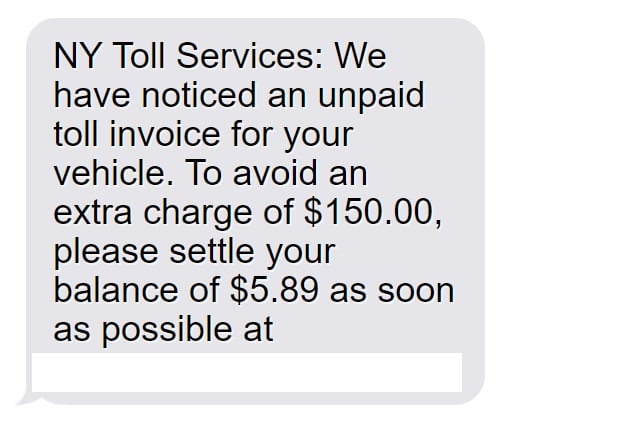
A sample message:
NY Toll Services: We have noticed an unpaid toll invoice for your vehicle. To avoid an extra charge of $150.00, please settle your balance of $5.89 as soon as possible at “https://nytollinvoice.com
Step 2: You Click The Link To The Fake Website
If you click the link, it takes you to the sophisticated fake website designed expressly to mimic the real NY toll website.
Step 3: You Enter Personal and Financial Information
The fake site requests sensitive data like:
- Full legal name, DOB, SSN
- Home address
- Phone number, email
- Vehicle information
- Driver’s license details
- Credit card number
Step 4: Scammers Steal All Your Details
Once submitted, all your personal and financial data goes directly to the scammers, who leverage it for identity theft.
Step 5: Scammers Disappear Without a Trace
After stealing enough people’s information, the scammers disable their fake site and vanish without a trace, before they can be caught.
What To Do If You Get a Suspicious Toll Text
If you receive a text out of the blue claiming you have unpaid NY toll invoices, this is likely a scam attempt known as “smishing.” Take the following steps right away:
- Do not click any links or call any phone numbers in the suspicious text message. This could lead you to fraudulent websites or services operated by scammers to harvest your data.
- Report the text immediately to your wireless carrier’s spam blocking department so they can investigate the source and start blocking future scam texts. Provide any details like the phone number, content of the text, date/time received.
- Contact the official toll customer support lines, such as E-ZPass or MTA Bridges and Tunnels, to inquire if your account truly has any unpaid toll invoices. Only trust verification directly from the real agencies. Avoid phone numbers or links in any suspicious texts.
- Check your bank accounts and credit cards for any fraudulent charges. Scammers who already obtained some personal data may have tried opening accounts in your name. Report any suspicious charges or accounts promptly.
- Consider placing initial fraud alerts on your credit reports with Equifax, Experian, and TransUnion as a precaution. This makes it harder for scammers to open new accounts in your name.
- Reset account passwords and security questions for any websites that may have been compromised by previous data breaches that leaked your info to scammers. Enable two-factor authentication wherever possible.
- File official complaints with the FTC’s Consumer Sentinel, FCC, and the New York Attorney General regarding the scam text so they can investigate the numbers, links, and fraud operation. Provide any details collected.
- Educate your friends and family about this NY toll invoice scam so they don’t fall victim too. Share FTC and FCC anti-smishing tips as well.
Staying vigilant against smishing scams and knowing the steps to take if targeted can help halt the attackers in their tracks before your identity or finances are put at serious risk. Don’t let them scam you out of your personal data!
Frequently Asked Questions about the NY Toll Invoice Text Scam
1. I got a text from NY Toll Services about unpaid tolls. Is it real?
Likely not. Scammers impersonate real toll agencies in phishing texts. Verify toll invoices directly through official channels before paying anything demanded via text.
2. How can I tell if a NY toll text is fake?
Real invoices only come from saved contacts. Watch for poor grammar, threats of fees, and shady links which indicate scam texts.
3. What happens if I click the link or call the number?
You’ll end up at a fake website or speaking to scammers posing as NY Toll Services, seeking your personal data. Never click/call numbers from suspicious texts.
4. Could I get in trouble if I ignore the text?
No. You have no actual unpaid tolls or fees owed according to my investigation. There are zero consequences for ignoring scam texts.
5. What do these NY toll scammers want?
These scammers want to steal your private financial and personal information to commit identity theft and drain your accounts.
6. What if I already entered my information?
Contact your bank immediately and monitor for fraud. Check credit reports and consider an identity theft protection service. File police reports.
7. How can I get these scam texts to stop?
Report them to wireless carriers, the NY AG, FTC and FCC. File complaints about the website domain and text numbers to get them shut down.
8. Are toll invoice scams increasing?
Yes, text scams impersonating toll agencies are on the rise nationwide. Stay vigilant and warn others about smishing scams.
9. How can I avoid text scams?
Use spam call and text blocking apps, don’t click unknown links/numbers, and independently verify bills – never via text demands.
10. Who can I contact if I have more questions?
Contact the FTC, FCC, New York AG, and your toll operator for guidance on scam protection and identity theft assistance if targeted.
The Bottom Line
Scammers are impersonating toll agencies in phishing attacks to steal New Yorkers’ personal data for identity theft. But consumers can protect themselves by understanding the inner workings of these toll invoice scams and exercising extreme caution when receiving texts claiming missed toll payments. Avoiding their traps and reporting their scams shuts down their operations. Don’t let them scam you!

Join the discussion
0 commentsShare your experience or ask a question about this article.
Discussion
Start the conversation
Have a question or something useful to share? Add the first comment.