

Have you received a suspicious text message claiming to be from NY Toll Services, demanding payment for an unpaid toll invoice? If so, you might be the target of a devious scam designed to trick you into revealing your personal and financial information. In this article, we’ll delve into the details of the NY Toll Services Text Scam, explain how it works, and provide you with valuable tips on what to do if you’ve fallen victim to this fraudulent scheme.
Scam Overview
The NY Toll Services Text Scam is a relatively new scam that has been gaining traction in recent months. Scammers send out spam text messages to unsuspecting individuals, claiming that they have an unpaid toll invoice for their vehicle. The message urges the recipient to settle their balance of $5.89 as soon as possible to avoid an extra charge of $150.00. The text message includes a link to a website, such as “https://nytollinvoice.com,” which appears to be an official NY Toll Services website. However, this website is a fake, designed to steal personal and financial information from unsuspecting victims.
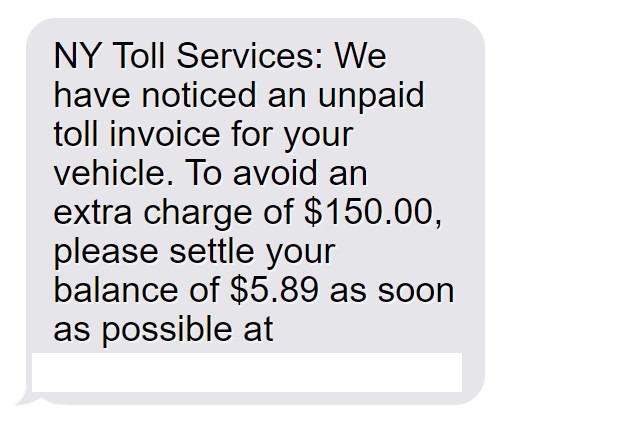
Here is scam message might look:
NY Toll Services: We have noticed an unpaid toll invoice for your vehicle. To avoid an extra charge of $150.00, please settle your balance of $5.89 as soon as possible at https://nytollinvoice.com
The scammers behind this scheme are highly skilled at creating convincing text messages and websites that closely resemble legitimate NY Toll Services communications. They use urgent language and threaten hefty late fees to pressure victims into acting quickly without thinking twice. The fake website is designed to look professional and trustworthy, complete with official-looking logos and branding. This attention to detail makes it easy for even the most cautious individuals to fall for the scam.
How The Scam Works
The NY Toll Services Text Scam is executed in a series of calculated steps designed to trick victims into revealing their personal and financial information. Here’s a step-by-step breakdown of how the scam works:
Step 1: The Spam Text Message
The scam begins with a spam text message sent to the victim’s mobile phone. The message claims to be from NY Toll Services and states that the recipient has an unpaid toll invoice for their vehicle. The message includes a specific balance amount, usually around $5.89, and threatens an additional late fee of $150.00 if the balance is not settled immediately.
Step 2: The Fake Website
The text message includes a link to a website, such as “https://nytollinvoice.com,” which the victim is instructed to visit to pay their outstanding balance. Upon clicking the link, the victim is directed to a fake website that closely resembles the official NY Toll Services site. The website is designed to look professional and trustworthy, with official logos and branding.
Step 3: Entering Personal and Financial Information
Once on the fake website, the victim is prompted to enter their personal and financial information to pay their supposed outstanding balance. The website asks for details such as full name, date of birth, email address, phone number, home address, and credit/debit card information, including the card number, expiration date, and CVV.
Step 4: Information Theft
As soon as the victim submits their personal and financial information, the scammers capture the data and use it for fraudulent purposes. They may make unauthorized purchases, open new accounts in the victim’s name, or sell the information on the dark web to other criminals.
What to Do if You Have Fallen Victim to This Scam
If you have fallen victim to the NY Toll Services Text Scam, it’s crucial to act quickly to minimize the potential damage. Here are some steps you should take:
- Contact your bank or credit card company immediately and report the fraudulent activity. They will help you cancel your card and issue a new one to prevent further unauthorized charges.
- Change your passwords for any online accounts that may have been compromised, especially if you used the same password for multiple accounts.
- Monitor your credit reports closely for any suspicious activity or new accounts opened in your name. You can request a free credit report from each of the three major credit bureaus (Equifax, Experian, and TransUnion) once a year.
- Report the scam to the Federal Trade Commission (FTC) and your local law enforcement agency. While they may not be able to recover your stolen funds, reporting the crime helps authorities track scam patterns and potentially catch the perpetrators.
- Spread the word about the scam to friends, family, and colleagues to help prevent others from falling victim to the same scheme.
Frequently Asked Questions About the NY Toll Services Text Scam
Q: What is the NY Toll Services Text Scam?
A: The NY Toll Services Text Scam is a fraudulent scheme where scammers send spam text messages to individuals, claiming they have an unpaid toll invoice. The messages include a link to a fake website designed to steal personal and financial information from unsuspecting victims.
Q: How can I identify a scam text message from NY Toll Services?
A: Scam text messages often contain urgent language, threaten hefty late fees, and include suspicious links to websites that closely resemble the official NY Toll Services site. If you receive a text message claiming to be from NY Toll Services, do not click on any links. Instead, contact NY Toll Services directly using their official phone number or website to verify the legitimacy of the message.
Q: What information do the scammers attempt to steal through the fake website?
A: The fake NY Toll Services website asks victims to enter personal and financial information, such as their full name, date of birth, email address, phone number, home address, and credit/debit card details, including card number, expiration date, and CVV.
Q: What should I do if I clicked on the link in the scam text message but did not provide any information?
A: If you clicked on the link but did not enter any personal or financial information, your data is likely still safe. However, it is advisable to run a virus scan on your device to ensure no malware was installed when you visited the fake website.
Q: What steps should I take if I provided my personal and financial information on the fake NY Toll Services website?
A: If you have fallen victim to the scam and provided your information, take the following steps:
- Contact your bank or credit card company immediately to report the fraudulent activity and cancel your card.
- Change your passwords for any online accounts that may have been compromised.
- Monitor your credit reports for suspicious activity or new accounts opened in your name.
- Report the scam to the Federal Trade Commission (FTC) and your local law enforcement agency.
Q: How can I protect myself from falling victim to similar scams in the future?
A: To protect yourself from text message scams, follow these tips:
- Be cautious of unsolicited text messages, especially those that contain urgent language or threaten consequences for not taking immediate action.
- Do not click on links in suspicious text messages, as they may lead to fake websites or install malware on your device.
- Always contact the alleged sender of the message directly using their official contact information to verify the legitimacy of the message.
- Never provide personal or financial information through a link in a text message or on a website you are not familiar with.
- Keep your device’s security software up to date to protect against potential malware infections.
The Bottom Line
The NY Toll Services Text Scam is a devious scheme designed to trick unsuspecting individuals into revealing their personal and financial information. By sending spam text messages and creating fake websites, scammers prey on victims’ fears of late fees and legal consequences. If you receive a suspicious text message claiming to be from NY Toll Services, do not click on any links or provide your personal information. Instead, contact NY Toll Services directly using their official phone number or website to verify the legitimacy of the message. If you have fallen victim to this scam, act quickly to minimize the damage and report the crime to the appropriate authorities. By staying informed and vigilant, you can protect yourself and your loved ones from falling prey to this and other similar scams.

Join the discussion
0 commentsShare your experience or ask a question about this article.
Discussion
Start the conversation
Have a question or something useful to share? Add the first comment.