

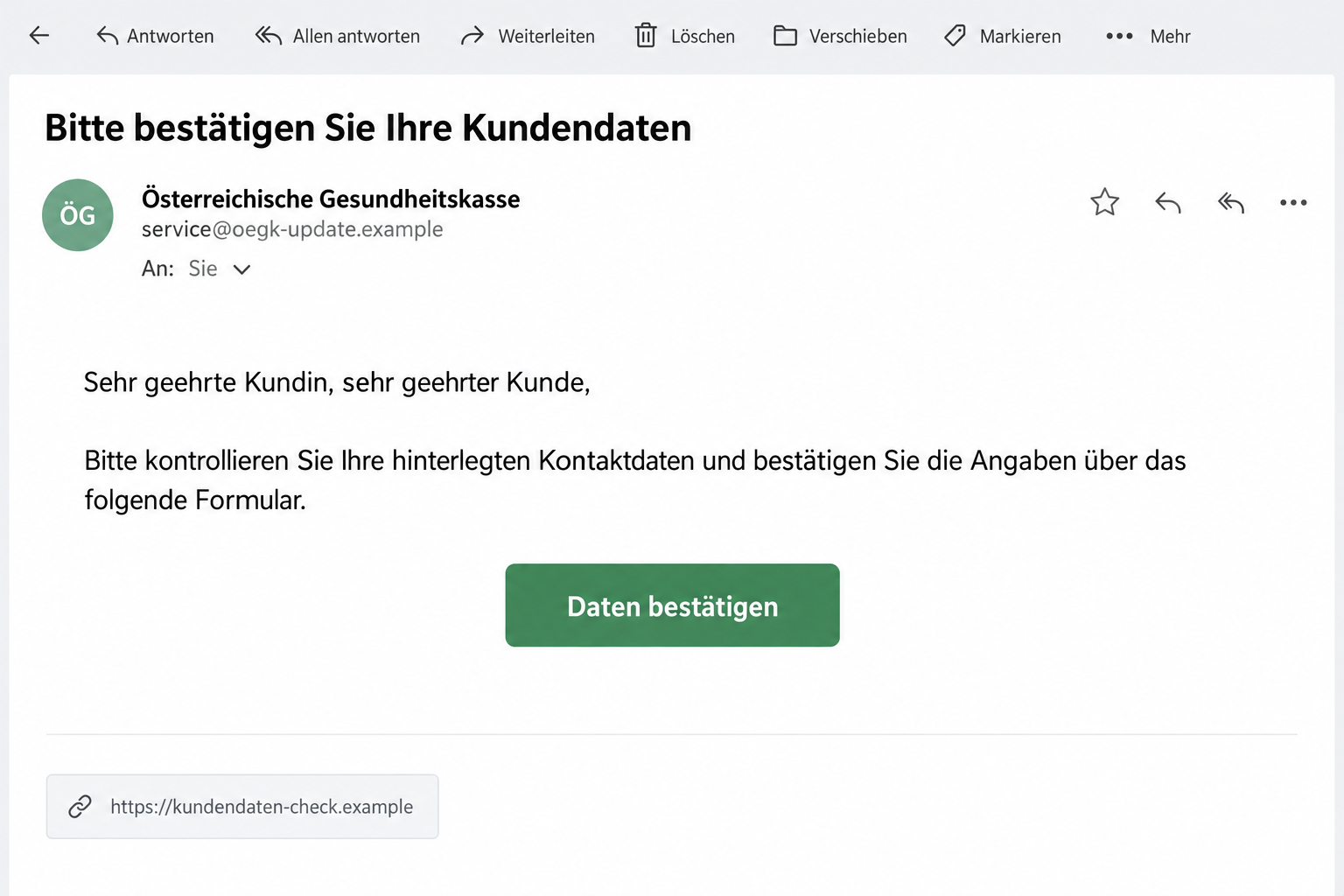
An email asks you to update or confirm your ÖGK customer details. The button looks like an ordinary account-maintenance task from your health insurer.
The ÖGK customer data email scam relies on that familiar setting. Before completing the form, check how the genuine insurer handles sensitive changes.
Overview
A genuine health insurer is being impersonated
ÖGK stands for Österreichische Gesundheitskasse, the Austrian Health Insurance Fund. It is the legitimate organization whose identity appears in these fraudulent messages.
Its official security notice confirms recurring emails falsely asking customers to update or confirm their records. The insurer says the messages aren’t from it.
That denial makes this a confirmed impersonation warning. It isn’t an accusation about the insurer’s treatment, coverage decisions, or customer service.
The message offers an apparently convenient way to fix an administrative detail. That convenience is the reason to examine the destination before supplying information.
The false button bypasses the genuine route for sensitive changes
ÖGK says it doesn’t ask customers to change sensitive information through direct links in emails or texts. It advises against the false update and confirmation buttons.
A page reached through such a message should not receive passwords, PINs, or personal data. A copied insurer heading doesn’t establish the operator’s identity.
The lead image uses a fictional email and link to illustrate the request. It isn’t an authentic ÖGK message or an inspected live phishing form.
The official notice does not specify an identified malware payload or a fixed payment charge. The documented issue is the impersonation and sensitive-data request.
The practical checks that keep the decision simple
- The update request is unexpected and arrives through an email or text link.
- The supplied page claims the insurer’s identity without independent verification.
- A form asks for sensitive information through that unverified route.
- The request can’t be confirmed through your genuine account or verified support.
- You are being asked to trust the message rather than the insurer’s established process.
Don’t complete the linked form to find out whether the update is necessary. Open the genuine account or contact ÖGK independently.
If you already responded, identify the details you supplied. The action needed for an exposed password differs from the action for a disclosed contact address.
Why a Customer-Data Update Feels Harmless
Insurance records can genuinely need maintenance. People move, change contact details, or use a different email address, so an update request can fit ordinary life.
The message also comes from a name associated with important services. Someone may worry that outdated records will interfere with a task they need to complete.
The scam doesn’t need to claim an enormous prize. It presents disclosure as a small chore that will prevent an inconvenient administrative problem.
A customer might therefore focus on finishing the form instead of checking its operator. The request feels familiar before the destination has earned trust.
That is why the route matters more than the button’s wording. A sensible-sounding task can still be directed to a fraudulent website.
Don’t decide based on whether you recently moved or changed an email address. A coincidental real need doesn’t authenticate an unsolicited link.
A legitimate update remains possible through the genuine service. Rejecting the false email doesn’t require you to leave inaccurate records unchanged.
Keep those two decisions separate: whether your details need attention and whether this particular message is authorized to collect them.
How the ÖGK Customer Data Email Scam Works
Step 1: The message borrows the insurer’s authority
The email presents itself as ÖGK correspondence and asks for a data update or confirmation. The familiar institutional name gives the instruction a plausible context.
A sender display name or copied design can create that impression without a real connection to the insurer. Those visible details aren’t account verification.
ÖGK’s warning concerns actual fraudulent messages, not merely emails that look unfamiliar. The organization explicitly says these requests weren’t sent by it.
You don’t need to know the impersonator’s real name before declining. Check the claim through the genuine organization, not through the contact making it.
Step 2: The update button moves you into the sender’s process
The email supplies a convenient update or confirmation button. Following it lets the message choose the page that will receive your information.
A copied portal can make that change feel routine. It may look like account maintenance while remaining separate from the service you intended to use.
The insurer’s guidance gives you a clearer boundary: sensitive changes should not be completed through these direct email or SMS links.
Don’t continue because the page looks professional. A form’s appearance doesn’t show whether its operator is authorized to receive protected details.
If the message creates uncertainty, leave it open only as evidence while checking elsewhere. You don’t need to interact with its form to ask the real insurer.
Step 3: Information entered into the false route needs protection
Once sensitive data is supplied, closing the page doesn’t take it back. The next step is identifying what was exposed and which provider can help.
A password requires account protection. Banking information calls for bank involvement. Contact details call for vigilance about later approaches that reuse the information.
Those are different outcomes, and none should be assumed solely from the presence of an email. Respond to the action you actually took.
Don’t submit a second form if the first appears to fail. An error screen doesn’t establish that the earlier entries remained private.
The Real Account Route Is the Useful Comparison
ÖGK directs customers to its official app or independently typed website for legitimate changes. Its secure Meine ÖGK service uses ID Austria access.
Start from a verified provider address, not from a link copied out of the disputed email. Then look for the actual account task.
A real login may require normal authentication. That doesn’t justify putting identity credentials into a separate form supplied by an unsolicited message.
You should understand which service you’re accessing and why. A health-insurer heading above a password field isn’t enough to establish that connection.
If you cannot find the requested task in the genuine service, ask verified support whether the particular email and update request are authorized.
Be specific. Asking only whether the organization uses email won’t confirm the message you received, the button it contains, or the page behind it.
Use the contact you already know or obtain it from the genuine website. Don’t let the unverified sender supply its own verification contact.
When a real record needs changing, finish through the approved process. Don’t reuse the false form because its questions seem to resemble the legitimate ones.
Checking the Email Without Opening Its Form
Look beyond the sender label to the actual address. An unrelated address can expose a mismatch, but an official-looking string shouldn’t be your only test.
Compare the requested action with the insurer’s published guidance. In this case, the direct-link sensitive-data change is the important contradiction.
A website can include the insurer’s name without being the insurer. Recognizable text inside a domain doesn’t establish who controls the destination.
Likewise, HTTPS is about the connection to the page. It doesn’t make a fraudulent operator into a legitimate insurance provider.
Don’t click merely to see whether a portal looks genuine. You can obtain a more useful answer from the verified account or actual support.
Save the email’s subject and destination for reporting. The precise link matters because different messages may lead to different sites.
Avoid posting complete insurance identifiers or private correspondence in a public warning. A helpful report doesn’t need to expose the information you’re trying to protect.
If an attachment appears in your version, don’t open it for a better look. Let the appropriate security support process assess it.
What Different Types of Shared Information Mean
Start with a list of the fields you completed. It prevents a vague worry about “all my details” from obscuring the account that needs protection first.
If you shared only an email or phone number, expect that a later message could sound more personal. Familiar information doesn’t verify its sender.
If you supplied a password, determine which genuine account it protects. Change that credential through the real service rather than through another link from the sender.
If you reused the password, protect the other accounts too. A false insurer form shouldn’t become a path to an unrelated email or financial account.
If identity-service access or approvals were involved, tell that provider as well. The recovery needs to address what was actually used, not only the insurer’s name.
For banking or card data, contact the bank or issuer. You don’t need to wait for a charge to ask how exposed information should be contained.
Don’t assume the notice proves a medical-record breach. The confirmed campaign is an impostor collecting information, not evidence that ÖGK’s own systems were compromised.
Keep genuine health or coverage questions with the real provider. An unverified email’s urgency shouldn’t decide how you access important services.
What to Do if You Have Fallen Victim to This Scam
-
Stop using the update link. Don’t supply more fields or try to complete a failed submission. Check any real account-maintenance task through the genuine service.
If the message merely sat in your inbox, report the impersonation and use the real insurer for account questions. No submitted data needs recovering.
-
Preserve a useful incident record. Save the sender, subject, link, time, and the categories of information supplied. Keep passwords and usable codes out of screenshots.
Describe whether you visited, entered details, approved an operation, or installed anything. Those actions help support choose the right response.
-
Report the impersonation to ÖGK. Use its official fraud-warning and contact page. Explain the message and any information you shared.
The provider lists office@oegk.at for reports of attempts to obtain information in its name. Verify the address through its site before sending sensitive material.
Ask whether any actual record needs checking. Don’t ask the impostor to confirm that your account is now secure.
-
Secure exposed credentials. Change them through the real account on a trusted device. Review available account activity, recovery details, and unfamiliar changes.
Protect reused passwords elsewhere. If ID Austria access was involved, contact its genuine support route rather than limiting the response to the email provider.
-
Involve your bank when financial information was shared. Use the bank’s real app or independently verified contact and explain the phishing exposure.
Review unfamiliar activity and follow its containment guidance. Don’t authorize another request from a caller claiming to reverse a false update.
-
Assess software exposure separately. If a link also caused an installation, download, or unexpected permission request, get device-security assistance before resuming sensitive activity.
Malwarebytes can help investigate harmful software on supported devices. It doesn’t remove information from the impostor’s records or protect a password by itself.
AdGuard can add web filtering for future browsing. It isn’t a way to establish whether an insurer requested a data change.
-
Report misuse and watch for follow-up contact. If information was abused or money was taken, preserve the evidence and report to the appropriate authorities.
Reject unknown helpers asking for a recovery fee, code, or remote access. Continue through the verified insurer, identity provider, bank, or security support.
Helping a Family Member Keep Genuine Services Within Reach
Someone may feel embarrassed after responding to an insurer-style message. Start by finding out what they supplied rather than asking why they trusted it.
Help them obtain the actual provider contact. A real conversation can clarify whether records need attention without returning to the false form.
Don’t tell them to ignore all insurance messages. They still need a reliable route for genuine account questions and important correspondence.
Keep that route easy to find. A verified bookmark or established contact is more useful than expecting someone to recognize every changing scam address.
If they entered a password, make recovery the first task. A lengthy discussion about the email’s appearance can wait until access is protected.
For only contact-data exposure, explain the follow-up risk without claiming that all accounts were breached. Calm, specific advice is easier to act on.
If another person manages the account, coordinate through your usual contact. Don’t forward the false button as an instruction for them to finish the update.
The enduring rule is simple: an unexpected sensitive-data request gets checked through the real service before information is supplied.
Frequently Asked Questions
Is ÖGK itself operating this scam?
No. ÖGK is the legitimate insurer being impersonated. Its official warning confirms that these false data-update emails weren’t sent by the organization.
Does ÖGK ask for sensitive changes through email or SMS links?
Its warning says it doesn’t request those changes through direct links. Use the genuine app, independently opened website, or verified support instead.
What if my customer details really need updating?
A real need doesn’t authenticate the email. Complete the actual change through the verified service, separately from the unexpected button.
Does a copied insurer logo make the linked form safe?
No. Appearance doesn’t establish the operator. Compare the request with official guidance and check the task through the genuine account.
Do I need to cancel a card after only reading the notice?
Reading alone doesn’t expose card details. Contact the issuer if financial information or approvals were supplied and let it assess the appropriate protection.
Does this alert establish a breach of ÖGK medical records?
No. It establishes fraudulent messages impersonating the insurer. Respond to information actually shared without assuming that the provider’s own systems were breached.
The Bottom Line
Don’t update sensitive ÖGK details through an unsolicited email button. The insurer has confirmed these false messages and directs customers to its genuine service.
If you already supplied information, report the impersonation and secure the affected account. Involve the bank or identity provider where the actual exposure requires it.

Join the discussion
0 commentsShare your experience or ask a question about this article.
Discussion
Start the conversation
Have a question or something useful to share? Add the first comment.