

If you recently received an email claiming you’re owed $3,192.51 from something called “Omni Agent Solutions” in relation to Bittrex International, you’re not alone. These emails are flooding inboxes across the internet, and while they may look official at first glance, they’re part of a growing crypto phishing scam that’s catching people off guard.
Don’t click anything just yet—read this first.
What Is the Omni Agent Solutions Bittrex Email Scam?
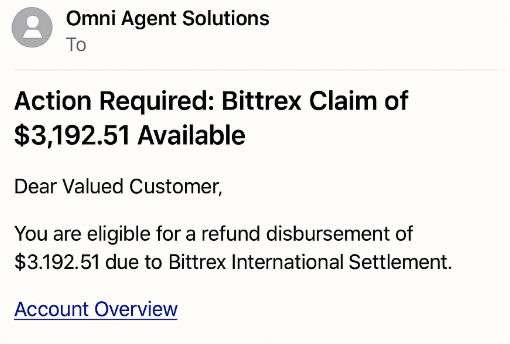
The Omni Agent Solutions Bittrex email scam is a phishing campaign disguised as an official claims notice. It pretends to offer users a refund or leftover balance from Bittrex International, a crypto exchange that officially ceased operations in 2023. The emails usually come with the subject line related to a claims process and state that you’re entitled to exactly $3,192.51, regardless of whether you ever used Bittrex or not.
Let’s break down the background and mechanics of this scam so you understand exactly why it’s dangerous and how it’s tricking people.
The Anatomy of the Deception
The emails in question claim to come from Omni Agent Solutions, which is being falsely presented as a third-party claims administrator handling leftover user balances from the now-defunct Bittrex exchange. The messages typically include:
- A subject line like: “Action Required: Bittrex Claim of $3,192.51 Available”
- Generic greetings like “Dear Valued Customer”
- A clickable link to view your “Account Overview”
- Language implying urgency and legitimacy
- Mentions of Bittrex International (not the real Bittrex Global)
Identical Amounts for Everyone
Every email references the exact same amount—$3,192.51. That’s the first major red flag. A real claims process would have unique amounts based on your past transactions. If someone who never had a Bittrex account is being told they’re owed thousands of dollars, something is clearly off.
Who Is Omni Agent Solutions?
Omni Agent Solutions is a real company that offers legal administrative support services. However, the version mentioned in the scam emails uses suspiciously spoofed domains and misspellings like “Omni Agent SoIutions” (note the capital I instead of an L), which are commonly used in phishing to bypass spam filters and deceive readers.
Sketchy Email Domains
Many users report that these emails come from domains such as @govdelivery.com, which is often used in official mass government communications. However, when used in this context, it’s a clear attempt to spoof legitimacy. It doesn’t match any known domain used by the real Bittrex or Omni Agent Solutions.
The “Connect Wallet” Trap
Perhaps the most dangerous part is the call to action. The email urges users to connect their crypto wallet in order to verify their identity or receive funds. This is the scam’s endgame: once you connect your wallet to the malicious site, the attacker gains access and can drain your assets.
Inconsistencies in Names and Affiliations
Another giveaway is the constant use of Bittrex International rather than Bittrex Global, which was the actual operating name of the exchange. This subtle inconsistency is common in scams where fraudsters rely on vague recollections to fool people.
How the Scam Works
Let’s walk through exactly how this phishing attack is designed to manipulate and exploit you.
Step 1: Mass Distribution of Fake Emails
The scammers start by harvesting or buying large lists of email addresses—some belonging to people who once used crypto platforms, others completely unrelated. The goal is volume.
- Email subject lines use urgency or official-sounding language: “Pending Crypto Claim Notification – Immediate Action Required”
- Sender names often mimic government or legal firms
- Domains are misspelled or unofficial (like govdelivery.com or omniagentsoIutions.com)
Step 2: Creating Legitimacy Through Visual Design
The email layout is designed to appear professional:
- Use of logos resembling Bittrex or legal firms
- Tables showing “Your Account Overview”
- “Secure” badge icons near the CTA buttons
- Signature footers claiming legal authority
Step 3: Triggering Emotional and Financial Responses
The fixed amount—$3,192.51—is carefully chosen. It’s significant enough to attract interest, but not so high it seems implausible. The psychological play includes:
- A fake sense of urgency (“Claim must be submitted by [date]”)
- An appeal to fear of missing out (“Final Notice!”)
- A feeling of deserved entitlement (“Your balance from Bittrex liquidation”)
Step 4: Redirecting to a Phishing Site
Clicking the email link brings you to a professional-looking website that mimics a legitimate claims portal.
- The page asks for personal info: full name, date of birth, wallet address
- Some forms go further and request mnemonic seed phrases or private keys
- Users are prompted to connect their crypto wallet via MetaMask, WalletConnect, or similar integrations
Step 5: Stealing Wallet Credentials
Once you authorize a connection, you essentially give the attacker access to:
- View balances
- Initiate transfers
- Approve smart contracts that can later drain tokens
In some cases, simply visiting the site may expose your browser or wallet session to exploits, especially if you’re not using up-to-date security tools.
Step 6: Disappearing Act
After they get what they want, the scammers may:
- Drain funds immediately
- Set up delayed transactions
- Distribute malware or spyware
- Disappear, leaving no way to recover funds
Since crypto transactions are irreversible and pseudonymous, there’s very little chance of recovery.
What to Do If You’ve Fallen Victim to This Scam
If you clicked a link or connected your wallet, act immediately. Here’s a step-by-step list of what you need to do:
1. Disconnect Your Wallet
If you used MetaMask or a similar wallet, go into the “Connected Sites” tab and remove all unauthorized connections.
2. Transfer Your Funds
Move all remaining crypto assets to a secure wallet with new private keys. Do not reuse the compromised wallet, even if you disconnect it.
3. Revoke Approvals
Use tools like Revoke.cash or Etherscan Token Approvals to cancel any lingering contract approvals that the scam may have initiated.
4. Scan for Malware
Run a thorough malware and spyware scan on your device. Use reliable antivirus tools like Malwarebytes or Bitdefender.
5. Report the Incident
- Report phishing to FTC.gov/complaint
- File a report with IC3.gov if you’re in the U.S.
- Inform your crypto wallet provider
- Post your experience on forums like Reddit to warn others
6. Notify Exchanges (If Applicable)
If any of your assets were sent to an exchange address, you can attempt to report the wallet address as associated with fraud. In rare cases, centralized exchanges can freeze suspicious accounts.
7. Consider a Security Reset
If you provided any personal info beyond your wallet, such as name, birth date, or identification, monitor for identity theft. Consider a credit freeze or fraud alert with the major credit bureaus.
Frequently Asked Questions (FAQ) About the Omni Agent Solutions Bittrex Email Scam
What is the Omni Agent Solutions Bittrex email scam?
This scam involves phishing emails that claim to be from Omni Agent Solutions, stating you’re entitled to a $3,192.51 refund related to Bittrex International. The email includes a link to an account overview and prompts users to connect a crypto wallet, which can lead to the theft of their funds.
Is Omni Agent Solutions a real company?
Yes, Omni Agent Solutions is a real company that provides administrative and claims support services. However, scammers are misusing the company’s name and creating fake domains or misspelled versions (e.g., “Omni Agent SoIutions” with a capital “I”) to appear legitimate.
Why does the email mention Bittrex International?
Scammers often refer to Bittrex International instead of the actual Bittrex Global to confuse recipients. This subtle inconsistency helps avoid detection while making the message sound official to people unfamiliar with the specifics of the exchange.
Is Bittrex still operating?
No, Bittrex shut down its U.S. operations in 2023 and filed for bankruptcy. Any legitimate communications about claims would come through court-appointed channels or via verified communications—not random emails urging wallet connections.
Why is the amount always $3,192.51?
Every email mentions the exact same amount, which is a red flag. Legitimate claims are based on individual account activity. A uniform payout amount is a sign the message is mass-generated and not personalized.
What happens if I clicked the link?
If you clicked the link but didn’t enter any information or connect your wallet, you’re likely safe. Still, clear your browser cache, run a malware scan, and monitor for any suspicious activity. If you did connect your wallet or submit personal information, take immediate steps to secure your crypto and identity.
How do I know if my wallet is compromised?
You may be compromised if:
- You connected your wallet to a suspicious site
- You approved unknown smart contracts
- You notice unauthorized transactions
Use tools like Etherscan or Revoke.cash to check and remove token approvals.
Can I recover stolen crypto?
Unfortunately, crypto transactions are typically irreversible. If your funds were sent to another wallet, recovery is unlikely unless the recipient address belongs to a centralized exchange that agrees to cooperate. Report the incident immediately to authorities and your wallet provider.
How can I report this scam?
You can report the scam to:
- The Federal Trade Commission (FTC): ftc.gov/complaint
- The Internet Crime Complaint Center (IC3): ic3.gov
- Your crypto wallet provider
- Online communities such as Reddit or crypto-focused forums to help warn others
How can I protect myself from future scams?
- Never click on links in unsolicited emails
- Use hardware wallets for better protection
- Enable two-factor authentication on all accounts
- Regularly review wallet permissions and revoke unused approvals
- Always verify the source of any communication, especially those involving crypto or financial claims
The Bottom Line
The Omni Agent Solutions Bittrex scam is an expertly crafted phishing campaign that preys on crypto users and non-users alike. By impersonating a legal firm and dangling the promise of unclaimed funds, scammers are gaining access to unsuspecting wallets and draining funds with ease.
If you receive one of these emails, do not engage. Never click links or enter information without verifying the source. Crypto scams are growing more sophisticated, and staying informed is your best defense.

Join the discussion
0 commentsShare your experience or ask a question about this article.
Discussion
Start the conversation
Have a question or something useful to share? Add the first comment.