

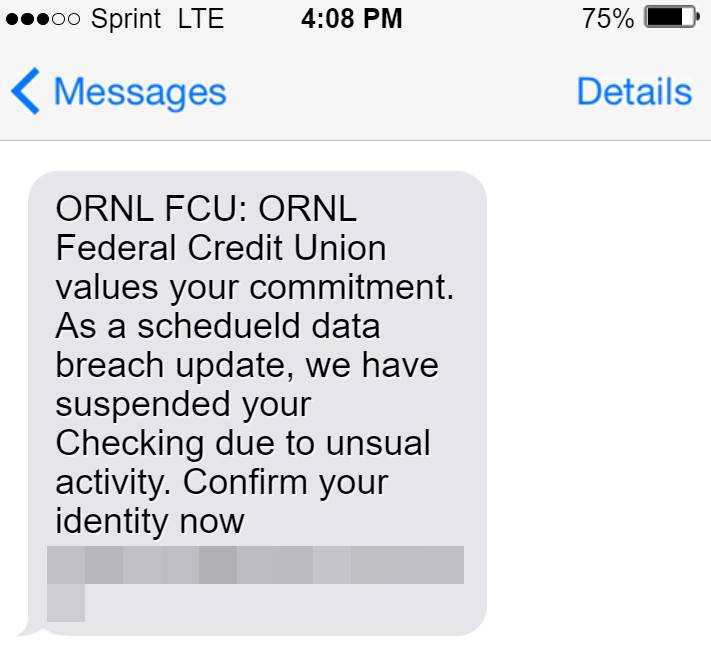
A new sophisticated phishing scam targets ORNL Federal Credit Union members through convincing text messages about frozen accounts due to “unusual activity”. The texts direct recipients to a fake credit union website to “verify their identity” by entering account login credentials. In reality, the site steals this sensitive information to take over accounts and drain funds.
This comprehensive guide will reveal how this ORNL Federal Credit Union phishing scam works, how to spot fraudulent texts, and what to do if you fall victim. Protect your hard-earned money.
An Overview of the Scam Targeting ORNL Federal Credit Union Members
This scam begins with ORNL Federal Credit Union members receiving unsolicited text messages falsely claiming that unusual activity has been detected on their account.
The texts state that this activity has required the immediate suspension of account access to prevent potential fraud. Recipients are instructed to click on an embedded link to verify their identity in order to lift the suspension.
However, the link leads to a fake phishing site impersonating the real ORNL Federal Credit Union login portal. If users enter their membership usernames and passwords, this sensitive information is stolen and used to take over accounts.
Once logged in, the criminals rapidly initiate transfers and drain funds from checking, savings, retirement accounts, and more. With full access, accounts can be wiped clean in minutes.
This simple but effective scam has already cost ORNL members across the region thousands in stolen funds. Awareness of how it works and what to avoid can help prevent you from being the next victim.
How the Elaborate ORNL Federal Credit Union Scam Works
From mass text delivery to laundering of stolen funds, here’s an in-depth look at how the scammers execute this phishing scam on ORNL Federal Credit Union members:
Stage 1: Mass Delivery of Fake Texts
The first step is randomly text blasting the fraudulent account freeze messages to thousands of phone numbers in regions where ORNL Federal Credit Union operates.
Most recipients have no relation to ORNL. But a small subset being members makes the wide net approach effective for the scammers.
Phone numbers are sourced through leaked data breaches, botnets, public records, and phone number list purchases. No prior relationship to recipients is needed.
Stage 2: Fake Account Freeze Alerts
The texts are made to appear as if they were sent automatically from ORNL’s own security alert system.
The message references unusual activity detected on the recipient’s account, claiming this requires immediate account suspension to prevent potential fraud.
Language around protecting their assets against suspicious activity mirrors legitimate ORNL communications.
Stage 3: Phishing Link to Fake Verification Site
A link is included in the texts that supposedly leads to the ORNL site where users can verify their identity to lift the account suspension.
In reality, it leads to a nearly identical spoof site controlled entirely by the scammers. This phishing site is designed specifically to capture entered member login credentials.
Many victims don’t notice the subtle URL differences on small mobile screens and assume legitimacy based on the official look and branding.
Stage 4: Login and Account Takeover
When recipients visit the phishing verification site and enter their username and password, this sensitive data is captured and saved by the scammers.
With the keys to members’ online banking access in hand, criminals immediately log in and get to work-draining accounts.
They transfer funds to external accounts, initiate wire transfers to money mules, and withdraw cash – clearing out account balances rapidly.
Stage 5: Laundering the Stolen Money
To cover their tracks, the criminals then layer the ill-gotten funds through a complex money laundering process.
Transfers route through multiple accounts under fake IDs, obscuring the destination. Cash is spent in untraceable ways.
The digital trail goes cold, making it extremely difficult to recover the stolen money.
Stage 6: Resale of Stolen Account Data
In addition to draining account balances, the scammers seek to extract maximum profit from the scam.
Usernames, passwords, account details, and any other personal info submitted is sold on dark web marketplaces.
This data allows other groups to commit additional identity fraud and account takeovers beyond just the ORNL scam.
Key Traits to Identify ORNL Federal Credit Union Scam Texts
The most effective defense against this scam is identifying and avoiding the fraudulent account alert texts used to initiate it. Here are 7 tell-tale traits of the phony ORNL texts:
1. You Didn’t Initiate Contact
Real ORNL account notifications only come in response to activity on your actual accounts. Outbound texts without any existing reason warrant scrutiny.
2. Includes a Link to Verify Identity
Valid institutions will never text account holders links to login and enter account credentials. This immediate red flag signals phishing.
3. Urgent Call to Action
While ORNL communications may note timeframes, excessively urgent language is used to cover up the fraudulent nature of the texts.
4. Missing Personalized Details
Actual ORNL texts include your name and partial account details. Any texts referencing only a “valued member” are impersonal scams.
5. Suspicious Link URL
Don’t click the link. Hover over it on your phone to preview the web address for any odd domain names, typos or redirects.
6. Unprompted Request for Sensitive Information
Banks will not request your username, password, SSN or account number over an unsolicited inbound text message.
7. Follow Up Validation
Check your actual ORNL account status and contact history in online or mobile banking to confirm any real notifications of account freezes.
Take a close look at any ORNL themed texts you receive against these scam indicators. When in doubt, reach out to ORNL directly to validate legitimacy. Avoid clicking, entering data, or calling numbers within suspicious messages.
Steps to Take if You Entered Your Account Information
If you provided your username, password, or other sensitive data into the phishing site, take these steps immediately:
Step 1: Contact ORNL Federal Credit Union
Call ORNL directly and alert them that your account credentials may be compromised. Ask them to escalate monitoring on your accounts for fraudulent activity. Inquire about resetting your login credentials as well.
Step 2: Update Your Password
Change your ORNL Federal Credit Union password immediately to something entirely new. Avoid reusing this password on any other accounts you hold.
Step 3: Review Recent Account Activity
Log in and carefully examine your account transaction histories, pending transfers, balance changes and account details for any unauthorized activity. Document anything suspicious and alert ORNL.
Step 4: Enable Multifactor Authentication
Set up multifactor login authentication through ORNL’s online banking portal using verification codes or biometrics. This secures access beyond just your password.
Step 5: Place Fraud Alert on Credit Reports
Contact the major credit bureaus to place fraud alerts if any personal information was entered, as a precaution against potential wider identity theft.
Step 6: File Police Reports
File reports on the scam with both local police and the FBI’s IC3 cybercrime division. This creates an official record to aid any claims.
Getting ahead of compromised credentials limits potential damages. But awareness of scam indicators remains your best defense.
How to Keep Your ORNL Federal Credit Union Accounts Secure
Practice the following habits to safeguard yourself from phishing texts and account takeovers moving forward:
- Never login through links sent in unsolicited texts – type official sites yourself or use app logins.
- Utilize multifactor authentication to secure accounts beyond just passwords.
- Analyze link URLs before clicking to spot odd domains, typos and redirects.
- Pay attention to grammar, branding, urgency and impersonal messaging in texts.
- Only provide sensitive account data through ORNL’s official mobile app and online banking portal when you initiate the access.
- Routinely check your account activity for unauthorized transactions.
- Set up scam call and text blocking through your mobile carrier.
Staying alert to the warning signs of phishing texts protects your finances and identity. Report any suspicious ORNL communications to help warn others.
Frequently Asked Questions about the ORNL Federal Credit Union Scam Texts
What is the ORNL Federal Credit Union scam text campaign?
This scam involves mass text messages sent to random phone numbers pretending to be from ORNL Federal Credit Union. The texts claim unusual activity has frozen the recipient’s account and provide a phishing link to verify identity and unlock it. The site steals entered login info to drain accounts.
How do the scammers send so many fake ORNL texts?
The scammers use automated text blasting tools to send thousands of messages quickly. They spoof the sender ID to make it look like the texts come from ORNL Federal Credit Union.
What details are included in the phony account freeze texts?
The texts reference detecting unauthorized activity on the recipient’s account. They claim this requires immediate account suspension pending identity verification. A fake case number adds legitimacy. Urgency around following the provided link to unlock the account is emphasized.
Where does the link in the text actually go?
While made to look like the real ORNL Federal Credit Union login portal, the link goes to a sophisticated fake login site controlled by the scammers to capture entered account credentials.
What should you do if you entered your details into the phishing site?
Contact ORNL immediately about the account compromise, change your password to a new complex one, review account activity for unauthorized transactions, enable multifactor login authentication, put a fraud alert on your credit, and file a police report on the scam.
How can you avoid falling for this ORNL text scam?
Never click links in unsolicited texts, scrutinize urgently worded messages, use multifactor authentication for accounts, check account activity routinely, and contact ORNL directly with account security concerns – not numbers in random texts.
Conclusion: Remain Vigilant Against ORNL Federal Credit Union Scam Texts
The ORNL Federal Credit Union phishing scam exposes how convincing and dangerous text message frauds have become. With losses quickly escalating, recognizing and avoiding these fraudulent account freeze alerts is critical.
Carefully analyze any unsolicited texts before clicking links or providing data. Verify urgently worded security notices with ORNL directly through official contact channels – not numbers supplied in messages. Implementing strong login protections beyond just passwords adds key account safeguards as well.
Staying informed on the latest financial scam tactics allows you to identify risks and respond appropriately. Keeping your details safe protects not just your ORNL accounts, but your wider identity and assets. Remain vigilant!

Join the discussion
0 commentsShare your experience or ask a question about this article.
Discussion
Start the conversation
Have a question or something useful to share? Add the first comment.