

Parking fines are never fun to receive. But what if the parking ticket you just got in a text message wasn’t even real? Scammers are now using fake parking penalty charge notices (PCNs) as a way to steal personal and financial information from unsuspecting victims.
This sneaky scam starts with a text message from an unknown number claiming you have an unpaid parking ticket that needs immediate payment. The message looks official enough to fool many people into clicking on the link and handing over sensitive info. But rest assured, it’s 100% a scam.
Scam Overview
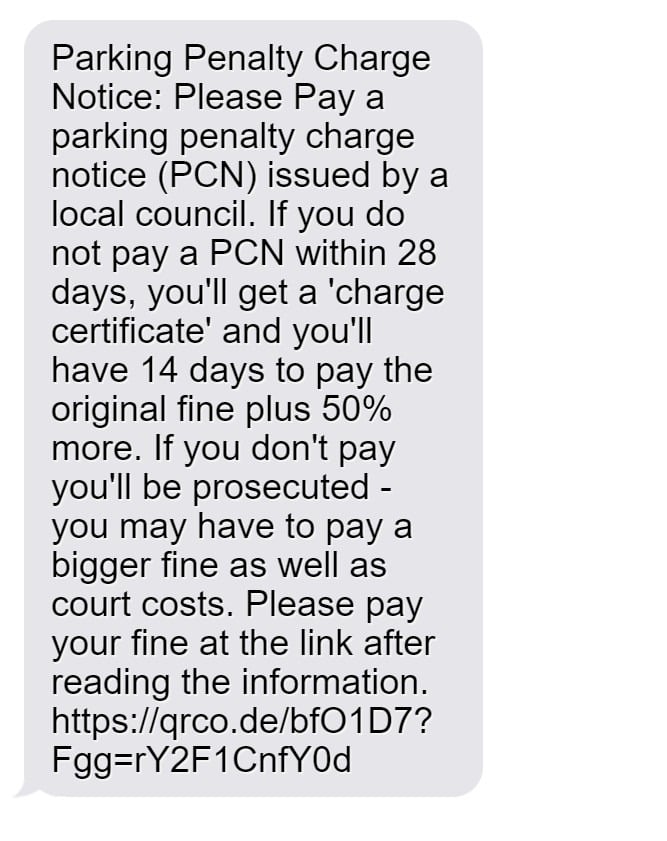
The parking penalty charge notice scam starts with a text from an unfamiliar number. The message will say something like:
“Parking Penalty Charge Notice: Please pay a parking penalty charge notice (PCN) issued by a local council. If you do not pay a PCN within 28 days, you’ll get a ‘charge certificate’ and you’ll have 14 days to pay the original fine plus 50% more.”
The text sounds official and threatening. It includes specific details like 28-day and 14-day payment deadlines, which are in line with actual UK parking violation rules.
The message goes on to say that failure to pay will result in bigger fines, court fees, and prosecution. This plays on people’s fears of legal consequences.
Then comes the call to action: a link where you can supposedly review info and pay the fine.
The link may start with “https://qrco.de/” which is a common QR code generator used in scams. Or it may look like a valid government URL, something like https://parkingukca.top/.
If you click the link, you are taken to a fake website dressed up to look like an official government parking violation portal. Everything from the logo to the fonts to the terminology mirrors official sites, making it look very convincing.
On the site, you are shown details of your “unpaid parking ticket” along with a form to enter personal and payment information. The scam site may even display your location, obtained from your IP address, to make the violation seem more plausible.
Once you enter your details and submit payment, the scammers have stolen your sensitive personal and financial information. The data can then be used for identity theft and unauthorized purchases.
How Does the Fake Parking Fine Scam Work?
Scammers have devised a step-by-step process to make their fake parking penalty charge notice scams seem as real as possible. By following a formula, they can convince many victims to comply and give up valuable personal data. Understanding each phase of the con helps identify red flags.
Step 1: Send Out Mass Texts or Emails
The first step is casting a wide net by sending thousands of messages about unpaid parking fines. The texts and emails go out randomly, hoping to hook a few gullible recipients. This blanket targeting keeps costs low since most people will ignore or delete the suspicious messages.
The texts come from a constantly changing array of unlisted phone numbers.
The messages claim the recipient has an outstanding PCN issued by parking wardens or automatic number plate recognition (ANPR) cameras. Threats of legal action, fines, and prosecution push urgency.
Step 2: Direct Victims to the Scam Website
The messages include a link to review details and pay the penalty charge. The URLs use masking techniques to appear real. For example, a QR code generator url like “qrco.de” may forward to “cityname_parking.co.uk.”
But the site has no affiliation with any government body. Scammers register lookalike domains to lend credibility. When victims click through, the sophisticated scam site loads.
Step 3: Display a Fake Parking Ticket
The website shows an official parking ticket with the city logo and a ticket number. The violation claims to be issued for parking in a restricted zone or running a red light captured on CCTV.
Your location may display on the ticket, swiped from your IP address. This location mirroring makes the fine seem relevant and real.
In reality, the tickets are fully fabricated. The numbers are randomly generated with no corresponding records. But victims tend not to verify and assume the tickets are genuine.
Step 4: Ask for Personal and Payment Details
After displaying the fake ticket, the site presents a form to submit personal details and pay the penalty charge. Scammers need this info to access your finances and steal your identity.
The form asks for your full name, address, phone number, email address, and payment information like bank account and credit card numbers.
Many victims comply, believing this is needed to pay the fine and avoid legal trouble. But in reality, it just gives scammers the ability to commit fraud.
Step 5: Use Stolen Data for Financial Gain
With your personal and payment information, scammers can now carry out their crimes. They may use your financial details to make purchases online or take out loans. Other data can be sold on the dark web.
Your compromised accounts will also face risks. Hackers can siphon money from bank accounts and make unauthorized transactions through payment providers like PayPal.
Meanwhile, your personal information can enable additional identity theft scams. Criminals may use it to file fake tax returns, open credit cards, or utility accounts in your name.
Step 6: Vanish Without a Trace
By the time victims realize it’s a scam, the scammers have already disappeared. They wipe away digital footprints and shut down any trace of their operation.
The phone numbers and domain names that originated the scam vanish. And any funds stolen quickly filter through cryptocurrency exchanges and overseas accounts to cover their tracks.
Victims are often left paying for fraudulent charges themselves or spending months repairing identity theft damages. Since the scams seem so real, it is vital to recognize their tactics in order to avoid becoming another statistic.
Warning Signs That Indicate a Parking PCN Scam
While these fake parking fine scams are designed to look real, there are a few red flags to watch out for:
- You receive a text out of the blue about an unpaid parking ticket, but don’t recall any violation.
- The message comes from an unknown number, not an official source.
- The link uses a URL shortener like qrco.de or redirects to a non-government domain.
- You are asked to enter personal info like your name, phone, email, address.
- Payment is requested via bank transfer, gift card, or crypto instead of official means.
- The ticket number shows up as invalid or fake when you verify through official channels.
- You are threatened with immediate legal action or extra fines for non-payment.
As soon as you see these signs, you can be sure it is a scam. No genuine government site will operate this way.
What to Do If You Get a Fake Parking Ticket Message
If you receive a suspicious text about an unpaid parking penalty charge, follow these steps:
- Do not click any links in the message. Links can download malware or lead to scammer-run sites.
- Check the URL carefully. Real government addresses end in .gov.uk in the UK.
- Try calling the number that texted you. Chances are you won’t be able to reach anyone or the number will be out of service.
- Look up the ticket number through official council resources. Fake ticket numbers won’t lead to any real violations.
- Forward the text to 7726, which is the number for reporting spam texts in the UK.
- Contact your local council if you have doubts and verify if any parking tickets are linked to your vehicle registration number.
- If you clicked the link, change your passwords and call your bank if you submitted any financial information. Monitor your accounts closely for unauthorized charges.
- Report the scam attempt to Action Fraud on 0300 123 2040 so authorities are aware.
Frequently Asked Questions About the Fake Parking Fine Scam
1. How does the fake parking ticket scam work?
The scam begins with an unsolicited text or email claiming you have an unpaid parking ticket. The message threatens legal action if you don’t pay promptly. It includes a link to a fake government lookalike site where you can view and pay the alleged fine. If you submit your personal and payment details, scammers can steal your identity and money.
2. What are some warning signs of the parking PCN scam?
Warning signs include getting a surprise ticket with no prior knowledge of a violation, urgent threats and deadlines, links to sketchy websites instead of .gov sites, requests for unnecessary personal information, shady payment methods, and inability to confirm the ticket through official channels.
3. What government agency sends parking tickets in the UK?
In the UK, parking tickets are issued by local city and county councils, not any nationwide government body. Councils send postal letters with official violation codes that can be verified on their websites. They do not text or call about unpaid fines.
4. Can you get jail time for not paying a parking ticket?
No, parking fines are civil penalties that do not result in criminal charges or jail time, even if late. The scam threatens immediate jail time to provoke panic, but this is never a consequence for real traffic tickets.
5. What should you do if you get a text or email about an unpaid parking fine?
Do not click any links, call the number back to confirm it’s bogus, look up your vehicle ticket status officially, report the scam text or email, avoid submitting personal or payment details anywhere, and notify your bank if you did share financial information.
6. Can a private company issue parking tickets in the UK?
No, only local councils have legal authority to issue parking tickets in the UK. Any fines from private landowners are invoices, not legally enforceable demands. Ignore texts about private parking tickets, as these are scams.
7. How can you tell if a parking fine website is fake?
Fake sites use misleading links, unofficial domains, no contact info, threats of legal action, urgent deadlines, requests for unnecessary details, inability to officially confirm ticket number, and misuse of government logos.
8. What should you do if you already paid a scam parking fine?
Contact your bank to reverse the charges and closely monitor accounts for fraud. Change online account passwords that used the same payment method. Report identity theft to CIFAS if personal information was compromised. And report the scam to Action Fraud.
9. Can you report fake parking ticket texts or websites?
Yes, report scam texts to your mobile provider by forwarding to 7726. Report scam emails to Action Fraud and the National Cyber Security Centre. And contact web hosts to shutdown fraudulent websites impersonating government services.
10. How can you avoid parking ticket scams?
Be wary of surprise texts or emails about fines, look for red flags, avoid clicking links or calling back numbers, verify ticket details through official channels only, and never submit personal or payment data to unsolicited requests or dubious websites.
The Bottom Line
Scam texts and websites impersonating parking penalties are on the rise in the UK. With convincing messages and lookalike sites, it’s easy to fall for these ploys. Just remember real councils and government bodies will never text about fines out of the blue. They also won’t threaten immediate legal action for non-payment. Checking for warning signs like dubious URLs and fake ticket numbers can save you the hassle and financial risk. Stay vigilant about links and requests for information to avoid getting scammed.








