

Kentucky drivers are increasingly receiving alarming texts stating they owe tolls from a recent journey and face late fees if immediate payment isn’t made. However, it’s a sophisticated scam aimed at stealing personal and financial information. This article provides an in-depth examination of how this toll invoice text fraud works, tips to avoid becoming a victim, and guidance if you entered information into their fake website.
Scam Overview
Kentucky drivers are increasingly receiving alarming scam texts stating they owe tolls from a recent trip and face late fees if immediate payment isn’t made. However, this is a sophisticated phishing scam aimed at stealing personal and financial information from unsuspecting victims.
This toll invoice text fraud specifically targets Kentucky residents by mentioning RiverLink, referencing travel on Kentucky toll roads, and providing a link to a fake website appearing to be the official RiverLink toll payment portal. The scammers send unsolicited texts to random phone numbers hoping to snare victims into entering sensitive information that can be used for identity theft and financial fraud.
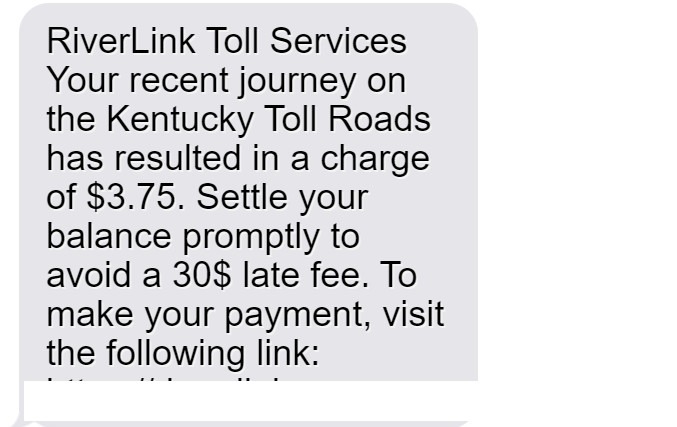
The scam message states: “RiverLink Toll Services: Your recent journey on the Kentucky Toll Roads has resulted in a charge of $3.75. Settle your balance promptly to avoid a $30 late fee. To make your payment, visit: https://river-link.org.”
While this text may seem legitimate at first glance, real RiverLink messages provide more detailed information, do not demand immediate payment under threat of late fees, and direct users to the official riverlink.com site rather than a third-party payment portal.
By generating a sense of urgency and offering a quick resolution, the scammers seek to trigger an emotional response that overrides critical thinking which could identify the deception. The seemingly small unpaid toll amount of $3.75 appears plausible, while threats of escalating $30 late fees spark fear that demands swift action.
However, no legitimate Kentucky toll agency contacts drivers solely by text message about unpaid balances or uses unverified third-party websites for payments. Real toll agencies provide paper invoices by mail with instructions on how to pay through official channels.
Unfortunately, many scam victims realize the deception only after entering personal information and do not discover actual fraud until unauthorized charges appear or identity theft occurs. At that point, the scammers have already exploited their stolen data.
How This Scam Works
To protect yourself, it’s critical to understand how this toll invoice phishing scam operates at each stage:
Step 1: Distributing Scam Texts En Masse
The scammers obtain cell phone numbers through various methods including:
- Purchasing bulk data sets of consumer information on the dark web
- Harvesting numbers from public records and online sources
- Using automated number generation programs
After compiling numbers, they distribute unsolicited text messages en masse falsely claiming to be from “RiverLink Toll Services.”
Step 2: Crafting Urgent Messages
The scam texts are carefully crafted to spur immediate action by:
- Stating the victim incurred a small unpaid Kentucky toll charge (e.g. $3.75), which appears plausible
- Threatening large late fees (e.g. $30) if payment is delayed, creating fear
- Providing a link to conveniently resolve the issue, offering a quick solution
By making the unpaid amount seem reasonable and penalties severe, victims are prompted to act quickly without deeper scrutiny.
Step 3: Developing Highly Sophisticated Fake Websites
In advance, the scammers design sophisticated phishing websites closely mimicking the real RiverLink portal. These include:
- Official RiverLink branding and logos
- A professional website template and design
- Forms prompting users to enter personal and financial information
To victims, the website appears legitimate and part of the official RiverLink domain.
Step 4: Collecting Personal Information
If directed to the fake site, victims encounter:
- Login pages asking for account usernames, passwords, and other identifying details
- Forms requesting sensitive personal information like:
- Full name, address, phone, email
- Driver’s license number
- Vehicle information
- Fields demanding financial information including:
- Credit/debit card numbers
- Bank account and routing numbers
- Social Security number
Step 5: Stealing User Data
The scammers capture all information entered into the phishing site to:
- Open fraudulent financial accounts
- Make unauthorized purchases with stolen card numbers
- File fake tax returns and steal refunds
- Sell the data on the black market
Step 6: Displaying Confirmation Pages
After victims submit their information, the site displays fake confirmation pages to maintain the deception, often:
- Thanking the user for payment
- Providing phony confirmation numbers
- Offering emailed payment receipts
This prevents immediate suspicion of the scam.
Step 7: Delayed Discovery of the Fraud
It takes days or weeks before victims recognize:
- Unauthorized charges on accounts
- Suspicious activity indicating identity theft
- Damage to their credit
This delay allows maximum time for criminals to monetize the stolen data.
By understanding each step of the phishing process, Kentuckians can recognize red flags and avoid being deceived. Remember, legitimate toll agencies will never contact you unsolicited by text, demand immediate payment under threat of penalties, or use unverified third-party websites. Exercising caution around texts related to unpaid tolls protects against invoice scams.
What to Do if You’re Targeted by the RiverLink Toll Scam
If you receive one of these scam texts do not click the link or provide any personal or financial information. However, if you already entered information into the fraudulent RiverLink website, take the following steps to protect yourself:
- Contact your bank and credit card companies immediately:
- Alert them to the possibility of fraudulent charges or account access
- Request replacement account and card numbers to prevent future unauthorized transactions
- Consider placing a temporary freeze on all accounts to block access
- Contact the three major credit bureaus to place fraud alerts:
- Equifax, Experian, TransUnion
- The alert requires creditors to verify your identity before opening new accounts
- Request credit reports to look for suspicious activity
- File reports with the following agencies:
- FTC: Report the scam at ftc.gov/complaint or 1-877-FTC-HELP
- Local law enforcement: Provide details & get a copy of the police report
- Consider placing a credit freeze on your accounts:
- This restricts all access to your credit reports
- Contact all three credit bureaus to place the freeze
- Be prepared to lift the freeze temporarily for legitimate applications
- Change login credentials on all accounts:
- Update passwords, security questions, and PINs
- Use unique complex passwords for each account
- Review all bank and credit card statements closely:
- Look for any unauthorized charges or account access
- Immediately report any fraudulent activity
- Monitor your credit reports frequently:
- Check for any accounts or activity you don’t recognize
- Watch for signs of potential identity theft
- Dispute any errors with the credit bureaus
- Be alert for any future phishing attempts:
- Scammers may target you again now that they have your information
- Do not click links or provide info in response to unsolicited contacts
- Consider an identity theft protection service:
- Proactive monitoring and resolution services are available
- Check provider reputations carefully first
Staying vigilant following a scam attempt can help limit the potential damage. But above all, remember to never click links or provide sensitive information in response to unexpected texts, calls, or emails requesting your personal or financial details. Protect yourself by understanding common phishing techniques used in toll invoice scams targeting Kentucky residents.
Frequently Asked Questions About the RiverLink Toll Scam
1. How do I know if a text requesting toll payment is a scam?
Legitimate toll agencies do not initiate contact solely by text message. Scam red flags include texts demanding immediate payment to avoid penalties and containing links to questionable third-party websites rather than official portals. Verify the source before providing any information.
2. What information did the scammers obtain from victims?
If directed to the fake website, victims entered sensitive personal and financial information. This included names, contact details, driver’s license data, vehicle info, credit card numbers, bank account access, and even social security numbers in some cases.
3. How will the scammers use my information obtained through the scam?
Criminals will attempt to monetize stolen data through fraudulent account access, taking over existing accounts, opening new accounts, making unauthorized purchases, filing fake tax returns, selling information on the black market, and more.
4. What are the risks if scammers have my personal information?
You’re at high risk for financial fraud and identity theft. This can result in accounts being drained, unauthorized purchases, damage to credit, difficulty obtaining loans, denial of government benefits, false tax returns, and legal issues.
5. How can I check for fraudulent use of my information?
Closely monitor bank and credit card statements for any unauthorized activity. Order credit reports to check for accounts or charges you don’t recognize. Place fraud alerts on your credit files for notification of suspicious applications.
6. What steps should I take if I entered my information on the fake website?
Immediately contact your bank and credit card companies to alter account numbers. Place fraud alerts and consider credit freezes. File reports with the FTC and police. Change login details on all accounts and watch closely for any signs of misuse of your information.
7. How can I avoid falling for the RiverLink toll scam?
Be skeptical of any urgent texts demanding payment under threat of penalties. Do not click links or provide information in unsolicited messages. Independently contact RiverLink using official channels to verify any payment requests. Understand common phishing techniques used in scams impersonating trusted entities.
8. Where can I report the RiverLink toll scam?
Notify the Federal Trade Commission by filing a scam report at ftc.gov/complaint or calling 1-877-FTC-HELP. You can also report it to local law enforcement and RiverLink for awareness.
9. How can I recover financially from the impacts of this scam?
Work with your bank and creditors to reverse fraudulent charges. Place fraud alerts and credit freezes to prevent further misuse. Monitor your credit and dispute any inaccurate information. Beware of any additional phishing attempts targeting previous scam victims.
10. How can I protect myself going forward?
Be cautious of all unsolicited requests for financial information by text, email or phone. Use unique complex passwords on all accounts. Monitor your statements and credit reports regularly for signs of misuse of data. Consider an identity protection service to detect scams using your information.
The Bottom Line on the RiverLink Toll Scam
This scam exploits fear and urgency to trick Kentucky drivers into providing valuable personal data. But understanding their deception tactics allows residents to evade these phishing attempts.
The bottom line is real RiverLink messages provide account details, offer official payment options, and never demand immediate payment under threat. Verifying communication channels independently stops scams in their tracks.
While data breaches are becoming more common, taking proactive precautions limits potential damage. Being alert to subtle red flags in unsolicited texts prevents falling victim in the first place. Staying vigilant following any scam attempt helps contain the impact.
Kentuckians have the power to protect their data from phishing scams by thinking critically about suspicious messages and treating personal information like cash. Outsmarting fraudsters by verifying real RiverLink contacts safeguards residents year-round as toll scams persist.
Though cybercriminals will continue evolving their tactics, informed residents can keep themselves and their sensitive data safe. By sharing awareness of schemes impersonating trusted toll authorities, we empower the community against digital deception tactics.
United against scams, Kentuckians can maintain the open roads and freer lives we cherish across this beautiful state.








