

Have you come across a website called GetGigRefund.com claiming you can get up to $32,000 in Covid relief funds? As tempting as it sounds, this offer is 100% a scam. Here’s what you need to know.
Scam Overview
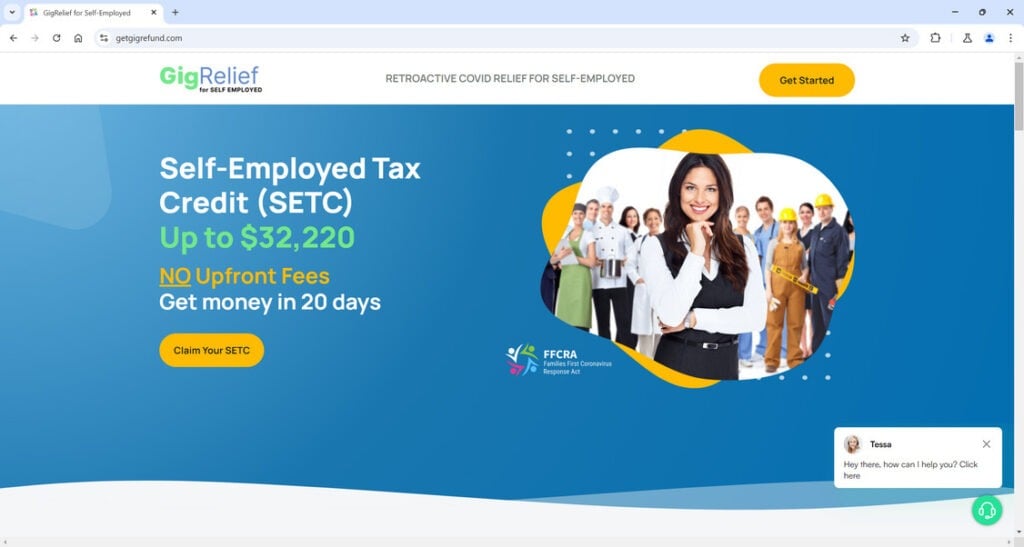
GetGigRefund.com promises self-employed individuals and independent contractors up to $32,220 in retroactive Covid relief under something called the “Self-Employed Tax Credit” (SETC).
According to the site, this program will compensate you for income lost during 2020-2021 due to Covid lockdowns, illness, quarantines, vaccine side effects, caring for others, and school closures.
The site claims they’ve already helped thousands of small business owners quickly and easily obtain these funds. All you need to do is provide personal details like your SSN and upload past tax returns.
This is nothing but a scam designed to steal people’s personal information. Here are the red flags:
- The website domain ends in .com instead of .gov. It is not run by any government agency.
- The SETC does not exist. The IRS has warned about scammers promoting a fake “Self Employment Tax Credit.”
- The sick and family leave tax credits promoted on the site were only temporary programs in 2020-2021. They are not available for 2023.
- GetGigRefund.com just launched in mid-2024. There’s no history or proof they’ve actually helped people get Covid relief.
- The site asks for sensitive information like SSNs. This is a sign they plan to commit identity theft.
- Their claims of being able to get thousands of people $32,000 in just 20 days are simply unrealistic.
- GetGigRefund.com is a middleman, not a direct lender. They likely sell your data after harvesting it.
This scam preys on vulnerable self-employed people and small business owners who are still struggling from losses sustained during Covid lockdowns. But no short online application will magically result in $32,000 in free government money.
How the Scam Works
Here is exactly how the GetGigRefund.com scam operates to steal people’s personal information:
- You encounter GetGigRefund.com online, on social media, or in an advertisement. The site markets itself as a way to claim up to $32,220 in Covid relief for self-employed people.
- You are directed to provide personal details like your name, contact info, SSN, and past tax returns. The site claims this is needed to “verify eligibility.”
- After entering your info, GetGigRefund.com’s “accountants” supposedly calculate the tax credit you can claim based on days of work missed for Covid reasons.
- You then digitally sign a service agreement authorizing their accountants to prepare filings on your behalf and submit them to the IRS.
- GetGigRefund.com emails you finalized documents to print, sign, and mail to the IRS using their prepaid envelopes. Supposedly this triggers the IRS to send your check for up to $32,000.
- In reality, GetGigRefund.com pockets your personal data and sells it to other scammers. They have no real accountants or ability to get Covid relief funds from the IRS.
- Weeks later, you realize no check is coming. But GetGigRefund.com already has your SSN and other info to commit identity theft or sell to other crooks.
This step-by-step scam process allows the site to harvest valuable personal data under the guise of providing a beneficial service. But the promised Covid relief funds will never materialize.
What to Do if You’re a Victim
If you already submitted personal information to GetGigRefund.com, take these steps right away:
- Contact the IRS to report the scam at 1-800-829-1040. They can place additional protections on your account if needed.
- Monitor your credit reports and accounts closely for any signs of misuse of your information.
- Consider placing a credit freeze with the major credit bureaus to lock down your credit from scammers.
- File an identity theft report with the FTC at IdentityTheft.gov. This helps create a record of the scam.
- Contact your bank and other accounts to warn them about potential fraud. Change passwords and security questions where possible.
- Be extremely cautious about any further contact from GetGigRefund.com or anyone claiming to be affiliated with them. Do not give additional personal or financial details.
- Consult an attorney regarding any potential legal action you can take against the scammers. They may be liable for losses due to fraud or identity theft.
The Bottom Line
Websites like GetGigRefund.com claiming to provide easy access to Covid relief funds in exchange for personal information are malicious scams. No such Self-Employed Tax Credit exists, and sharing your SSN or tax details with them only enables identity theft.
Legitimate government programs do not operate via questionable .com websites. Always verify any offers directly with the IRS or other agencies. Be wary of anyone claiming you’re entitled to thousands in stimulus or relief funds in exchange for upfront fees or your sensitive data. If it seems too good to be true, it always is.
Frequently Asked Questions About the GetGigRefund.com Scam
1. What is GetGigRefund.com?
GetGigRefund.com is a website that promises self-employed individuals and independent contractors up to $32,000 in retroactive COVID-19 relief funds. However, it is a scam designed to harvest people’s personal information. There is no such thing as their advertised “Self-Employed Tax Credit.”
2. How does the GetGigRefund scam work?
The site asks you to enter personal details like your SSN and tax returns to “verify eligibility” for up to $32,220 in COVID relief. You then sign a form authorizing their “accountants” to prepare filings for submission to the IRS. But in reality, they pocket your data and sell it without ever getting you any stimulus money.
3. What is the Self-Employed Tax Credit they advertise?
The Self-Employed Tax Credit does not exist. It is completely fabricated by GetGigRefund.com to lend legitimacy to their scheme. The IRS itself has warned people about scammers promoting a fake tax credit under this name.
4. Why is this website a scam?
GetGigRefund.com shows multiple signs of being a scam, including being a .com site with no history, making unrealistic claims, requesting sensitive personal financial information, and impersonating a government program that does not exist.
5. What are the red flags of this scam?
Red flags include GetGigRefund.com being a private .com domain, launching recently in 2024, claiming to have already helped thousands get COVID funds quickly, and asking for SSNs and tax returns to “verify eligibility” for a made-up tax credit.
6. What happens if I already gave them my personal information?
Contact the IRS immediately about the scam and potential identity theft. Also monitor your credit reports for any misuse of your data. Place a credit freeze if needed and file an ID theft report with the FTC.
7. How can I report this scam?
To report this scam, contact the IRS at 1-800-829-1040. You can also file a complaint about GetGigRefund.com with the FTC and Internet Crime Complaint Center (IC3).
8. How can I protect myself from similar scams?
Be wary of offers for stimulus funds, tax credits, or other government benefits in exchange for an upfront fee or your personal data. Verify directly with official agencies like IRS.gov or SSA.gov. Check for signs of scams like .com domains and urgent calls for money or sensitive info.
9. Where can I get legitimate help with COVID-19 relief funds?
Consult official government agency resources like the SBA’s website to learn about legitimate COVID-19 relief options still available in 2024. Do not trust third-party websites claiming access to special stimulus programs or credits that require your SSN or bank details..
This article is for educational purposes only and does not constitute professional, financial or legal advice. The content is intended for general information and should not be construed as definitive guidance. Information contained herein is subject to change without notice.  For concerns, please contact us via the provided form.
If you are the owner of the website or product in question and wish to offer clarifications regarding your business or website, please reach out to us through the provided Contact Form.








