

An email congratulating you on a new merchant account would be strange enough. Then comes the detail meant to turn confusion into panic: a $255.77 setup charge has already been processed, and two support numbers are waiting for your call.
The account, fee, and urgent cancellation route are fabricated. This PayPal merchant account scam is a callback scheme built to move recipients from a fake invoice into a conversation with criminals posing as payment-support specialists.
Overview
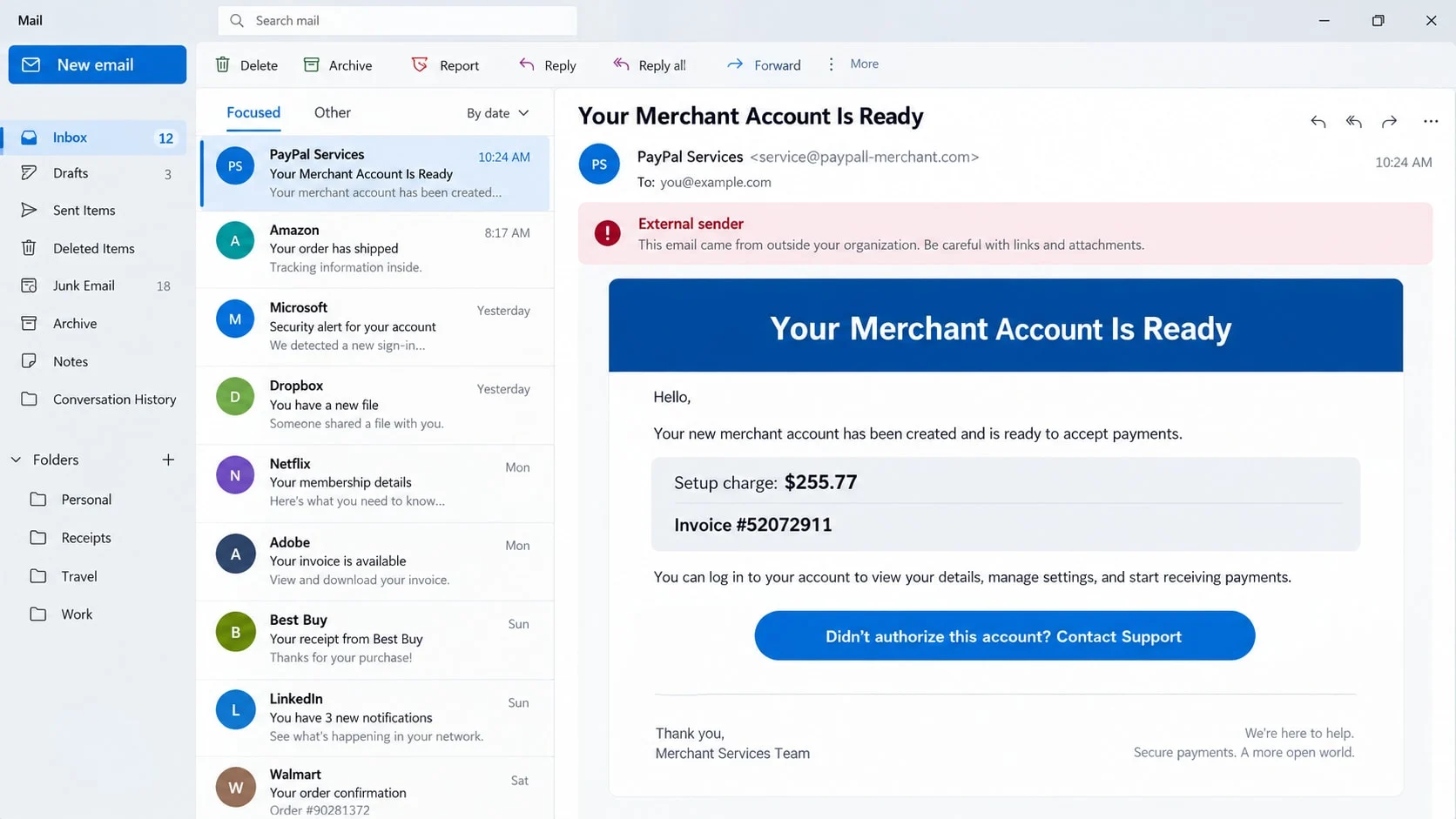
The email claims a business account was created without permission
The message welcomes the recipient to a business community and says a PayPal merchant account has been created and verified. It lists an invoice number, reference ID, wallet ID, and verification status to resemble an automated onboarding notice.
A setup fee of $255.77 is said to be heading to the recipient’s bank statement. The amount is specific because precision feels more credible than a vague warning.
The fake support numbers are the most important part of the message
Reported copies have directed recipients to call 831-266-9216 or 810-282-1290 if they did not authorize the account. Those numbers appeared in the fraudulent email and should not be used to reach PayPal.
Numbers can be disconnected, reassigned, or reused in later campaigns. The warning applies to the message and its behavior, not to every future person who might receive the same number.
The caller is pushed toward account theft, remote access, or payment
A scammer answering the line can pretend to locate the charge, open a cancellation case, and begin a fake refund. The recipient may be asked to disclose credentials, install software, or sign into a bank account while the agent watches.
The conversation can expose:
- PayPal and email passwords used to control financial notifications.
- Card and bank details collected for a supposed identity check.
- One-time codes that approve a password reset or transaction.
- Online banking sessions viewed through remote-access software.
- Real money sent during a fabricated refund or account-protection step.
What the Fake PayPal Merchant Email Says
The subject line may read “Your Invoice has been paid.” Inside, the recipient is thanked for joining PayPal and told that a merchant account was successfully created. The wording blends an invoice notice with a business-account welcome.
The email lists an invoice number such as #52072911 and claims the account is verified. It may include an unfamiliar wallet ID and a creation date matching the day the message was delivered.
The supposed $255.77 fee is described as supporting system maintenance and account activation. Benefits such as secure transfers, instant payments, and reporting features make the unwanted account sound like a real product.
The final line does the real work: anyone who did not authorize the account should contact support immediately. The email may provide more than one number so the operation looks like it has regional or departmental lines.
The message is not proof that money moved. Scammers know many recipients will call before checking PayPal or a bank statement. That reaction gives the fake agent a chance to create the loss the email only pretended had happened.
How the PayPal Merchant Account Scam Works
Step 1: A mass email invents a merchant-account enrollment
Criminals send the notice to many addresses without knowing whether each person has PayPal. The combination of an unexpected business account and an activation charge is broad enough to concern both consumers and small-business owners.
Brand colors, invoice formatting, and generic security language create familiarity. The sender address may contain PayPal-related words while belonging to an unrelated or newly created domain.
Step 2: The $255.77 charge creates a reason to call now
The email says the charge will appear soon, which puts the victim in an uncomfortable middle ground. They may not see the transaction yet, but the message suggests waiting will make it harder to reverse.
That timing also gives the agent an explanation when the bank shows nothing. The caller can say the fee is pending inside a merchant system and only the support department can stop it.
Step 3: The fake representative opens a cancellation case
When the recipient calls, the agent asks for the invoice or reference number. Because the scam group created the email, it can repeat every detail and appear to locate the file instantly.
The representative may ask the victim to confirm a name, email address, phone number, and bank. Information the criminal does not have is presented as information needed to find the unauthorized account.
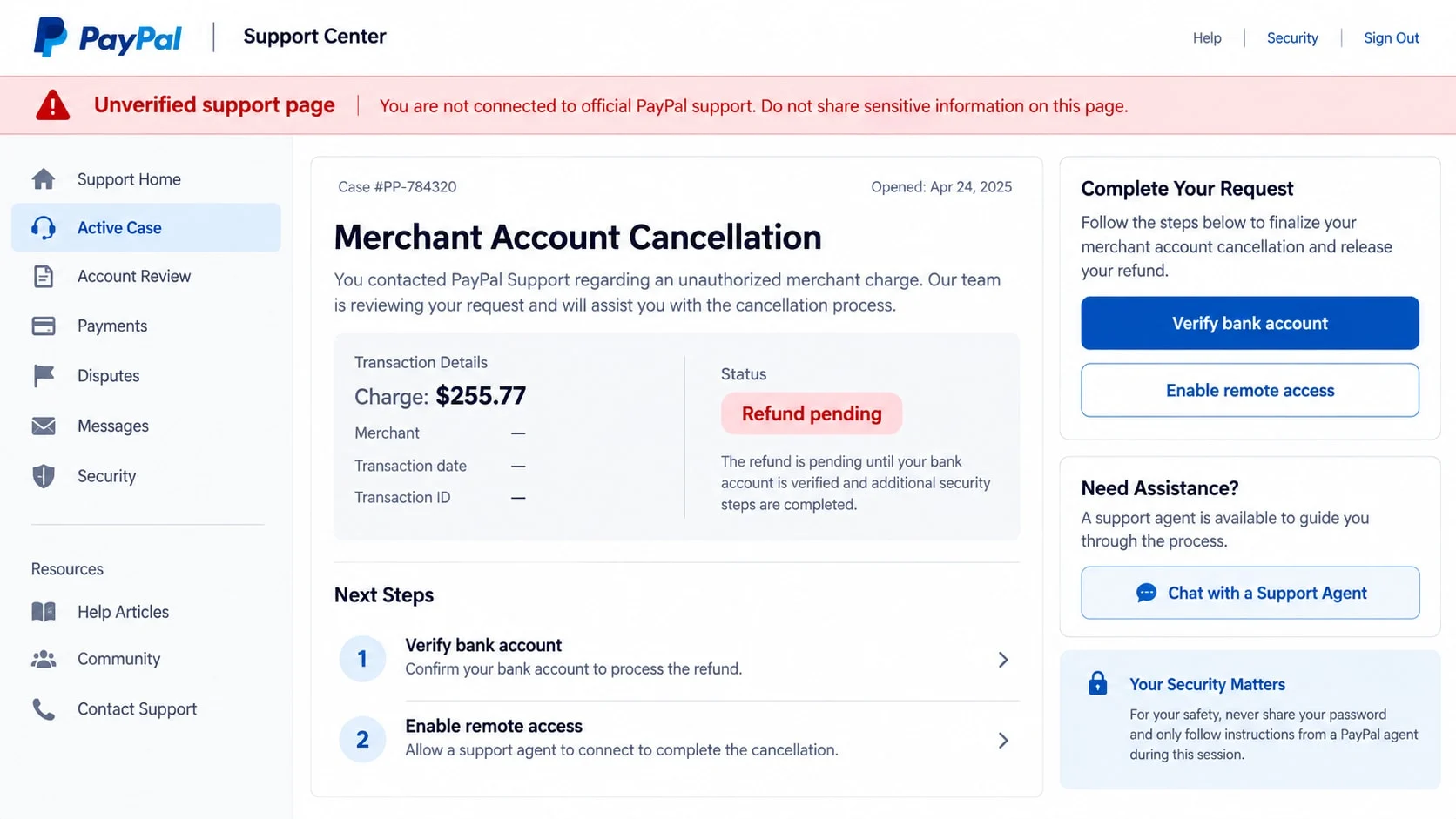
Step 4: A fake cancellation or refund requires device access
The agent says a secure support tool is needed to remove the merchant profile. The victim is guided to install remote-access software and may be told to ignore warnings because the session is encrypted.
Once connected, the criminal can see personal files, email, PayPal activity, and banking pages. The agent may ask the victim to log in so the $255.77 refund can supposedly be matched to the correct account.
Step 5: The refund is manipulated into a transfer
A common script alters what the victim sees or uses a fake page to show that too much money was refunded. The agent claims the extra amount must be returned immediately to avoid job loss, legal action, or account closure.
The victim may be directed to buy gift cards, send cryptocurrency, make a wire, or transfer money through another payment service. The supposed overpayment never occurred, but the victim’s return payment is real.
Step 6: Stolen credentials support more fraud
If the agent obtained passwords or one-time codes, the group may take over PayPal or email accounts. They can change recovery settings, send requests to contacts, create real invoices, or make unauthorized purchases.
Even an unsuccessful call confirms that the phone number and email reach a responsive person. The contact can be recycled into bank, antivirus-renewal, or recovery scams.
Identity, Contact, and Payment Checks
Check PayPal activity without using the email
Open the PayPal app you already use or type paypal.com into the browser. Look at Activity, invoices, money requests, account type, and notifications. Do not sign in through a button in the merchant email.
If no business account, invoice, or $255.77 charge appears, the email did not come from your authenticated account activity. Preserve it for reporting and then delete it.
Verify any bank charge from the bank’s own records
Open the official bank app or call the number printed on the card. Ask whether the fee is pending, authorized, or completed. A screenshot or line of text in an email is not a financial record.
If a genuine unauthorized payment exists, work with the bank and PayPal through their established dispute paths. Do not transfer money to a support agent to test or reverse the transaction.
Use PayPal’s official reporting and support routes
PayPal advises people not to call numbers in suspicious messages. Forward the email to phishing@paypal.com and reach customer service from the Help Center or authenticated app.
PayPal also states that unfamiliar invoices should be reviewed and reported from the Activity page. A legitimate support representative does not need remote control of online banking.
Examine the sender, domain, and requested action
A display name such as “PayPal Merchant” can be typed by anyone. Expand the sender address and inspect the domain. Misspellings, added words, free mailboxes, and unrelated domains are strong warning signs.
The decisive test is behavior. Password requests, security-code requests, gift cards, safe-account transfers, and remote-access instructions do not belong in a legitimate account cancellation.
Why the Invoice Details Do Not Prove the Email Is Real
Invoice numbers are simple text. A long numeric sequence may look database-generated, but there is no guarantee it corresponds to any PayPal record. The same is true of reference and wallet IDs.
A sender can include the recipient’s name or email through ordinary mailing-list data. Personalization proves that the address was known, not that PayPal supplied it.
Good spelling is not proof either. Modern scam templates can be polished, and criminals can copy real transactional-email layouts. Authentication must come from account activity and official support channels.
Even an email genuinely sent through a payment platform can carry a fraudulent note. Scammers sometimes abuse real invoice features to place a fake support number in a message. The presence of a notification in an inbox never requires calling that number.
A real invoice or money request can be declined and reported inside PayPal. The sender cannot force a payment simply by creating it, and there is no reason to give an unknown caller access to a device.
Warning Signs in the Merchant Account Email
Pause when several of these details appear together:
- You never applied for the merchant account described in the message.
- The email says an activation fee was processed but the bank shows no charge.
- The subject mentions a paid invoice while the body describes account creation.
- The sender domain is not an official PayPal domain.
- The only cancellation path is a telephone number printed in the message.
- The caller asks for a password, card security code, or one-time code.
- Remote-access software is required to issue the refund.
- The agent wants to watch you sign in to the bank.
- An alleged refund error must be repaid with gift cards, crypto, or a wire.
- The caller tells you not to contact PayPal or your bank separately.
The phone numbers and amounts can change quickly. Focus on the method: a surprising charge, a callback number controlled by the sender, and a support process that demands access or money.
What to Do if You Have Fallen Victim to This Scam
- Hang up and disconnect remote access. Do not let the caller continue “finishing” a refund. Turn off network access if the agent still controls the screen, and photograph or record the names of installed support tools before removing them.
- Call the bank or card issuer from a verified number. Explain that a fake PayPal representative may have seen account information. Ask about blocking transfers, replacing cards, recalling wires, and adding a verbal security note to the account.
- Secure PayPal and email. Change both passwords from a clean device, enable multi-factor authentication, review account recovery options, sign out unfamiliar sessions, and inspect PayPal Activity for invoices, requests, cards, or addresses you do not recognize.
- Report unauthorized activity through PayPal. Use the Resolution Center or official in-app support. Forward the fraudulent email to phishing@paypal.com. Never continue a case through the numbers contained in the message.
- Clean the affected device. Uninstall remote-control programs and run a complete Malwarebytes scan. Review browser extensions, startup programs, downloads, and saved credentials. If the criminal had administrative access, consider professional help or a secure system reset.
- Block malicious follow-up sites. AdGuard can help stop many known phishing and advertising domains used in callback campaigns. It cannot undo disclosed credentials, so combine it with password changes and financial monitoring.
- Respond to identity exposure. If an ID, Social Security number, or bank login was disclosed, follow a recovery plan at IdentityTheft.gov. Freeze credit when appropriate and examine reports for accounts you did not open.
- Document and report the fraud. Keep the original email headers, telephone numbers, reference IDs, payment destination, and receipts. Submit them at ReportFraud.ftc.gov and, for substantial losses, IC3.gov.
- Reject recovery offers. A person who calls later promising a guaranteed refund for an upfront fee may be using information from the first incident. Share evidence only with the bank, PayPal, law enforcement, or a lawyer you selected independently.
Frequently Asked Questions
Did PayPal charge $255.77 to create a merchant account?
The reported email uses that amount as bait. Confirm all fees inside the authenticated PayPal account and with the bank. Do not accept an emailed balance as evidence that a payment occurred.
Should I call 831-266-9216 or 810-282-1290?
No. Those numbers appeared in the reported fraudulent message. Numbers may later be disconnected or reassigned, but they should not be used to handle this email. Reach PayPal from its official app or website.
Can a scammer send a real PayPal invoice?
Yes. A fraudster can misuse legitimate invoice or money-request tools and insert a false support number. Report unfamiliar requests inside PayPal and never call a number placed in the invoice note.
Does opening the email compromise my account?
Simply reading a normal email usually does not hand over the account. The larger dangers are calling the number, opening an attachment, following a link, entering credentials, sharing a code, or installing remote software.
Why would the fake agent want to see my bank account?
Bank access lets the criminal identify balances, move money, and stage a fake refund. A genuine PayPal representative can investigate account activity without watching a customer sign in to online banking.
Can I get money back after a fake refund scam?
Contact every involved financial provider immediately. A transfer may sometimes be stopped or recalled, but recovery is not guaranteed. Do not pay a private recovery service that claims it can guarantee the result.
The Bottom Line
The PayPal merchant account scam turns a fictional $255.77 fee into a real support-fraud risk. The invoice numbers and business language are props designed to make a recipient call before checking an authenticated account.
Do not call the numbers in the email. Verify activity inside PayPal and with the bank, report the message through official channels, and end any conversation that asks for remote access, security codes, or a money transfer.

Join the discussion
0 commentsShare your experience or ask a question about this article.
Discussion
Start the conversation
Have a question or something useful to share? Add the first comment.