

PayPal is one of the most popular online payment platforms, providing a convenient way for people to send and receive money. Unfortunately, the widespread use of PayPal also makes it a major target for scammers. There are many types of PayPal scams aimed at stealing money or personal information from unsuspecting users.
In this comprehensive guide, we will provide an overview of the most common PayPal scams, explain how these scams work, provide tips to avoid falling victim, and answer some frequently asked questions. Read on to learn how to protect yourself from PayPal scams.
Overview of Common PayPal Scams
Here are some of the most prevalent PayPal scams to watch out for:
- Phishing Scams – Fraudulent emails or websites pretending to be from PayPal in order to steal login credentials or personal information.
- Fake Payment Scams – Receiving fake payment confirmations for items sold online and shipping before the money is actually received.
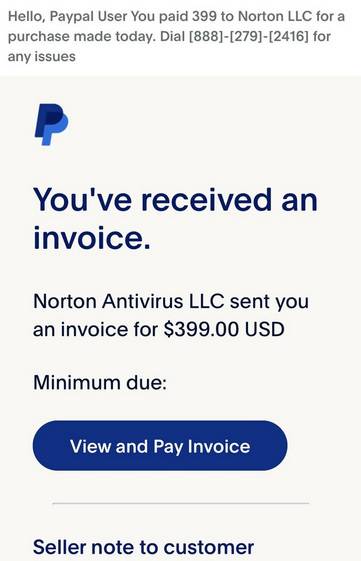
- Invoice Scams – Receiving fake invoice emails asking for payment for a non-existent service or product.
- Refund and Overpayment Scams– Scammers make a purchase, ask for a refund, and scam the victim when repaying the inflated amount.
- Charity Scams – Fake charities solicit donations through PayPal to steal money.
- Lottery and Prize Scams – Fake notifications that the victim has won a prize but requires paying fees via PayPal before receiving it.
- Debt Collection Scams – Scammers pretend to be debt collectors demanding payment through PayPal.
How Common PayPal Scams Work
Now let’s take a closer look at how some of these PayPal scams operate and how to detect them.
Phishing Scams
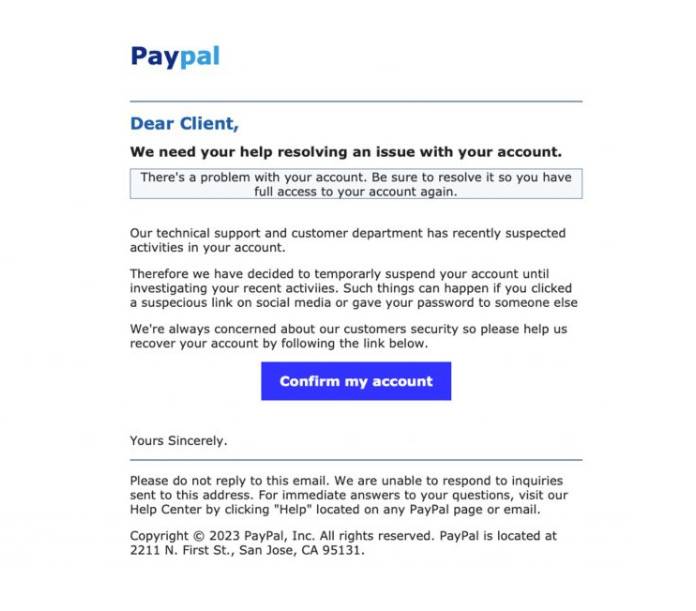
Phishing scams attempt to trick users into providing their PayPal login details or personal information. This is done by sending convincing looking emails or directing victims to fake PayPal pages.
Some signs of PayPal phishing scams include:
- Emails containing spelling errors or grammatical mistakes.
- Links in emails going to suspicious or slightly altered web addresses.
- Websites having a distorted PayPal logo or poor design.
- PayPal asking for sensitive information like bank account or social security numbers.
Users should avoid clicking links in suspicious emails claiming to be from PayPal. Always log into your PayPal account directly through the official website or app.
Call for Support Scams
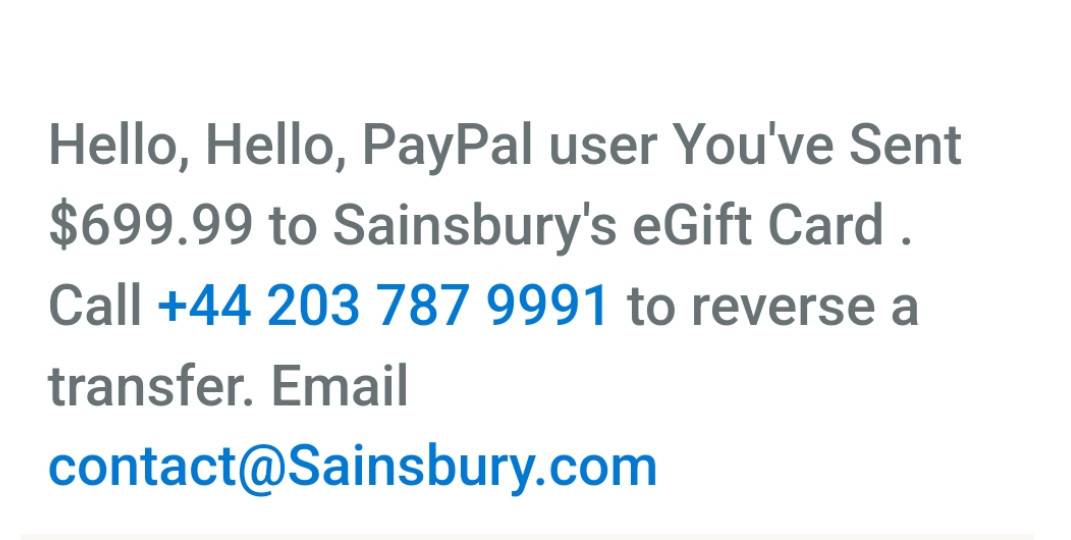
Another scam to watch out for is phone numbers in PayPal emails or invoices directing you to call for support. The numbers seem legitimate and official, but are actually schemes to remotely access your computer or trick you into paying a ‘fee’ over the phone to fraudsters posing as PayPal agents. If you receive any unsolicited emails or texts with a phone number to call about a problem with your PayPal account, ignore them. Independently look up and contact PayPal customer service directly if you have any issues.
Fake Payment Scams
Fake payment scams often target individuals selling items online. Here is how they work:
- A buyer expresses interest in an item for sale online and sends a PayPal payment notification email to the seller.
- The seller receives what appears to be an official email from PayPal indicating payment has been sent.
- Thinking the payment has cleared, the seller ships the item to the buyer.
- Eventually the seller realizes the payment never cleared and has lost both the item and the money.
These scams take advantage of the fact that initially a payment can appear as pending in PayPal before the money is cleared. Sellers should always log into their PayPal account to verify a payment has fully cleared before shipping any items.
Invoice Scams
With invoice scams, victims receive emails that appear to contain outstanding invoices demanding payment through PayPal. The emails may threaten further action if payment is not made.
Here are some signs that a PayPal invoice is not legitimate:
- You don’t recognize the company sending the invoice.
- There are spelling or grammar mistakes in the email.
- You never requested the services or products described.
- The tone seems threatening or urgent about paying.
The safest approach is to ignore and delete any suspicious PayPal invoice emails. Only pay invoices that come from companies you can confirm are legitimate.
Refund and Overpayment Scams
In refund and overpayment scams, a buyer makes a legitimate purchase but then scams the seller during the refund process.
Here is how the scam unfolds:
- The buyer makes a real purchase and has your item shipped to them.
- The buyer requests a refund through PayPal shortly after receiving the item.
- If issued a refund through PayPal, the buyer will claim the refund was insufficient.
- The buyer will provide fake evidence showing they were overcharged and demand the difference back.
- The unsuspecting seller sends the extra funds but ultimately receives no money back.
Protect yourself by only refunding exactly what was initially paid and ignore any demands for additional refund payments. Only issue refunds through the official PayPal interface.
Charity Scams
Fake charities and fundraisers frequently use PayPal as a way to collect donations from well-meaning users. These scams pull at the heartstrings of victims with causes like medical bills, funerals, or other tragic life events.
Here are some tips for avoiding bogus charity scams involving PayPal:
- Research any charity before donating to ensure they are reputable.
- Exercise caution when asked to donate through PayPal to someone you do not know personally.
- Avoid appeals coming from personal PayPal accounts and emails.
- Look for indicators of a scam like emotional language or spelling and grammar mistakes.
- Contact the purported charity via their official website or phone number to confirm the appeal is legitimate.
Prize and Lottery Scams
With prize and lottery scams, victims receive messages indicating they won a contest, prize draw, or lottery. Before funds are dispersed, they are instructed to first pay fees or taxes using PayPal.
Warning signs of PayPal prize scams:
- Receiving a prize notification for a contest you did not enter.
- Being asked to pay fees upfront before receiving the prize.
- Pressure to act quickly or risk losing the prize.
- Poor spelling and grammar in the prize notification.
- Being required to provide personal information to claim the prize.
No legitimate prize or lottery requires you to pay fees upfront to collect winnings. Any notification requesting payment through PayPal to receive funds is surely fraudulent.
Debt Collection Scams
Scammers may also pose as debt collectors and demand fake outstanding payments using PayPal. They often fabricate urgent threats such as arrest warrants or lawsuits to frighten victims into paying.
Indications that a supposed debt collection request could be a scam:
- You have no memory or record of the debt in question.
- Threats of immediate dire consequences if payment is not made.
- Requesting payment via PayPal instead of normal repayment channels.
- Refusal to provide details and verification about the supposed debt.
Ensure any debt payment demand is real by asking for validation and contacting the company claiming you owe money directly. Avoid paying anything solely based on a random email or phone call.
What to Do if You Fall Victim to a PayPal Scam
If you realize you have fallen prey to any sort of PayPal scam and suffered financial loss, take the following steps right away:
- Contact PayPal – Report the scam to PayPal directly so they can investigate and potentially recover lost funds. Provide details like transaction records and screenshots.
- Report it to authorities – File a complaint with agencies like the FTC and Internet Crime Complaint Center.
- Notify your bank – If the scam involved your bank account, contact your bank to dispute unauthorized charges and have new cards issued.
- Change passwords – Update your passwords for PayPal and any other compromised accounts.
- Watch for suspicious activity – Monitor your financial statements and credit reports for signs of identity theft.
- Spread awareness – Share details of the scam online and with your social network to help protect others.
Acting quickly can increase the chances of reversing damages and preventing further issues. PayPal also provides Seller Protection for some online transactions so look into whether it applies to your situation.
PayPal Scam FAQs
For additional help spotting and dealing with PayPal scams, here are answers to some frequently asked questions:
How can I verify a PayPal email is legitimate?
Go directly to your PayPal account login page, without clicking any links in the email. If there is no notification there, the email is fake. You can also look for a secure paypal.com URL, proper grammar, and your exact name.
Are phone calls from PayPal real?
PayPal will never call users unexpectedly and ask for confidential information over the phone. Assume any call asking for your PayPal password or account details is fraudulent.
Can PayPal decide I owe them money randomly?
No, PayPal cannot charge your account without a legitimate reason like an authorized transaction or linked bank account. Any surprise debt claims come from scammers, not PayPal.
What should I do if my account is compromised?
If your PayPal account has been accessed by a scammer, contact PayPal immediately to lock it down. Reset your password, remove linked payment methods, and monitor closely for fraudulent activity.
Can a PayPal payment be faked?
While scammers can spoof PayPal notifications, they cannot fake an actual payment appearing in your account. Always log in to double check new payments directly.
Is there a way to get scammed money back?
If you act quickly, PayPal can try recovering funds transferred to another account before they are withdrawn. The faster you contact them and your bank, the better chance of getting reimbursement.
Protect Yourself from PayPal Scams
PayPal scams continue to evolve, but there are steps you can take to avoid falling victim and minimize any damage:
- Use strong unique passwords and enable two-factor authentication.
- Never share your PayPal login information or details with anyone.
- Verify all payment notifications directly within your PayPal account.
- Only send payments to people and organizations you know and trust.
- If in doubt, contact PayPal via their official customer service.
Remember that no legitimate company will threaten you, demand immediate payment by unconventional means, or ask for sensitive information over email or phone. Always think twice before sending any funds through PayPal.
Following these tips, looking for the warning signs outlined here, and trusting your instincts will go a long way in protecting you from PayPal scams.








