

You may have recently received a misleading text message claiming your vehicle has unpaid Peach Pass toll charges in Georgia that require immediate payment. But beware – this is a scam designed to steal your personal and financial information.
This comprehensive guide will uncover how the Peachpassinvoice.com scam text operates, reveal telltale signs that expose their deception, and most importantly, provide actionable tips to protect yourself. Don’t become another victim.
An In-Depth Look at the Peachpassinvoice.com Scam
Recently, many Georgia drivers have received extremely misleading text messages falsely claiming their vehicle has outstanding Peach Pass toll fees that require immediate payment. The texts convey urgency, warning recipients to pay promptly through a linked website to avoid additional late fees.
However, it’s crucial to understand these are complete scams. The texts do not originate from the real Peach Pass Services. Any links, phone numbers, or payment instructions provided are entirely fraudulent, solely intending to steal personal and financial information.
Sadly, this scam has already deceived numerous innocent Georgia motorists who didn’t realize the toll notices were fake. The texts appear convincingly authentic upon initial glance. The scammers utilize the Peach Pass name, official logos, and urgent language about legal consequences or financial penalties related to the fabricated unpaid tolls. This fools unsuspecting people into thinking the messages are legitimate.
In reality, once individuals input their private data and credit card info, the criminals steal it to commit identity theft, drain bank accounts, and leave victims struggling to undo the damage. Many only discover they were scammed after noticing fraudulent charges and activity indicating their identities were compromised.
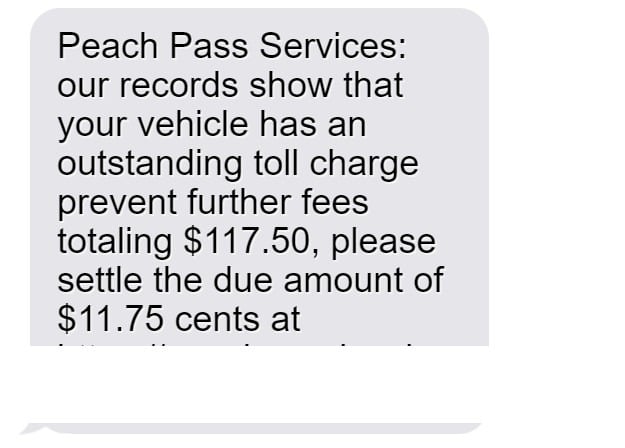
Here’s an example of the misleading texts Georgia drivers may receive:
“Peach Pass Services: our records show that your vehicle has an outstanding toll charge prevent further fees totaling $117.50, please settle the due amount of $11.75 cents at https://peachpassinvoice.com”
This urgent call-to-action tricks recipients into believing immediate payment is required. But in reality, the scammers simply want your details.
The website URL imitates the real Peach Pass site, but goes to a fraudulent payment portal completely controlled by criminals. Any information entered will be stolen and used illegally.
Unfortunately, toll bill scams like this have been rampant across the country too, frequently targeting drivers in states like Florida, New Jersey, Indiana, Texas, New York, Ohio, and more. Scammers capitalize on the fear of legal woes, financial penalties, or credit damage to trick unsuspecting consumers.
Be vigilant about any questionable texts pressuring quick payment of supposed toll fees. Look for red flags like grammatical errors, unusually low amounts, threats, and requests for unnecessary personal data.
Protect yourself by never providing your information through random communications. Verify the legitimacy of any bills directly through official channels before taking action. Avoid being deceived by understanding the underhanded techniques scammers use against Georgia motorists. Don’t become their next victim.
How Scammers Carry Out the Peachpassinvoice.com Scam
Here is an in-depth look at how scammers execute this toll road trickery:
Step 1: You Receive the Deceptive Text
You’ll receive a text message stating:
“Peach Pass Services: our records show that your vehicle has an outstanding toll charge prevent further fees totaling $117.50, please settle the due amount of $11.75 cents at https://peachpassinvoice.com”
The text appears credible, mentioning Peach Pass Services and claiming urgent payment is required. But it’s completely fabricated.
Step 2: You Visit the Fake Website
Wanting to promptly settle what looks like a real bill, most people click the link to https://peachpassinvoice.com.
But in reality, this website is a total scam designed to mimic the real Peach Pass site. It’s controlled entirely by criminals seeking your personal data.
Step 3: You Enter Personal and Payment Information
On the site, you’ll be prompted to enter details like your full name, driver’s license number, phone number, email address, home address, and date of birth.
You’ll also be asked to submit credit card information such as card number, expiry date, and CVV code supposedly to pay the fake toll fees.
Step 4: Your Information is Stolen
Once submitted, the scammers immediately steal all the personal and financial details you entered on the fraudulent site. They can then use it to commit identity theft or make unauthorized credit card charges.
Step 5: You Suffer Financial Loss and Identity Theft
As a result, you may experience stolen money, fraudulent charges, harm to your credit, inability to access your own accounts, and major hassle cleaning up extensive identity theft.
5 Red Flags That Expose These Georgia Toll Scam Texts
While these texts look real at first glance, there are telltale signs you can watch for:
- You don’t recognize the phone number – Legitimate contacts will come from a known number.
- Threats of fees or legal action – Official toll companies won’t threaten random penalties.
- Very low toll amount – Most real unpaid tolls exceed $20 or $30.
- Request for unnecessary personal information – Legitimate toll agencies already have your vehicle details.
- Website URL looks suspicious – Scam sites imitate real URLs but are slightly different.
Being aware of these red flags helps you identify and avoid providing your details to these deceptive scam texts requesting immediate toll payment. Protect yourself.
What to Do if You’re Already Scammed
If you entered any personal data, take these steps right away:
- Contact your bank and credit card company if you shared payment info. They can freeze your card, refund fraudulent charges, and send a new card number.
- Put an initial 90-day fraud alert on your credit reports and review for any suspicious activity indicating identity theft.
- Reset all account passwords that may be compromised if you entered your email or phone number. Enable two-factor authentication where possible.
- Consider enrolling in identity theft protection services that actively monitor your credit and personal info across the web.
- Report the scam to the FTC to assist prevention efforts. Warn others about the Peachpassinvoice.com scam texts.
- Block the phone number that sent the scam text to avoid further messages, but keep a copy of the text as evidence.
How to Avoid Falling Victim to Toll Invoice Scams
Here are tips to protect yourself from toll bill and fee scams:
- Never provide personal or financial details over text or calls. Only enter info directly on official company websites after verifying legitimacy.
- Confirm bills directly with the toll company before paying, if you receive questionable texts claiming you owe tolls.
- Double check website URLs for subtle differences from the real site, like extra letters or misspellings.
- Contact toll customer service directly using official contact info from their real website if you have questions about possible unpaid toll notices.
- Legitimate toll agencies allow linking bank accounts to automatically pay bills rather than asking for card details directly.
Stay vigilant against questionable texts pressuring immediate payment of supposed toll bills. Verify before providing any personal information or payment to avoid tricks.
FAQs: How to Spot and Avoid the Peachpassinvoice.com Toll Scam Text
1. I got a text about unpaid Peach Pass tolls. Is it real?
No, this is most likely the scam. Never submit personal or payment details through these random texts, as they intend to steal your information.
2. How can I identify if a Peach Pass toll text is fake?
Watch for these indicators:
- You don’t recognize the sender phone number.
- There are grammar/spelling errors or threats of fees.
- The toll amount seems unusually low.
- It requests unnecessary personal information.
- The website URL appears suspicious.
3. What happens if I enter my information on their site?
Scammers will steal your personal and financial details to commit identity theft and drain your bank accounts through credit card fraud.
4. I entered my details. What should I do now?
Immediately contact your bank if you shared payment information. Also place fraud alerts on your credit, monitor your credit reports, change account passwords, and consider enrolling in identity theft protection services.
5. How can I stop these scam Peach Pass texts?
Block the sender’s number through your smartphone’s call/text blocking settings. But keep copies of the messages as evidence before blocking.
6. Does Peach Pass cover all of Georgia’s toll roads?
No. Peach Pass is accepted on Georgia SRTA tollways, but there are some other limited toll roads not under their system. Any texts from random numbers about Georgia tolls should be considered highly suspicious.
7. How can I safely pay a real Peach Pass bill?
If you verify you actually owe legitimate tolls, pay through the official Peach Pass website’s payment portal or mail a check. Never settle supposed bills through random texts/calls.
8. Where should I report Peach Pass toll scams?
Contact Peach Pass Customer Service, the Georgia AG’s office, Federal Trade Commission (FTC), and your phone carrier.
9. What happens if I ignore a real Peach Pass bill?
You may face additional fees and penalties, but first verify if any notices are real or scam texts by contacting Peach Pass directly. Never assume texts are legitimate.
The Bottom Line
The Peachpassinvoice.com scam text aims to expose Georgia drivers to fraud by falsely claiming urgent outstanding Peach Pass toll fees. Use caution with threatening payment demands over text and confirm bills directly with Peach Pass before providing any details or payment. Protect yourself from toll invoice trickery.

Reviews & discussion
0 commentsShare a firsthand experience, or ask a question.
Community reviews
peachpassinvoice.com
Moderated reader experiences, not an editorial verdict.
Start the conversation
Have a question or something useful to share? Add the first comment.