

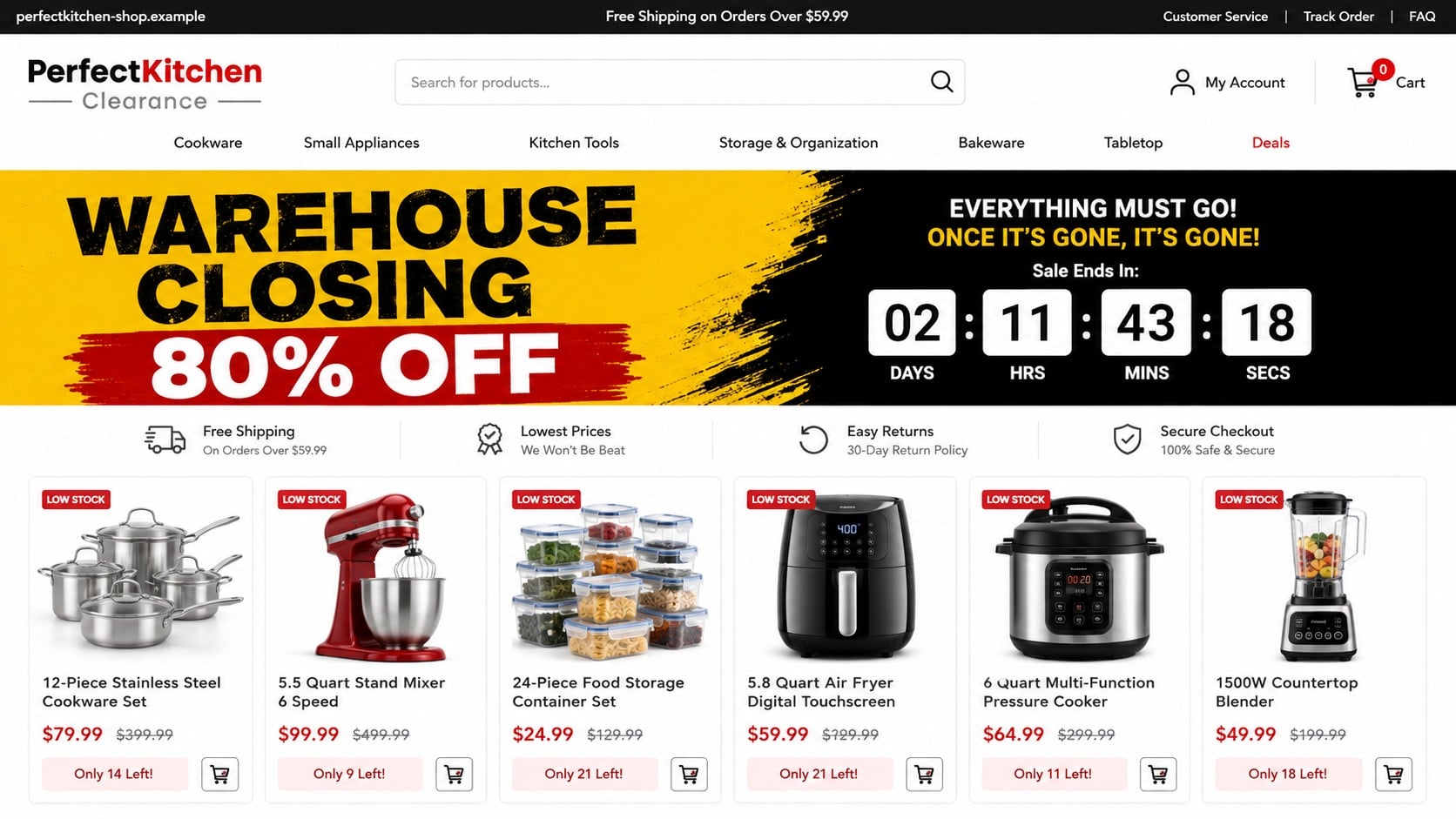
A polished kitchen store advertises cookware, mixers, and small appliances at prices that seem too good to leave behind. A warehouse-closing banner and a ticking clock suggest that waiting even ten minutes could mean missing the deal.
That rush is the center of the PerfectKitchen scam pattern. The storefront looks familiar enough to shop, but the identity, fulfillment trail, and route to a real refund become difficult to find once payment is collected.
Overview
What the PerfectKitchen offer looks like
The name has been associated with an online-store warning dating to 2020. The reported storefront used the broad appeal of kitchen goods, a category where shoppers expect recognizable product photography, seasonal discounts, and many similar-looking retailers.
A current page using PerfectKitchen or a similar name should not automatically be treated as the same operator. Generic business names can be reused by unrelated companies. This report concerns the suspicious storefront pattern, not every business with “Perfect Kitchen” in its name.
- Large discounts on popular kitchen products
- Closing-sale, clearance, or overstock explanations
- Countdown timers and low-inventory warnings
- Product images that may have been copied from other sellers
- Weak legal identity, contact, shipping, and return information
- Payment collection before the buyer can verify who will fulfill the order
What can happen after checkout
A risky store may take payment and never ship, send an inexpensive item unrelated to the listing, provide unusable tracking, or make returns impractical. Card and contact details may also be retained for unauthorized charges or later phishing.
The exact outcome can vary. A late or poor-quality order is not automatically fraud, but a missing seller combined with copied content, false urgency, and blocked refund attempts creates a much more serious pattern.
Why an old store name can reappear
Fake stores are cheap to rebuild. Operators can reuse a product catalog, switch the logo and domain, change the sale explanation, and launch a new advertising campaign after complaints catch up with the previous site.
This means a dead historical domain does not make a new lookalike safe. Buyers should assess the exact URL, legal seller, policies, and payment recipient shown today.
How Fake Kitchen Stores Manufacture Trust
Familiar products make the site feel ordinary
Cookware and appliances do not look inherently risky. Product grids, category menus, search bars, order trackers, and secure-checkout badges resemble the elements shoppers see on legitimate retail sites every day.
The design reduces attention to the questions that matter most: Who owns the store? Where is the inventory? Which company appears on the card statement? Where must a return be sent?
Extreme prices receive a convenient explanation
A $399 mixer offered for $79.99 should trigger verification. Instead, the store supplies a story such as liquidation, warehouse closure, anniversary pricing, seized inventory, or direct-from-manufacturer savings.
The explanation turns an implausible price into an apparent one-time event. A countdown then punishes the visitor for slowing down long enough to check it.
Copied reviews finish the illusion
Five-star ratings, customer photographs, and short testimonials can be copied with the rest of the page. A review widget controlled by the seller is not independent evidence that orders arrived.
Search a distinctive sentence from a testimonial in quotation marks. If it appears under different names on unrelated stores, the social proof was likely assembled rather than earned.
How the PerfectKitchen Scam Works
Step 1: A social ad presents a dramatic kitchen clearance
The funnel often begins on Facebook, Instagram, a display-ad network, or a sponsored search result. It shows an attractive appliance or cookware set beside a price far below normal retail value.
The ad may claim a warehouse is closing or a retailer must sell remaining inventory immediately. Comments can be limited, filtered, or filled with generic praise that appears to confirm quick delivery.
The visitor is not encouraged to compare. The creative is built to produce an emotional click before price, model number, or seller identity can be checked.
Step 2: The landing page copies a complete retail experience
The site contains more than one product, which makes it look like an established store rather than a single fraudulent offer. Menus, policy links, trust icons, and sale badges create visual depth.
That depth can be superficial. Category links may lead to the same small catalog, policies may mention another company, and contact details may be copied or incomplete.
A professional design proves only that the page was assembled well. Modern store templates allow a convincing shop to be launched quickly without proving inventory or a lawful operator.
Step 3: Urgency pushes the buyer toward checkout
Countdowns, “only 9 left” labels, and a stream of recent purchases create the impression that other people are buying rapidly. The same numbers may reset when the page reloads.
A discount code can appear automatically, making the visitor feel they have unlocked an additional saving. Free-shipping thresholds encourage adding more products before the first item has been verified.
The goal is not simply to sell. It is to shorten the period between discovery and payment, when skepticism is most likely to interrupt the transaction.
Step 4: Checkout collects more than the purchase price
The form gathers a name, delivery address, email, phone number, and card details. Those records can support unauthorized payments, targeted phishing, fake delivery messages, or identity-based account attacks.
A checkout may display a low item price while adding shipping, processing, insurance, or handling charges later. The merchant name on the receipt can differ from the store name, making the transaction harder to recognize.
HTTPS is not a seller verification. It protects the connection to the site, including a fraudulent site, but does not establish that merchandise exists.
Step 5: The order enters a permanent waiting state
A confirmation email may arrive with an order number but no usable tracking. The account page can show “processing,” “label not created,” or an estimated date that keeps moving.
Some buyers receive a tracking number that belongs to a different shipment, destination, or small parcel. A delivered scan does not prove that the advertised product reached the correct customer.
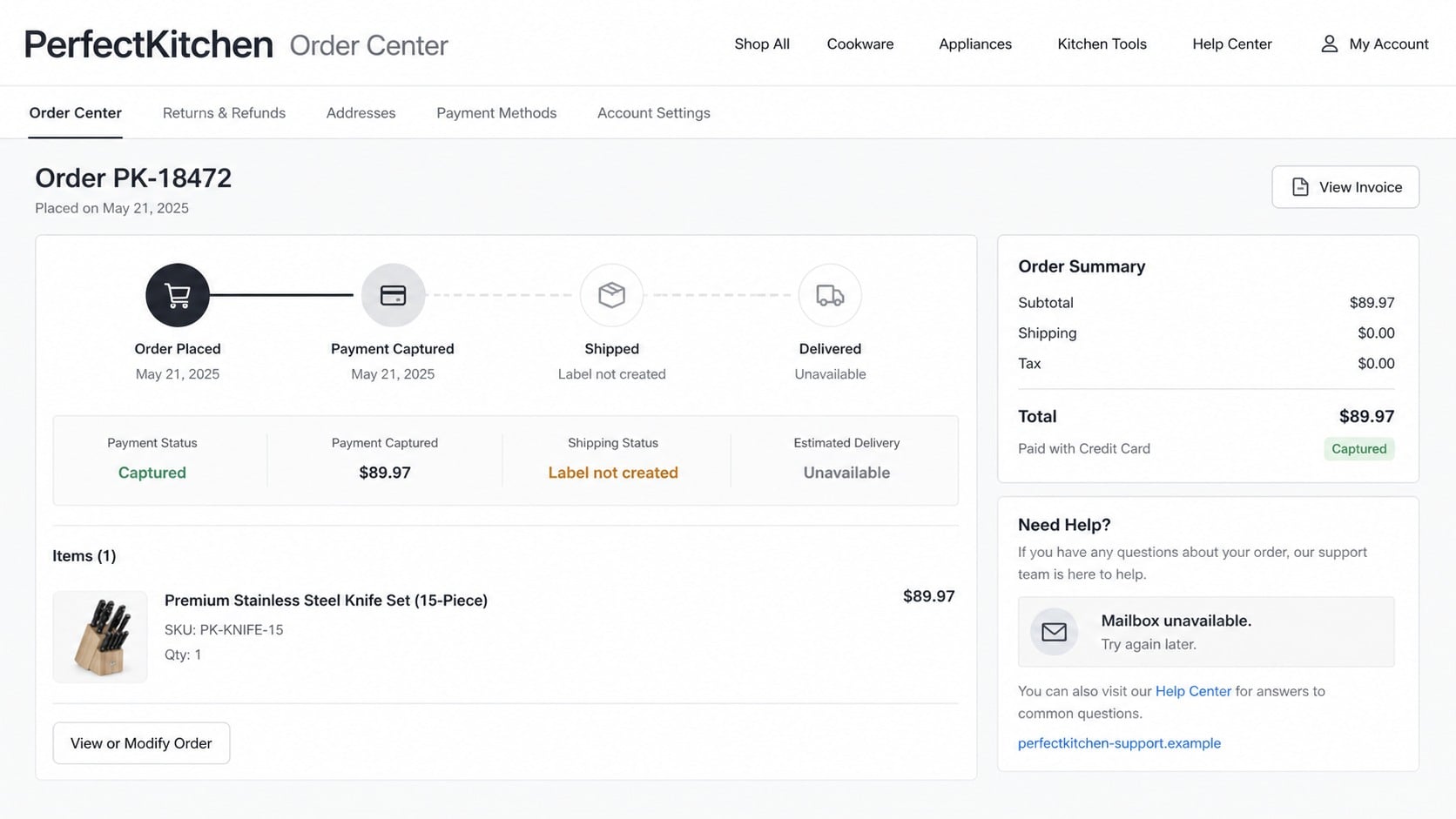
Delay can be strategic. The longer a customer waits, the closer they move toward card-dispute deadlines and the less likely they are to preserve the original advertisement.
Step 6: Support and refund routes stop working
Replies may be automated, vague, or designed to buy another week. The seller can request patience, blame customs, offer a small partial refund, or require a return to an expensive overseas address.
If a low-value item arrives, return shipping may cost nearly as much as the order. The site can insist that the buyer pay that cost even when the delivered product is materially different.
When the domain disappears, the buyer is left with a receipt and a card-statement descriptor that may not match the store. That is why saving evidence before ordering matters.
Company, Address, and Fulfillment Checks
The store name is not a legal identity
“PerfectKitchen” sounds like a brand, but a brand label does not identify the company responsible for payment, shipping, returns, or privacy. The legal name should appear consistently in the terms, privacy policy, receipt, and card statement.
If those pages show different names or no registrable business at all, the buyer cannot easily determine who accepted the order. Do not assume an unrelated company with a similar name owns the site.
The listed address may not hold inventory
A contact page can display a residence, virtual mailbox, shared office, or unrelated business. Mapping an address is useful, but the result must be interpreted carefully.
A return warehouse is not necessarily headquarters, and a registered agent is not a fulfillment center. What matters is whether the seller clearly explains the role of the location and accepts returns there.
Customer support may exist only before payment
Pre-sale chat can answer instantly while refund emails go unanswered. Phone numbers may be missing, disconnected, or shared across multiple short-lived stores.
Test support with a specific question before ordering. Ask for the legal seller, model number, shipping origin, and return address. A generic coupon response does not answer any of those questions.
Also compare the response with the written policies. A seller that promises domestic delivery in chat while its terms describe an overseas shipment is giving the buyer two incompatible stories. Screenshot both before deciding whether to pay.
The product trail is difficult to verify
Legitimate appliance listings identify the manufacturer, model, voltage, warranty provider, and safety certification where relevant. Scam listings often rely on attractive photos and broad phrases such as “premium quality.”
Reverse-search product images and compare model details. If the same photograph belongs to another retailer at a very different price, the suspicious store has not proved it possesses or is authorized to sell the item.
Checks to Make Before Buying From an Unknown Store
The FTC’s online-shopping guidance recommends checking sellers and products, reading reviews critically, understanding delivery and return terms, keeping records, and paying by credit card when possible.
- Type the domain yourself and inspect every character.
- Search the exact domain with “complaint,” “review,” and “scam.”
- Compare the price with several established retailers.
- Search product photos and distinctive policy sentences.
- Confirm a legal company name and a real support channel.
- Read the shipping origin, delivery window, and complete return policy.
- Check whether the countdown or inventory number resets.
- Use a credit card, not crypto, gift cards, wires, or payment-app transfers.
Do not let a padlock, payment logo, or five-star widget replace these checks. Fraudulent stores can copy all three.
What to Do if You Have Fallen Victim to This Scam
- Build an evidence folder before the site changes. Capture the product page, advertised price, checkout total, confirmation, policies, emails, tracking details, domain, and card-statement descriptor. Save files outside the store account in case the site disappears.
- Send one clear written cancellation. State the order number, purchase date, amount, reason, and the refund you expect. Ask for a written response and do not accept endless delays that could consume your dispute window.
- Contact the card issuer promptly. Explain whether merchandise never arrived, was materially different, or the seller cannot be reached. Ask about chargeback rights, card replacement, merchant blocks, and the deadline for written documentation.
- Watch for additional charges. Review statements for small tests, repeat billing, or unfamiliar merchant names. Turn on transaction alerts and report anything unauthorized immediately.
- Change reused credentials. If you created an account with a password used elsewhere, replace it everywhere it appears. Start with email and financial accounts, then enable multi-factor authentication.
- Check the device if you opened files. Run Malwarebytes if the store prompted a download, browser extension, invoice attachment, or unusual payment application. A normal checkout visit does not prove malware was installed, but unexpected files deserve a full scan.
- Reduce exposure to follow-up traps. AdGuard can help block malicious advertisements, trackers, and known scam destinations. Expect fake delivery texts and refund messages that use the contact details supplied during checkout.
- Report the store accurately. File a report with the FTC, your state attorney general, the payment provider, advertising platform, registrar, or hosting provider. Describe what happened and provide evidence without claiming facts you cannot prove.
- Do not pay a recovery service upfront. A second operator may promise to retrieve the order or refund for a fee. Work through the card issuer and official consumer-protection channels instead.
Frequently Asked Questions
Is every website named PerfectKitchen fraudulent?
No. Similar generic names may belong to unrelated businesses. Verify the exact domain, legal seller, policies, and payment recipient. This article addresses the suspicious online-store pattern associated with the reported PerfectKitchen name.
Does HTTPS prove the store is legitimate?
No. HTTPS encrypts data between your browser and the site. Scammers can obtain certificates too, so the padlock does not verify inventory, ownership, shipping, or refund performance.
Why do fake stores send order confirmations?
A confirmation delays suspicion and makes the transaction feel routine. It may also give support a reference number to use while repeatedly telling the buyer to wait.
What if tracking says delivered but nothing arrived?
Ask the carrier for destination-level confirmation that can be shared without exposing another customer’s data. Give that evidence to the card issuer and explain that a generic delivered scan does not match your address or order.
Should I return a cheap item sent instead of my order?
First ask the card issuer what evidence and return steps it requires. Photograph the package, label, and item. Do not spend heavily on international return shipping without written instructions and a realistic refund path.
Can a browser blocker guarantee that a store is safe?
No. Blocking tools reduce exposure to known threats, but new domains can appear before they are classified. Seller verification, realistic pricing, written policies, and protected payment remain essential.
The Bottom Line
The PerfectKitchen scam pattern uses ordinary retail design and extraordinary discounts to move buyers through checkout before they verify the seller. The most revealing details are not the logo or product grid, but the legal identity, fulfillment evidence, return route, and payment protection.
If those details cannot be confirmed, leave the cart. A sale that survives only when the buyer does not investigate is not a bargain worth taking.

Join the discussion
0 commentsShare your experience or ask a question about this article.
Discussion
Start the conversation
Have a question or something useful to share? Add the first comment.