

An unexpected invoice says your Geek Squad plan has renewed for $449.87. The charge looks final, the cancellation window is closing, and a help-desk number appears to offer the fastest way out.
The Geek Squad 865-388-7028 scam is built around that moment of alarm. Before calling, slow down and look at what the message is actually asking you to trust.
Overview
What the renewal notice claims
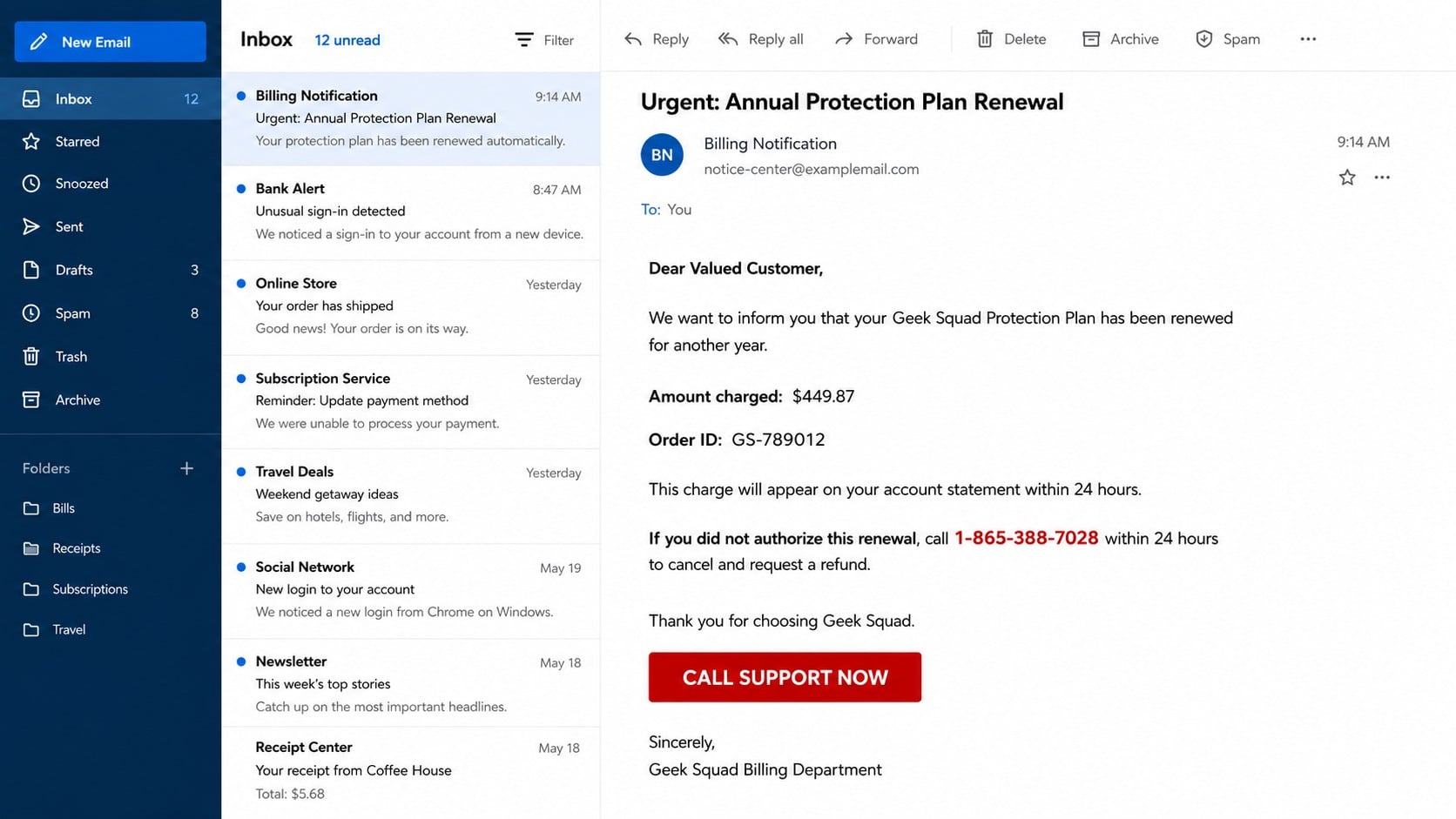
The email poses as a billing confirmation for an annual computer-support or protection plan. One version reviewed for this article lists a $449.87 charge and tells the recipient to call 865-388-7028 if the renewal was not authorized.
The message may describe the purchase as already approved, scheduled, or automatically debited. It often includes an invoice number, renewal date, product name, and formal-looking table to make an invented transaction feel like a completed order.
- An unfamiliar annual plan or service renewal
- A large charge that creates immediate concern
- A short cancellation or refund deadline
- A phone number placed prominently beside the warning
- Instructions to call instead of checking a real account
What the scammers actually want
The invoice is bait. Its purpose is to make the recipient call a number controlled by the scam operation, where a supposed billing agent can guide the conversation away from the original email and toward a payment, remote-access session, or fake refund.
No genuine renewal is needed for the scheme to work. The operator only needs the victim to believe that money is about to leave an account. Once that belief takes hold, requests that would normally seem invasive can be presented as necessary cancellation steps.
Why the phone call is the dangerous part
A suspicious email can be inspected quietly, but a live caller is easier to pressure. The person answering 865-388-7028 may sound calm, know the amount on the invoice, and use support language that creates the impression of an established help desk.
The agent can adapt to every objection. If the victim has no Geek Squad plan, that becomes proof of an unauthorized purchase. If the charge is not visible at the bank, the agent may say it is pending and must be stopped before it posts.
Why the Fake $449.87 Invoice Can Look Convincing
The amount feels too specific to be invented
A precise total such as $449.87 appears more credible than a round number. Taxes, reference numbers, and service dates give the message the texture of a real accounting document even when every field was created by the sender.
Specificity is not verification. A recipient should confirm the transaction in the bank or card account opened independently, not through a link or contact method supplied by the email.
The message uses a familiar service category
Many households have purchased a device, security product, repair, or support plan at some point. The sender does not need to know whether the recipient is a current customer. The brand and category are broad enough to create uncertainty.
Older adults and people who share household bills may worry that another family member subscribed. That hesitation can make calling seem safer than deleting the notice, even though the listed number is the trap.
A fake deadline discourages independent checking
The email may say the recipient has 12 or 24 hours to dispute the charge. A legitimate cardholder can report an unauthorized transaction through the card issuer’s official process; an arbitrary deadline in an unsolicited invoice does not replace those rights.
The countdown serves the caller, not the consumer. It reduces the chance that the recipient will ask a relative, search the number, contact Best Buy through a verified channel, or notice that no matching charge exists.
How the Geek Squad 865-388-7028 Scam Works
Step 1: A fake renewal email reaches a large mailing list
The campaign begins with bulk email sent to people who may or may not have used Geek Squad. The sender address can come from a free mailbox, compromised account, lookalike domain, or unrelated mailing service.
A display name such as “Billing Team,” “Geek Squad Service,” or “Subscription Department” can be typed by anyone. It does not establish a connection to Best Buy or Geek Squad.
The message may be mostly text, an image of an invoice, or a PDF attachment. Image-based invoices can make it harder for basic filters to evaluate the wording, while a PDF gives the false notice the appearance of a document generated by an accounting system.
Step 2: The $449.87 charge creates a problem that feels urgent
The invoice says the plan renewed automatically and implies that the money has already been taken or will be taken soon. The amount is high enough to demand attention but plausible enough for a multiyear protection or support plan.
The recipient is instructed to call 865-388-7028 to cancel, dispute, or obtain a refund. The email does not encourage checking a genuine account, calling the number on a bank card, or visiting Best Buy through a bookmark.
This is the central reversal in the scam. The supposed support channel is not there to solve the fake problem. The fake problem exists to drive calls into that channel.
Step 3: A fake agent confirms the invented transaction
The person answering may ask for the invoice number, then read back the plan name and $449.87 amount as though looking it up. Those details came from the same template the victim received, so repeating them proves nothing.
The agent may ask whether anyone else uses the computer or card. Answers help shape the story. If the victim lives alone, the charge becomes a hacking incident; if family members share accounts, the agent suggests that one of them may have enrolled accidentally.
Basic details such as name, email, address, card brand, or bank name may be requested under the excuse of locating the subscription. Each answer makes the next stage more personalized and exposes information useful for later fraud.
Step 4: The caller is directed to install remote-access software
The supposed technician says a secure cancellation form must be completed on a computer. The victim may be sent to a remote-support website or asked to install a legitimate screen-sharing application.
Remote-access tools have valid uses, but they become dangerous when an unsolicited caller controls the session. The operator can watch passwords being entered, move the mouse, open files, copy data, change settings, or hide activity from view.
The victim may be told to ignore security warnings because the session is “encrypted” or “registered.” No label inside a remote-support window proves that the person connected to it represents Geek Squad.
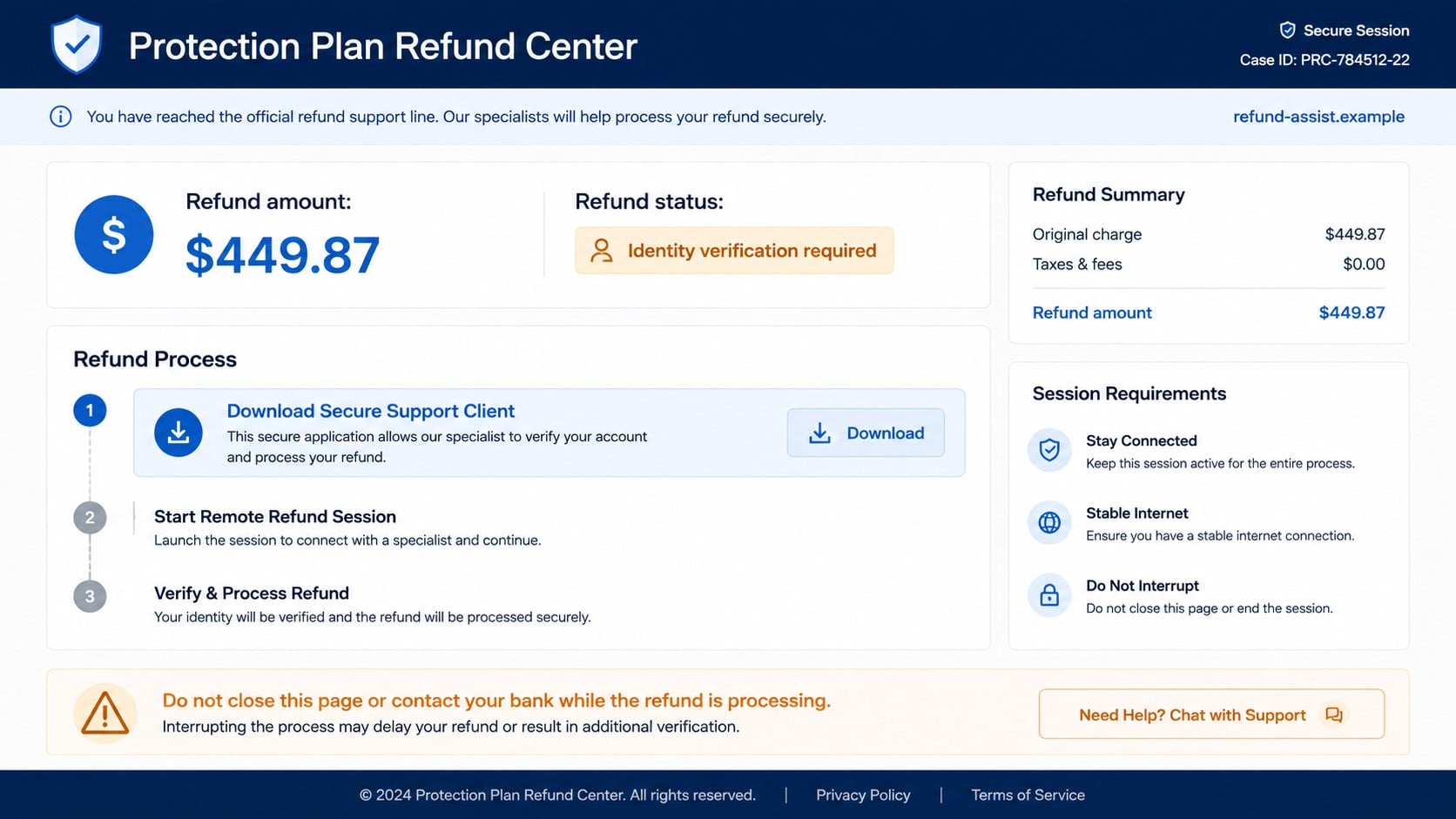
Step 5: A fake refund process exposes banking information
Once connected, the agent may open a counterfeit refund portal and ask the victim to enter a bank name, account details, card information, or online-banking credentials. Another version tells the victim to sign in to the real bank while the attacker watches.
The operator may cover part of the screen, blank the display, or claim that a secure server is processing the request. In the background, the attacker can attempt transfers, add payment recipients, change contact details, or inspect balances.
A refund does not require a stranger to see an online-banking password, authentication code, full card PIN, or remote desktop. A legitimate merchant can return funds to the original payment method through its own payment system.
Step 6: The scam becomes an over-refund or emergency payment
In a common variation, the fake agent manipulates what appears on the screen so it looks as though $4,498.70 was refunded instead of $449.87. The victim is blamed for entering an extra digit and told the employee will lose a job unless the difference is returned immediately.
The apparent extra balance may be created by moving money between the victim’s own accounts, editing page content in the browser, or showing a fake banking page. It is not proof that the company sent money.
The victim is then instructed to buy gift cards, send cash through a parcel or courier, transfer cryptocurrency, use a payment app, or make a wire. These methods are chosen because recovery is difficult and because the recipient may not clearly identify the scammer.
Step 7: The operator keeps applying pressure after the first loss
A successful payment rarely ends the contact. The caller may invent a transfer error, tax, frozen account, fraud-investigation fee, or second accidental refund. Each request is framed as the final action needed to correct the account.
If the victim stops cooperating, the attacker may threaten arrest, account closure, lost savings, or public embarrassment. None of those threats makes the original invoice genuine.
The information collected during the call can also fuel follow-up scams. A different caller may later pose as a bank investigator, police officer, government employee, or recovery specialist who already knows the amount and brand involved.
Company, Address, and Fulfillment Checks
The displayed brand does not identify the sender
The use of Geek Squad or Best Buy names in an email is not evidence of authorization. Logos, colors, invoice layouts, and legal-sounding footer text can be copied without access to the real company’s systems.
The FTC has specifically warned about fake Geek Squad renewal scams that lead to calls with scammers seeking money, account access, or remote control of a computer.
The listed number is not a verified billing channel
The message version examined directs calls to 865-388-7028. A number printed on the suspicious invoice cannot validate the invoice because both pieces of information come from the same untrusted source.
Phone numbers can be newly activated, forwarded, spoofed, reassigned, or replaced across campaigns. Even if a friendly agent answers with the expected greeting, verify support through contact information found independently on the company’s official site.
The refund website is part of the same closed story
A portal opened by the caller may repeat the recipient’s name, invoice number, and amount. That consistency can feel reassuring, but the operator already knows what was printed in the email and what the victim said on the phone.
Real verification comes from an independently accessed customer account, bank statement, and official support channel. A collection of pages and people controlled by one operator does not become trustworthy because every part repeats the same claim.
The payment destination hides the real beneficiary
Gift-card codes, crypto addresses, money mules, payment-app accounts, and cash shipments separate the public-facing caller from the person receiving value. The name spoken on the phone may be invented or borrowed.
Do not assume the phone subscriber, remote-access account, receiving bank account, and organizer are the same person. Preserve every identifier for investigators, but avoid making unsupported claims about a specific individual or location.
Warning Signs in the Fake Geek Squad Renewal
- You receive an invoice for a plan you do not recognize.
- The sender address does not match an independently verified company domain.
- The email says you must call quickly to prevent a charge.
- The listed amount does not appear in your card or bank account.
- The agent asks you to install remote-access software.
- You are asked to log in to online banking while sharing your screen.
- A refund supposedly requires gift cards, crypto, cash, or a wire.
- The caller tells you to hide the purpose of a payment from bank staff.
- The agent becomes threatening when you try to end the call.
Do not provide payment in response to an unexpected support request or grant remote access to an unsolicited caller. Use a trusted Best Buy or Geek Squad contact route if you want to check an account.
Do not call 865-388-7028 simply to test it. Calling confirms that your number is active and gives the operator another opportunity to persuade you. Block the number after preserving the evidence.
What to Do if You Have Fallen Victim to This Scam
- Cut off every live connection at once. End the call and disconnect the computer from the internet if the caller still has control. Do not argue, explain, or follow any final instruction to “secure” the machine.
- Contact the bank or card issuer through an official number. Use the number printed on the card, a trusted banking app, or the institution’s official site. Describe every payment, transfer, login, and remote-access event, then ask about freezes, recalls, disputes, and account replacement.
- Tell the bank that remote access was involved. This detail matters because the attacker may have seen balances, authentication steps, payees, or security answers even if no transaction is visible yet.
- Secure email and financial accounts from a clean device. Change passwords, sign out other sessions, review recovery methods, remove unfamiliar devices, and enable multi-factor authentication. Never share a new verification code with anyone who calls.
- Remove remote-control software and unknown programs. Uninstall tools installed during the call, then review browser extensions, startup items, and newly created user accounts. Revoke unattended-access permissions rather than merely closing the program window.
- Scan the computer with Malwarebytes. Run a full scan for infostealers, backdoors, unwanted programs, and other payloads. If the attacker had administrator access or security tools were disabled, consider professional inspection or a clean system reinstall.
- Use AdGuard to reduce exposure to malicious destinations. Blocking known phishing pages, deceptive ads, and tracking connections adds a useful layer, but it cannot reverse access already granted or replace password and banking action.
- Preserve the evidence. Save the original email with headers, attachment, phone number, call time, remote-support code, website address, payment receipt, gift-card details, wallet address, and messages. Do not keep opening a suspicious attachment just to take more screenshots.
- Report gift cards or money transfers quickly. Contact the issuing retailer or transfer provider and ask whether the value can be stopped. Keep the physical cards and receipts. Speed matters, although recovery is not guaranteed.
- Report the fraud and warn affected contacts. File reports with the FTC, FBI Internet Crime Complaint Center when appropriate, local police for substantial losses, and the company being impersonated. Tell household members so they do not trust follow-up calls about the same invoice.
- Reject paid recovery offers. Anyone promising guaranteed recovery for an upfront fee may be using victim information from the first scam. Continue through banks, payment providers, law enforcement, and official consumer-protection channels.
Frequently Asked Questions
Is 865-388-7028 an official Geek Squad number?
The number appears in the suspicious renewal message examined for this scam pattern, not as a contact independently verified through Best Buy. Do not rely on a number printed inside an unexpected invoice. Find support through the official site, app, receipt, or store.
Was I really charged $449.87?
An email cannot prove that a charge exists. Open your bank or card account independently and look for a posted or pending transaction. If one appears, contact the issuer using its official number and report it.
What happens if I only called but shared no information?
End contact and block the number. The operator now knows your phone is active, so be alert for follow-up calls and texts. If you disclosed no personal data, installed nothing, and made no payment, the immediate risk is lower.
Can I safely open the attached invoice?
Do not open an unexpected attachment merely to inspect it. Some files are harmless visual bait, while others can contain dangerous links or code. Preserve the original email and let a security product or trained professional examine the attachment safely if needed.
Does remote access mean the scammer stole everything?
Not necessarily, but treat the exposure seriously. The risk depends on what was visible, what permissions were granted, how long the session lasted, and whether unattended access or malware remains. Secure accounts and have the device checked.
Will Geek Squad ask for gift cards to correct a refund?
No legitimate refund process requires a customer to repay an error with gift cards, cryptocurrency, cash, or a secret transfer. End the call and contact the real company and your bank through independently verified channels.
The Bottom Line
The Geek Squad 865-388-7028 scam turns a nonexistent $449.87 renewal into a live support emergency. The invoice, deadline, phone number, agent, and refund portal all reinforce one another, but none is independent proof of a real charge.
Check the account yourself, avoid the listed number, and never give an unexpected caller remote access. If contact has already gone further, act quickly with the bank, secure the computer, preserve evidence, and ignore anyone demanding a secret payment.

Join the discussion
0 commentsShare your experience or ask a question about this article.
Discussion
Start the conversation
Have a question or something useful to share? Add the first comment.