


The conversation begins somewhere that feels familiar. A buyer messages about your Marketplace listing, a recruiter comments on your résumé, or a friendly match starts chatting on a dating app.
Then comes a small request: “Let’s continue on WhatsApp.” That move can look harmless, but in a platform hopping scam it is the moment the stranger tries to pull you away from the protections, history, and reporting tools that brought you together.

Overview
The first platform is only the introduction
A platform hopping scam does not belong to one app. It is a method in which a criminal starts contact on a marketplace, dating service, social network, job board, email account, or text message, then moves the conversation to a private messaging channel.
WhatsApp, Telegram, Signal, text messaging, and private email are common destinations. These services are legitimate. The danger comes from the stranger’s reason for moving, the speed of the request, and what happens after the original platform is left behind.
Moving the chat gives the scammer more control
The original service may scan messages for fraud patterns, warn about suspicious links, restrict unsafe payments, preserve transaction records, and provide a dispute process. A private chat can weaken or remove those layers.
The criminal can also replace accounts and numbers, delete messages, create fake groups, and keep talking after the original profile is reported. The victim may lose the marketplace’s buyer protection or the dating app’s ability to review the full conversation.
The destination depends on the story
A fake buyer may send a bogus Zelle payment email. A fake recruiter may demand a training deposit. A romantic contact may introduce cryptocurrency. A supposed support agent may ask for an OTP, remote access, or a payment to “secure” an account.
The story changes, but the movement has the same purpose. It carries the victim from a place with context and controls into a conversation designed and controlled by the scammer.
- Contact begins on a legitimate marketplace, dating app, social network, or job site.
- The stranger quickly asks to move to WhatsApp, Telegram, Signal, text, or email.
- The new account may use a different name, number, photograph, or supposed company.
- Links, payment instructions, and identity requests arrive after the move.
- The scammer discourages contact with official support or other people.
- Payments move outside the original platform’s protected checkout.
- When challenged, the account disappears and another contact may take over.
What Platform Hopping Really Means
There are legitimate reasons to change communication channels. A seller and buyer may exchange a phone number before meeting, an employer may schedule a video interview, and friends may prefer one messaging app over another.
The move becomes dangerous when it arrives too early, removes a protected payment route, avoids verification, or is followed by pressure for money or sensitive information.
The request is a security decision, not just a convenience
When you leave a marketplace chat, the marketplace may no longer see the payment promise, refund demand, or fake support link. If the transaction happens elsewhere, the service may have limited evidence and no obligation to reimburse the loss.
The FTC’s marketplace guidance warns against paying outside a marketplace’s payment system because the buyer can lose the protection the platform provides.
The scammer can separate each stage of the fraud
One account attracts the victim. A second number builds trust. A third identity provides payment instructions. A fake website displays a balance, and a different “support agent” appears when withdrawal fails.
Separating the stages makes the operation harder to report as one event. Each company sees only a fragment, while the victim experiences a continuous story.
Private messaging supports long-term manipulation
Marketplace fraud may unfold within an hour, but romance and investment schemes can last for weeks or months. Daily private messages create familiarity and give the operator time to learn about the victim’s savings, family, work, and emotional pressure points.
The FBI identifies moving a conversation to another messaging platform as a common red flag in investment fraud. The new channel becomes the place where trust is measured, scripts are adjusted, and deposits gradually increase.
The Four Common Platform Hopping Stories
A fake Marketplace buyer creates a payment problem
A buyer contacts a seller about furniture, electronics, a vehicle, or another listing. They quickly ask for a phone number or WhatsApp contact and claim they will pay through Zelle, Venmo, Cash App, or another payment service.
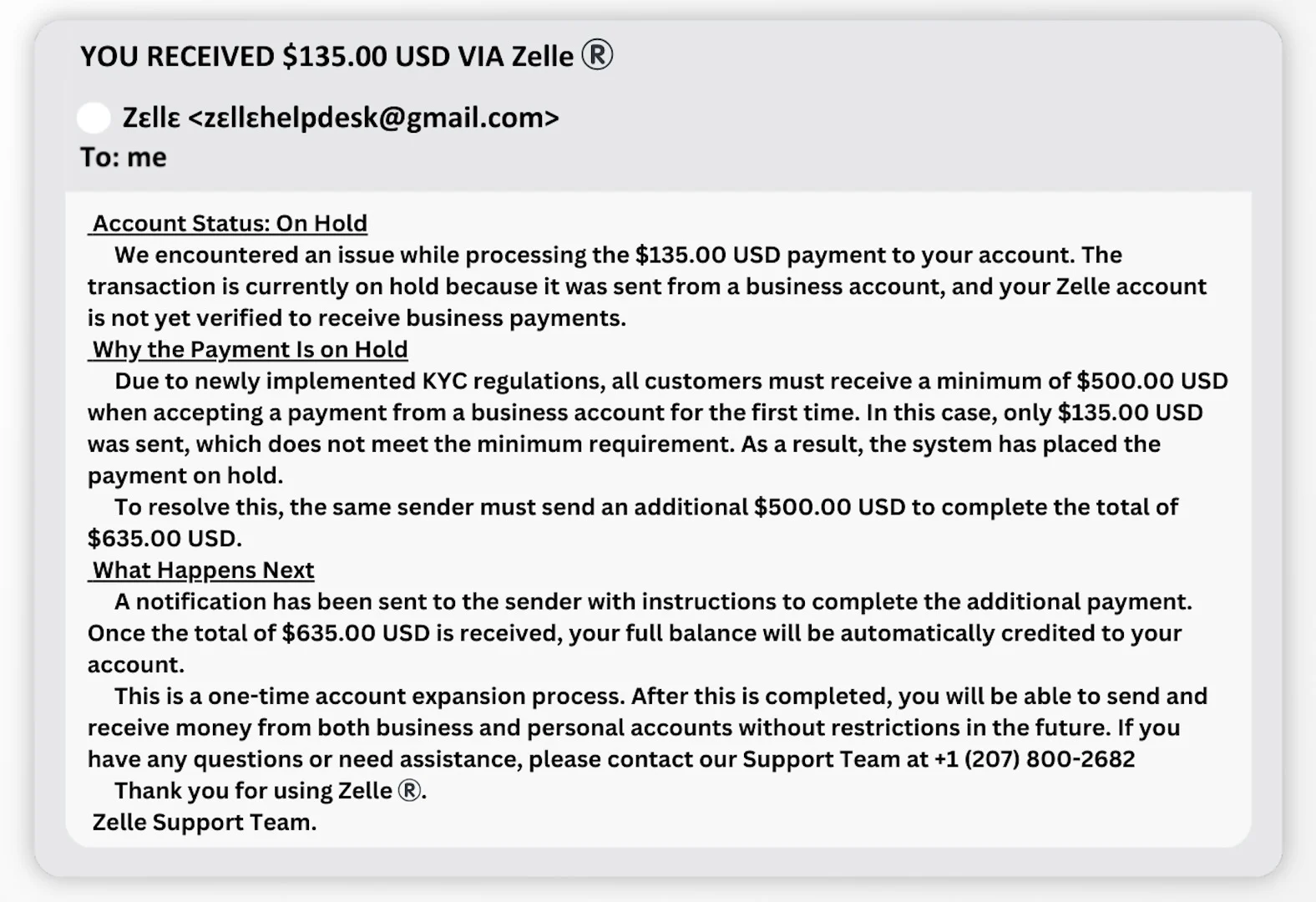
The seller then receives an email saying the payment is on hold because the account is not authorized for business payments. The message claims that additional money must be sent before the original payment can be released.
The payment never existed. Zelle’s own safety guidance states that there is no account upgrade and warns about fake emails demanding money to release a supposed Marketplace payment.
A fake recruiter moves the interview into private chat
The contact may start on LinkedIn, a job board, social media, or email. The recruiter offers remote work with attractive pay, then shifts the interview to WhatsApp or Telegram instead of using a verifiable company email and scheduled call.
After a simple interview, the applicant is asked to buy equipment, pay for training, deposit money into a task platform, receive and forward a check, or provide identity documents before a formal contract exists.
A dating match introduces a private investment
The match appears attentive and consistent. After moving to private chat, they discuss personal goals and eventually mention profitable cryptocurrency, gold, foreign exchange, or stock trading.
The victim is directed to a website or app showing fabricated returns. A small withdrawal may be allowed to build confidence. Larger balances become trapped behind taxes, verification fees, liquidity charges, or account upgrades that do not exist.
A fake support agent creates a secure channel
A comment, direct message, or unexpected call claims there is a problem with a bank, social account, wallet, or device. The agent says Telegram or WhatsApp is a secure place to troubleshoot.
The private chat is then used to collect screenshots, passwords, one-time codes, seed phrases, or remote-access approvals. Real support staff do not move customers into a personal account and ask them to bypass the company’s official recovery process.
Why the Fake Zelle Upgrade Email Is So Effective
The seller expects money, so a payment notification feels like confirmation rather than a new claim. The message often includes the exact item price and says the buyer already sent funds, which creates pressure to solve the supposed hold.
A fake email may claim the buyer must send an additional amount to reach a business-payment minimum. The buyer then asks the seller to refund that extra money once the account is upgraded.
No money reaches the seller’s bank. Any “refund” is a new payment from the seller to the scammer. The email, screenshot, and buyer’s reassurance are all controlled by the same operation.
The sender address reveals the fake
Messages may display the Zelle name while coming from Gmail or another unrelated address. Zelle states that it does not send official messages from free consumer email domains.
Do not use a link or phone number inside the message. Open your banking app independently and check the actual account balance and transaction history.
There is no fee to receive a completed payment
A stranger should not need you to send money before their payment can appear. “Business upgrade,” “account expansion,” “release fee,” and “payment verification deposit” are invented explanations for a transfer in the wrong direction.
The FTC also warns that fake buyers send false payment notifications and bogus refund requests. A screenshot of a payment is not a deposit.
How the Platform Hopping Scam Works
Step 1: The scammer finds a believable opening
The first message responds to something real, such as a listing, profile, job search, comment, or dating match. That relevance makes the contact feel less random than ordinary spam.
The account may look established, but photos, work histories, and reviews can be stolen, fabricated, or generated. A complete profile is not the same as a verified identity.
Step 2: Friendly conversation lowers resistance
The scammer asks normal questions and mirrors the victim’s tone. A fake buyer discusses pickup, a recruiter praises experience, and a romantic contact shares personal stories.
Nothing dangerous has happened yet. That is intentional. The victim is being trained to treat each new request as part of an ordinary conversation.
Step 3: The chat moves to another platform
The stranger says WhatsApp is easier, Telegram is more secure, email is needed for payment, or the original app is unreliable. They may claim the platform charges fees or blocks necessary attachments.
The move strips away context. The new app may not show the original listing, verified profile, employer page, platform warnings, or dispute rules.
Step 4: A second identity reinforces the story
A “payment department,” manager, lawyer, investment assistant, or customer-support representative may join. Multiple people create the impression that the story involves a real organization.
In organized campaigns, several accounts may be controlled by the same team. A busy group filled with satisfied investors can consist mostly of fake participants and scripted testimonials.
Step 5: A link or document creates apparent proof
The victim receives a payment email, tracking page, employment agreement, investment dashboard, invoice, or security notice. It may contain real logos and information copied from the original conversation.
The document proves only that someone created it. Verify the payment inside the financial account, the job through the employer’s published contact, and the investment through a licensed regulator.
Step 6: Money or sensitive information is requested
The ask may be a refund, upgrade fee, deposit, gift card, cryptocurrency transfer, OTP, identity photo, bank login, or remote-access session. The scammer frames it as the final step before the promised payment, job, relationship, or account recovery.
Requests often start small. A successful first payment proves that the victim can be guided, and later demands become larger.
Step 7: The scammer blocks outside verification
The victim is told not to contact the marketplace, bank, employer, family, or police because doing so will delay payment or close the account. Urgency and secrecy keep the conversation inside the criminal’s chosen channel.
A real transaction can survive a five-minute pause. If verification will supposedly destroy the opportunity, the opportunity is not safe.
Step 8: The accounts disappear or return under a new name
Once money or data has been collected, the profile may block the victim. The original account can be deleted while the payment recipient and private-chat number remain difficult to connect.
Another account may then offer recovery, legal help, account unlocking, or a refund for an upfront charge. This is a second scam built on knowledge of the first loss.
Company, Address, and Fulfillment Checks
The profile name is not a verified legal identity
A Marketplace name, recruiter title, romantic profile, or Telegram username does not identify the person controlling it. Compare the claimed company with an official registry, corporate domain, published staff page, and independently located contact number.
The address may be copied from a real business
Scammers often provide the address of a legitimate employer, bank, warehouse, or law office. A real address proves that the location exists, not that the private-chat account represents it. Call the organization using contact details from its own website.
Support disappears outside the original platform
A personal WhatsApp number or Telegram handle can be replaced instantly. The “support team” may answer quickly before payment and vanish afterward. Genuine disputes should be handled through the platform, bank, employer, or service provider’s documented support process.
The payment and fulfillment trail does not match
A seller who refuses protected checkout, a recruiter who uses a personal payment account, or an investment adviser who directs crypto to changing wallets has no coherent commercial trail. Payment should connect to a verifiable agreement, legal entity, product, and refund process.
Warning Signs That the Move Is Part of a Scam
- The stranger wants to leave the original platform after only a few messages.
- They provide a different name or story on the new app.
- They claim protected checkout cannot be used.
- An email says a payment is on hold until money is sent.
- A job interview takes place entirely through text chat.
- A new romantic contact introduces guaranteed investment returns.
- A support agent asks for an OTP, password, seed phrase, or remote access.
- The person refuses a normal voice or video verification.
- You are told to keep the transaction secret or avoid official support.
- Gift cards, cryptocurrency, wires, or direct payment apps are the only options.
The move alone does not prove fraud. The move combined with secrecy, unverifiable identity, unusual payment, and pressure is the pattern that matters.
How to Stay Safe Without Ending Every Online Conversation
Keep marketplace messages and payments on the platform until the transaction is complete. If a legitimate buyer needs logistics information, share only what is necessary and return to the protected checkout for payment.
For jobs, require a company-domain email, a scheduled voice or video interview, a written offer, and a verifiable hiring manager. Employers pay workers. Applicants do not send deposits to unlock wages.
For dating and investment contacts, separate the relationship from money. Do not invest through a person met online, even if the private conversation has lasted months and a dashboard displays profit.
For support, start a new conversation yourself. Open the official app or website and use the contact details published there, not the number, account, or link supplied by the stranger.
What to Do if You Have Fallen Victim to This Scam
- Stop communicating and do not send another payment. Do not argue, threaten, or pay a final release fee. Block the private-chat accounts after preserving their usernames, numbers, profile links, and messages.
- Contact the payment provider immediately. Call your bank, card issuer, payment app, wire service, gift card company, or crypto exchange through its official channel. Ask about a freeze, recall, dispute, account lock, or fraud investigation.
- Report both ends of the conversation. Report the original marketplace, dating, social, or job profile and the WhatsApp, Telegram, Signal, email, or phone account. Explain that the same person moved the conversation across platforms.
- Preserve the complete path. Save the original listing or profile, messages, email headers, phone numbers, usernames, payment receipts, wallet addresses, fake websites, and dates. Screenshots should show enough context to connect each stage.
- Secure any account that shared a code or password. Change the password from a clean device, enable multi-factor authentication, review logged-in sessions, and remove unknown recovery details or connected applications.
- Protect your identity. If you sent an ID, tax number, bank statement, or selfie, follow the identity-theft recovery plan at IdentityTheft.gov. Monitor credit and financial accounts for new activity.
- Scan devices used for links or downloads. Install Malwarebytes from its official website and run a full scan. Use AdGuard to help block known phishing domains and malicious advertising during recovery.
- Report the fraud to authorities. Submit the full cross-platform timeline at ReportFraud.ftc.gov. Investment and cyber-enabled losses can also be reported to IC3.
- Tell trusted contacts what happened. Scammers may impersonate you or target relatives using details from the chat. A short warning can stop the next message from being trusted automatically.
- Reject recovery agents. Anyone who guarantees a refund for an upfront fee, remote access, cryptocurrency deposit, or tax payment is likely continuing the same fraud.
Frequently Asked Questions
Is moving a conversation to WhatsApp always a scam?
No. People and legitimate businesses use WhatsApp every day. Be cautious when a new contact moves quickly, avoids the original platform’s protections, changes identity, sends payment links, or begins requesting money and sensitive information.
Why do scammers prefer Telegram or WhatsApp?
Private messaging gives them direct contact, flexible accounts, group tools, disappearing messages, and distance from the original platform’s transaction monitoring. It also lets them continue after the first profile is suspended.
Is there a Zelle business-account upgrade fee?
No. Zelle specifically warns that fake Marketplace emails claim money is needed to upgrade an account and release a payment. Check your real banking app. Never send money to receive money from a supposed buyer.
Can a payment screenshot prove that a buyer paid?
No. Screenshots, emails, and dashboard images can be fabricated or edited. Confirm the transaction inside your own bank or payment account before shipping an item, refunding money, or changing a listing’s status.
What if the person has talked to me for several months?
Time is not identity verification. Long-term romance and investment scams deliberately use daily conversation to build trust. Verify the person independently and never treat a private relationship as proof that an investment platform is real.
Can I recover money sent outside the original platform?
Recovery depends on the payment method and timing. Contact the provider immediately and report the transaction. The original marketplace may have limited protection once payment leaves its system, but the profile should still be reported.
The Bottom Line
A platform hopping scam uses movement as a security bypass. The first app supplies credibility, the second supplies privacy, and the final payment or website supplies the loss.
Stay on the original platform, verify identities through channels you control, and never send money to release money. When a stranger needs you to leave the place where you met before the story can continue, slow down and ask what protection you are being asked to give up.

Join the discussion
0 commentsShare your experience or ask a question about this article.
Discussion
Start the conversation
Have a question or something useful to share? Add the first comment.