


A friend receives a money request from someone using your name and a photograph you never posted publicly. The picture feels like proof that the sender must really be you.
It is convincing proof of one thing only: someone obtained a copy of the image.
Overview
A private photograph gives the impersonation unusual credibility
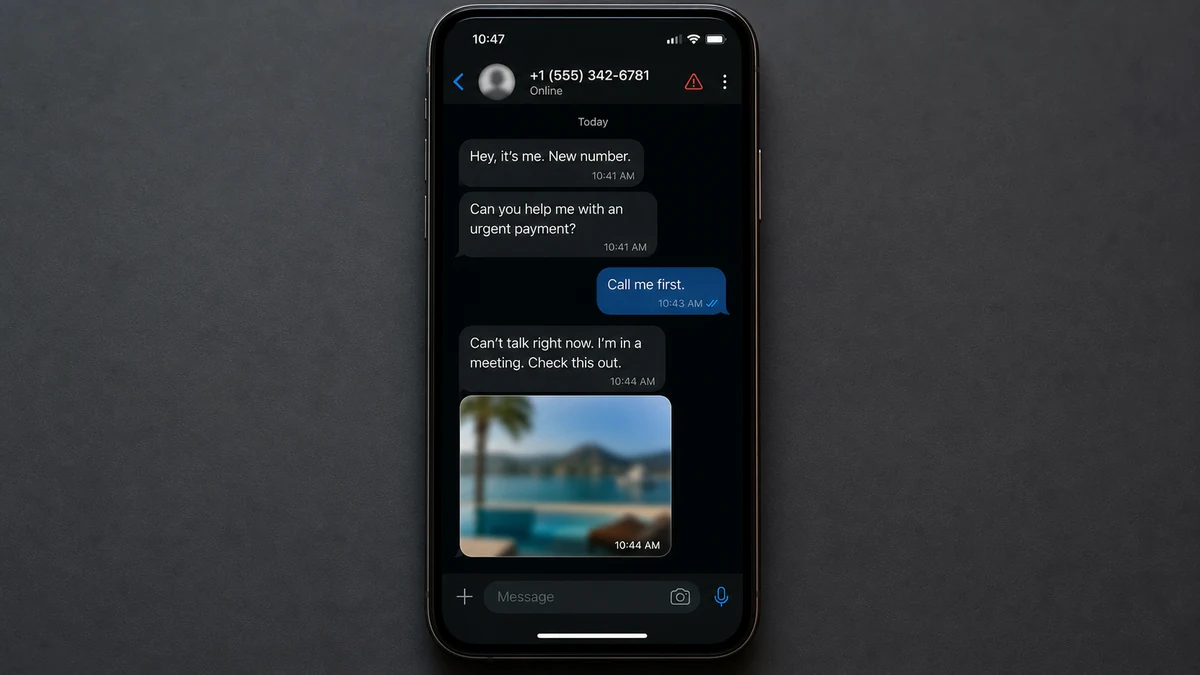
In a reported case, an impostor contacted one of the victim’s friends and asked for money. When challenged, the account reportedly sent threats and displayed a photograph of the real person.
The victim remembered sharing that picture only in a family group chat and storing it in Google Photos. It was not believed to be visible on a public social profile, which made the impersonation much harder to dismiss.
The friend did the one thing the scammer could not control: contacted the real person through another route before paying. That independent check ended the story immediately.
The image does not reveal how it was obtained
A copy may exist on every phone in the family chat, in message backups, synced galleries, old devices, forwarded conversations, and cloud accounts belonging to other recipients. One compromised participant can expose a picture without the victim’s own Google account being entered.
The account owner reviewed Google’s device list and did not see an unfamiliar login. That is useful but not conclusive. A stolen session may look familiar, and the image may have come from another person or an older copy.
The money request still follows a familiar impersonation pattern
The operator uses personal material to skip the normal identity check, then creates an emergency that supposedly cannot wait for a call. The friend is asked to act first and understand later.
Watch for the combination:
- A new account or phone number claims to belong to someone you know.
- The sender has a private-looking photograph or personal detail.
- Money is needed before the person will take a call.
- The payment recipient’s name does not match the friend.
- The emergency requires secrecy or immediate action.
- Questions are answered with more images instead of independent contact.
- The sender becomes angry or threatening when challenged.
- A second friend receives the same story soon afterward.
Knowing real details makes an impostor more persuasive. It does not make the channel trustworthy.

How the Private Photo Impersonation Scam Works
Step 1: The scammer identifies a real circle of friends
Public profiles reveal relatives, coworkers, schools, nicknames, birthdays, and recent events. A stolen social account or contact list gives the operator an even better map of who trusts whom.
The target is often someone likely to help quickly, not necessarily the wealthiest person in the group.
Step 2: A believable account or new number appears
The impostor copies the name, profile picture, writing style, and biography. A slightly different username may go unnoticed, while a new phone number is explained as a replacement after a lost or broken device.
A hijacked account is stronger because old messages and mutual connections are already present.
Step 3: The private photograph becomes identity proof
When the friend hesitates, the sender produces an image that appears impossible for a stranger to have. The recipient stops verifying the person and begins trying to understand how to solve the emergency.
The photograph may be completely authentic. The conclusion attached to it is false. Possessing a file does not prove control of the identity shown in it.
Step 4: A temporary emergency justifies the payment
The supposed friend has a frozen card, overdue bill, travel problem, medical cost, or urgent purchase. They promise to repay quickly, making the transfer feel like a short loan.
The reason is chosen to discourage delay. A call is impossible because the battery is low, the hospital is noisy, or someone else is watching.
Step 5: Verification stays inside the compromised channel
The impostor sends more photos, voice notes, screenshots, or facts already visible online. Every new answer comes from the same account whose identity is in question.
Real verification leaves that channel. Call a saved number, contact a relative, or speak face to face. Do not use a new contact detail supplied by the sender.
Step 6: Pressure increases when the friend resists
The operator may claim the victim is being disloyal, that a deadline is seconds away, or that harm will follow if money is not sent. In the reported case, threats appeared after the impersonation was challenged.
Threats are meant to restore control. Save them, stop replying, and report the account.
Step 7: The same material is reused
One photograph and contact list can support several simultaneous requests. After the first account is reported, the impersonator may create another or claim the real person has changed numbers again.
Warn the entire contact group so each recipient verifies independently rather than waiting to be approached.
How a “Private” Photograph Can Leak
A family group chat is private from the public, but it is not a single locked location. Every participant may download, screenshot, forward, back up, or sync the image. Their devices and accounts become part of its security.
Automatic backups create additional copies. A phone may upload the picture to Google Photos, iCloud, another gallery service, or a computer used during a device transfer. Old devices can remain signed in for years.
A recipient may have forwarded the photo innocently. It can then move into another chat, contact card, shared album, or social draft that the original sender never sees.
Account compromise is another possibility, but it must be investigated rather than assumed. Check recent security events, active sessions, connected apps, forwarding rules, recovery details, and devices for every account that may hold the image.
Google’s account security guidance recommends reviewing devices and recent events, changing the password, and strengthening verification after suspected compromise. Complete those steps even if the image’s path remains unknown.
Do not delete the original group chat before preserving dates and participants. It may help narrow when the photograph was shared and which devices had access.
How Friends Should Verify an Urgent Money Request
Call the person using a number already saved before the emergency. If they do not answer, contact a close relative or mutual friend. One independent conversation is stronger than ten images supplied by the requesting account.
Agree on a family verification phrase for financial emergencies. It should not be a birthday, pet name, school, or other detail visible online. Keep the phrase out of ordinary chats and change it if exposed.
Ask a question that requires current, private context, but do not rely on it alone. Stolen conversations can provide answers, and voice cloning can imitate a short call. Verification should involve a trusted number and, for a large payment, another person.
Check the recipient name in the payment app. If it differs, stop. An explanation such as “my account is frozen, use my friend’s account” is common precisely because the impersonator cannot receive money as the person being copied.
If the emergency could be paid directly, offer to call the hospital, hotel, airline, utility, or other business through its official number. Scammers usually resist any solution that removes their personal payment account.
How to Trace the Photograph Without Guessing
Begin with the exact file if it is still available. Compare its crop, size, orientation, and visible edits with the versions stored on family devices. A matching crop may point to the app or person from which that copy came.
Write down when the photograph was taken, first shared, and later reused by the impostor. Check which group members and services had access during that interval.
Review shared albums, message media folders, cloud links, old phones, tablets, laptops, and automatic backup services. Do not focus only on the account the victim uses today.
Ask relatives whether the image was forwarded or saved as a contact picture. This should be a fact-finding conversation, not an accusation. People often forget routine sharing that occurred years earlier.
Check email and messaging accounts for forwarding rules, unknown linked devices, connected applications, and recent security alerts. Revoke sessions you cannot explain, even if the device label looks only slightly unfamiliar.
Reverse-image search may reveal a public copy the victim did not know existed. A private social account, old forum, tagged post, cached profile, or another person’s page can make the picture discoverable.
The source may remain unknown. That does not prevent useful action. Secure the accounts, warn contacts, report impersonation, and make future money requests dependent on independent verification rather than images.
Ask the friend who received the impersonation message to preserve the image as delivered. Messaging apps may resize files or strip metadata, but the delivered version can still differ from the original stored by the victim.
Do not upload an intimate or sensitive photograph to public search tools merely to investigate it. Use privacy-conscious methods, crop nonessential areas, or obtain help from a trusted specialist when exposure would cause additional harm.
If the image is intimate, report nonconsensual sharing through the platform’s dedicated safety process. Threats to publish it may also fall under extortion laws, so preserve the threat and contact local authorities.
Do not pay the impersonator for deletion. Payment cannot prove that every stored or forwarded copy was removed.
Company, Address, and Fulfillment Checks
The messaging platform is only the delivery channel
A familiar app does not verify the person using an account. Report the impersonation to the platform, but confirm identity through a previously trusted channel.
The payment recipient is the most useful identity
Save the exact name, payment tag, phone number, bank details, and transaction reference. A profile photo can be copied; the financial destination gives the provider something concrete to investigate.
The claimed location should survive a real-world check
If the sender says they are at a hospital, hotel, police station, or airport, find that organization’s number independently. Do not call a number provided inside the suspicious chat.
Real help must reach the real person
Fulfillment is not a screenshot saying the money arrived. It is confirmation from the person you intended to help, reached through a channel the impostor does not control.
What to Do if You Have Fallen Victim to This Scam
- Contact the payment service immediately. Report impersonation fraud and ask whether the transfer can be frozen, recalled, or disputed.
- Warn the real person and their contacts. Use established phone numbers. Tell recipients which account, number, photograph, and payment story are being used.
- Preserve the evidence. Save the profile URL, username, threats, messages, images, call logs, recipient details, and transaction ID before blocking.
- Secure likely source accounts. Review Google, Apple, messaging, social, and email sessions. Change reused passwords and enable strong multi-factor authentication.
- Check every family participant. The photo may have leaked from another device or backup. Ask group members to review their accounts without blaming anyone prematurely.
- Scan suspicious devices. Use Malwarebytes if anyone opened a file, installed an app, or granted remote access during the exchange. A photograph alone does not infect a phone.
- Reduce malicious-link exposure. AdGuard can block many known scam and advertising domains, but it cannot authenticate a friend or remove copied photos.
- Report the impersonating account. Use the platform’s impersonation and fraud tools. Include proof from the real person where requested.
- Report financial fraud. File with ReportFraud.ftc.gov, IC3.gov, or the appropriate authority in your country. Include the payment destination and threats.
- Ignore paid recovery offers. No stranger can guarantee removal of every photo copy or return of a transfer for an upfront fee.
Frequently Asked Questions
Does a private photo prove my Google account was hacked?
No. It proves someone obtained a copy. The source could be another participant, backup, old device, forwarded message, or compromised account. Review all plausible routes.
Can the scammer access my bank with only my photo?
Normally no. Risk increases if the person also has credentials, identity documents, recovery information, or control of an authenticated device.
Why did no unfamiliar device appear in my account?
The photo may not have come from that account. Stolen sessions can also be difficult to recognize. Review security events and connected apps, not only device names.
Should I reply to threats to collect more evidence?
Usually not. Save what already exists, stop engaging, and report credible threats to the platform and police. Continued replies can reveal more information.
Is a video call enough to verify a money request?
It is stronger than a photograph but not perfect. Use a number you already trust, ask for current context, and confirm large transfers with another person.
Can the leaked photograph be removed everywhere?
Removal can be requested from accounts and platforms you identify, but complete deletion cannot be guaranteed once copies spread. Focus on reports, warnings, and account security.
The Bottom Line
A private photograph can make an impersonator feel authentic because it answers the wrong question. It shows that the sender has a file, not that the sender is the person in it.
Leave the suspicious chat and contact the real person through a number you already know. That small break in the conversation defeats the scammer’s strongest evidence and protects both the friend and the person being copied.

Join the discussion
0 commentsShare your experience or ask a question about this article.
Discussion
Start the conversation
Have a question or something useful to share? Add the first comment.