

The Proposal Evaluation Completed email is a phishing scam. It pretends that a contract or procurement review is waiting, then sends the recipient to a fake sign-in page designed to steal an email password.
Do not use the Open Review button. If you already entered a password, change it from the real provider’s website immediately, sign out other sessions and inspect the mailbox for forwarding rules or messages sent by the attacker.
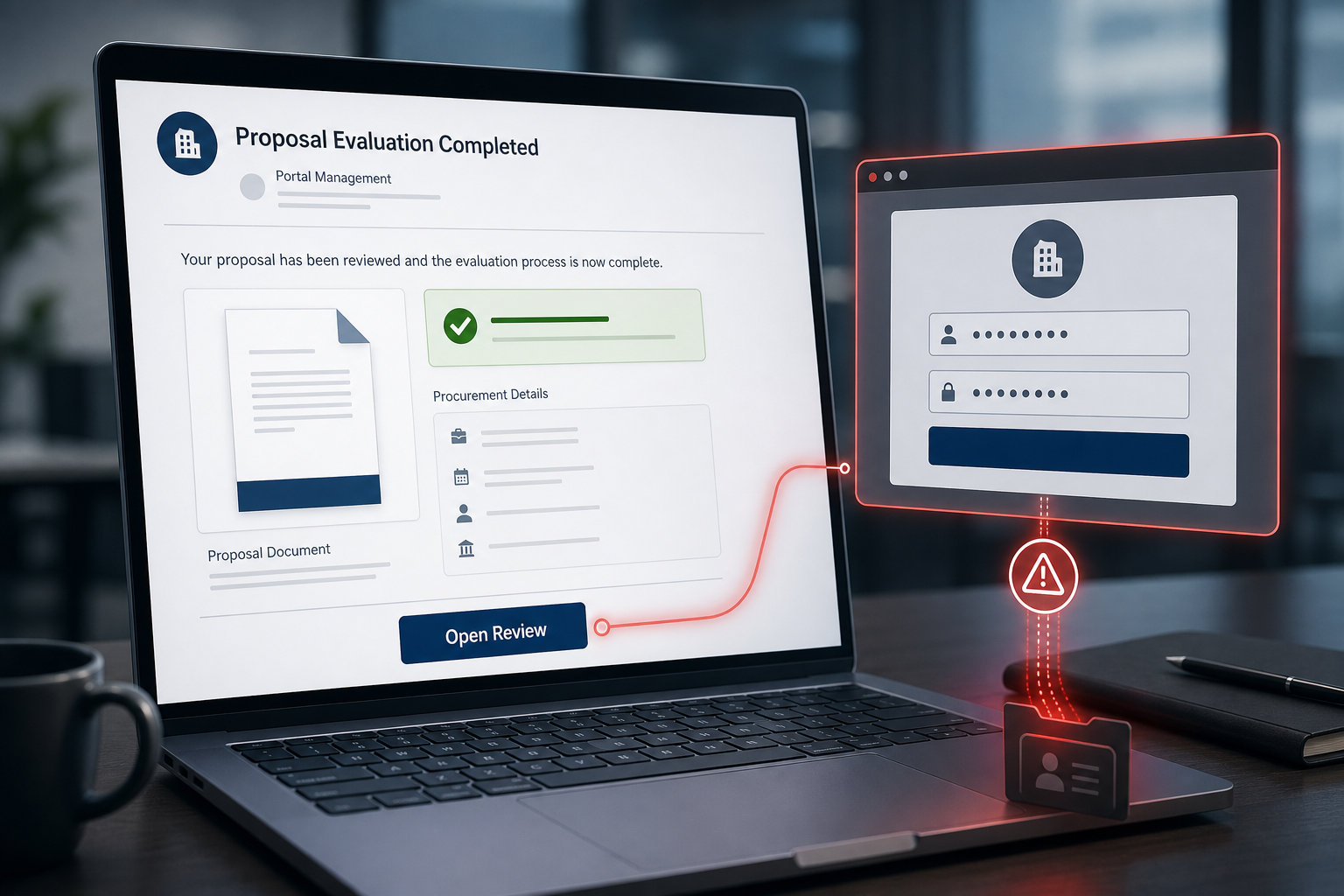
Proposal Evaluation Completed Email Scam Overview
This campaign disguises a password-stealing link as a routine business workflow. The email resembles an automated management-portal notification and claims that a proposal or contract evaluation has reached the stage where the recipient must respond. It may show a document ID, revision number, pending status, a department such as Strategic Procurement and the recipient’s email address. Those details make the message look like it came from a system rather than a random sender.
The prominent Open Review button is the trap. It does not lead to a genuine procurement portal or document service. The observed destination used an unrelated website address and displayed a counterfeit login page. The page can adjust its branding to the recipient’s email domain, so a Gmail user may see a Google-style sign-in while another target sees a different provider. That customization is designed to keep the victim focused on the familiar logo instead of the real web address.
Entering credentials sends them to the scammers. With control of the mailbox, an attacker can read private conversations, search for invoices, reset passwords on other accounts and impersonate the victim in fresh phishing messages. A work inbox is especially valuable because it contains trusted relationships with colleagues, suppliers and customers. The criminals can reply inside a real conversation and redirect a payment without sending an obviously suspicious cold email.
Common details used in the fake notification
- A subject resembling a management portal or contract review notification.
- The claim that a proposal evaluation has been completed or needs a response.
- A document ID, revision number and status such as Pending Response.
- A department name such as Strategic Procurement.
- A large Open Review button that hides the real destination.
- A login page that copies the branding of the recipient’s email provider.
The named document, department and portal can change. Judge the message by its behavior: an unexpected review request that leads to an unrelated domain and asks for email credentials is phishing, even when the page looks polished.
How the Proposal Evaluation Completed Scam Works
Step 1: A business-style notification reaches the inbox
The scammer sends a message that resembles an automated procurement or document-management alert. The wording is deliberately formal and generic, allowing the same template to reach employees in many companies.
Step 2: Administrative details create credibility
Document numbers, a revision value, department label and pending status make the request feel like an internal task. The recipient may assume a colleague, customer or supplier started the process and click before verifying it.
Step 3: The Open Review button hides an unrelated link
Buttons display action text instead of the destination address. Hovering over the button on a desktop computer can reveal that the link does not belong to the claimed organization, email provider or recognized document platform.
Step 4: A fake login page copies familiar branding
The phishing site presents a sign-in form and may choose a logo based on the victim’s email address. Familiar colors and layouts are visual decoration; they do not prove who operates the domain. The address bar is the stronger piece of evidence.
Step 5: The password is transmitted to the scammers
The form records the entered email address and password. Some pages deliberately show an error and ask for the password again, which helps the attacker collect multiple password variations or confirm that the victim typed carefully.
Step 6: The stolen mailbox becomes a launch point
The attacker can search messages, reset connected accounts, create hidden forwarding rules and send phishing from a real address. In a business email compromise, the criminal may wait for an invoice conversation and replace legitimate payment instructions.
How to Recognize This Phishing Email
You were not expecting a proposal review
A legitimate workflow normally has context: a known project, sender, contract name or earlier discussion. A vague completed evaluation arriving without any recognizable background deserves independent verification.
The sender and reply address do not match
Inspect the complete email address, not only the display name. Look for misspellings, free mailbox services, unrelated domains and a Reply-To address that differs from the visible sender.
The button points outside the claimed service
On a computer, hover without clicking. On a phone, press and hold only if the mail app safely previews the URL. A random domain, free-hosting address or unrelated organization is a decisive warning sign.
The login page asks for an email password on the wrong domain
A website can copy a Google or Microsoft logo in seconds. It cannot place itself on the provider’s genuine domain. Close the page and open the service through a saved bookmark or by typing the known address yourself.
The message uses urgency without a named contact
Automated deadlines, pending-response labels and warnings about access can rush the recipient. A real procurement request can be confirmed with the supposed sender through an existing phone number or internal chat.
What to Do If You Received the Fake Proposal Email
- Do not click Open Review, reply to the sender or download attachments.
- Report the message through your organization’s phishing-report process.
- Delete it after the security team has collected any needed evidence.
- Warn coworkers if several people received the same notification.
- Verify a real proposal through the known portal or a separate conversation.
- Block the sender and destination domain at the mail-security layer when appropriate.
Clicking the link without entering information does not automatically mean the password was stolen. Close the page, record the address and tell the IT team. A security scan is sensible if anything downloaded, the browser requested an extension, or a file was opened.
What to Do If You Entered Your Password
Change the password from a trusted device
Open the real email provider directly. Create a unique password that is not used anywhere else. If the same or a similar password protects another account, change those credentials too.
Sign out all active sessions
A password change may not invalidate every existing token. Use the provider’s security controls to sign out other devices, revoke app passwords and remove unfamiliar connected applications.
Enable multi-factor authentication
Use an authenticator app, passkey or hardware security key when available. If multi-factor authentication was already enabled, check whether the phishing page also asked for a code and review any newly registered authentication methods.
Inspect mailbox rules and account settings
Attackers create forwarding, deletion or move rules to hide replies and security alerts. Check recovery email addresses, phone numbers, delegates, aliases, filters and automatic replies. Remove anything you did not configure.
Review sent mail, deleted items and recent logins
Look for messages you did not send and access from unfamiliar locations. Tell contacts to ignore suspicious requests from your account. A business should search for invoice changes, payroll requests and other high-risk messages.
Contact financial partners when payment data may be exposed
If the mailbox contained invoices or bank details, notify the finance team and affected partners using known contact information. Confirm pending payment instructions by phone. Speed matters because fraudulent transfers can become difficult to recover.
How Organizations Can Block Similar Email Scams
- Require phishing-resistant multi-factor authentication for important accounts.
- Configure SPF, DKIM and DMARC and monitor authentication failures.
- Use link analysis and browser isolation for newly registered or low-reputation domains.
- Train staff to verify document invitations through a separate channel.
- Alert on new forwarding rules, impossible travel and unusual mailbox access.
- Require verbal confirmation for changes to supplier bank details.
- Provide a simple report-phishing button and respond quickly to reports.
The Bottom Line
The Proposal Evaluation Completed message is a credential-phishing scam dressed as a procurement workflow. Its document details and familiar login branding are there to distract from the unrelated link and fake sign-in form.
Do not open the review through the email. Verify the request separately. If credentials were entered, change them on the real service, revoke sessions, inspect mailbox rules and warn the organization immediately. A stolen inbox can become the starting point for far more damaging fraud.

Join the discussion
0 commentsShare your experience or ask a question about this article.
Discussion
Start the conversation
Have a question or something useful to share? Add the first comment.