

If you are seeing a fake alert from S.M.A.R.T Check or S.M.A.R.T Repair then you’re probably reading this article so you can understand how to get rid of it.Thankfully we’ve got the instructions to help you get rid of this virus.
First off all , you should know that , S.M.A.R.T Check and S.M.A.R.T Repair are both fake components of Data Recovery or Smart HDD malicious software, this infections will display fake alerts, claiming that several hard drive errors were detected on your computer.In reality, none of the reported issues are real, and are only used to scare you into buying S.M.A.R.T virus and stealing your personal financial information.
The infections has changed your desktop background to a black scren, has hidden your files and shortcuts and it’s causing browsing redirects.
If you’ve got a S.M.A.R.T virus infection , you’ll be seeing this screens :
![[Image: Smart Check.png]](http://malwaretips.com/blogs/wp-content/uploads/2012/05/Data-Recovery-Rogue.png "S.M.A.R.T Check")
![[Image: Smart Repair.png]](http://malwaretips.com/blogs/wp-content/uploads/2012/05/Data-Recovery-fake-alert.png "S.M.A.R.T Repair")
![[Image: Smart alert.png]](http://malwaretips.com/blogs/wp-content/uploads/2012/05/Data-Recovery-Rogue-alert.png "S.M.A.R.T Alert")
Registration codes for S.M.A.R.T virus
As an optional step,you can use the following license key to register S.M.A.R.T virus and stop the fake alerts.
Data Recovery Rogue: 08869246386344953972969146034087
SMART HDD Rogue: 15801587234612645205224631045976
Please keep in mind that entering the above registration code will NOT remove S.M.A.R.T virus from your computer , instead it will just stop the fake alerts so that you’ll be able to complete our removal guide more easily.
Removal guide for S.M.A.R.T virus
STEP 1 : Start your computer in Safe Mode with Networking
- Remove all floppy disks, CDs, and DVDs from your computer, and then restart your computer.
- Press and hold the F8 key as your computer restarts.Please keep in mind that you need to press the F8 key before the Windows start-up logo appears.
- On the Advanced Boot Options screen, use the arrow keys to highlight Safe Mode with Networking , and then press ENTER.
![[Image: Safemode.jpg]](//malwaretips.com/images/removalguide/safemode.jpg "Safe Mode with Networking screen")
- Log on to your computer with a user account that has administrator rights
![[Image: Safemode.jpg]](http://malwaretips.com/images/removalguide/safemode.jpg "Safe Mode with Networking screen")
STEP 2: Remove S.M.A.R.T virus malicious proxy server
S.M.A.R.T virus may add a proxy server which prevents the user from accessing the internet,follow the below instructions to remove the proxy.
- Start Internet Explorer
![[Image: S.M.A.R.T virus- IE]](//malwaretips.com/images/removalguide/Ieicon.png "IE 9") and if you are using Internet Explorer 9 ,click on the gear icon
and if you are using Internet Explorer 9 ,click on the gear icon ![[Image: IE gear icon]](//malwaretips.com/images/removalguide/icongear.jpg "Gear Icon") (Tools for Internet Explorer 8 users) ,then select Internet Options.
(Tools for Internet Explorer 8 users) ,then select Internet Options.
![[Image: Internet-options-IE.png]](//malwaretips.com/images/removalguide/ie1.png "Internet Options in IE")
- Go to the tab Connections.At the bottom, click on LAN settings.
![[Image: Remove-proxy-server2.png]](//malwaretips.com/images/removalguide/ie2.png "Connections tab in Internet Explorer")
- Uncheck the option Use a proxy server for your LAN. This should remove the malicious proxy server and allow you to use the internet again.
![[Image: Remove-proxy-server3.png]](//malwaretips.com/images/removalguide/ie3.png "Uncheck the option Use a proxy server for your LAN")
![[Image: S.M.A.R.T virus- IE]](http://malwaretips.com/images/removalguide/Ieicon.png "IE 9") and if you are using Internet Explorer 9 ,click on the gear icon
and if you are using Internet Explorer 9 ,click on the gear icon ![[Image: IE gear icon]](http://malwaretips.com/images/removalguide/icongear.jpg "Gear Icon") (Tools for Internet Explorer 8 users) ,then select Internet Options.
(Tools for Internet Explorer 8 users) ,then select Internet Options.![[Image: Internet-options-IE.png]](http://malwaretips.com/images/removalguide/ie1.png "Internet Options in IE")
![[Image: Remove-proxy-server2.png]](http://malwaretips.com/images/removalguide/ie2.png "Connections tab in Internet Explorer")
![[Image: Remove-proxy-server3.png]](http://malwaretips.com/images/removalguide/ie3.png "Uncheck the option Use a proxy server for your LAN")
If you are a Firefox users, go to Firefox(upper left corner) → Options → Advanced tab → Network → Settings → Select No Proxy
STEP 3: Run RKill to terminate known malware processes associated with S.M.A.R.T virus.
RKill is a program that attempts to terminate any malicious processes associated with S.M.A.R.T virus ,so that your normal security software can then run and clean your computer of infections.
As RKill only terminates a program’s running process, and does not delete any files, after running it you should not reboot your computer as any malware processes that are configured to start automatically will just be started again.
- While your computer is in Safe Mode with Networking ,please download the latest official version of RKill.

- Double-click on the RKill iconin order to automatically attempt to stop any processes associated with S.M.A.R.T virus.
![[Image: run-rkill-1.png]](//malwaretips.com/images/removalguide/rkill1.png "RKILL ICON")
- RKill will now start working in the background, please be patient while the program looks for various malware programs and tries to terminate them.
![[Image: run-rkill-2.png]](//malwaretips.com/images/removalguide/rkill2.png "RKILL Command prompt")
IF you receive a message that RKill is an infection, that is a fake warning given by the rogue. As a possible solution we advise you to leave the warning on the screen and then try to run RKill again.Run RKill until the fake program is not visible but not more than ten times.
IF you continue having problems running RKill, you can download the other renamed versions of RKill from here. - When Rkill has completed its task, it will generate a log. You can then proceed with the rest of the guide.
![[Image: S.M.A.R.T virus rkill3.jpg]](//malwaretips.com/images/removalguide/rkill3.png "RKILL LOG")
![[Image: run-rkill-1.png]](http://malwaretips.com/images/removalguide/rkill1.png "RKILL ICON")
![[Image: run-rkill-2.png]](http://malwaretips.com/images/removalguide/rkill2.png "RKILL Command prompt")
![[Image: S.M.A.R.T virus rkill3.jpg]](http://malwaretips.com/images/removalguide/rkill3.png "RKILL LOG")
WARNING: Do not reboot your computer after running RKill as the malware process will start again , preventing you from properly performing the next step.
STEP 4: Remove S.M.A.R.T virus malicious files with Malwarebytes Anti-Malware FREE
- Please download the latest official version of Malwarebytes Anti-Malware FREE.
- Install Malwarebytes’ Anti-Malware by double clicking on mbam-setup.
![[Image: malwarebytes-installer.png]](//malwaretips.com/images/removalguide/mbam1.png "Malwarebytes Anti-Malware Installer")
- When the installation begins, keep following the prompts in order to continue with the installation process. Do not make any changes to default settings and when the program has finished installing, make sure you leave both the Update Malwarebytes’ Anti-Malware and Launch Malwarebytes’ Anti-Malware checked. Then click on the Finishbutton. If Malwarebytes’ prompts you to reboot, please do not do so.
![[Image: install-malwarebytes.png]](//malwaretips.com/images/removalguide/mbam2.png "Install Malwarebytes Anti-Malware")
- Malwarebytes Anti-Malware will now start and you’ll be prompted to start a trial period , please select ‘Decline‘ as we just want to use the on-demand scanner.
![[Image: decline-trial-malwarebytes.png]](//malwaretips.com/images/removalguide/mbam3.PNG "Decline trial period in Malwarebytes Anti-Malware")
- On the Scanner tab,please select Perform full scan and then click on the Scan button to start scanning your computer for any possible infections.
![[Image: malwarebytes-full-system-scan.png]](//malwaretips.com/images/removalguide/mbam4.png "Perform a Full System Scan")
- Malwarebytes’ Anti-Malware will now start scanning your computer for S.M.A.R.T virus malicious files as shown below.
![[Image: malwarebytes-scanning.png]](//malwaretips.com/images/removalguide/mbam5.png "Malwarebytes Anti-Malware scanning for S.M.A.R.T virus")
- When the scan is finished a message box will appear, click OK to continue.
![[Image: malwarebytes-scan-finish.png]](//malwaretips.com/images/removalguide/mbam9.png "Malwarebytes when the scan is finished")
- You will now be presented with a screen showing you the malware infections that Malwarebytes’ Anti-Malware has detected.Please note that the infections found may be different than what is shown in the image.Make sure that everything is Checked (ticked) and click on the Remove Selected button.
![[Image: malwarebytes-scan-results.png]](//malwaretips.com/images/removalguide/mbam6.png "S.M.A.R.T virus infection scan results")
- Malwarebytes’ Anti-Malware will now start removing the malicious files.If during the removal process Malwarebytes will display a message stating that it needs to reboot, please allow this request.
![[Image: malwarebytes-reboot-prompt.png]](//malwaretips.com/images/removalguide/mbam10.png "Reboot prompt from Malwarebytes")
![[Image: malwarebytes-installer.png]](http://malwaretips.com/images/removalguide/mbam1.png "Malwarebytes Anti-Malware Installer")
![[Image: install-malwarebytes.png]](http://malwaretips.com/images/removalguide/mbam2.png "Install Malwarebytes Anti-Malware")
![[Image: decline-trial-malwarebytes.png]](http://malwaretips.com/images/removalguide/mbam3.PNG "Decline trial period in Malwarebytes Anti-Malware")
![[Image: malwarebytes-full-system-scan.png]](http://malwaretips.com/images/removalguide/mbam4.png "Perform a Full System Scan")
![[Image: malwarebytes-scanning.png]](http://malwaretips.com/images/removalguide/mbam5.png "Malwarebytes Anti-Malware scanning for S.M.A.R.T virus")
![[Image: malwarebytes-scan-finish.png]](http://malwaretips.com/images/removalguide/mbam9.png "Malwarebytes when the scan is finished")
![[Image: malwarebytes-scan-results.png]](http://malwaretips.com/images/removalguide/mbam6.png "S.M.A.R.T virus infection scan results")
![[Image: malwarebytes-reboot-prompt.png]](http://malwaretips.com/images/removalguide/mbam10.png "Reboot prompt from Malwarebytes")
STEP 5: Double check your system for any left over infections with HitmanPro
- This step can be performed in Normal Mode ,so please download the latest official version of HitmanPro.
- Double click on the previously downloaded file to start the HitmanPro installation.
![[Image: hitmanpro-icon.png]](//malwaretips.com/images/removalguide/hpro1.png "HitmanPro Installer")
NOTE : If you have problems starting HitmanPro, use the “Force Breach” mode. Hold down the left CTRL-key when you start HitmanPro and all non-essential processes are terminated, including the malware process. (How to start HitmanPro in Force Breach mode – Video) - Click on Next to install HitmanPro on your system.
![[Image: installing-hitmanpro.png]](//malwaretips.com/images/removalguide/hpro2.png "HitmanPro installation process")
- The setup screen is displayed, from which you can decide whether you wish to install HitmanPro on your machine or just perform a one-time scan, select a option then click on Next to start a system scan.
![[Image: hitmanpro-setup-options.png]](//malwaretips.com/images/removalguide/hpro3.png "HitmanPro setup options")
- HitmanPro will start scanning your system for malicious files. Depending on the size of your hard drive, and the performance of your computer, this step will take several minutes.
![[Image: hitmanpro-scanning.png]](//malwaretips.com/images/removalguide/hpro4.png "HitmanPro scanning for S.M.A.R.T virus")
- Once the scan is complete,a screen displaying all the malicious files that the program found will be shown as seen in the image below.After reviewing each malicious object click Next.
![[Image: hitmanpro-scan-results.png]](//malwaretips.com/blogs/wp-content/uploads/2012/02/rsz_hpro5.png "HitmanPro S.M.A.R.T virus scan results")
- Click Activate free license to start the free 30 days trial and remove the malicious files.
![[Image: hitmanpro-activation.png]](//malwaretips.com/images/removalguide/hpro6.png "Activate HitmanPro free license to remove detected infections")
- HitmanPro will now start removing the infected objects, and in some instances, may suggest a reboot in order to completely remove the malware from your system. In this scenario, always confirm the reboot action to be on the safe side.
![[Image: hitmanpro-icon.png]](http://malwaretips.com/images/removalguide/hpro1.png "HitmanPro Installer")
![[Image: installing-hitmanpro.png]](http://malwaretips.com/images/removalguide/hpro2.png "HitmanPro installation process")
![[Image: hitmanpro-setup-options.png]](http://malwaretips.com/images/removalguide/hpro3.png "HitmanPro setup options")
![[Image: hitmanpro-scanning.png]](http://malwaretips.com/images/removalguide/hpro4.png "HitmanPro scanning for S.M.A.R.T virus")
![[Image: hitmanpro-scan-results.png]](http://malwaretips.com/blogs/wp-content/uploads/2012/02/rsz_hpro5.png "HitmanPro S.M.A.R.T virus scan results")
![[Image: hitmanpro-activation.png]](http://malwaretips.com/images/removalguide/hpro6.png "Activate HitmanPro free license to remove detected infections")
STEP 6: Unhide your files and folders
S.M.A.R.T virus modifies your file system in such a way that all files and folders become hidden, to restore the default settings , you’ll need to run the below program.
- Download Unhide.exe, to unhide your files and folders.
- Double-click on the Unhide.exe icon on your desktop and allow the program to run.The whole process should not take more than 5 minutes to complete,and at the end this utility will generate a report.
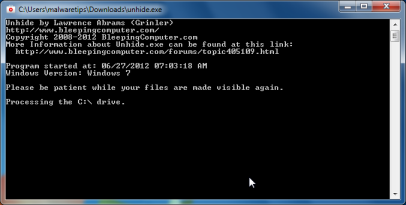
STEP 7 : Restore your shortcuts and remove any left over malicious registry keys
S.M.A.R.T virus has moved your shortcuts files in the Temporary Internet folder and added some malicious registry keys to your Windows installation , to restore your files we will need to perform a scan with RogueKiller.
- Please download the latest official version of RogueKiller.
- Double click on RogueKiller.exe to start this utility and then wait for the Prescan to complete.This should take only a few seconds and then you can click the Start button to perform a system scan.
![[Image: roguekiller-1.png]](//malwaretips.com/blogs/wp-content/uploads/2012/04/roguek-1.png "Click on the Start button to perform a system scan")
- After the scan has completed, press the Delete button to remove any malicious registry keys.
![[Image: roguekiller-2.png]](//malwaretips.com/blogs/wp-content/uploads/2012/04/roguek-2.png "Press Delete to remove the malicious registry keys")
- Next we will need to restore your shortcuts, so click on the ShortcutsFix button and allow the program to run.
![[Image: roguekiller-1.png]](//malwaretips.com/blogs/wp-content/uploads/2012/04/roguek-3.png "Click on the Start button to perform a system scan")
![[Image: roguekiller-1.png]](http://malwaretips.com/blogs/wp-content/uploads/2012/04/roguek-1.png "Click on the Start button to perform a system scan")
![[Image: roguekiller-2.png]](http://malwaretips.com/blogs/wp-content/uploads/2012/04/roguek-2.png "Press Delete to remove the malicious registry keys")
![[Image: roguekiller-1.png]](http://malwaretips.com/blogs/wp-content/uploads/2012/04/roguek-3.png "Click on the Start button to perform a system scan")
STEP 8: Get your desktop look back!
S.M.A.R.T virus changes your desktop background to a solid black color,to change it back to default one follow the below instruction.
- Windows XP : Click on the Start button and then select Control Panel. When the Control Panel opens, please click on the Display icon. From this screen you can now change your Theme and desktop background.
- Windows 7 and Vista : Click on the Start button and then select Control Panel. When the Control Panel opens, please click on the Appearance and Personalization category. Then select Change the Theme or Change Desktop Background to revert back to your original Theme and colors.
If you are still experiencing problems while trying to remove Smart HDD from your machine, please start a new thread in our Malware Removal Assistance forum.
What’s next? Join our amazing community and build up your malware defenses !









Ooo NaNa What your name, my hon
THANK YOU SOOOO MUCH
I didn’t do them in any order but I think it worked i still have yet to turn it off and restart it I’m scared to do it how do i keep all that malware away from my computer? Should i scan with any product monthly any suggestions? Thank you so much
If you removed all the malware that was found with the scanners then you should be ok! :)
Use Malwarebytes and HitmanPro to scan your computer weekly…Also start a thread in our Security Configuration forum so that we can help you build a solid security configuration for your PC – http://malwaretips.com/Forum-Security-Configuration-Wizard
Thank you SO MUCH! I went through each step and it worked like a charm. I really appreciate the help.
Thank you so much for this guide. It was easy to follow, comprehensive and allowed me to restore my system in under two hours. Brilliant!
Thank you so much for taking the time to write this brilliant and comprehensive. Printed off and followed the guide to the letter, little or no confusion following it. Job was done in under 2 hours and PC has been fine and back to normal since then…no more opening emails from DHL about tracking numbers for me.
Thank you again, your hard-work was a real life saver.
Stay safe and build up your computer malware defense!!:D
About 10 years ago, I just knew my computer was infected with the worst ever, malware, adware and virus all in one. It took me a month to track it down, then to uninstall. However, I was wrong, Smart HDD was 100 times more evil and distructive. Now, it is gone. Had I not found this site, it would have been off the the computer repair, and who knows what might or might not have been saved. Or what it would have cost me for the computer tech to do the steps you so clearly laid out. Thnk You, Thank You and again Thank You
Thank you soooooooo much !!!!!!!!
Your site is amazing! I was able to remove the virus. Thanks so much for the time and effort:)
Thank you!Stay safe!:D
Thank you so much!! I am a computer moron, with your great directions, I fixed it on my own!! Thanks!!!
I can not download the MalwareBytes setup. I go through the process and at the end of the download i get a box that says access denied. Help, what else can I try, or how do i get access? I tried it with both internet explorer and firefox, same results on both. I tried to rename the file, no good. I downloaded the file on another computer to a thumb drive, still no good.
Did you run RKILL before attempting to download Malwarebytes??
STEP 1 : Try to download HitmanPro and then start this program in ForceBreach Mode
1.Here are the direct download links for HitmanPro,
– http://dl.surfright.nl/HitmanPro36.exe (For 32bit)
– http://dl.surfright.nl/HitmanPro36_x64.exe (For 64bit)
2.Hold down the left CTRL-key when you start HitmanPro and all non-essential processes are terminated, including the Smart HDD malicious process
Here is a video that explains with graphic details how to do this : http://www.youtube.com/watch?v=m6eRWTv2STk
3. If it start ,let it scan and remove all the detected threats , after that run the RKILL scan and then try to scan with Malwarebytes!
STEP 2: Next , perform a system scan with Emsisoft Emergency Kit:
Make sure that everything is Checked (ticked) and click on the ‘Quarantine selected objects’ button.
If during the removal process Emsisoft will display a message stating that it needs to reboot, please allow this request.
If you are still experiencing problems , start a thread in our Malware Removal Support forum : http://malwaretips.com/Forum-Help-my-PC-is-infected
Thank you, thank you, thank you!
Thanks guys thought i was up Sh!t street your walk through fix it no problem thanks again
HitmanPro 3.6.0 Build 153 (from your link) does not have a one-time free activation option.
And HitmanPro detected infected objects on your system right?
Please perform a system Scan with Emsisoft:
Download and scan with Emsisoft Emergency Kit
Make sure that everything is Checked (ticked) and click on the ‘Quarantine selected objects’ button.
If during the removal process Emsisoft will display a message stating that it needs to reboot, please allow this request.
Tarrbot:
There is a “one time scan” option. You have to start the install to get to it.
I did everything listed on this website to remove the S.M.A.R.T. virus from my computer. No luck. whenever I reboot my computer it is still there. If I do a system restore to an earlier date when I got this problem, will it remove this issue? I have used Rkill, Malware Bytes, HotmanPro, Tweaking.com Unhide.exe, and RogueKiller. Not working. In addition this also comes up as Data Recovery. very irritating.
Any input is appreciated.
Thank You.
Hello John,
Did you remove all the detected threats? Please try to perform another Full System Scan with Malwarebytes Anti-Malware..and remove all the detected threats.
Next , perform a system scan with Emsisoft Emergency Kit:
You can also try to make a scan with Emsisoft Emergency Kit… just to make sure everything is clean… :)
Download and scan with Emsisoft Emergency Kit
Make sure that everything is Checked (ticked) and click on the ‘Quarantine selected objects’ button.
If during the removal process Emsisoft will display a message stating that it needs to reboot, please allow this request.
If you are still experiencing problems , please start a thread in our Malware Removal Forum : http://malwaretips.com/Forum-Help-my-PC-is-infected
thank you so much!
Thank you guys!
HI there just wanted to say I had received an supposedd email from the USPS saying that my package was not delivered due to a wrong address. Well it just so happened that i was supposed to receive a package from USPS that very week. Like a dummy, I opened it up and opened up the shipping label that was attached. In doing so, I opened up a virus that took me 4 hours to wipe off my computer. Thankfully I was able to remove it effectively. So far no problems but will keep my fingers crossed. Thanks so much to this site for giving me all the info I needed and steps required to get rid of this horrid thing! I was so upset last night when I thought I had lost everything! What a sicko to come up with such a thing to scare people into identity theft. Freaking idiots! I’m just so thankful I got all my info back! Thanks so much for this!!
Well,at least you know what you did wrong…. :P
You can read our 5 easy tips on how to avoid infections here: http://malwaretips.com/Thread-5-easy-tips-to-avoid-infections
Also you can start a thread in this forum , and build up your malware defenses: http://malwaretips.com/Forum-Security-Configuration-Wizard
Stay safe beachbum!
Thanks for your very clear and easy to follow instructions which work perfectly. Highly recommended to all.
Just want to say a BIG THANKS, everything is ok now.How did my pc got infected?
Hello cizi99,
You’ve got this rogue software from an infected website, I would advise you to start a thread in this forum : http://malwaretips.com/Forum-Security-Configuration-Wizard , so that we will be able to help you build a solid security protection!
thank you!you’re aweome!I’ve manage to remove this virus!thank you agaiN!!!
Nice work!! Seems to have done the job.
Anyone following…. For me, when back in normal mode to run Hitman Pro, the virus was still active… Just ignore it (and all it’s warnings and windows etc.) and it will get killed off as you move through.
Thanks again :-)
I got infected with the SMART HDD virus. When I got the symptoms I also got a UAC box asking if appdata/local/temp/aolupdate.exe should be allowed to update something. Running just malware bytes was not sufficient. After restarting, I was immediately re-infected. I then deleted imvuclient re-ran malwarebytes (found 3 viruses). Then ran ESET online scan, which found 9 viruses. I checked and the aolupdate.exe was still there, so I manually renamed and moved to another folder. I still have it so I could upload it so scanners can start checking for it. So far I haven’t been reinfected. Running secunia now. I suspect the IMVU client was the culprit, though I’m not certain. Couldn’t get secunia to scan in safe mode.
Thank you! I had removed the virus and unhid my files but I couldn’t get my favorites back, etc. I followed your directions and SUCCESS. Thanks again.