

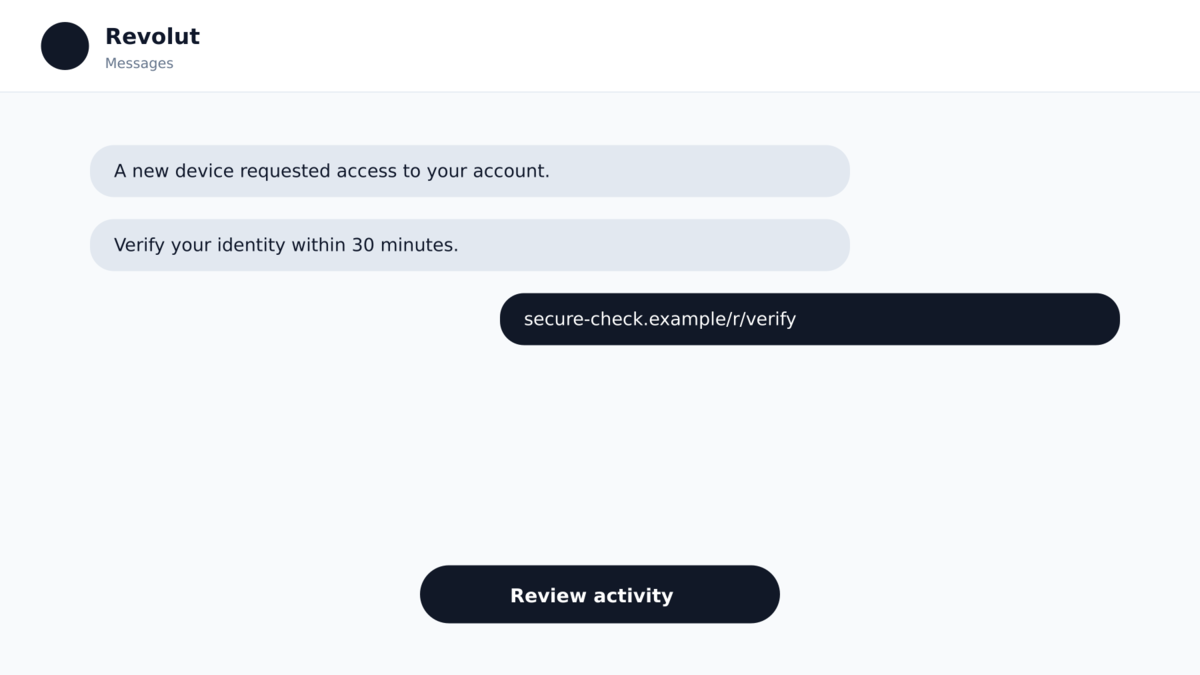
A text appears inside the same conversation where genuine Revolut messages have arrived before. It warns that something about the account needs attention and provides a link.
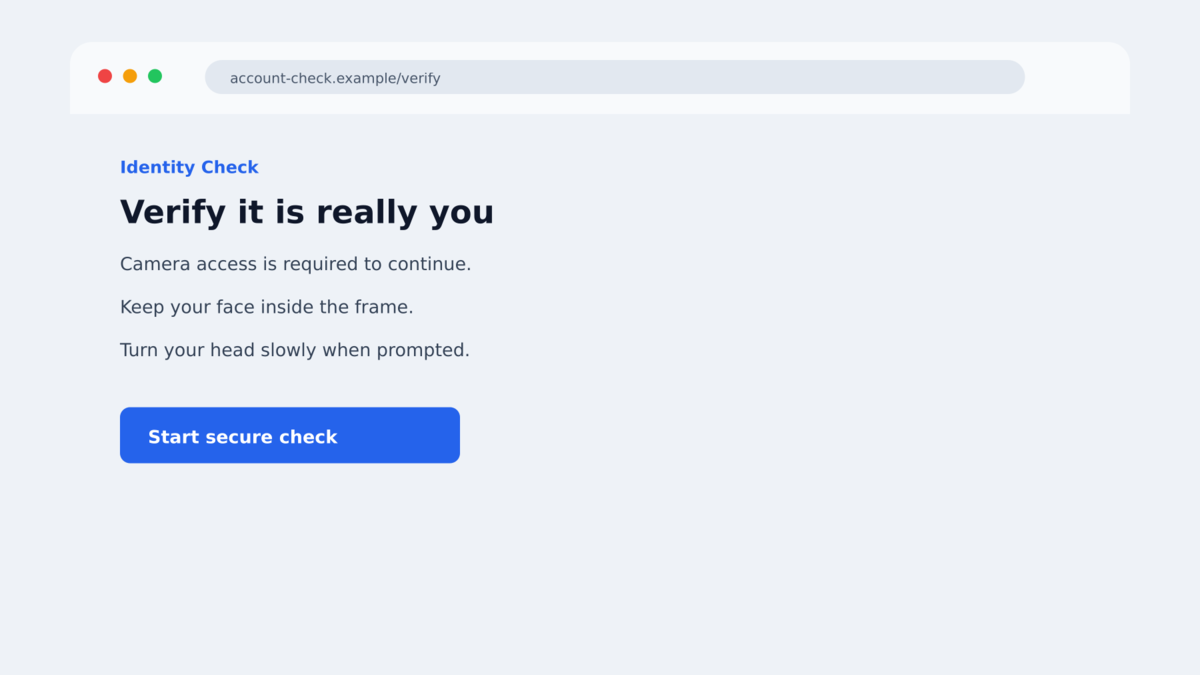
The page that opens does not begin with an obviously crude password box. It asks to use the camera and imitates the sort of identity check a financial app might perform.
That familiar sequence is what makes Revolut phishing texts unusually convincing, especially for customers already worried by news about exposed personal information.
Overview
The phishing texts appeared after Revolut disclosed a data incident
In September 2026, Revolut acknowledged that an unauthorized party obtained customer information by submitting fraudulent requests from a legitimate government agency email domain. This was a social-engineering incident involving external impersonation, not a reported breach of Revolut’s banking systems.
Days later, affected customers reported receiving Revolut-themed phishing texts. One documented message arrived in the same SMS conversation as earlier legitimate Revolut communications, a presentation that can make a malicious message look as though the bank sent it.
The fake page imitates a camera-based identity check
A reported phishing destination requested permission to access the device camera. After the visitor tapped Allow, the page imitated a live-video identity check, including an instruction to turn the head, before displaying a password prompt.
The sequence borrows behavior people associate with real financial verification. It may collect a selfie or video as well as login information, creating material that could support account-recovery fraud, identity impersonation, or more personalized follow-up scams.
The connection to the earlier data disclosure is not proven
The timing is concerning, and at least one phishing recipient was described as an affected customer. However, researchers stated that it was not yet known whether the texts used information obtained through the fraudulent government requests or whether unrelated criminals were exploiting public news about the incident.
That distinction matters. The Revolut phishing texts are real and dangerous, but the available evidence does not justify claiming that every message came from the same actor or that the disclosed data definitely powered the phishing campaign.
- The messages impersonate Revolut and direct recipients to a non-Revolut page.
- At least one text appeared in an existing conversation containing genuine bank messages.
- The phishing domain was newly observed around the time of the reported text.
- The page requested camera access and imitated a liveness-style identity check.
- A password prompt followed the fake video step.
- The flow could collect both account credentials and fresh identity imagery.
- Revolut was the impersonated bank and was not operating the phishing page.
- A direct link between the phishing texts and the earlier data incident remains unconfirmed.
The incident also shows why breach news and phishing must be investigated separately. Criminals frequently exploit public announcements before anyone knows whether they possess the exposed records. A timely message can be opportunistic and still be extremely effective.
Customers do not need to solve that attribution question before protecting themselves. Whether the sender used breached data, a purchased marketing list, or random targeting, the safe response is the same: do not follow the link and verify the account in the official app.
Why the Message Thread and Camera Request Feel Believable
SMS sender names do not work like verified email addresses. Mobile networks and messaging systems can group messages by a displayed sender identity, which means a fraudulent text may appear alongside authentic messages from the same brand.
Most people use conversation history as a trust signal. If earlier balance alerts or login codes in the thread were real, the newest message inherits that credibility even though it may have arrived through a different route.
The camera prompt adds a second layer of borrowed trust. Financial apps increasingly use selfies and motion instructions to confirm identity. A request to turn your head can therefore feel more sophisticated and legitimate than a simple imitation login form.
Browser permission prompts only confirm that a website is asking for the camera. They do not confirm that the site belongs to Revolut, that the identity process is approved, or that the resulting video will be handled safely.
A polished animation can be created by any website. The decisive evidence remains the destination domain and whether the identity check began inside the official Revolut app after an action the customer initiated.
Public reporting about the earlier incident may also increase urgency. A customer who has just been warned about exposed information may react quickly to a text claiming the account must be reverified, even when that exact urgency is what the scammer planned to exploit.
Company, Address, and Fulfillment Checks
The displayed sender is not enough to authenticate the text
A message appearing under the Revolut name or inside a familiar thread is not proof of origin. Sender IDs can be spoofed, abused, or grouped in ways that hide the true delivery path from the recipient.
Legitimate-looking history should never override a suspicious request. If a banking text contains a link, close it and open the bank’s installed app independently.
The phishing domain was separate from Revolut
The documented link led to a domain that was not part of Revolut’s official service. VirusTotal records cited by researchers showed that the phishing domain was first scanned on the same day as one reported message.
A secure padlock does not fix the ownership problem. HTTPS can encrypt the connection to a scam page while the page collects information for criminals.
The fake liveness check can capture more than a password
Camera access may allow the page to record a fresh image or video. Combined with a name, phone number, date of birth, identity document, or transaction detail obtained elsewhere, that media could make later impersonation more convincing.
The following password prompt completes the account-theft path. An attacker may also trigger a real login or recovery request and pressure the victim to approve a notification or provide a one-time code.
Research confirms the phishing flow but preserves the uncertainty
Malwarebytes documented the Revolut phishing texts and the camera-based imitation identity check. The report also clearly states that the relationship between those texts and the earlier data disclosure was not known.
That is the accurate conclusion: the phishing operation is confirmed, the page is fraudulent, and the timing is documented. Attribution to the same actor or to the exposed customer data remains a possibility rather than an established fact.
Revolut’s real support relationship also matters. A genuine bank can be reached inside its authenticated application, where staff can see the account without asking the customer to repeat passwords, camera checks, or one-time codes through an unsolicited webpage.
How the Revolut Phishing Text Scam Works
Step 1: A text creates an account-security concern
The recipient receives a message about verification, access, a suspicious action, or another banking issue. It is designed to make checking the account feel urgent and sensible.
The text may arrive inside a thread containing real Revolut notices. That placement reduces suspicion before the recipient has examined the link.
Step 2: The link opens a lookalike banking page
The destination copies Revolut’s visual style but is hosted on an unrelated domain. The site may be optimized for mobile screens so the browser address bar receives less attention.
Instead of immediately requesting card details, the flow begins with an identity step that resembles a normal banking safeguard.
Step 3: The page requests access to the camera
The browser displays a real permission prompt because the fraudulent website has asked to use the camera. If the victim taps Allow, the page can receive camera input.
The site then imitates a liveness check, possibly instructing the person to turn their head. The animation is part of the website, not proof that Revolut is performing the check.
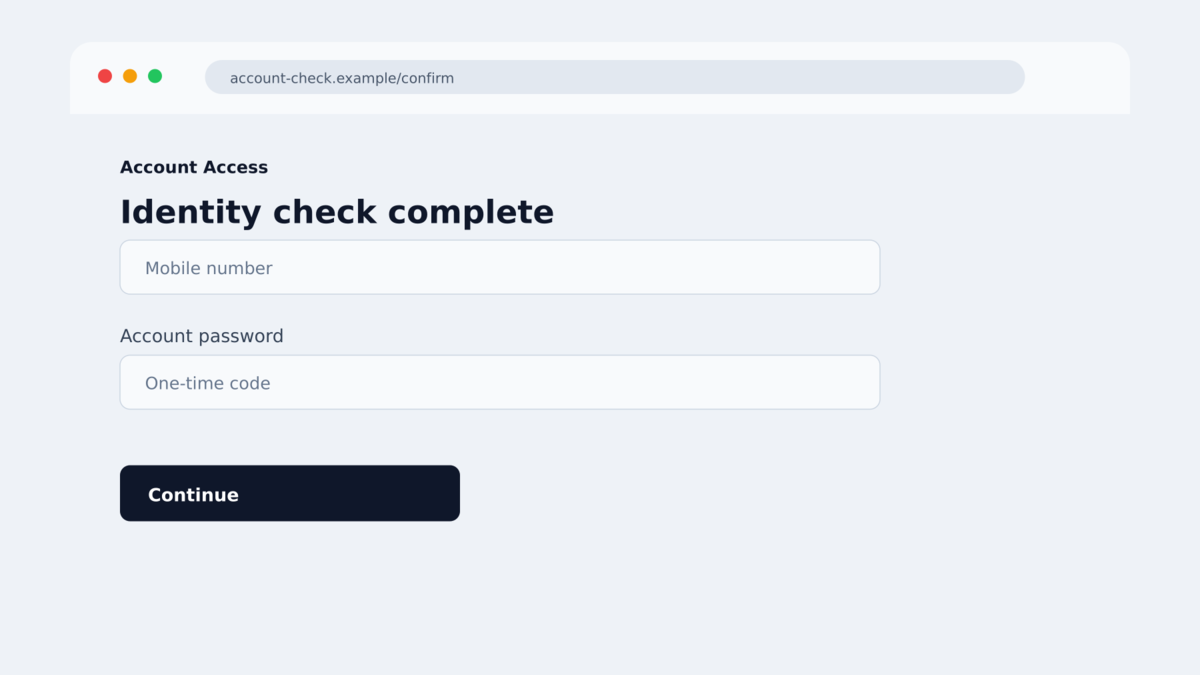
Step 4: A password screen appears after the video step
Once the visitor has completed what feels like a strong identity check, the page asks for a password. By this point, the victim may be less likely to question the request because several convincing screens have already been completed.
Any password entered goes to the phishing operators. The page may then show an error, a completion message, or another request.
Step 5: The attacker attempts a real login or recovery
The stolen credentials can be tested against the real service. The attacker may also use personal data and fresh identity imagery to make an account-recovery attempt appear more credible.
If Revolut sends a genuine approval request or one-time code, the scammer can contact the victim again and claim that completing the verification requires approving it.
Step 6: The account and identity data support further fraud
A successful takeover can expose transaction history, linked cards, transfers, and personal information. Even an unsuccessful login can leave the attackers with a working phone number, password, selfie, and evidence that the victim responds to bank-themed messages.
Those details can be reused in follow-up calls, identity fraud, credential-stuffing attempts, or recovery scams promising to fix the original problem.
Warning Signs in a Banking Verification Text
- An unexpected banking message contains a link instead of directing you to the installed app.
- The message creates urgency around verification, security, or account access.
- The link’s registered domain is not revolut.com.
- A web page, rather than the official app, requests camera access for identity verification.
- The page asks for a password after collecting a selfie or video.
- You are asked to approve a login or provide a code you did not request.
- The message relies on recent breach news to make immediate action feel necessary.
- The page displays security icons but offers no verifiable connection to the bank.
- The text warns that delaying will restrict or close the account.
- A supposed support agent contacts you after you visit the page.
Always open Revolut from the app icon already installed on your device. If the warning is real, the relevant notice should be visible there or through support reached from within the app.
What to Do if You Have Fallen Victim to This Scam
- Close the phishing page and disconnect if a download occurred. Do not return to the link to inspect it. Preserve the text and address with screenshots if this can be done safely.
- Open Revolut independently. Use the official installed app or manually type the official address on a trusted device. Contact in-app support and explain exactly what information you entered.
- Change the Revolut passcode and associated email password. Use a clean device. Replace any reused password everywhere else and review email recovery settings.
- Revoke unfamiliar sessions and devices. Check for new authentication methods, cards, beneficiaries, transfers, and personal-detail changes. Ask Revolut support to secure the account if you cannot verify every session.
- Tell support whether you provided a selfie or video. Identity imagery can be relevant to account-recovery fraud. Ask what additional protections or identity notes can be placed on the account.
- Contact linked banks and card issuers. Freeze affected cards or accounts when advised, review transactions, and dispute unauthorized activity promptly.
- Scan the device if anything was downloaded. Malwarebytes can check for malicious apps or files. AdGuard can help block known phishing domains and deceptive ads, but it cannot recover credentials already submitted.
- Report the text and domain. Forward the message to the appropriate carrier reporting service, notify Revolut, and file a report with your national fraud or cybercrime agency.
- Expect a second approach. Ignore callers who know details about the incident and claim they can recover money, reverse a transfer, or secure the account for a fee. Use only in-app support.
Frequently Asked Questions
Can a scam text appear in a real Revolut conversation?
Yes. Sender-ID behavior can cause a fraudulent message to appear alongside legitimate texts. Conversation placement is not reliable authentication.
Does Revolut verify customers through a link in an SMS?
You should not trust an unsolicited link for verification. Open the official Revolut app directly and check for notices or contact support there.
Why does the fake page ask me to turn my head?
The motion imitates a real liveness check and can make the page feel authentic. It may also let the scammer collect fresh identity imagery.
Were the phishing texts definitely caused by the data incident?
No direct link had been confirmed in the reviewed reporting. The phishing was real, but whether the attackers used data from the earlier incident remained unknown.
What if I allowed camera access but entered no password?
Revoke the site’s camera permission, clear its browser data, notify Revolut, and remain alert for identity-themed follow-ups. The risk is lower than if credentials were also submitted, but it is not zero.
What if I only opened the link?
If you did not grant permissions, download anything, enter information, or approve a request, the immediate risk is lower. Close the page, remove its site permissions, and check the account through the official app.
The Bottom Line
The Revolut phishing texts combine two unusually persuasive signals: placement inside a trusted message thread and a fake camera-based identity check. Neither proves that the page belongs to the bank.
The campaign itself is confirmed. A connection to the earlier customer-data disclosure is possible but not established, and it should not be presented as fact.
Never complete financial identity verification from an unsolicited text link. Open the official Revolut app, check the account there, and contact in-app support if anything looks wrong.

Join the discussion
0 commentsShare your experience or ask a question about this article.
Discussion
Start the conversation
Have a question or something useful to share? Add the first comment.