

If you’ve come across flashy Facebook ads claiming that CNN anchor Richard Quest is offering investment advice, you might want to hit the brakes. The so-called “Richard Wealth Guide” is not a real opportunity—it’s a sophisticated scam.
This article delves deep into how this fraud works, who’s behind it, and what to do if you’ve fallen victim. Stay with us, because what you’ll read could save you or someone you know from financial disaster.
Scam Overview: The Richard Wealth Guide Deception
The “Richard Wealth Guide” is part of a growing trend of online investment scams that misuse the identities of high-profile media and finance figures. In this case, the scammers have hijacked the name and image of CNN’s Richard Quest to create false legitimacy for their operations. What makes this scam particularly dangerous is how convincingly it’s presented and how deeply it infiltrates mainstream platforms like Facebook and WhatsApp.
What the Scam Looks Like
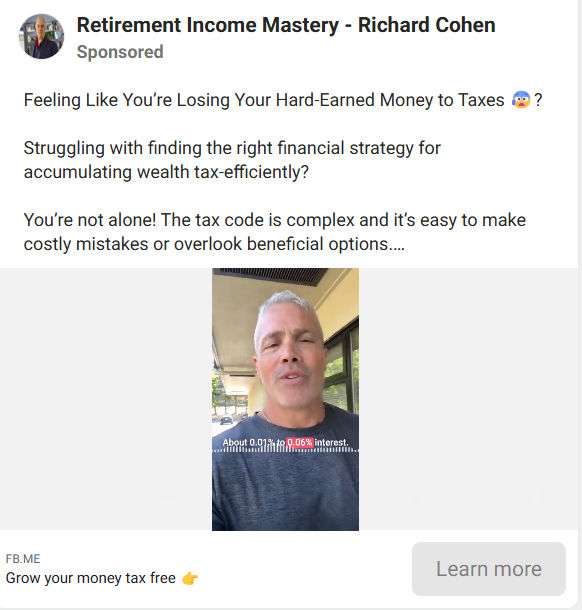
It typically starts with a Facebook ad. The ad uses Richard Quest’s image and name, suggesting he’s endorsing an investment platform that offers unusually high returns—such as a 45% increase in a single week. These ads are paid promotions, meaning Facebook profits from them until they’re reported and taken down.
Clicking the ad redirects users to a landing page titled “Richard Wealth Guide.” The page is professionally designed, mimicking legitimate financial websites. From there, users are encouraged to join a WhatsApp group for exclusive stock tips and insights.
In the WhatsApp group, users encounter someone posing as an investment advisor—often under names like “Alyssa Mendez”—who offers free tips for 100 days and promises only a 5% commission on profits afterward.
They make it sound like Richard Quest and a mysterious partner named “John” are working behind the scenes, developing these stock picks. Users are told that Quest will join the group when he’s available, further reinforcing the illusion of legitimacy.
Fake Endorsements and Identity Theft
CNN has explicitly denied any connection between Richard Quest and this so-called investment group. After media outlet Press Gazette brought the issue to light, CNN confirmed the misuse of Quest’s identity. Facebook removed the specific page in question—but this only scratched the surface.
The scam is adaptable. After being exposed, it resurfaced under different guises, using other well-known names like:
- Karen Finerman (CNBC)
- Scott Galloway (NYU professor and tech analyst)
- Cathie Wood (Ark Invest)
- David Kostin (Goldman Sachs)
None of these individuals are affiliated with the scam. Their names and photos are used without permission to build credibility and confuse victims.
Why It’s So Dangerous
These scams are particularly insidious because they blend seamlessly into legitimate content. They:
- Use AI-generated imagery and voice to simulate authenticity
- Create fake social media profiles
- Launch professional-looking websites
- Exploit high-traffic platforms like Facebook and WhatsApp
Victims often don’t realize they’ve been scammed until they’ve invested real money and see no returns—or worse, are asked for more funds to “unlock” their profits.
How The Scam Works
Step 1: The Facebook Ad Hook
Scammers launch sponsored Facebook ads featuring Richard Quest or other financial figures. The ads claim they’re sharing a “wealth breakthrough,” often with outrageous promises like doubling your money in days.

Step 2: The Clickbait Landing Page
Clicking the ad leads to a landing page styled to resemble legitimate financial publications or portals. It’s branded with logos and testimonials and reiterates the high-return claims. The call-to-action? Join the exclusive WhatsApp group for insider stock picks.
Step 3: WhatsApp Group Infiltration
Once inside the WhatsApp group, users are greeted warmly. The scammers quickly create a sense of community and urgency. They introduce themselves as financial advisors and promise daily stock recommendations.
Common tactics include:
- Sending daily messages with stock picks
- Sharing screenshots of fake profits
- Praising Richard Quest’s (fake) involvement
- Fabricating user testimonials
Step 4: Building Trust
They offer a 100-day free trial and say they’ll only charge a 5% commission on profits. This low barrier to entry builds trust. The scammers may even give real stock picks initially—usually based on public trends—to appear credible.
Step 5: The Investment Pitch
Once users are comfortable, they’re asked to create accounts on third-party platforms (also fake or semi-legit but controlled by the scammers). Victims deposit real money here, believing they’re starting their investment journey.
The scammers claim to invest the money in fast-moving stocks. They might show charts, fake dashboards, or statements that indicate significant gains.
Step 6: The “Profit Lock-in”
When users request to withdraw their supposed profits, they’re met with conditions:
- You must pay a tax fee (e.g., 15%)
- You need to upgrade your account
- There are delays due to “banking regulations”
Each condition is designed to extract more money. Victims end up paying more in hopes of receiving their profits—which never come.
Step 7: Ghosting or Exit Scam
Once the scammers feel they’ve squeezed out enough, they vanish. The WhatsApp group is deleted, the Facebook page disappears, and all communications cease. Victims are left with empty accounts and no recourse.
What to Do If You Have Fallen Victim to the Scam
If you’ve already handed over money or personal information, act fast. Here’s a step-by-step recovery guide:
- Cease All Communication
- Do not engage further with the scammers.
- Block them on all platforms (WhatsApp, Facebook, etc.)
- Report the Scam
- Facebook: Use the “Report Ad” and “Report Page” options
- WhatsApp: Report the group and individuals involved
- CNN and other impersonated parties: Notify their legal departments
- Contact Your Bank or Credit Card Provider
- Inform them of the fraudulent transaction
- Request a chargeback if applicable
- Monitor your account for unauthorized transactions
- File a Complaint with Authorities
- FTC (Federal Trade Commission): https://reportfraud.ftc.gov
- FBI’s IC3: https://www.ic3.gov
- Local consumer protection agencies
- Secure Your Digital Identity
- Change all passwords associated with the scam
- Set up two-factor authentication
- Consider a credit freeze if you shared sensitive personal data
- Warn Others
- Share your story on social media (omit private info)
- Leave reviews on scam report sites like Scamwatch or Trustpilot
- Help others avoid falling into the same trap
- Seek Legal Advice
- A consumer rights lawyer may be able to assist with recovery options
- Join online forums or class actions if they exist
Frequently Asked Questions (FAQ)
What is the Richard Quest Scam?
The Richard Quest Scam, also known as the Richard Wealth Guide scam, is a fraudulent investment scheme that falsely uses the name and image of CNN anchor Richard Quest to lure victims into fake stock trading groups, often through Facebook ads and WhatsApp chats.
Is Richard Quest actually involved in this investment group?
No. Richard Quest has no affiliation with any investment group or financial service. His name and image are being used without permission to add false credibility to the scam.
How does the Richard Wealth Guide scam work?
The scam starts with paid Facebook ads featuring Richard Quest’s face and a fake success story. Clicking the ad redirects you to a website and then into a WhatsApp group. There, scammers posing as financial advisors offer free stock tips and eventually convince victims to transfer money into fraudulent accounts.
Why are scammers using WhatsApp for this scam?
WhatsApp offers encrypted, direct communication with little moderation. This allows scammers to create a false sense of exclusivity and avoid public scrutiny, making it easier to manipulate victims.
What are the red flags that this is a scam?
- Unrealistic investment returns (e.g., 45% in one week)
- Fake endorsements from celebrities or media personalities
- Requests to send money to unregulated platforms
- Delays or excuses when trying to withdraw funds
- Pressure tactics or promises of “limited time” opportunities
Is this scam only using Richard Quest’s name?
No. Other well-known personalities such as Karen Finerman (CNBC), Scott Galloway, Cathie Wood (Ark Invest), and David Kostin (Goldman Sachs) have also been falsely linked to similar scams.
What should I do if I joined one of these WhatsApp groups?
Exit the group immediately and block the contact. Report the group and any individuals involved to WhatsApp and Facebook. Do not send any money or personal information.
Can I recover my money if I was scammed?
Recovery is difficult, but not impossible. Contact your bank or payment provider immediately to report the fraud and attempt a chargeback. You should also file reports with the FTC, FBI (IC3), and local law enforcement.
The Bottom Line
The “Richard Wealth Guide” scam is a textbook example of how cybercriminals use trusted public figures, slick branding, and psychological manipulation to steal your money. Richard Quest has nothing to do with it—his name and image are being abused for financial gain.
Always be skeptical of online ads promising quick riches, especially those featuring famous names. Do your own research, verify sources, and never make investments based on social media messages or WhatsApp groups.

Reviews & discussion
0 commentsShare a firsthand experience, or ask a question.
Community reviews
Richard Quest
Moderated reader experiences, not an editorial verdict.
Start the conversation
Have a question or something useful to share? Add the first comment.