

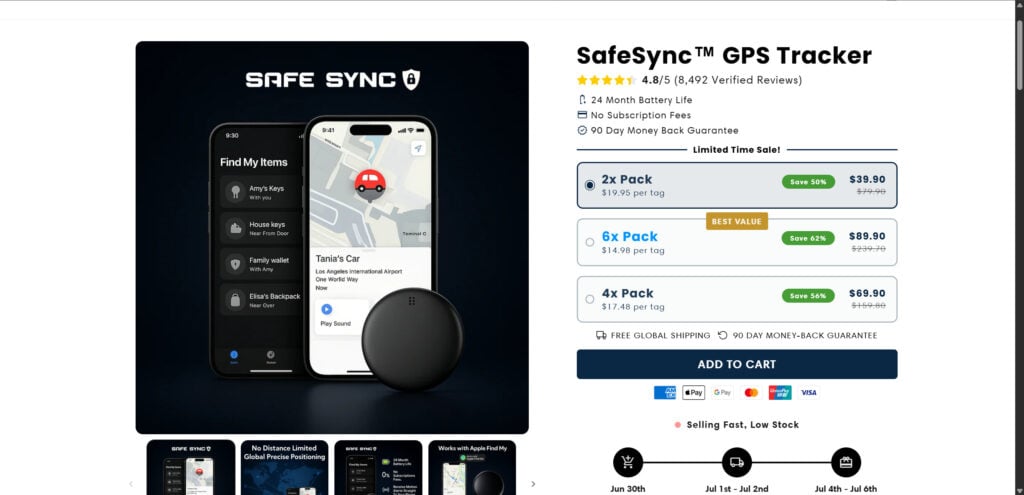
You’ve probably seen it on Facebook, Instagram, or some suspicious site: the SafeSync GPS Tracker. It promises next-level security for your car, bike, keys, wallet, or even your kid’s backpack. They say it has 24-month battery life, no monthly fees, real-time tracking, motion alerts, Apple Find My integration, and more — all at a “limited-time discount.”
But when a product makes such bold claims and shows up in aggressive ads all over the internet, smart consumers know to pause and investigate. Is SafeSync really the high-tech tracker it claims to be — or is this another dropshipping scam built on false promises?
Let’s dive deep into the red flags, customer complaints, misleading tactics, and the truth behind SafeSync.
What Is SafeSync and Why It’s Raising Alarms
On the surface, SafeSync looks like a game-changing GPS tracker. Their landing page is sleek, full of buzzwords like “Apple Find My”, “real-time tracking”, “military-grade”, and “zero monthly fees.” The 4.8-star TrustPilot score and glowing customer reviews only add to the illusion.
But here’s where the mask slips:
1. False Advertising & Overpromising
SafeSync claims a 24-month battery life while also stating “lasts several weeks on a charge” — which are two very different things. No Bluetooth-based or GPS-enabled tracker can offer motion alerts, real-time tracking, and such long battery life without recharging.
2. Misuse of Apple’s Brand
The product says it works with Apple’s Find My network. However, Apple only allows certified MFi (Made for iPhone) devices to connect to their secure network. There’s no certification badge, no Apple partnership, and SafeSync is not listed in Apple’s official directory.
3. No Real Company Info
No physical address, no working contact number, and no legitimate company behind the site. Everything points to an anonymous dropshipping setup designed to avoid responsibility once your payment is processed.
4. Fake Reviews & Inflated Ratings
The reviews showcased on the site are not from verified buyers and appear fabricated. Some names and stories are reused from similar scams. TrustPilot stars on the site are embedded as images, not linked to actual review pages.
5. Suspicious Pricing Strategy
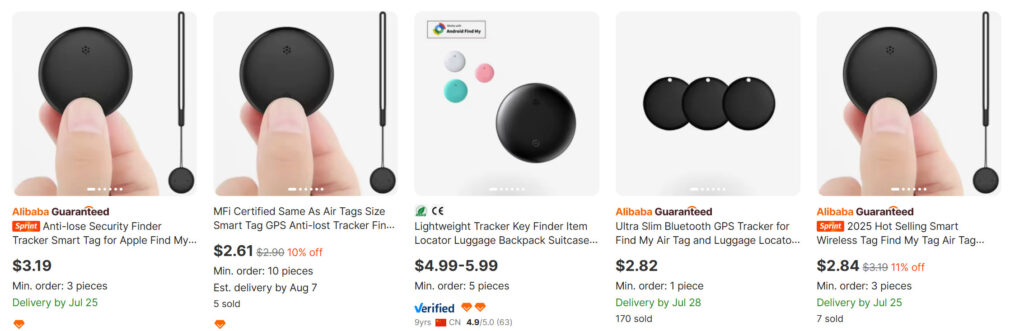
They push high “discounted” bundles — $39.90 for 2, or $89.90 for 6 — while identical products are available on Alibaba for under $3 per unit. This is classic dropshipping: buy cheap in bulk, rebrand with a false backstory, and mark up the price by 2000%.
6. Plagiarized Product Content
The visuals and descriptions match multiple listings from Chinese suppliers (see: Alibaba, AliExpress). These generic tags are not proprietary technology. Anyone can order, private-label, and resell them.
How the Scheme Works
This type of operation is a textbook example of a deceptive eCommerce scam built around cheap consumer electronics. Here’s how it typically unfolds:
Step 1: Dropshipping Setup
Scammers buy cheap trackers ($2.50–$3.00) from Alibaba, most of which are simple Bluetooth tags (not true GPS devices). They don’t have embedded GPS chips, and rely on proximity to smartphones using apps like “Find My” — if supported.
They then:
- Rebrand the item (like “SafeSync”)
- Create a Shopify or WooCommerce site
- Use a flashy theme with fake urgency and fake discounts
- Add misleading comparison tables and stolen reviews
Step 2: Fake Product Claims
The SafeSync listing fabricates features like:
- 24-month battery life (impossible for real-time trackers)
- No subscription (which real GPS devices often require)
- Worldwide coverage (which Bluetooth devices cannot provide)
These features are meant to trick people into thinking they’re buying something comparable to Apple AirTag or Tile, but it’s not even close.
Step 3: Facebook & Google Ad Blitz
Once the site is up, the scammers:
- Run aggressive ad campaigns on Facebook, Instagram, and YouTube
- Use influencer-style videos with scripted demos
- Promote urgency: “Only 3 left in stock,” “Price goes up tonight,” etc.
Since the item costs them under $3 and they sell it for $20–$40 apiece, even a 5% conversion rate can generate thousands in quick profits.
Step 4: Delayed or No Shipping
Buyers often report:
- No confirmation emails
- Tracking numbers that never work
- Shipping delays over 3–4 weeks
- Items arriving from China, unbranded or in plastic bags
Some never receive anything at all.
Step 5: Ghosted Customer Support
If customers complain or ask for refunds, they’re met with:
- Automated email responses
- “Please wait another 3–5 business days”
- Or silence
Returns are usually only accepted if you ship it at your own expense to a warehouse in China, making it not worth the effort.
Step 6: Payment Processor Hops
Once enough chargebacks pile up or complaints emerge, the scammers:
- Shut down the current site
- Clone it under a new name (ex: TrackBuddy, SyncZone, GPSSecure)
- Launch new campaigns under the radar
This cycle continues — rebrand, relaunch, restart the scam.
What To Do If You’ve Fallen Victim to SafeSync
If you’ve already purchased from SafeSync or a similar GPS tracker site and feel scammed, take action now:
1. Contact Your Bank or Credit Card Provider
Immediately request a chargeback or dispute the transaction. Mention that the product was falsely advertised and customer service is unreachable.
2. File a Complaint
Report the scam to:
- FTC Complaint Assistant
- econsumer.gov (International)
- Better Business Bureau (BBB)
- Internet Crime Complaint Center (IC3)
3. Warn Others
- Leave honest reviews on TrustPilot, SiteJabber, and Reddit.
- Post warnings in relevant Facebook groups.
- Report their ads on Facebook or Google as misleading.
4. Track the Domain
Use a service like Whois Lookup to see if the site was recently registered or linked to other scam domains. Most scam stores are less than a year old.
5. Use Buyer Protection (If Available)
If you purchased using PayPal, file a dispute there. They may issue a refund if you prove it was a deceptive product.
The Bottom Line
The SafeSync GPS Tracker is yet another dropshipping scam disguised as a premium tech product. It relies on:
- False battery and GPS claims
- Fake Apple compatibility
- Stolen product listings
- Misleading trust signals
- No accountability
In reality, it’s a $2 Bluetooth tag being sold for up to $45 per piece — without offering the core GPS functionality it promises.
If you’re looking for a legitimate tracking solution, stick to well-reviewed, MFi-certified devices like Apple AirTags, Tile, or Jiobit. These companies offer proper customer service, accurate location tracking, and real return policies.
Don’t fall for flashy ads with made-up benefits and urgency tactics. Always research, check the company background, and remember: if it looks too good to be true — it usually is.








