


You only wanted a PDF, an instruction manual, or a quicker search. An ad offered a small browser tool, and installing it seemed like the easiest shortcut.
Now the results still look familiar, but getting to them feels different. A brief detour in the address bar can tell an important story.

Overview
The Searchjacked finding is about the route your searches take
Searchjacked describes a collection of browser extensions investigated by Socket researcher John Tuckner. The problem is search interception, not a flaw in the PDF file you wanted.
The research identifies 319 extensions associated with roughly 13.4 million users across a decade. Those figures describe the collection, not one newly installed extension.
The extensions change search behavior so queries pass through an operator’s service before reaching a familiar destination. That extra stop gives someone else access to the query.
A useful-sounding tool can come with a different main purpose
The ads use practical hooks, including document finding, manuals, safer searches, and AI assistance. The installation can feel like a necessary step toward finishing your original task.
On the Simple PDF Search landing page, text beneath the installation button expressly says the extension changes browser search and new-tab settings to use Yahoo.
That disclosure matters. The warning is not that every setting change happens without a prompt, but that shoppers may misunderstand what they are agreeing to install.
What this does and does not mean for your computer
- Your searches can reveal sensitive interests even when the extension never asks for an account password.
- A final Yahoo or Bing page does not reveal every intermediary that handled the query.
- A store listing or recognizable search brand is not a complete privacy assessment.
- The research describes redirect capabilities, not proof that every affected user received malware or a phishing page.
Remove unwanted search-changing extensions and restore the search provider you intended to use. There is no benefit in leaving an unnecessary query intermediary in place.
Why a Normal Results Page Can Hide a Privacy Problem
Imagine searching for a medical symptom, a debt repayment question, or a private workplace concern. The words themselves can be sensitive, even without your name attached.
When a browser sends that query directly to your chosen search service, you know which service you meant to use. A redirect adds another participant.
The intermediary may also receive connection information and identifiers. Repeated searches associated with the same identifier can reveal more than any individual query.
Seeing legitimate results afterward does not undo that earlier disclosure. By then, the question has already passed through the additional system.
This is different from an ordinary bookmark or a link that opens your preferred search site. The extension can affect searches you make later from the address bar.
That distinction explains why removing only a new-tab shortcut may not resolve the problem. The installed extension and the search setting both need attention.
It also explains why HTTPS is not a complete answer. An encrypted connection can protect data in transit while still delivering it to an unwanted recipient.
How the Searchjacked Extension Funnel Works
Step 1: An advertisement meets an immediate need
The starting point may be a search for a manual or document. An installation offer appears while the reader is concentrating on getting that task done.
A button promising to find PDFs quickly has a clear appeal. It sounds like a tool for the next few minutes, not a lasting change to everyday browsing.
Readers should pause at that mismatch. Retrieving one public document normally should not require handing another company control over every future address-bar search.
The relevant question is not whether all document tools are bad. It is whether the requested browser change is proportionate to the feature you actually need.
Step 2: The landing page directs you toward an extension
The Simple PDF Search page prominently offers an installation button. Its smaller accompanying agreement covers changes to search and new-tab behavior.
Those are ongoing browser functions. If you were expecting a document download, the agreement describes a broader change than the task that brought you there.
Do not rush past wording about a default search provider. A default determines where routine searches go unless you deliberately choose another route.
You can close the page without installing anything. An unfinished document search is an inconvenience, not a reason to accept an unnecessary extension.
Step 3: The store supplies a familiar installation setting
An official extension marketplace can make the handoff feel reassuring. It provides recognizable buttons, developer details, review areas, and sometimes a featured label.
Socket found that many extensions in the collection were unlisted. An unlisted item can still be reached through a direct link even when normal store searches miss it.
Unlisted distribution has legitimate uses. In this context, however, it helps explain how an advertised extension can have users without being easy to discover independently.
Do not confuse marketplace availability with a guarantee that the extension’s business model or data handling matches your expectations.
Step 4: Browser settings send later queries through another service
The important change happens after installation. Address-bar searches can now follow the extension’s configured route rather than the provider you previously selected.
Some extensions can accomplish this through a search-provider setting in their manifest. A long list of alarming permissions is not necessary for that change.
That is why a short installation prompt can still deserve careful reading. The practical effect matters more than how complicated the extension appears.
If Chrome says an extension controls your search setting, treat that as a useful clue. Identify the extension instead of repeatedly selecting a different provider.
Step 5: Familiar results can conceal the commercial detour
The intermediary can forward the search with referral information. The operator may earn money when traffic reaches a search partner through that arrangement.
The broader research also describes server-controlled routing. A destination can vary without requiring a new extension installation on the user’s computer.
That capability creates an additional risk, but it should not be overstated. A potential harmful destination is different from an observed malware delivery to every user.
The immediate reason to remove an unwanted extension is enough: it inserts a participant into searches without providing a benefit you want to retain.
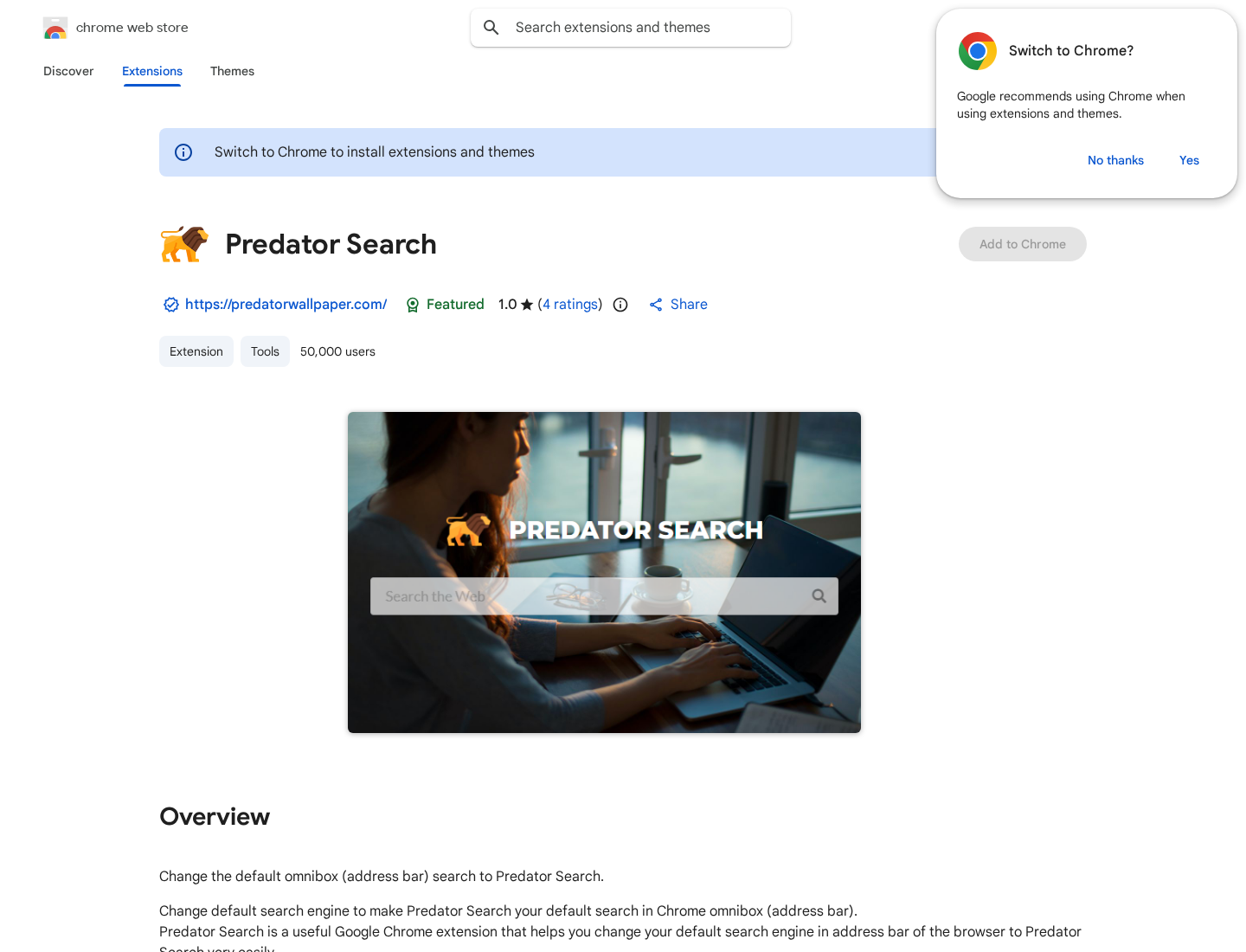
The Store Listing Is Only One Part of the Check
The Predator Search listing is one example named in the research. Its description openly discusses replacing the browser’s default address-bar search.
The listing also presents a developer declaration about data collection. That statement should not be confused with an independent measurement of every server handling a query.
For an extension you find installed, compare its exact name, developer, website, and identifier. Names can overlap, and unrelated tools may sound similar.
A browser extension identifier is useful because it points to a specific listing. The same is not true of a generic phrase such as safe search.
Do not install a suspicious extension just to compare it with a warning article. Existing details and the store page are enough to start the identification.
If you need help, record the identifier and your browser version. Keep private search terms out of public screenshots or forum posts.
Use a harmless test phrase when describing the symptom. There is no need to repeat a private medical query or paste a work document into a demonstration.
Note whether the change affects the address bar, a new-tab search box, or both. That small detail helps distinguish a changed shortcut from a broader provider override.
A legitimate search engine can also be the final destination of unwanted routing. This article does not accuse Yahoo, Bing, or every extension using them of fraud.
What to Do If an Extension Changed Your Searches
-
Stop using the changed search route while checking it. Open a trusted search service directly or use a clean browser profile for sensitive activity.
You do not need to search for banking or health information through the extension while deciding whether to keep it.
-
Identify what is installed. Enter chrome://extensions in Chrome’s address bar. Review tools added around the time the redirects began.
Open Details for a questionable item and note its name, identifier, developer, and permissions. Compare those details rather than relying only on its icon.
-
Remove the unwanted extension. Choose Remove on its card and confirm. Google’s settings-change instructions explain this supported route.
If you are unsure which extension is responsible, disable suspect items individually and check whether the behavior stops. Keep trusted work or accessibility tools intact.
-
Restore the intended search provider. Open Chrome Settings, then Search engine. Select the provider you actually want, and inspect unfamiliar search entries.
Also review On startup and the new-tab experience. Search routing, startup pages, and shortcuts can be separate settings, so verify the symptom that brought you here.
-
Check every affected profile. Repeat the review in other Chrome profiles and on devices where the same extension may have been installed.
If the item returns, consider whether synchronization, another profile, or an installed application is restoring it. Record what happens before removing unrelated software.
-
Scan when there are signs of additional unwanted software. On Windows, use the established Malwarebytes Free download route and run a Threat Scan.
For a Mac, choose Malwarebytes for Mac. Review detected items and restart if requested, then check whether the redirect has stopped.
Read installation screens and decline optional offers you do not want. Manual scanning is separate from a paid plan offering ongoing protection.
Some linked security tools use MalwareTips affiliate links. Scanning does not retrieve past queries, reverse a payment, or prove that every account is safe.
-
Reduce the advertising exposure that led to the installation. AdGuard can help filter advertising and tracking, depending on the product and configuration.
Blocking an ad is a preventive layer, not a substitute for uninstalling an extension already controlling searches. Avoid installing another unknown cleaner from a pop-up.
-
Protect accounts according to what actually happened. If you entered a password on a suspicious destination, change it through the genuine service and review active sessions.
Enable multifactor authentication where available. If you only experienced a search redirect, do not assume that every saved password was stolen.
If Chrome Will Not Let You Remove the Extension
A managed work or school browser can restrict removal. Contact its administrator rather than attempting to delete management policies yourself.
On a personal device, an unexpected management message deserves further checking. Save the exact extension details and any explanation Chrome displays.
Do not respond by deleting random registry entries, scheduled tasks, or application folders. The Searchjacked finding alone does not establish that those components are involved.
A browser reset can help with persistent unwanted settings, but it changes preferences and disables extensions. Understand that consequence before using it.
Back up important browsing information first, and check the current browser help instructions. Re-enable only extensions you recognize and actually need afterward.
If the problem survives removal and a scan, ask for case-specific assistance. Describe the affected browser, the route shown, and the steps already attempted.
Keep financial documents, account cookies, recovery codes, and private browsing history out of a public help request. A short redacted example is safer.
How to Avoid Another Search-Tool Installation Trap
Separate the file you want from the software offered beside it. A PDF icon in an advertisement does not mean the button downloads that document.
When looking for a manual, start with the equipment maker’s support page and model number. That often avoids the extension offer entirely.
Before installing any browser tool, read what happens to search, the homepage, and new tabs. Decline changes that do not serve your intended purpose.
Give extensions an occasional clear-out. A tool installed for a one-off task should not remain indefinitely merely because you forgot its name.
Finally, look beyond whether a search eventually works. The privacy question is who receives it along the way, and whether you deliberately chose those recipients.
Frequently Asked Questions
What is Searchjacked?
It is the name of Socket’s research into extensions that redirect browser searches through operator-controlled services. It is not the name of one installed app.
Were 13.4 million people infected at once?
No. The estimate covers users associated with 319 extensions over roughly a decade. It should not be presented as one simultaneous infection event.
Why do my searches still finish at Yahoo or Bing?
An intermediary can forward your query to a genuine search engine. The familiar final page does not show every service that received the original request.
Can an extension change search without broad permissions?
Yes. A search-provider configuration can alter the default route. Review installation disclosures and browser settings even when the permission list looks short.
Does this prove my passwords were stolen?
No. Search interception is not automatic proof of password theft. Take account-recovery steps if you entered credentials on a suspicious page or see unauthorized activity.
What should I do first?
Identify and remove the unwanted extension, then restore your intended search settings. Check other affected profiles and investigate further if the behavior returns.
The Bottom Line
Do not keep an unwanted search-changing extension because the results page looks normal. Remove it and choose your search provider deliberately.
If redirects persist, check other profiles and installed software, use an appropriate scan, and seek targeted help. Do not pay a pop-up cleaner to fix the problem.

Join the discussion
0 commentsShare your experience or ask a question about this article.
Discussion
Start the conversation
Have a question or something useful to share? Add the first comment.