

A suspicious website is making the rounds in the crypto community, claiming to host the exclusive presale of a new meme-inspired cryptocurrency called $SHADOW. Presented as an opportunity to “join the meme coin movement,” the presale promises early investors access to special benefits and the potential for high returns.
But there’s a major problem: it’s all a scam.
This fake presale, hosted at sol-shadow.com, is not connected to any legitimate blockchain project. Instead, it’s designed to harvest wallet credentials and drain user funds. This article provides a comprehensive breakdown of how the scam operates, how victims are exploited, and what you can do if you’ve fallen into the trap.
Scam Overview: Inside the Fake $SHADOW Presale
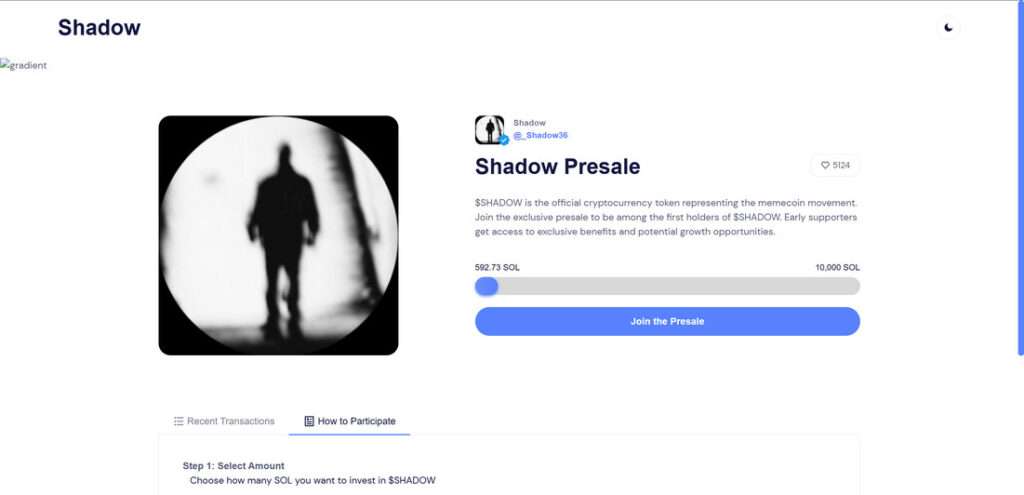
The $SHADOW presale is promoted as an early investment opportunity in a meme coin project. The website, sol-shadow.com, claims that $SHADOW is the “official cryptocurrency token representing the memecoin movement.”
It encourages users to participate in an exclusive presale, stating that early supporters will enjoy “exclusive benefits and potential growth opportunities.” There’s even a progress bar that shows how many SOL (Solana tokens) have already been invested, reinforcing a sense of momentum and legitimacy.
At the time of writing, the scam site displays:
- “5124 $SHADOW supporters”
- “466.29 SOL raised out of 10,000 SOL”
- A 3-step process to participate in the presale:
- Select amount of SOL to invest
- Sign the transaction
- Claim your tokens after the presale ends
The Illusion of Legitimacy
The layout of the site is slick, minimal, and mirrors popular crypto launchpads. It uses clean fonts, live counters, and wallet integration prompts that feel familiar to anyone who has interacted with Web3.
However, it is all a front.
This presale is not listed on any legitimate aggregator, not verified on Solana-based platforms like Solscan, and has no backing from any recognized developers or crypto firms.
The Real Goal: Stealing Wallet Access
While the scam site does ask users to select an investment amount and connect their wallet, the real trap lies in the wallet connection process.
Instead of a secure, permission-based wallet interface, the site prompts users to enter their recovery phrase or private keys under the guise of signing or confirming the transaction.
Once the victim submits this sensitive information, the scammer gains full control of their wallet.
This allows them to:
- Access and transfer out all SOL and SPL tokens
- Drain NFTs or staking positions
- Use smart contract exploits to continue withdrawing assets even after the site is closed
Why the Scam Works
This scam preys on several common behavioral patterns:
- Fear of missing out (FOMO) created by progress bars and participant counters
- Social proof in the form of large investment totals and fake supporter counts
- Meme coin hype that has dominated headlines thanks to the success of tokens like DOGE and SHIB
- Trust in browser wallet popups, which are mimicked to appear genuine
Combined, these tactics reduce suspicion and increase the likelihood that a user will submit sensitive information.
No Team, No Whitepaper, No Code Transparency
Legitimate token launches typically offer:
- A verifiable development team
- A whitepaper or technical overview
- A GitHub repository or audited smart contract
- Community channels (Telegram, Discord)
The $SHADOW presale offers none of these. There is no team, no roadmap, and no indication that a real token will ever be issued. It is a phishing site in disguise, designed to impersonate a standard presale experience.
How the Scam Works
Scams like this rely on a methodical playbook, engineered to exploit user trust and extract sensitive data. Here is how the $SHADOW presale scam typically unfolds:
Step 1: User Is Targeted via Ads, Social Posts, or Forums
Scammers promote the $SHADOW presale through:
- Sponsored posts on Twitter/X
- Crypto-themed Discord or Telegram communities
- Comments on Reddit or YouTube
- Email newsletters
These promotions highlight the exclusivity and urgency of the presale, with messages like:
- “The next 100x meme coin is here”
- “Private round for early adopters only”
- “$SHADOW presale is LIVE now – limited allocation”
Links often use shorteners or cloaked URLs to avoid detection.
Step 2: Victim Lands on sol-shadow.com
The user clicks through and lands on a visually clean, professionally designed site. Elements include:
- A live counter showing SOL raised
- Step-by-step instructions to join the presale
- A call to connect their wallet to proceed
These cues are designed to mirror platforms like Raydium, Pinksale, or CoinList.
Step 3: Wallet Connection Prompt
The next step asks the user to connect their Solana wallet. This might appear through a WalletConnect QR code or a browser extension prompt (e.g., Phantom Wallet).
Here, two scenarios may occur:
- The site requests the user to manually input their seed phrase or private key
- The site mimics a signature request that actually grants extensive permissions to the scammer
This is the critical exploit point. Once the phrase or permissions are handed over, the scammer gains unrestricted access to the wallet.
Step 4: Wallet Is Drained
Once access is granted, the scammer will:
- Sweep the wallet’s balance (SOL, SPL tokens)
- Transfer any NFTs to scam-controlled addresses
- Use decentralized exchanges to swap assets and obfuscate tracking
Some scripts are configured to remain active for hours or days, draining assets as they appear.
Step 5: No Tokens Are Ever Delivered
Victims who believe they are participating in a presale will never receive $SHADOW tokens. The “Claim Tokens” step is a placeholder with no backend functionality. It exists only to maintain the illusion long enough for funds to be stolen.
What to Do If You Have Fallen Victim to This Scam
If you interacted with sol-shadow.com or entered your wallet credentials, act immediately:
1. Transfer Remaining Assets to a Safe Wallet
If you still have control of your wallet, move your funds to a new, secure wallet that has never interacted with the scam site. Do not reuse seed phrases or private keys.
2. Revoke Token Permissions
Use platforms like:
Revoke access to any permissions granted during the scam.
3. Report the Scam Site
Report sol-shadow.com to:
- Google Safe Browsing
- Chainabuse (https://chainabuse.com)
- Crypto scam databases and alert groups
4. Scan Your Device
Check your device for malware, spyware, or suspicious browser extensions. Some phishing sites also attempt to install backdoors or clipboard hijackers.
5. Alert the Community
Post about your experience in:
- r/CryptoCurrency
- Crypto Discord groups
- Twitter/X scam alert threads
Public awareness is one of the most powerful tools against scams.
6. Use a Hardware Wallet Moving Forward
Cold wallets provide a layer of protection that browser-based wallets do not. Consider migrating to Ledger, Trezor, or other reputable hardware solutions for high-value assets.
Frequently Asked Questions (FAQ) About the $SHADOW Presale Scam
What is the $SHADOW Presale scam?
The $SHADOW Presale scam is a fraudulent scheme disguised as a cryptocurrency token launch. Hosted on sol-shadow.com and possibly other domains, the site pretends to offer early access to a meme coin project. In reality, it tricks users into exposing their wallet credentials or authorizing malicious transactions, allowing scammers to drain crypto assets.
Is $SHADOW a real cryptocurrency?
No. There is no legitimate $SHADOW token associated with the site or presale. The project has no verified team, roadmap, or listings on trusted platforms. It exists solely as a phishing tool to steal user funds.
How does the scam steal funds?
Victims are lured to the site and prompted to connect their wallets. The scam then asks users to either sign a malicious transaction or enter their recovery phrase. Once this information is submitted, scammers gain full access to the wallet and can transfer out any assets, including SOL, tokens, and NFTs.
What are the signs this is a scam?
Red flags include:
- Requests for your wallet’s seed phrase or private key
- No verifiable team or social media presence
- Fake progress bars and user counts
- No listings or verification on trusted aggregators like CoinGecko or Solscan
- Claims of exclusivity and urgency designed to pressure you into acting quickly
What happens after I connect my wallet?
If you sign a transaction or provide your recovery phrase, the scammer’s backend system immediately initiates asset transfers. This can include draining SOL, SPL tokens, NFTs, and other wallet holdings. Some scripts remain active to monitor wallets and capture additional funds later.
Is there any way to recover funds?
Unfortunately, recovery is unlikely. Transactions on the Solana blockchain are irreversible. If funds have been stolen, the best course of action is to secure remaining assets, report the scam, and alert the crypto community to prevent further damage.
How can I protect myself from similar scams?
To stay safe:
- Never enter your wallet’s recovery phrase or private key online
- Always verify a presale through official project channels
- Use a hardware wallet for added security
- Revoke permissions after interacting with any unknown DApp
- Be cautious with unsolicited links and ads promoting new tokens
What should I do if I fell for the $SHADOW scam?
- Immediately transfer any remaining funds to a new wallet
- Revoke permissions using Solana Explorer or compatible tools
- Report the scam to Google Safe Browsing and Chainabuse
- Run a full malware scan on your device
- Share your experience on forums like Reddit and Discord to warn others
Is sol-shadow.com still online?
The domain may still be active, though scammers often migrate their operations across new domains. If you encounter sol-shadow.com or any clone sites, avoid interacting with them and report the link immediately.
Where can I report crypto scams?
You can report this and similar scams to:
- Chainabuse
- Google Safe Browsing: https://safebrowsing.google.com
- Reddit’s r/CryptoCurrency and other community-based scam trackers
Raising visibility is key to reducing the reach of these schemes.
The Bottom Line
The $SHADOW Presale hosted on sol-shadow.com is a phishing scam masquerading as a meme coin token launch. It has no affiliation with any real crypto project and is purely designed to steal digital wallets through deceptive prompts and fake presale mechanics.
By promising early access and exclusive rewards, the site encourages users to input seed phrases or sign malicious contracts, resulting in stolen assets and compromised wallets.
Always verify presales, never enter your recovery phrase online, and approach every “exclusive opportunity” with caution.
Staying informed and skeptical is your best defense in a rapidly evolving crypto landscape.

Join the discussion
0 commentsShare your experience or ask a question about this article.
Discussion
Start the conversation
Have a question or something useful to share? Add the first comment.