

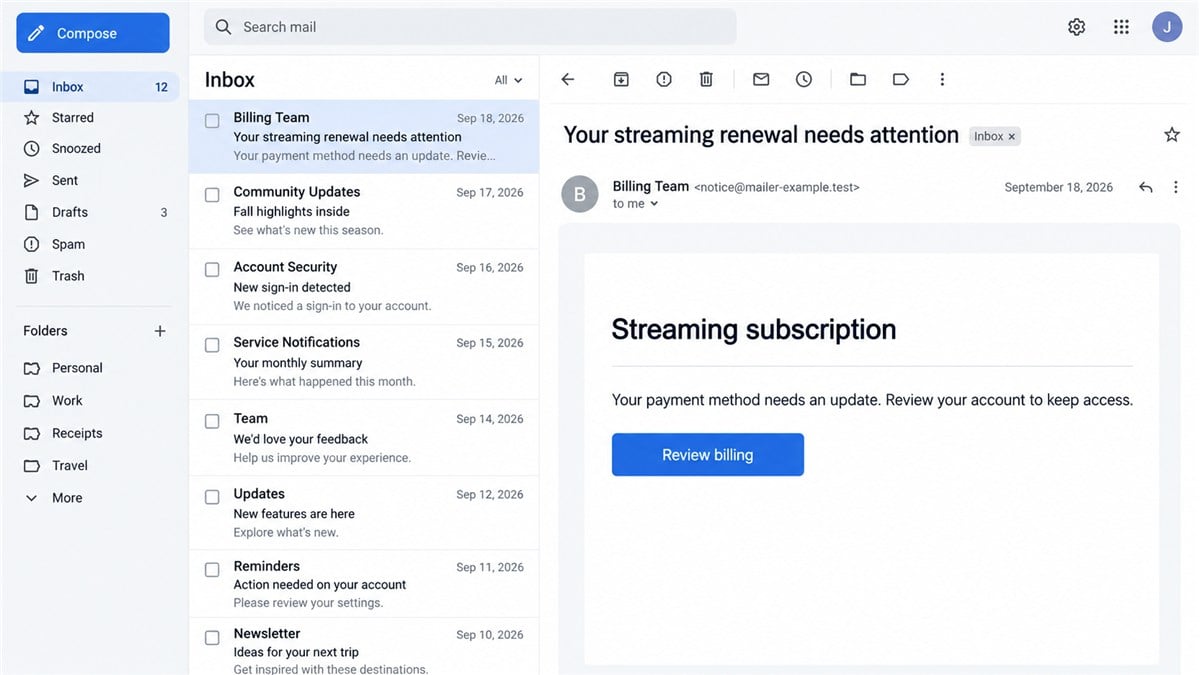
An email says your streaming subscription needs attention. The service name looks familiar, the message is polished, and the payment button offers a quick way to keep watching.
Then you expand the sender details. Why would a notice about Prime Video come from an address associated with Shardeum?
That mismatch is the starting point for the Shardeum email scam, a confirmed phishing incident with an important detail that ordinary sender checks can miss.
Overview
A real sending account carried unauthorized messages
Shardeum disclosed on September 24, 2026 that attackers had used compromised credentials for its Brevo email service account to send phishing messages. Some impersonated Prime Video; others used renewal or healthcare notices. Shardeum said it had neither sent nor approved them.
Its official incident notice places the main sending activity on September 17 and 18. The company identified the incident on September 21. Brevo subsequently confirmed credential misuse, and the affected credentials were revoked.
Shardeum said its blockchain network was unaffected. It also reported no detected contact-export activity and said nearly all targeted addresses were supplied by the attacker. Only 10 matched existing subscribers. Receiving one of these emails therefore does not establish that you subscribed to Shardeum or that your wallet was breached.
The payment problem is the hook
A renewal warning catches people between two ordinary thoughts: they recognize the service, and they do not want an interruption. The attacker benefits if the recipient treats the email as a small administrative task instead of a request from an unverified stranger.
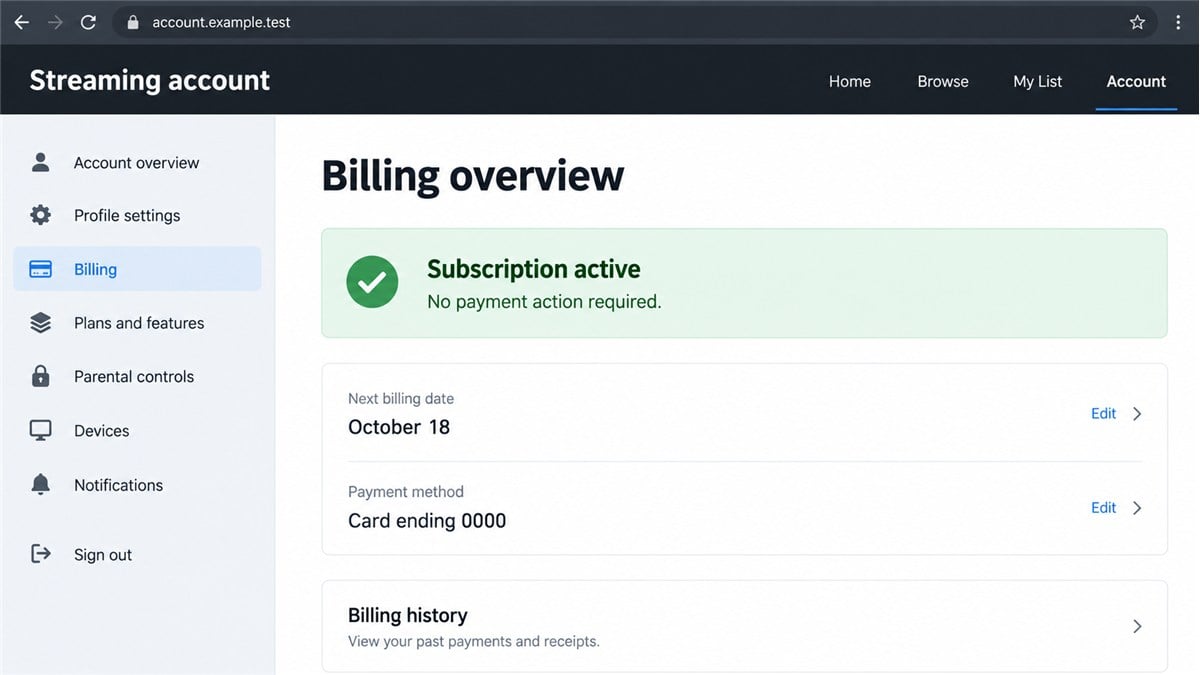
The useful question is whether the named service confirms the problem inside your account. A streaming subscription is managed by its provider or the service through which you bought it. An unrelated sender, even a recognizable one, cannot establish that a payment is overdue.
- Check the full sender address, not just the display name.
- Open the streaming service through its app or a saved bookmark.
- Look for a matching billing issue in your account.
- Keep passwords, card details, and verification codes out of email replies.
- Do not interpret a familiar email platform as an endorsement of the message.
Separate the confirmed incident from possible next steps
The published disclosure confirms unauthorized messages and their themes. It does not document every landing page, every attachment, or the experience of every recipient. We have not independently captured the exact payment page used in this incident.
The illustrations in this article are reconstructions of the renewal lure and the verification decision, using fictional details. They are not forensic captures of a particular recipient’s email. Any discussion of what could happen after a click is a risk explanation, not a claim that every message followed that path.
This distinction matters if you are checking an email now. A subject line can change. The attempt to make you act on an unverified billing instruction is the part you need to recognize.
Why a Familiar Sender Can Still Deliver a Scam
People are often told to inspect the sender address. That remains useful, but it answers only one part of the question. It can reveal an obvious lookalike domain. It cannot guarantee that a legitimate account is still under its owner’s control.
Imagine receiving a message from a colleague’s real mailbox after someone has stolen access to it. The address is familiar, but the person writing the email may be an impostor. Misuse of a business email service creates a similar trust problem.
A company can legitimately use a specialist provider to send newsletters and notifications. Access credentials let its systems submit messages through that provider. If those credentials are stolen, the sending arrangement can be abused without the attacker owning the company named in the address.
That does not make all messages from the company fraudulent. It means the message’s purpose, destination, timing, and relationship to your account need checking together. A renewal request for a completely different business is a reason to pause.
Professional formatting adds little reassurance. Anyone can write a courteous notice, insert a button, and use a conventional footer. The strongest check happens outside the email: your own account, reached independently, should tell you whether any action is needed.
How the Shardeum Email Scam Works
Step 1: A routine service notice gets your attention
The opening claim concerns something people are used to managing online, such as a renewal or payment. That makes the message easy to read while distracted. A recipient may already be expecting a card update, so the invented problem feels plausible.
Do not assume that the timing proves the sender knows your subscription history. A widely used service can produce coincidental matches when a message reaches many addresses.
Step 2: The sending identity gives the message extra credibility
In this incident, the unrelated sending account is an important clue. A recipient who sees an established domain may decide that the email is safer than a message from a string of random characters.
That shortcut misses the distinction between identifying a sending system and verifying the request. The account’s owner and the service being impersonated are separate parties. Neither should be blamed for the attacker’s instructions.
Step 3: The message asks you to resolve the problem through its own route
A typical renewal lure places the convenient action inside the message. The button may say to update billing, restore access, or review a notice. Those are ordinary words attached to an unverified destination.
The exact destination of each message in the Shardeum incident is not established here. Do not open one to investigate. You can settle the billing question by leaving the email and checking the real service directly.
Step 4: Any information you submit creates a different exposure
Entering a password on a fake page can expose an account. Entering card details creates a payment risk. Sharing a one-time code may let an attacker complete a login or transaction while you are still looking at the page.
These are different situations and need different responses. Simply receiving an email is not the same as supplying information. Clicking is also not proof that a device has been infected. Write down what you actually did before deciding what to secure.
Step 5: A convincing follow-up can extend the deception
After an initial interaction, a criminal may have enough information to make a later contact sound more personal. A caller who knows your email address or the service mentioned in the message has not thereby proved an official connection.
Be especially cautious if the new contact offers to fix a charge, asks for a screen-sharing session, or sends another payment link. Treat the request as a fresh verification problem and use the service’s established support channel.
Company and Sender Checks
The service name is not the sender’s identity
Compare the service mentioned in the subject with the full address and the account you actually use. Expand the message details if your email app hides them. A display name can be chosen freely and may look authoritative while concealing an unrelated address.
Do not reply to ask whether the message is genuine. A reply can return to the person who sent it. Open a new conversation through the official service instead.
A postal address does not authenticate an email
An email footer may contain a company address, registration text, or privacy statement. Such material can be copied. It is supporting information to compare, not a substitute for checking the requested action.
Compare the footer with the service supposedly asking for payment. If the names do not match, do not try to resolve the mismatch by calling a number in that same email. Start again from the service’s app or official website.
Support must be reached independently
Find support from the app you already use or the service’s official website. Avoid a phone number embedded in a suspicious email or a sponsored result promising an immediate refund. The shortest route is not always the correct one.
Explain the mismatch to support without forwarding passwords or full card numbers. If you need to submit the email, use the organization’s published phishing-reporting process.
Trace a charge through your own records
If you see an unfamiliar charge, compare its date, amount, and merchant description with your subscription history. A charge and a phishing email arriving together do not automatically have the same cause.
Your card issuer can help identify a transaction and explain the options for reporting unauthorized use. Keep the email and transaction evidence, but avoid paying another supposed fee to have the original charge investigated.
What Your Interaction Does and Does Not Mean
This email incident is separate from the Brevo ClickFix attack, which involved malicious website instructions. Do not assume you ran malware because an email mentioned Brevo or Shardeum. The response should match the actions you took.
If you only received or read the email, you do not need to assume that your account has been taken over. Report the message as phishing and remove it after keeping any evidence you need. Do not click an unsubscribe link inside a suspected scam.
If you clicked but entered nothing, close the page and check whether anything downloaded. Review any browser permission you granted. A website notification permission is separate from a streaming subscription and can be removed in browser settings.
If you entered credentials, focus on that account and any other account using the same password. If you supplied a verification code, treat the situation as urgent and tell the provider exactly what happened.
If you installed an app or allowed remote access, include that in your report. Account protection and device cleanup are related tasks, but neither replaces the other. A clean device scan cannot undo information already sent to a phishing form.
What to Do if You Have Fallen Victim to This Scam
-
Stop using the message’s links. Close the page and end any related call or chat. Do not test whether the payment button works a second time. Continue through an app or address you independently know belongs to the service.
-
Record what you shared. Note whether it was an email address, password, card number, verification code, document, or remote-access permission. This gives the provider and your bank a clearer starting point than saying only that you clicked something.
-
Secure exposed accounts. Change any submitted password through the genuine service. Change reused passwords elsewhere, starting with email. Review active sessions, recovery details, and unfamiliar changes. Enable multifactor authentication where available, and follow the provider’s account-recovery guidance if you cannot sign in.
-
Contact your card issuer if payment details were entered. Use the number on your card or banking app. Explain that the information went to a suspected phishing page, ask whether replacement is needed, and report any unauthorized transactions. Do not wait for a second charge.
-
Preserve the original evidence. Save the email, sender details, screenshots, and transaction records. Keep a simple timeline. Avoid sharing the material publicly if it includes personal information or active links that could expose someone else.
-
Check the device if you downloaded or installed something. Run a trusted tool such as Malwarebytes to look for malicious software. AdGuard can help block known malicious pages and deceptive ads during future browsing. Neither tool guarantees recovery of an account or money already lost.
-
Report the message and monitor the result. Use your email provider’s phishing-report option and the impersonated service’s official reporting channel. Monitor relevant accounts for unfamiliar activity. Report financial loss to the appropriate local fraud-reporting authority, using its independently located official website.
-
Ignore unsolicited recovery offers. Someone who claims they can retrieve money for an advance payment may be running another scam. Sharing your experience can attract these approaches. Keep recovery discussions with your bank, service provider, and authorities.
Frequently Asked Questions
Is Shardeum responsible for the fake Prime Video request?
Shardeum says the messages were unauthorized and sent through compromised email-service credentials. The warning concerns an attacker abusing that sending account, not an official streaming service offered by Shardeum.
Does receiving the email mean my crypto wallet was hacked?
No. Receipt of an email does not establish wallet access. Do not enter a seed phrase anywhere in response to it. Investigate any separate wallet activity through trusted tools and official support.
Why did I receive it if I never subscribed to Shardeum?
The incident disclosure says the attacker supplied almost all targeted addresses. Receiving a message therefore does not by itself indicate that you were on the company’s existing mailing list.
Can a message pass email checks and still be fraudulent?
Yes. A sending account can be misused. Technical delivery checks do not establish that the owner approved the content or that an unrelated billing request is valid.
Should I cancel my real streaming subscription?
Not simply because a scam email mentions it. Check the genuine account for billing issues and unauthorized changes. If you want to cancel, use the actual service or the billing platform through which you subscribed.
Are the images actual copies of the campaign?
No. They are illustrative reconstructions with fictional details. They explain the warning signs without presenting an invented screenshot as evidence of the exact email or destination.
The Bottom Line
The Shardeum email scam shows why a recognizable sending address cannot settle whether a payment request is genuine. Check the request against your own account, reached independently.
If you already interacted, respond to what you shared. Secure exposed credentials, involve your bank where payment details are involved, and keep the evidence. You do not need to follow the attacker any further to find out whether the notice was real.

Join the discussion
0 commentsShare your experience or ask a question about this article.
Discussion
Start the conversation
Have a question or something useful to share? Add the first comment.