


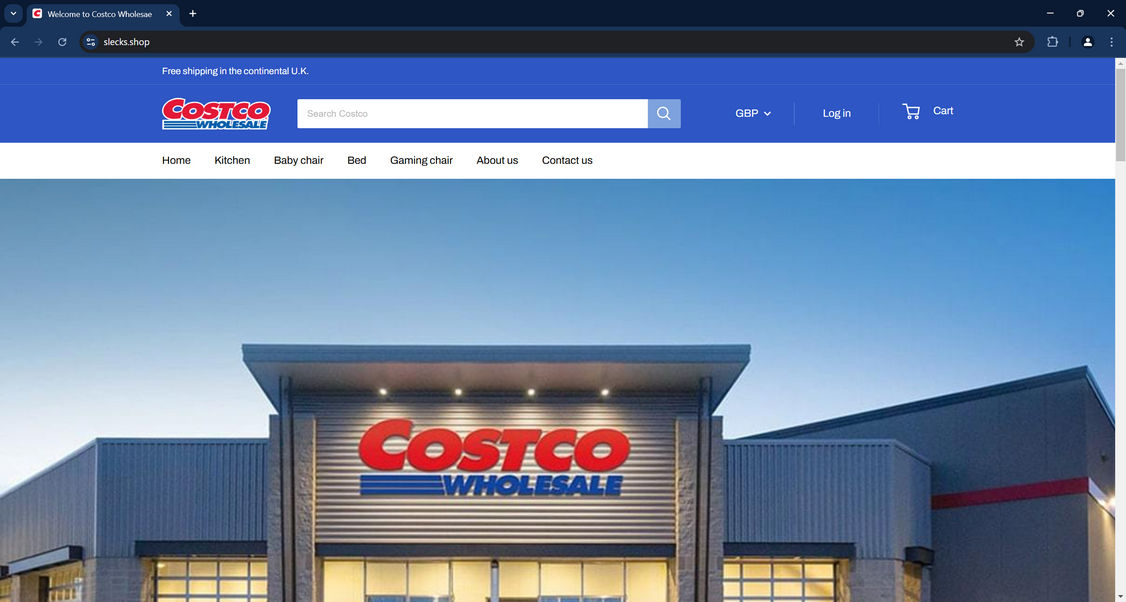
In January 2025, slecks.shop looked like Costco Wholesale, with the Costco logo, a Search Costco box, a warehouse photo and menus of beds and gaming chairs priced in pounds.
So is there a Costco Slecks program? Months earlier, the same domain sold earrings, and its one buyer review tells a very different story about where the money went.
Overview
A Costco storefront on a jewelry domain
In July 2024, slecks.shop was a small Shopify jewelry store selling hoop earrings for $33.88. By January 2025, the same address carried Costco Wholesale branding from top to bottom.
Why it isn’t Costco
Costco’s UK store is at costco.co.uk. Slecks.shop used Costco’s name and logo, but its Trustpilot profile describes a jewelry store with a US address.
Where Slecks stands now
The slecks.shop domain no longer resolves. Its only Trustpilot review, from a UK buyer, says a PayPal payment went to a private Gmail account.
- Don’t buy from any site that shows Costco’s logo on a domain other than costco.co.uk or costco.com.
- If you paid slecks.shop through PayPal, open a dispute and include screenshots of the Costco branding.
- If you paid by card, ask your card issuer about a chargeback for goods not received.
- Treat sleeksettle.com as unverified, because it doesn’t load and nothing links it to Slecks.
Is Slecks.shop Legit?
No. Slecks.shop presented itself as Costco Wholesale, the warehouse club, but Costco didn’t run it, and the site gave buyers no way to confirm who did.
The logo, the banner and even the search box used Costco’s branding. The search field read Search Costco, so a shopper had little reason to doubt the page.
The browser tab gave the game away for anyone who looked closely. It read Welcome to Costco Wholesae, with the last word misspelled.
Behind the front, the details didn’t match Costco either. The store’s Trustpilot profile described a jewelry shop, and its listed address and phone number were American.
The one buyer report adds to that picture. A UK shopper who paid in early January 2025 wrote that the PayPal payment went to a private Gmail account.
A real retailer takes payment through its own checkout under its company name. A personal email address on a PayPal receipt suggests no business stood behind the order.
Is There a Costco Slecks Program?
No. Slecks wasn’t a Costco program. The January 2025 site was a plain storefront with furniture and kitchen categories, dressed in Costco’s branding.
The phrase pairs Costco’s name with the store’s. Anyone who saw a Costco program pointing to slecks.shop was looking at an imitation, not an offer from Costco.
Costco’s name turns up in many fake offers, from member rewards to free products. Our report on Costco survey scams explains how those fake rewards work.
To check any Costco deal, type Costco’s address yourself and look for the offer there, rather than following a link in an ad, post or email.
Costco doesn’t need a partner store to sell online in Britain, because it runs its own UK shop.
Is SleekSettle a Legit Website?
There’s nothing to show that sleeksettle.com is legit. The domain was registered through GoDaddy on December 22, 2025.
The address points to a hosting server, but no website loads there. It has no archived copies and no Trustpilot profile.
Nothing connects sleeksettle.com to Slecks beyond a similar-looking name. No shared email, address, logo or payment detail appears in any of the evidence.
If sleeksettle appeared on a checkout page or a card statement, treat it as an unknown merchant. Ask your bank or PayPal who received the payment before trusting it.
If you don’t recognize the charge at all, report it to your card issuer as unauthorized and ask for a new card number.
Slecks.shop Reviews
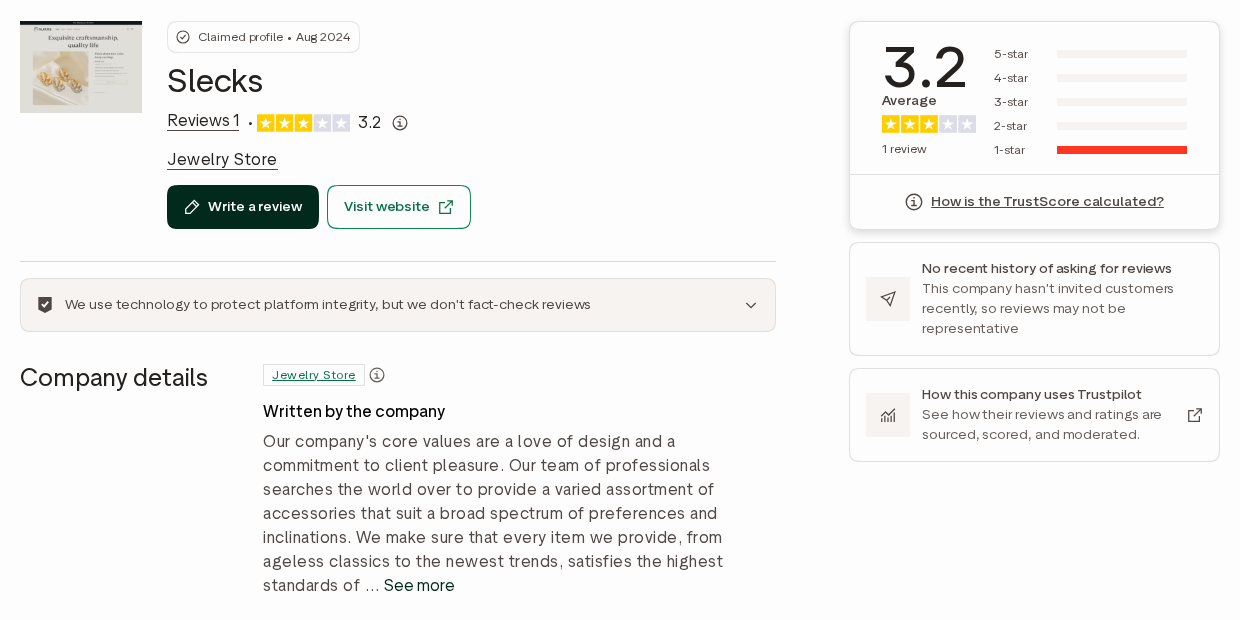
Slecks.shop has only one public review. It sits on Trustpilot, on a profile that was claimed in August 2024 and still lists the business as a jewelry store.
The review gives one star. Its author, writing from the UK, describes an experience dated January 7, 2025, and warns others to avoid the site.
According to the review, the buyer paid through PayPal and the money went to a private Gmail account. The reviewer called the store a scam.
The profile shows a TrustScore of 3.2. With a single review, that figure reflects Trustpilot’s starting formula rather than many happy buyers.
Trustpilot also notes that the company hasn’t invited customers to review it recently, so the profile can’t show how most orders went.
From Jewelry Store to Costco Lookalike
The slecks.shop domain has a short, odd history. In July 2024, it ran as a Shopify store titled My Store, selling earrings under the slogan Exquisite craftsmanship, quality life.
In August 2024, a Trustpilot profile for slecks.shop was claimed under the name Slecks and listed as a jewelry store. Its description talked about accessories and design.
In September and November 2024, the www address showed a Shopify notice that the store was unavailable, with a prompt for the owner to finish connecting the domain.
In January 2025, the domain returned as Costco Wholesale, with free shipping in the continental U.K., prices in pounds and menus for kitchen items, baby chairs, beds and gaming chairs.
The phrase continental U.K. borrows American shipping language that doesn’t fit Britain. It’s the kind of slip a real Costco UK page wouldn’t make.
A jewelry shop turning into a Costco furniture store within six months points to a reused domain, not a growing business.
How the Slecks Costco Scam Works
Step 1: A used domain gets a new brand
The Costco storefront went up on a domain that had already run a jewelry shop, while its Trustpilot profile still described jewelry.
An older domain can look more established to a quick check than one registered the same week.
Step 2: Costco’s logo does the selling
The header logo, the Search Costco box and a large photo of a Costco warehouse made the site look like an official Costco shop.
Anyone can copy a logo and a photo, which is why branding alone proves nothing about who runs a site.
Step 3: Prices in pounds for UK shoppers
The site showed GBP prices and promised free shipping across the U.K., aiming at British shoppers who know Costco from its UK warehouses.
A misspelled tab title and US-style shipping wording were the main clues that the page wasn’t British.
Step 4: Big items raise the order value
The menu listed kitchen items, baby chairs, beds and gaming chairs. Furniture like this makes each order worth more than a typical small gadget.
Step 5: Payment goes to a personal account
The only buyer review says a PayPal payment went to a private Gmail account rather than to a business, leaving no company name on the receipt.
Payments to personal accounts are also harder to dispute when they’re sent as friends and family.
Step 6: The domain disappears
The slecks.shop domain no longer resolves, so buyers are left with no site, order page or contact form.
Who Runs Slecks?
No link to Costco
Nothing on the site named a Costco company as the seller. The Costco name appeared only in the logo, the search box and the banner.
Costco’s UK business sells through its own warehouses and costco.co.uk. A seller using its logo on a .shop domain is not part of it.
Jewelry store details on Trustpilot
The Trustpilot profile lists Slecks as a jewelry store with a support@slecks.shop email, a US phone number and a street address in Westerly, Rhode Island.
Those details belong to the jewelry version of the site. Nothing shows that they changed when the Costco branding went up.
A US address for a UK store
A UK-facing store with a Rhode Island address and an American phone number gives British buyers no local company to contact or complain to.
A private payee
A personal PayPal account gives buyers nothing to trace back to a company. A real Costco order is paid on Costco’s own checkout, under Costco’s name.
Is Slecks.shop Still Online?
No. The slecks.shop domain no longer resolves to any server, and the store’s pages, checkout and contact form are gone.
Costco lookalike stores tend to reappear on new domains. Our reports on Bfkar.top and Costcos.shop describe other fake Costco storefronts.
Past buyers may still get emails in Costco’s name. Don’t click links in them, and reach Costco only by typing its address yourself.
Why Costco’s Name Keeps Being Copied
Slecks.shop is one of many Costco lookalikes. Shoppers trust the warehouse club’s low prices, so a Costco logo makes a cheap deal feel believable.
MalwareTips has covered fake Costco stores on domains such as Shopumallout.com, Forustops.com and Uscostcosale.shop, each using Costco’s branding on an unrelated address.
Costco’s name also appears in fake membership renewal emails, Facebook voucher giveaways and clearance sale ads. Our report on fake Costco membership emails shows how those messages work.
The common thread is a link that leads away from Costco’s own websites. Once you’re on another domain, the logo means nothing.
Signs a Costco Store Is Fake
Fake Costco stores reuse the same few tricks. The details from Slecks.shop make a useful checklist for the next one.
- The address isn’t costco.co.uk or costco.com, even though the logo is Costco’s.
- The page title or menus contain spelling slips, such as Costco Wholesae.
- Prices are in pounds, but the contact details point to the United States.
- Payment goes to a personal email address instead of a company.
- The domain is new to Costco branding and once sold something else entirely.
- The menu is short and random, mixing kitchen goods with beds and gaming chairs.
Costco’s UK shop is at costco.co.uk. If an offer can’t be found there, treat it as unofficial.
How to Check a Costco Offer Before You Pay
- Type costco.co.uk or costco.com into your browser rather than tapping a link in an ad or message.
- Search Costco’s own site for the exact product and price you were shown.
- Look at the address bar on the payment page, not just the logo on the screen.
- Never pay a Costco order to a personal email address or through a friends and family payment.
- Be wary of deals that call themselves a program, a giveaway or a member reward without appearing on Costco’s site.
How to Spot Fake Costco Stores
Fraudulent shopping websites often share common patterns that make them easier to detect once you know what to look for. Before entering personal information or making a payment, take a few minutes to check for these warning signs:
- Unrealistic prices and discounts
If a website offers products at prices far below trusted retailers, it’s often a red flag. Many of these sites advertise luxury or high-demand products at massive discounts to create a sense of urgency. A $300 product listed for $49.99 should immediately raise suspicion. - Recently registered or suspicious domain names
Many fraudulent websites operate on newly created domains that disappear after a few weeks. Look for signs like random characters in the URL, misspellings of well-known brands, or hyphenated domains.
You can check a site’s age with a WHOIS lookup, or run it through our free Scam URL Scanner. - Missing or vague company details
Legitimate businesses clearly display their company name, tax information, phone numbers, physical address, and return policies. Fraudulent sites often provide incomplete, fake, or no company details at all. A lack of verifiable contact information is a major warning sign. - No reliable customer service
Real businesses provide clear ways to contact support—email, phone, live chat, or physical return addresses. Fake stores often list nonfunctional contact forms, invalid phone numbers, or reply with generic automated messages. - Poor website quality and structure
Many fake stores are set up quickly with low-effort templates. Look for poor grammar, spelling errors, low-resolution product images, broken links, or missing legal pages (Terms of Service, Privacy Policy, Return Policy). A sloppy website often signals something isn’t right. - Copied product descriptions and images
Fraudulent sites often lift product listings directly from real retailers or marketplaces. If you reverse image search a product photo and find it on multiple unrelated websites, the listing is likely not original. - Lack of credible reviews or suspicious review patterns
A real store will usually have a mix of customer reviews across different platforms. Warning signs include no reviews at all, obviously fake five-star reviews, or multiple identical reviews posted on the same day. Searching “[website name] reviews” or “[website name] scam” on Google often reveals warnings from other consumers. - Unclear or unfair return and refund policies
Fake stores often use vague language around returns and refunds—or avoid the topic entirely. If you can’t easily find clear instructions for how to return an item or get a refund, proceed with caution. - Aggressive urgency and pressure tactics
Fraudulent websites commonly use fake scarcity (e.g., “Only 2 left in stock!”) or countdown timers (“Sale ends in 10 minutes!”) to push you to buy before you think it through. Legitimate stores don’t rely on fabricated urgency to make sales.
Quick Steps to Verify a Website’s Legitimacy
Before entering payment or personal details on a new shopping website, take a few simple precautions:
- Search for the store’s name along with words like “reviews” or “complaints” on Google and Trustpilot.
- Check the website’s domain registration using Whois.com.
- Use trusted tools to scan for malicious or fraudulent links:
- Malwarebytes ScamGuard – detect scams and unsafe links before they reach you on Android and iOS phone.
- Malwarebytes Browser Guard – block dangerous or fake websites on Windows and macOS browsers.
- Verify the business address on Google Maps to ensure it’s a legitimate location.
- Review the store’s accepted payment methods – credit cards and PayPal are traceable and safer than cryptocurrency or bank transfers.
- Trust your instincts; if something feels off, it’s better not to proceed.
How to Spot Similar Scams on Social Media
Many fraudulent shopping websites rely heavily on sponsored social media ads to draw in large numbers of potential buyers. These ads often promise extraordinary discounts—sometimes up to 90% off—and use emotionally charged language to push users into buying immediately.
They frequently appear on Facebook, Instagram, and TikTok, blending in with legitimate content. However, these ads follow predictable patterns that make them easier to identify once you know what to look for.
Spotting Fraudulent Facebook Ads
Facebook’s advertising platform is a favorite tool for fake online stores because of its massive reach. These ads often feature “unbelievable” offers designed to create urgency and bypass critical thinking. Warning signs include:
- Extreme, unrealistic discounts such as “90% OFF,” “Store Closing Sale,” or “Final Liquidation.” Real retailers rarely discount new products this aggressively.
- Poor grammar, awkward phrasing, or inconsistent language throughout the ad or website, indicating low-effort, mass-produced content.
- Generic stock photos or images with watermarks, suggesting the images were taken from legitimate brands or stolen from other sources.
- Recently created Facebook Pages, which is common for temporary fraudulent campaigns. Check the “Page Transparency” section to see when the page was created.
- Limited or no engagement from real customers. Authentic brands usually have reviews, comments, and visible user interaction.
If an ad raises doubts, search for reviews of the website or reverse image search the product photos to see if they’re copied from elsewhere. Never provide payment information until the site is verified.
Spotting Fraudulent Instagram Ads
Instagram is another major platform used to promote fake shopping sites through eye-catching visuals and short-lived “flash sale” captions. Warning signs to look for:
- New or disposable accounts with few posts and followers, often created just weeks or days before launching ads.
- Lack of tagged users in product posts. Legitimate stores often feature real customers, influencers, or product usage.
- Unsecured checkout pages. If the website linked in the bio does not use HTTPS, do not enter payment information.
- Fake or missing customer reviews. Fraudulent stores rarely have authentic purchase feedback.
- Unclear or restrictive return policies, often hidden or written vaguely to make refunds difficult.
When in doubt, search for independent reviews before buying, and only enter payment details on verified, secure websites.
Catching Fake TikTok Ads
TikTok is increasingly used to promote questionable shopping deals through short, persuasive videos. While many ads look polished, the same red flags apply:
- Links to unknown stores that don’t appear in search results or have no external reputation. Many of these sites are temporary and disappear after a short time.
- No verification badge on the TikTok account. While not every legitimate store is verified, the lack of a badge is one more indicator to check further.
- Aggressive countdown timers or “one-day only” promotions designed to rush decision-making.
- Lack of genuine customer reviews or real user content demonstrating the product in actual use.
- Comment sections filled with complaints or warnings from other users. This is often the first place victims speak up.
TikTok scams often rely on impulse buying. Take a moment to verify the website, read independent reviews, and use trusted browser protection before visiting external links.
What to Do If You Ordered From Slecks.shop
- Open your PayPal activity and check who received the payment. Note the email address shown, especially if it’s a personal Gmail account.
- Within 180 days of payment, open a dispute in PayPal’s Resolution Centre for an item not received. Explain that the site used Costco’s name without being Costco.
- If the payment went as friends and family, PayPal Buyer Protection won’t cover it. Ask the bank or card that funded the payment what it can do.
- If you paid by card, call the number on the back of the card and ask about a chargeback for goods not received.
- If a single item cost more than £100 and you paid by UK credit card, ask about a Section 75 claim. PayPal payments usually don’t qualify.
- Keep your order confirmation, any emails and screenshots of the Costco branding. They help show that the site misrepresented itself.
- Ignore recovery services that ask for an upfront fee, and don’t share card details in reply to messages about the order.
- If you created a slecks.shop account with a password you use elsewhere, change that password on the other sites.
- UK shoppers can get advice and report the store through Citizens Advice. Reporting helps Trading Standards but doesn’t guarantee your money back.
Frequently Asked Questions
Is Slecks.shop legit?
No. It used Costco’s logo and branding without being Costco, and its only buyer review reports a payment sent to a private Gmail account. The site has since gone offline.
Is Slecks.shop part of Costco?
No. Costco’s UK store is costco.co.uk. Slecks.shop used Costco’s logo on its own domain, and its contact details belonged to a jewelry store profile.
What is the Costco Slecks program?
There isn’t one. The phrase pairs Costco’s name with the store’s, and the store was a Costco lookalike, not a Costco program. Real Costco offers appear on costco.co.uk or costco.com.
Is SleekSettle a legit website?
It can’t be verified. The sleeksettle.com domain was registered in December 2025, doesn’t load and has no reviews or archived pages. Nothing links it to Slecks.
Is slecks.shop still online?
No. The domain no longer resolves, so the store, its checkout and its contact form are gone. Its Trustpilot profile remains, with one review.
What should I do if I paid Slecks.shop?
Contact PayPal or your card issuer and ask about a dispute or chargeback. Outcomes depend on their rules and deadlines, so act quickly.
The Bottom Line
Our verdict: Slecks.shop was a fake Costco store, and you shouldn’t buy from it or any site that copies it. It borrowed Costco’s logo on a former jewelry domain.
If you already paid, contact PayPal or your card issuer today with your order details and screenshots. PayPal’s dispute window closes 180 days after payment.
For Costco shopping, type costco.co.uk or costco.com yourself, and ignore program offers that send you anywhere else.
This article is for informational purposes only and should not be relied upon for financial or business decisions. We identify potential scams using research, user experiences, and expert analysis. However, all claims should be independently verified. Mistakes may occur, and legitimate products could be flagged. We strive for accuracy but make no warranties regarding the completeness or reliability of the information.

If you are the owner of the website or product in question and wish to offer clarifications regarding your business or website, please reach out to us via our Contact form.

Reviews & discussion
0 commentsShare a firsthand experience, or ask a question.
Community reviews
slecks.shop
Moderated reader experiences, not an editorial verdict.
Start the conversation
Have a question or something useful to share? Add the first comment.