

A new and dangerous phishing scam is making the rounds in the crypto community, posing as a legitimate presale event on the Solana blockchain. Disguised under the name “Solana L2 Presale”, this fraudulent scheme tricks users into revealing sensitive wallet information and in some cases, directly drains their crypto funds.
If you’ve seen promotions for this presale—especially from the site dashboard-solaxy.pages[.]dev—do not interact with it. This scam has no affiliation with the real Solana blockchain (solana.com) or any legitimate crypto projects.
In this article, we’ll break down exactly how the scam works, the risks it poses, and what you should do if you’ve been exposed to it.
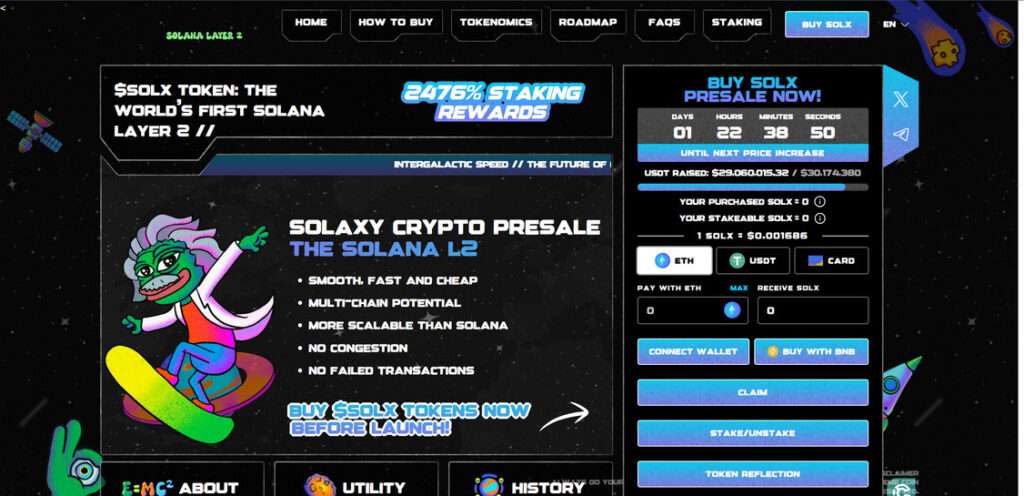
The Fake Solana L2 Presale
The “Solana L2 Presale” is not a real blockchain project or investment opportunity. It is a phishing scam, designed to trick users into disclosing the login credentials to their crypto wallets. By impersonating a promising Layer 2 presale tied to Solana, the scammers attempt to capitalize on growing interest in Layer 2 scalability solutions and Solana’s recent popularity in the DeFi and NFT spaces.
Where the Scam Is Hosted
One known URL promoting this scam is:
- dashboard-solaxy.pages[.]dev
However, scammers are known to deploy their campaigns across multiple domains. It’s very likely that mirror sites or redirecting links are being used to drive more victims into the trap. These domains often look professional, mimicking the design and branding of authentic blockchain platforms.
What the Site Claims
The fraudulent website claims to offer:
- Exclusive early access to a new Layer 2 network on Solana
- Guaranteed allocation of tokens for early participants
- A fast and secure wallet connection process
- Bonuses for connecting quickly or referring others
It’s all fabricated. There is no Solana L2 presale. The site is engineered solely to harvest user data and initiate wallet-draining attacks.
How the Scam Works
Step 1: The Hook – Ads, Tweets, and Direct Messages
Scammers first reach users through:
- Twitter/X promotions, including fake influencer endorsements
- Telegram or Discord messages shared in crypto groups
- Phishing emails pretending to come from Solana or a crypto news site
- Malicious links shared via social media comments
These promotions often hype the presale with lines like:
- “Solana’s L2 is live—early access only”
- “Secure your allocation before the public launch”
- “Guaranteed airdrop for early supporters”
All of it is fake.
Step 2: The Landing Page – dashboard-solaxy.pages[.]dev
Clicking the ad or link brings users to the fake presale site, which is designed to look like an official Solana dashboard. The branding is clean, the design mimics real DeFi dashboards, and the page includes:
- A “Connect Wallet” button
- A fake progress bar (e.g., “87% allocation filled”)
- Claims of being audited or KYC verified
- Urgent messaging and countdown timers
The goal is to create urgency and trust.
Step 3: The Wallet Connection Prompt
This is the most dangerous step.
Users are prompted to connect their digital wallets using common providers like:
- MetaMask
- Phantom (popular with Solana users)
- WalletConnect
- Trust Wallet
- Coinbase Wallet
- And other browser extensions or mobile wallets
In some versions of the scam, users are asked to manually enter wallet credentials (a massive red flag). In others, they’re prompted to sign transactions after connecting their wallets.
Here’s what happens next:
- If the user enters login credentials, the information is sent directly to the scammer’s server.
- If the user connects a wallet and approves a transaction, a malicious contract may be executed, silently draining their funds and tokens.
Because of how wallet permissions work, the malicious smart contract may have ongoing access to the victim’s wallet even after the session ends.
Step 4: Funds Are Stolen
Once access is obtained, scammers immediately:
- Transfer any SOL, SPL tokens, or NFTs from the wallet
- Move funds to mixer addresses or centralized exchanges to cover their tracks
- Use the victim’s wallet signature history to target future transactions
In most cases, victims realize they’ve been scammed only after their funds are gone.
What to Do If You’ve Been Targeted or Compromised
If you interacted with the scam site or connected your wallet, act fast:
1. Disconnect Your Wallet Immediately
Go to your wallet settings and revoke any active permissions related to the scam site. Use tools like:
- Solana Explorer – Token Approvals
- Revoke.cash (for EVM-compatible wallets)
2. Move Your Funds
If your wallet was compromised, transfer all remaining assets to a new wallet you fully control. Do not reuse the compromised wallet.
3. Scan Your Device
Run a malware and spyware scan to ensure no additional scripts or keystroke loggers were installed while you interacted with the scam page.
4. Report the Scam
Report the scam to:
- Solana Foundation – via their support or Discord
- Phish Report Services like Google Safe Browsing and Chainabuse
- Social platforms where you found the link (X, Reddit, Telegram)
This helps shut down active domains and alert others.
5. Warn the Community
Post on forums like:
- r/Solana
- r/CryptoCurrency
- Solana Discord or Telegram groups
Community awareness is crucial to stopping the spread.
How to Recognize Fake Presales
Here are a few key red flags to help you spot future scams:
- You’re asked to enter private keys or login credentials directly
- The site isn’t listed on the official project’s website or blog
- There are unverifiable claims of audits, KYC, or token listings
- Countdown timers or pressure tactics are used to rush your decision
- You’re redirected to a suspicious or unofficial domain name
- The URL ends in domains like
.pages.dev,.xyz, or looks like a low-effort clone
Always verify presales or token launches via official project sources.
Frequently Asked Questions (FAQ) About the Solana L2 Presale Scam
What is the Solana L2 Presale scam?
The Solana L2 Presale scam is a phishing operation posing as a legitimate Layer 2 token presale event on the Solana blockchain. It tricks users into connecting their wallets or entering login credentials under the pretense of participating in an exclusive early access sale. The scam has no association with Solana, solana.com, or any legitimate Layer 2 project.
Where is the scam hosted?
The scam has been actively promoted through the domain dashboard-solaxy.pages[.]dev, but similar versions may appear on other websites or cloned domains. Scammers often rotate URLs to avoid detection or takedown.
How does the scam work?
Victims are directed to a fake presale website that mimics an official Solana launch. Users are prompted to connect their crypto wallets or input their wallet credentials. If a wallet is connected, a malicious smart contract may execute transactions that drain funds. If login data is submitted, it is captured by the scammers and used to access wallets manually.
What happens when I connect my wallet?
When you connect your wallet to the fake presale site and approve any transaction, you may unknowingly authorize a smart contract with access to your assets. This can lead to the immediate and permanent loss of funds, tokens, or NFTs stored in the wallet.
What if I was asked to enter my wallet’s login credentials?
If you manually entered your credentials on the scam site, scammers likely now have full access to your crypto wallet. They can use this information to log in directly, transfer your assets, or exploit linked accounts.
How can I tell if a presale is a scam?
Red flags include being asked for wallet login credentials, fake audit or KYC badges, aggressive countdown timers, and websites hosted on unusual or unofficial domains. Always verify any presale through official Solana channels, including solana.com, official Discord servers, or the Solana Foundation’s announcements.
What should I do if I interacted with the scam?
Immediately disconnect your wallet, revoke permissions using trusted tools, and move your remaining assets to a new wallet. Run a malware scan on your device, report the scam to Solana support and crypto security platforms, and alert the community to help others avoid it.
Can I recover my stolen funds?
In most cases, crypto transactions are irreversible. If a malicious contract drained your wallet or if credentials were used to transfer your assets, recovery is highly unlikely. However, you can prevent further loss by securing your accounts and reporting the incident to relevant platforms.
How do I report the Solana L2 Presale scam?
You can report the scam to Solana moderators via Discord or official community channels, as well as through crypto security platforms like Chainabuse. Also report phishing websites to Google Safe Browsing or other domain blacklist services to aid in takedown efforts.
How can I protect myself from crypto phishing scams?
Never enter your wallet credentials on any website. Only connect your wallet to trusted, verified platforms. Use hardware wallets for added security. Double-check URLs and avoid interacting with unsolicited messages, ads, or links that claim to offer early access or presale tokens. Always confirm project legitimacy through official sources.
The Bottom Line
The Solana L2 Presale scam is a clear example of how phishing tactics in crypto are evolving. By posing as a trusted blockchain project and offering fake early access to a Layer 2 launch, scammers are successfully stealing credentials, draining wallets, and walking away with victims’ assets.
This scam has no connection to Solana, solana.com, or any real L2 solution. It is a trap—carefully engineered to appear legitimate, but designed solely to steal.
Stay vigilant, double-check URLs, never enter wallet credentials manually, and think twice before connecting your wallet to any unverified site.

Join the discussion
0 commentsShare your experience or ask a question about this article.
Discussion
Start the conversation
Have a question or something useful to share? Add the first comment.