


SongReviewer.us says you can earn $45 an hour listening to Spotify and writing music reviews. There’s no application form behind it, only an Apply button that leaves the site.
If you found Song Reviewer through an ad or a post and clicked Apply, here’s where that button goes, who is behind the page and what to do next.
Overview
What SongReviewer.us promises
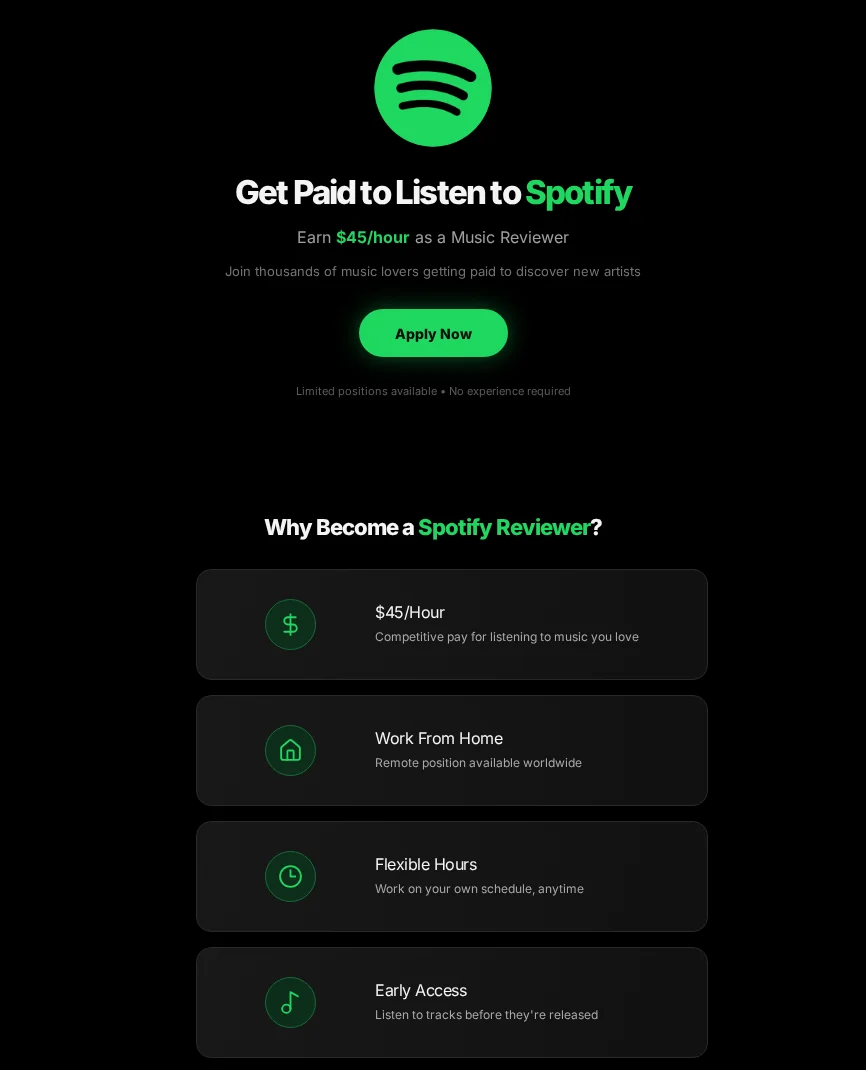
The page calls itself the Spotify Music Reviewer Program. It shows Spotify’s logo above the headline Get Paid to Listen to Spotify and promises $45 an hour.
It lists the usual perks: work from home anywhere in the world, flexible hours and early access to tracks before release. It says no experience is required.
When we first reported on the site in July 2025, it advertised $36 an hour. The rate has gone up, but the job still doesn’t exist.
Where the Apply button goes
Both Apply Now buttons open the same affiliate tracking link on trksy.org. That link carries an offer number, an affiliate ID and the word spotify as its traffic source.
On October 29, 2026, it ended on newjobslooker.com, a job-search and career-articles site. Nothing on the way asked for a music review.
Is SongReviewer.us legit?
No. SongReviewer.us uses Spotify’s name and logo for a job Spotify says it doesn’t offer. Here’s what we found:
- Claim: Spotify pays music reviewers $45 an hour to work from home.
- Reality: Spotify’s support site says it doesn’t pay users for listening to or interacting with content.
- Apply button: an affiliate tracking link, not an application form.
- Owner: no company, address, email or privacy policy appears anywhere on the page.
- Pattern: the same script we saw on SpotHires and other fake Spotify reviewer pages.
Spotify Says It Doesn’t Pay Listeners
Spotify has a support article for exactly this kind of offer. It says Spotify “does not offer payments or financial incentives” to users for listening to or interacting with content.
The article adds that people who get such offers through messaging groups or social media posts shouldn’t engage, because the offer “may be a scam or fraud.”
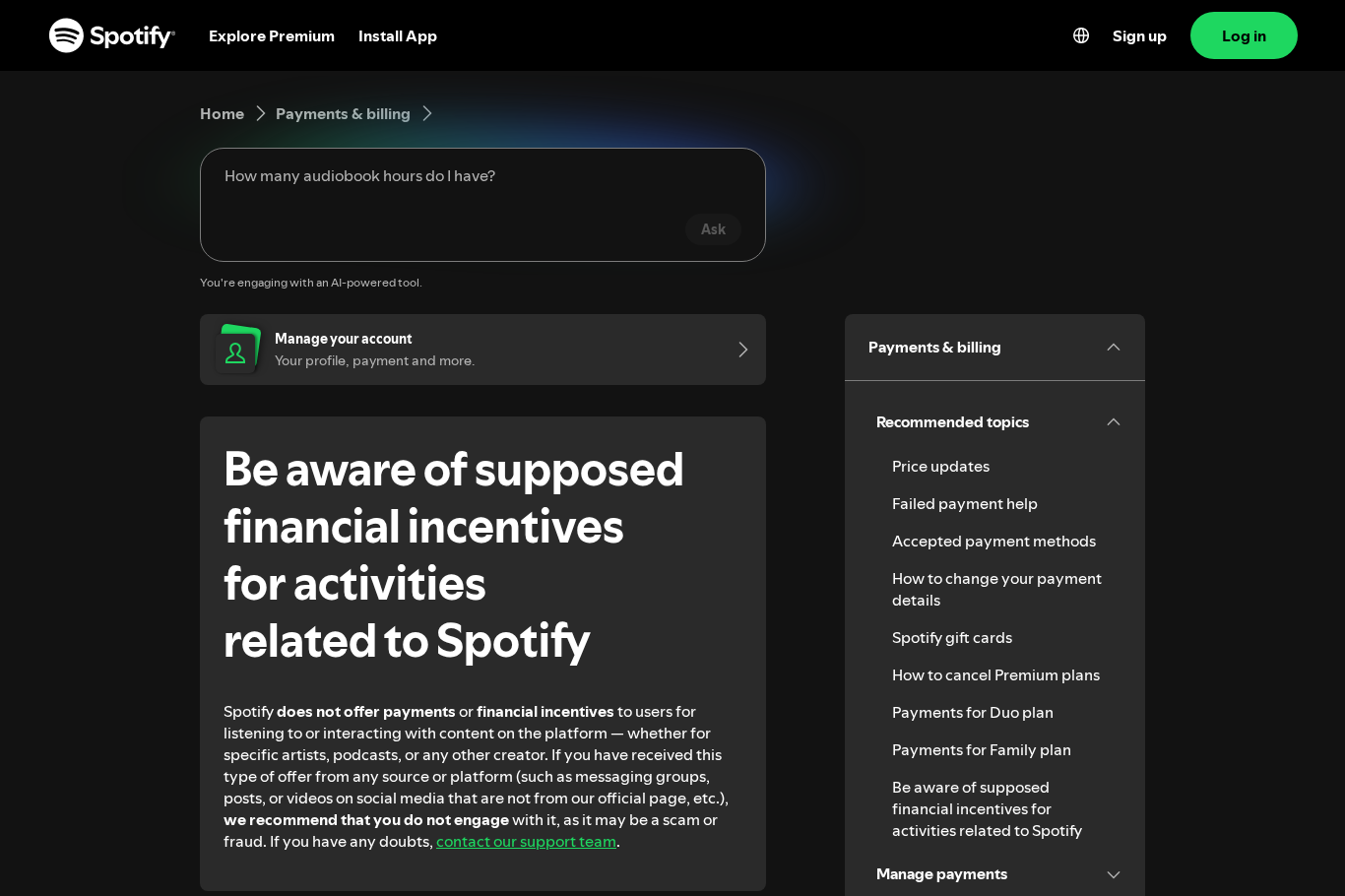
That settles the core question. A page that says Spotify will pay you hourly to listen contradicts Spotify’s own help center.
Real Spotify jobs are posted on its official careers site, lifeatspotify.com, and go through a normal hiring process. None of them is an open listening gig.
Spotify does pay artists and rights holders royalties for streams. That money goes to the people who make and own the music, not to listeners rating songs.
Who Is Behind SongReviewer.us?
The page names no operator, but its setup tells us a few things. None of it points to Spotify.
A domain registered in April 2025
The .us registry’s records show songreviewer.us was registered on April 7, 2025, and its registration now runs to April 2027. It uses Namecheap’s name servers.
The site is hosted on Netlify, a common platform for static web pages. Its only outgoing link is the Apply button’s tracking URL.
A page built with bolt.new
The page loads a badge script from bolt.new, an AI app builder that can generate and publish a site in minutes. That suggests the page was made there.
Tools like this make fake job pages cheap to replace. When one address is reported, the same design can return under a new name quickly.
The trksy.org tracking link
The tracking domain, trksy.org, was registered on January 23, 2026, through Cloudflare. Its link format, with an offer ID and an affiliate ID, is typical of affiliate networks.
Links like it pay whoever placed them when a visitor reaches or completes an advertiser’s offer. The affiliate on this link is number 11314, and the offer is number 1970.
The NewJobsLooker landing site
The final page, newjobslooker.com, was registered in September 2025. It describes itself as a job search engine and says it isn’t affiliated with any listed employers.
Its homepage shows career articles and a job search box. There’s no Spotify reviewer application, so the promise made on SongReviewer.us goes nowhere.
How the SongReviewer.us Scam Works
Step 1: An ad or post promises paid listening
Offers like this spread through ads, social posts and messaging groups, the channels Spotify’s own warning mentions. They target anyone looking for remote work.
Step 2: The page borrows Spotify’s look
The landing page uses Spotify’s logo, its green color and its name in every heading. That makes a stranger’s page feel like an official recruitment site.
Step 3: Apply opens a tracking link
The Apply button skips any application. It sends you to the affiliate link, which records the click and forwards you to whatever page the advertiser chose.
Step 4: Your details can travel with the click
The final address had empty slots for email, first and last name, street address, ZIP code, mobile number, date of birth and gender.
Affiliate networks use slots like these to pass along details a visitor already gave. Here they were unfilled, apart from a city based on location.
Step 5: The job never appears
No reviewer account, schedule or payment follows. The only money in the chain is the commission paid for your click or sign-up.
SongReviewer.us vs SpotHires: Same Script, New Address
Our report on SpotHires.com covered a near-identical page. It promised $35 an hour to review music for Spotify and showed the Spotify logo above the headline.
Its Apply buttons opened an affiliate tracking link on rewarduplevel.com, with an offer number and an affiliate ID. SongReviewer.us does the same through trksy.org.
SpotHires was built with Lovable, and that platform later suspended it. SongReviewer.us loads a badge from bolt.new instead, so the builder changed but the method didn’t.
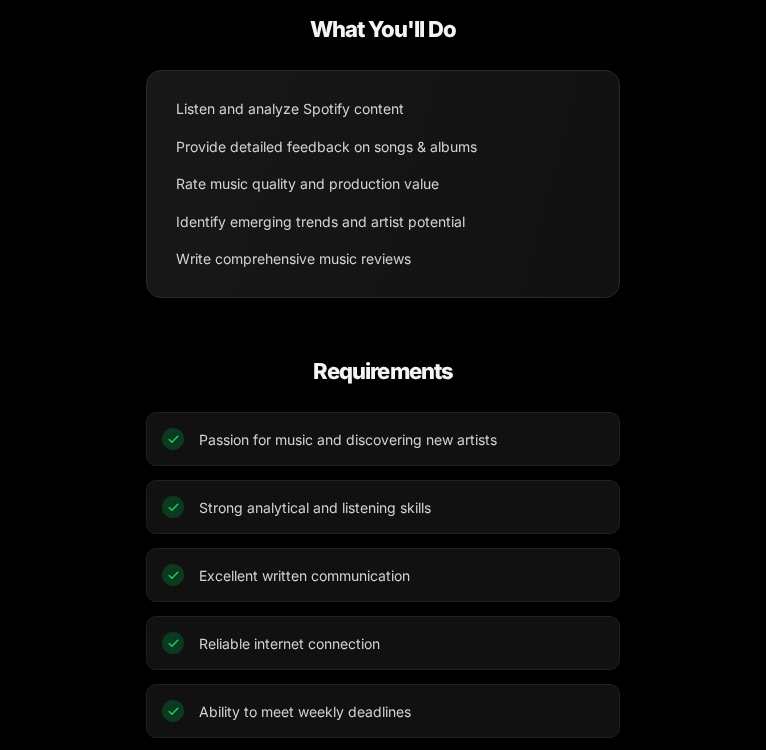
SongReviewer.us lists duties that sound like real work: analyze tracks, rate production quality and write detailed reviews. It never explains who checks the reviews or how pay is sent.
We’ve seen the same template on SpotifyReview.com and Spotifyjobs.lovable.app. The hourly rate changes from page to page, from $35 at SpotHires to $45 at SpotifyReview.com.
A newer variant, the Spotify Rewards listening job, swaps the hourly rate for a $300-a-day claim. The bigger the number, the faster people click.
Song Check, Soundcheck and Song Reviewer: Which Is Which?
The SongReviewer.us browser tab reads Soundcheck, Music Reviewer Program. That’s why some people search for song check us or soundcheck instead of the domain.
They’re looking for the same fake Spotify reviewer page. Songcheck.com is a different, unrelated address that forwards to a songwriting contest website.
Not every song reviewer offer is fake. Some legitimate music sites and research panels pay for opinions, but they name their company and don’t borrow Spotify’s logo.
Why Fake Spotify Jobs Keep Coming Back
Pages like SongReviewer.us cost almost nothing to build. An AI app builder, a free host and a tracking link are enough to start earning from clicks.
Spotify’s brand does the rest. Millions of people stream music on it every day, so a paid listening job sounds believable to anyone who already uses the app.
That’s why the same offer keeps returning under new names and new hourly rates. Treat any paid-listening offer as fake unless Spotify itself confirms it on its own website.
Red Flags in Any Music Reviewer Job
- The page uses Spotify’s logo but isn’t on a Spotify domain.
- An hourly rate of $35 or more for listening, with no experience needed.
- No company name, address, email or privacy policy.
- The Apply button opens a different website instead of a form.
- Requests to complete offers, surveys or trials before you can start.
- A fee for training, a starter kit or access to the reviewer dashboard.
What the FTC Says About Job Scams
The Federal Trade Commission’s job scam guidance gives a simple rule: don’t pay for the promise of a job. Honest employers don’t charge people to start work.
It also warns that an offer promising big earnings for little work is almost certainly a scam. A $45 hourly rate for listening to songs fits that warning exactly.
The FTC suggests searching a company’s name with words like scam or complaint before you apply, and using official sources such as USAJobs.gov and CareerOneStop to find real openings.
If you paid someone, the FTC says to contact the company you used to send the money right away, report the fraud and ask for a reversal.
What to Do if You Applied Through SongReviewer.us
- Stop at the Apply step.
Don’t fill in forms, surveys or trials that appeared after you clicked Apply. None of them leads to a Spotify job.
- Never pay to start.
Ignore any request for a training fee, starter kit or account activation payment. Spotify doesn’t charge listeners or pay them for reviews.
- Check for trials you didn’t mean to start.
If an offer took your card details, look for trial or subscription charges and cancel them. Ask your bank or card issuer to reverse anything you didn’t approve.
- Watch your inbox and phone.
If you entered your email or number, expect more job offers and prize messages. Don’t click their links, and mark them as spam.
- Undo anything an offer added.
If an offer had you install an app, add an extension or allow notifications, follow the removal steps below. A Malwarebytes scan and AdGuard are optional extras.
- Report the page.
Report it at ReportFraud.ftc.gov and tell Spotify support that a site is using its logo for a fake job.
How to Remove Anything a SongReviewer.us Offer Installed
Opening SongReviewer.us or its Apply link doesn’t install anything by itself. Each step below undoes one kind of change a later offer can make, from notifications to installed apps.
Step 1: Revoke notification permission
Job and reward pages often ask to send notifications, then use them for fake job alerts and prize messages. Take that permission back first.
In Chrome, open Settings, Privacy and security, Site settings, Notifications, and remove unfamiliar sites. In Edge, search its Settings page for Notifications.
In Firefox, open Settings, Privacy & Security, then Notifications under Permissions. On a Mac, Safari keeps the list under Settings, Websites, Notifications.
On Android, open Chrome, tap More, then Settings, Site settings, Notifications. Also check each app’s own notification switch in the phone’s Settings.
Step 2: Remove browser extensions you don’t recognize
In Chrome or Edge, open the Extensions page and remove anything added around the time you clicked Apply. Firefox lists extensions under Add-ons and themes.
In Safari on a Mac, open Settings, Extensions, select the extension and click Uninstall. If Safari says it came with an app, remove that app in Step 3.
Step 3: Uninstall apps the offers asked you to add
On Windows 11, open Settings, Apps, Installed apps, and uninstall anything added after you clicked Apply. On a Mac, drag the app from Applications to the Trash.
On Android, open Settings, then Apps, select the app and tap Uninstall. On an iPhone, touch and hold the app icon, tap Remove App, then tap Delete App.
Step 4: Run an optional free Malwarebytes scan
If an offer installed something, a free on-demand scan can look for leftovers. It’s optional, and no scanner can promise a threat-free device.
- Windows: download the free Malwarebytes installer, run a scan and quarantine anything it flags.
- Mac: download the free Malwarebytes for Mac installer, open it and run a scan.
- Android: install Malwarebytes from Google Play or through our Malwarebytes for Android link, then run a scan.
Step 5: Add optional paid protection only if you want it
Paid real-time protection isn’t needed to recover from a fake job page. If you want it anyway, Malwarebytes Premium is an optional paid product for Windows and Mac.
An ad blocker such as AdGuard can cut down on aggressive offer pages and pop-ups. Its apps are paid and optional, and they don’t remove anything already installed.
Step 6: Don’t reset a device because of a job page
A factory reset erases your photos, files and settings, and clicking a fake job ad doesn’t call for one. If a reset ever seems necessary, back up everything first.
If problems continue after these steps, ask for free help in our Windows, Mac or mobile malware removal forums.
Frequently Asked Questions
Is SongReviewer.us legit?
No. It uses Spotify’s name and logo for a $45-an-hour reviewer job that doesn’t exist. Its Apply button opens an affiliate tracking link instead of an application.
Does Spotify pay people to review songs?
No. Spotify’s support site says it doesn’t offer payments or financial incentives to users for listening to or interacting with content on the platform.
What is song check us or Soundcheck?
Soundcheck is the name in the SongReviewer.us browser tab, which is why people search for song check us. It’s the same fake Spotify reviewer page.
Where does the SongReviewer.us Apply button go?
It opens an affiliate tracking link on trksy.org. In October 2026, that link ended on newjobslooker.com, a job-search and career-articles site.
Is SongReviewer.us connected to SpotHires?
We found no shared owner, but both pages use the same script: Spotify branding, a high hourly rate and an Apply button that opens an affiliate link.
What should I do if I entered my email?
Expect more job and prize spam, and don’t click links in those messages. If you reused a password anywhere in the process, change it and turn on two-factor authentication.
The Bottom Line
SongReviewer.us is a Spotify-branded page with no job behind it. Spotify says it doesn’t pay listeners, and the Apply button only feeds an affiliate tracking link.
If you clicked Apply, stop there and don’t pay any fee. If an offer took your card details, cancel the trial and dispute charges you didn’t approve.
Then report the page at ReportFraud.ftc.gov and to Spotify support, so the next person searching for song reviewer jobs finds a warning first.

Reviews & discussion
0 commentsShare a firsthand experience, or ask a question.
Community reviews
songreviewer.us
Moderated reader experiences, not an editorial verdict.
Start the conversation
Have a question or something useful to share? Add the first comment.