

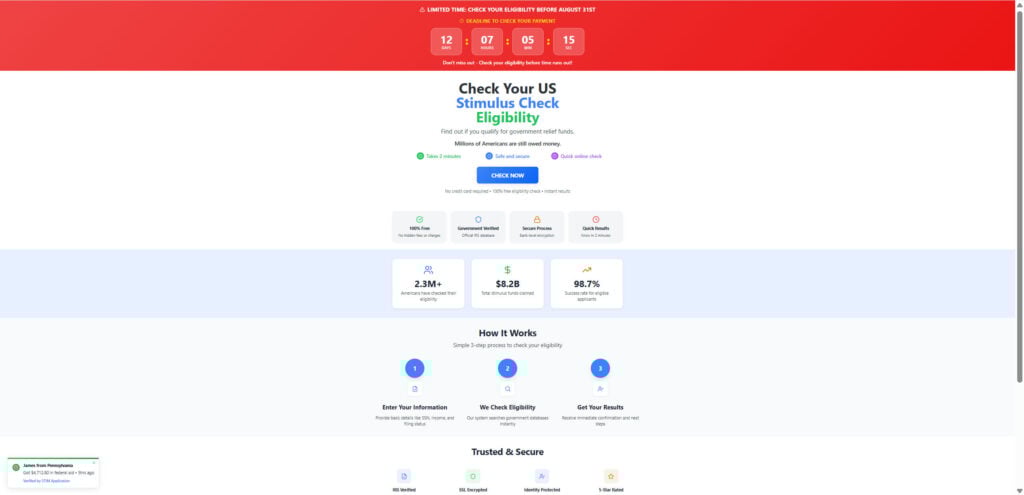
At first glance, StimulusFundsUSA.com looks like a legitimate website designed to help Americans determine their eligibility for stimulus payments. The homepage claims that over 2.3 million Americans have used the service, and it showcases impressive stats like $8.2 billion in stimulus funds distributed and a 98.7% approval rate. But behind the polished design and trust-sealing icons lies a network of misleading claims, fake urgency, and suspicious redirects.
In this article, we uncover how the StimulusFundsUSA.com scam works, expose the warning signs that make it dangerous, and explain what to do if you’ve fallen for it. Read on before entering any personal information into this site.
Scam Overview
StimulusFundsUSA.com presents itself as a gateway to unclaimed stimulus funds. Using language like “Millions of Americans are still owed money” and “Check your eligibility now,” the site capitalizes on ongoing financial hardship and confusion surrounding federal aid.
It is carefully designed to mimic the look and feel of official government websites. Key elements include:
- A countdown timer urging visitors to act quickly.
- Fake verification statements such as “IRS verified” and “SSL encrypted.”
- Statistics and claims of success without any verifiable source.
- Activity notifications like “James from Pennsylvania just received $4,712.80 in federal aid,” which are fabricated.
The goal is to create a false sense of legitimacy and urgency that pressures users into completing the site’s questionnaire and providing personal data. But instead of connecting users with actual stimulus resources, the site simply redirects them to third-party offers, marketing funnels, and unrelated affiliate pages.
Key Red Flags:
- No official .gov affiliation
- Fake urgency timers
- Fabricated social proof and success rates
- Redirects to unrelated promotions
- Misuse of IRS language and design elements
- New domain registration with no company details
These indicators reveal that the true intent of StimulusFundsUSA.com is not to provide assistance, but to capture leads, farm user data, and earn money through traffic redirection.
How the Scam Works: Step-by-Step
Step 1: The Hook
Users are lured in by headlines like “Check Your US Stimulus Check Eligibility” and “Millions Are Still Owed Money.” The design includes government-like badges and statistics to imply legitimacy. A countdown timer suggests that the opportunity is limited, heightening urgency.
Step 2: The Questionnaire
Once you click “Check Now,” the site asks for personal details including your ZIP code, filing status, income range, and even partial Social Security data. These questions are positioned as part of a free eligibility check, but there’s no actual verification system.
Step 3: Fake Results
After completing the form, users are told they are eligible. This result is consistent regardless of the information provided. It reinforces trust and sets the stage for further engagement.
Step 4: Redirection
Instead of delivering real stimulus payment instructions, users are redirected to one of several third-party websites. These might include:
- Insurance quotes
- Credit card offers
- Survey or sweepstakes entries
- Free trial product pages
Each of these partner pages exists to capture your information and may even request payment info under the guise of “shipping fees” or “reward claims.”
Step 5: Monetization
StimulusFundsUSA.com profits through affiliate marketing. Each completed form, click-through, or trial sign-up may earn commissions for the scam operators. Meanwhile, your data can be sold to ad networks or resold multiple times across shady data broker platforms.
Step 6: Ongoing Targeting
Your interaction with the site triggers cookies and tracking pixels that follow you around the web. You may start receiving targeted spam emails, robocalls, or see more scam websites offering fake benefits. Your data becomes part of a much larger exploitation network.
This isn’t just a one-off scam. It’s a full-fledged data operation dressed up as government assistance.
What to Do if You Have Fallen Victim to This Scam
- Stop Using the Website Immediately
Close the page and avoid clicking on any follow-up offers or links. - Do Not Provide Any More Personal Information
If you didn’t complete the questionnaire, stop before doing so. If you submitted personal details, continue to the next steps. - Change Your Passwords and Enable 2FA
If you entered any login credentials or used your email address, change your passwords and enable two-factor authentication for extra security. - Report the Scam to Authorities
- Federal Trade Commission (FTC): reportfraud.ftc.gov
- Internet Crime Complaint Center (IC3): www.ic3.gov
- Your state’s attorney general or consumer protection office
- Monitor Your Financial Accounts
Keep an eye on your bank accounts, credit cards, and any online wallets. If needed, place a fraud alert or credit freeze with the three major credit bureaus. - Use a Trusted Identity Theft Protection Service
Enroll in an identity protection service to monitor for data misuse or breaches linked to your personal information. - Install Ad Blockers and Anti-Tracking Tools
Tools like browser ad blockers, script blockers, and anti-tracking extensions can help minimize the damage and protect you from further exploitation. - Warn Others
Scams thrive when they go unchecked. Share your experience and point others to legitimate sources for federal aid like irs.gov/ .
Is Your Device Infected? Run a Free Malware Scan
Slow performance, constant pop-ups, or strange behavior? These are classic signs of a malware infection. The fastest way to find out is to scan your device with Malwarebytes Free — one of the most trusted malware removal tools available.
The free version detects and removes the most common threats, including:
- Adware — the cause of those annoying pop-ups
- Browser hijackers — unwanted redirects and changed homepages
- Trojans and spyware — hidden programs stealing your data
- Potentially unwanted programs (PUPs) — software you never asked for
👉 Select your device below — Windows, Mac, or Android — then follow the simple steps to download Malwarebytes, scan your system, and remove any threats it finds. The scan usually takes 5 to 20 minutes.
Run a Malware Scan with Malwarebytes for Windows
Malwarebytes is one of the most popular and trusted anti-malware tools for Windows — and it’s completely free for removing infections. It catches threats that many antivirus programs miss, including adware, browser hijackers, and trojans. Follow the steps below to scan and clean your PC in just a few minutes.
Download Malwarebytes
Click the button below to download the latest version of Malwarebytes for Windows from the official source. The free version is all you need — it will scan your computer and remove adware, browser hijackers, and other malicious software at no cost.
Download MalwarebytesOfficial installer for Windows 11 and 10. Your download starts right away.Want real-time protection? See Malwarebytes Premium Malwarebytes Free for WindowsScans and removes malware at no cost
-
Install Malwarebytes
When the download finishes, open your Downloads folder and double-click the MBSetup file. If Windows shows a User Account Control pop-up, click “Yes” to allow the installation.

Follow the On-Screen Prompts to Install Malwarebytes
The setup wizard will walk you through a few quick screens:
-
Choose where you’re installing the program — “Personal Computer” or “Work Computer” — then click Next.

-
Malwarebytes will now install on your device. This usually takes under a minute.

-
When installation is complete, the “Welcome to Malwarebytes” screen will open automatically.

-
On the final screen, click Open Malwarebytes to launch the program.

-
Enable “Scan for Rootkits”
Before scanning, turn on rootkit detection so Malwarebytes can find even the most hidden threats. Click the Settings gear icon on the left side of the screen.

In the settings menu, find “Scan for rootkits” and click the toggle so it turns blue.

Done? Click “Dashboard” in the left pane to return to the main screen.
Start the Scan
Click the blue Scan button. Malwarebytes will automatically update its virus database and start checking your computer for malware.

-
Wait for the Scan to Finish
The scan checks your entire system for browser hijackers and other malicious programs, so it can take 5 to 20 minutes depending on your computer. Feel free to do something else — just check back occasionally to see the progress.

-
Quarantine the Detected Threats
When the scan is done, you’ll see a list of everything Malwarebytes found — malware, adware, and potentially unwanted programs. Click the “Quarantine” button to remove all of them at once.

Malwarebytes will now remove the malicious files and registry entries and move them safely into quarantine.

-
Restart Your Computer
Some threats can only be fully removed after a reboot. If Malwarebytes asks you to restart, click Yes. Once you’re logged back in, Malwarebytes has finished removing the threats it found.

That’s it — your Windows PC is now clean of trojans, adware, and other malware, and should be back to running smoothly.
If you are still having problems with your computer after completing these instructions, then please follow one of the steps:
- Run a computer scan with ESET Online Scanner
- Ask for help in our Windows Malware Removal Help & Support forum.
Run a Malware Scan with Malwarebytes for Mac
Malwarebytes for Mac is a free on-demand scanner that removes the malware other security software tends to miss — adware, browser hijackers, and unwanted programs included. Cleaning an infected Mac with Malwarebytes has always been completely free, and it’s our go-to recommendation. Follow the steps below to scan and clean your Mac in just a few minutes.
-
Download Malwarebytes for Mac
Click the button below to download the latest version of Malwarebytes for Mac.
Download MalwarebytesOfficial installer for macOS. Your download starts right away.Want real-time protection? See Malwarebytes PremiumMalwarebytes Free for MacScans and removes malware at no cost -
Open the Malwarebytes setup file
When the download finishes, open your Downloads folder and double-click the setup file to begin the installation.

-
Follow the On-Screen Prompts to Install Malwarebytes
The Malwarebytes for Mac Installer will guide you through a few quick screens. Click “Continue” and keep following the prompts until the installation completes.



When the installation is complete, Malwarebytes opens to the Welcome to Malwarebytes screen. Click “Get started“.
-
Select “Personal Computer” or “Work Computer”
Malwarebytes will ask what type of computer you’re installing it on. Click either Personal Computer or Work Computer, whichever applies.

-
Start the Scan
Click the “Scan” button. Malwarebytes will automatically update its detection database and begin checking your Mac for malware.

-
Wait for the Scan to Finish
Malwarebytes will scan your Mac for adware, browser hijackers, and other malicious programs. This can take a few minutes, so feel free to do something else — just check back occasionally to see the progress.

-
Quarantine the Detected Threats
When the scan is done, you’ll see a list of everything Malwarebytes found. Click the “Quarantine” button to remove all the threats at once.

-
Restart Your Mac
Malwarebytes will now remove all the malicious files it found. Some threats can only be fully removed after a reboot — if Malwarebytes asks you to restart, allow it. Once you’re logged back in, your Mac is clean.

That’s it — your Mac is now free of adware, rogue browser extensions, and other potentially harmful software.
If you are still experiencing problems while trying to remove a malicious program from your computer, please ask for help in our Mac Malware Removal Help & Support forum.
Run a Malware Scan with Malwarebytes for Android
Malwarebytes for Android automatically detects and removes dangerous threats like malware and ransomware so you don’t have to worry about your most-used device being compromised. Aggressive detection of adware and potentially unwanted programs keeps your Android phone or tablet running smooth.
-
Download Malwarebytes for Android.
You can download Malwarebytes for Android by clicking the link below.
Get Malwarebytes for AndroidOpens Google Play in a new tab.Want real-time protection? See Malwarebytes Premium for AndroidMalwarebytes for AndroidScans your phone and removes malware at no cost -
Install Malwarebytes for Android on your phone.
In the Google Play Store, tap “Install” to install Malwarebytes for Android on your device.

When the installation process has finished, tap “Open” to begin using Malwarebytes for Android. You can also open Malwarebytes by tapping on its icon in your phone menu or home screen.

-
Follow the on-screen prompts to complete the setup process
When Malwarebytes will open, you will see the Malwarebytes Setup Wizard which will guide you through a series of permissions and other setup options.
This is the first of two screens that explain the difference between the Premium and Free versions. Swipe this screen to continue.
Tap on “Got it” to proceed to the next step.
Malwarebytes for Android will now ask for a set of permissions that are required to scan your device and protect it from malware. Tap on “Give permission” to continue.
Tap on “Allow” to permit Malwarebytes to access the files on your phone.
-
Update database and run a scan with Malwarebytes for Android
You will now be prompted to update the Malwarebytes database and run a full system scan.

Click on “Update database” to update the Malwarebytes for Android definitions to the latest version, then click on “Run full scan” to perform a system scan.

-
Wait for the Malwarebytes scan to complete.
Malwarebytes will now start scanning your phone for adware and other malicious apps. This process can take a few minutes, so we suggest you do something else and periodically check on the status of the scan to see when it is finished.

-
Click on “Remove Selected”.
When the scan has been completed, you will be presented with a screen showing the malware infections that Malwarebytes for Android has detected. To remove the malicious apps that Malwarebytes has found, tap on the “Remove Selected” button.

-
Restart your phone.
Malwarebytes for Android will now remove all the malicious apps that it has found. To complete the malware removal process, Malwarebytes may ask you to restart your device.
That’s it — your Android phone is now clean — no more malicious apps, adware, or browser redirects.
If you are still having problems with your phone after completing these instructions, then please follow one of the steps:
- Restore your phone to factory settings by going to Settings > General management > Reset > Factory data reset.
- Ask for help in our Mobile Malware Removal Help & Support forum.
Stay Protected: Block Ads and Malicious Sites
Now that your device is clean, keep it that way. Most infections start with a malicious ad or a fake download button — so blocking them at the source is your best defense.
We recommend AdGuard, which blocks malicious ads, phishing pages, and dangerous redirects before they can reach you.
👉 Download AdGuard and browse safely
Frequently Asked Questions About the StimulusFundsUSA.com Scam
What is StimulusFundsUSA.com?
StimulusFundsUSA.com is a deceptive website that claims to help users determine their eligibility for government stimulus checks. While it promotes itself as a legitimate stimulus check tool, the site is not affiliated with any official U.S. government agency and has been identified as part of a data-harvesting and affiliate scam network.
Is StimulusFundsUSA.com a real government website?
No, StimulusFundsUSA.com is not a real government website. Legitimate government platforms related to stimulus checks or relief payments use “.gov” domains and are hosted by federal agencies like the IRS. StimulusFundsUSA.com uses a commercial “.com” domain and provides no verifiable government affiliation.
How does the StimulusFundsUSA.com scam work?
The scam works by enticing users to check their eligibility for stimulus funds. After submitting personal details like ZIP code, income, or employment status, users are told they are eligible—regardless of their input. They are then redirected to unrelated third-party websites offering surveys, product trials, or promotions. These redirects generate revenue for the scammers and expose users to further spam or phishing attempts.
What kind of information does StimulusFundsUSA.com collect?
The site collects data such as:\n- Email addresses\n- ZIP codes\n- Employment and income details\n- Browsing behavior via cookies and tracking pixels
While it may not immediately ask for Social Security numbers or financial information, the data gathered can be used for marketing, profiling, or phishing.
Are the user reviews and statistics on StimulusFundsUSA.com real?
No, the testimonials and statistics are fabricated. Fake pop-ups claim users are receiving thousands of dollars in real time. These are scripted elements meant to build urgency and credibility but have no basis in fact.
What happens after I click “Check Now” or “Apply Now” on the site?
After clicking these calls to action, you’re directed through a simple questionnaire. Once completed, you are told you qualify and then redirected to third-party promotional sites. These can include unrelated product offers, insurance forms, or other scams. No real stimulus funds are ever distributed.
Why is the domain registration date important?
The domain registration date for StimulusFundsUSA.com shows it was created recently. Scammers often launch new domains every few months to avoid detection and blacklisting. A newly registered site claiming to offer access to billions in government funding should always be treated with caution.
Can I actually get a stimulus check from StimulusFundsUSA.com?
No. StimulusFundsUSA.com does not have any authority or access to disburse stimulus checks. If you are eligible for government relief, it must be claimed through the official IRS website or your state government’s official portal.
What should I do if I submitted my information to StimulusFundsUSA.com?
If you’ve interacted with the site, take these steps immediately:
- Clear your browser history and cookies to remove tracking tools.
- Change your passwords if you submitted an email address.
- Monitor your email and phone for spam or scam messages.
- Report the site to the FTC at reportfraud.ftc.gov and to the Internet Crime Complaint Center at www.ic3.gov.
- Enable spam filters and consider identity monitoring if you shared sensitive information.
How can I protect myself from similar scams?
To avoid falling for scams like StimulusFundsUSA.com:
- Only trust official websites with a “.gov” domain
- Avoid sites that use countdown timers, fake pop-ups, or offer instant cash without verification
- Never provide personal data to websites with no contact information or privacy policy
- Use browser extensions that block trackers and alert you to suspicious websites
The Bottom Line
StimulusFundsUSA.com is a highly deceptive scam site disguised as a government assistance platform. Its goal is not to help you access federal relief, but to manipulate your trust, extract your personal data, and redirect you to unrelated marketing offers for profit.
From fake statistics and urgency countdowns to fabricated success stories and unverified redirects, every part of the site is engineered to appear legitimate while exploiting user desperation.
The only safe way to check for real stimulus eligibility is through official government portals. Always look for .gov domains and avoid any site that pressures you to act fast or submit sensitive information without clear purpose or credentials.
Don’t let the appearance of legitimacy fool you. StimulusFundsUSA.com is not offering help—it’s taking advantage of people who need it most.

Reviews & discussion
0 commentsShare a firsthand experience, or ask a question.
Community reviews
stimulusfundsusa.com
Moderated reader experiences, not an editorial verdict.
Reviews
Be the first to review
Approved reviews for this site or product will appear here.