

Mysterious ads promoting a new mobile casino app called Sweet Bonanza & MrBeast Casino have gone viral across social media. But don’t let the manufactured hype fool you – the too-good-to-be-true app is completely fake. This article exposes the elaborate hoax designed to manipulate MrBeast fans and steal personal data through deepfake technology and phishing sites. Learn how the scam works and protect yourself from becoming a victim. Beyond the slick ads lies a scam with serious consequences for anyone who falls for the deception. Stay vigilant!
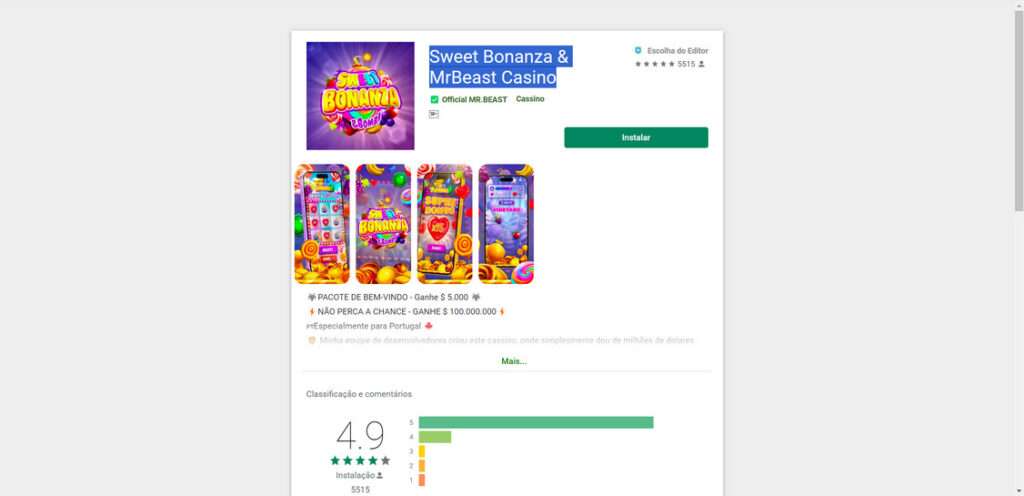
Overview of the Sweet Bonanza & MrBeast Casino Scam
A new viral social media scam is leveraging the popularity of YouTube superstar MrBeast along with manipulated celebrity endorsements to promote a fake mobile casino app called “Sweet Bonanza & MrBeast Casino.” This elaborate criminal scheme aims to deceive users into handing over personal information or downloading malware that can lead to device infections, identity theft, and stolen funds.
The core deception relies on advanced artificial intelligence technology to create deepfake videos that appear to show credible figures like news anchors, Andrew Tate, and Dwayne “The Rock” Johnson discussing, reviewing, and endorsing the non-existent app. For example, some versions use seamlessly edited clips to make it seem as if Fox News hosts Laura Ingraham and Sean Hannity are reporting on and promoting the app release as legitimate breaking news stories on their shows.
This aims to establish credibility by making it look like trusted media personalities have verified and approved of the app. Other deceptive implementations feature The Rock and Andrew Tate appearing to enthusiastically endorse the fake casino app in interview settings. The AI-fabricated videos are engineered to realistically mimic the vocal tones, mannerisms, and facial expressions of the celebrities to the point where their endorsement conversations seem authentic.

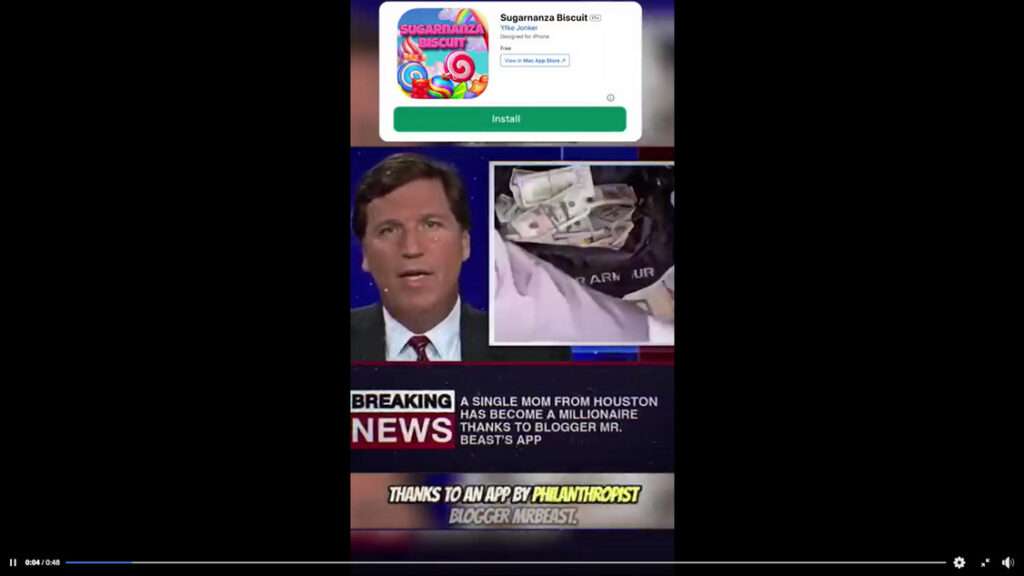
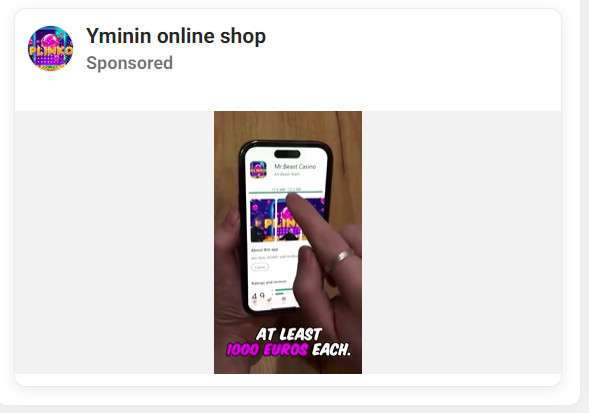
In addition to the deepfaked celebrity promotions, the scam ads also contain a short clip of MrBeast himself seeming to announce and validate the Sweet Bonanza & MrBeast Casino app. The AI transformation shows MrBeast saying things like “It’s already become a problem. No one believes that such a game exists. But in the past, people didn’t believe it when I gave them a bag with $10,000…” This script portrays MrBeast as frustrated that people doubt the legitimacy of his supposed new app, which plays into the scam’s tactic of making targets feel like they’re discovering something exclusive that most people don’t know about yet.
Of course, the real MrBeast has never endorsed or released any gambling apps. But the seamless deepfake technology gives the appearance that he has.
At the end of the deceptive ads, the AI-powered deepfake of the cable news host returns to thank MrBeast and urge viewers to download the app for themselves via a link placed below the video. They might say something like “Thank you MrBeast for creating this game. I’m going to try it myself. Remember, only download it from the official link below.” This closing technique aims to further convince targets they’re getting exclusive access to the “real” app directly verified by a credible public figure.
However, in reality no Sweet Bonanza & MrBeast Casino app exists. The videos are entirely fabricated through devious deepfake AI to manipulate viewers. Unfortunately, unsuspecting users who click the link don’t get access to any real app. Instead, the links redirect to fake app store pages designed to either infect devices with malware or phish for personal information, depending on the attackers’ motives. By downloading what they think is an exclusive casino app, victims may instead infect their device with data-stealing malware. Or if they enter any requested info on phishing pages masquerading as app stores, their accounts and identities could be stolen.
This extremely deceptive scam combines multiple manipulation techniques to successfully fool social media users. It takes advantage of MrBeast’s fame and perceived trustworthiness among his followers while exploiting advanced deepfake AI to impersonate and put false words into the mouths of respected celebrities and authority figures. The blending of these tactics gives the strong illusion that the app is real and endorsed by household names. But in the end, the entire operation aims to mislead victims into surrendering control over their devices, sensitive personal data, online accounts, or money to cybercriminals.
Next, let’s break down exactly how scammers carry out this scam from start to finish.
How the Deceptive Sweet Bonanza & MrBeast Casino Scam Works
The creators of the Sweet Bonanza & MrBeast Casino scam employ various sophisticated techniques to convince social media users that the fake casino app is real and legitimate. Let’s take an in-depth look at how they manipulate targets at each step of the process:
1. AI-Fabricated Celebrity Endorsements Lend Credibility
The cornerstone of the deception campaign involves using advanced artificial intelligence to generate ultra-realistic deepfake endorsements from credible public figures like news anchors and celebrities. The deepfakes are designed to make it seem as if these household names are discussing, reviewing, and promoting the non-existent casino app in interview settings.
For example, some versions of the scam ads feature deepfaked videos of Fox News hosts like Laura Ingraham or Sean Hannity seeming to share breaking news about the app’s release during their shows. The AI-powered fakes mimic their vocal inflections, mannerisms, and facial expressions to make the clips look like authentic broadcast footage.
The deepfaked anchors report that the app was created by MrBeast and allows users to easily win money. This aims to establish credibility by making it appear trusted media personalities have verified the legitimacy of the app and shared it as official breaking news.
Other deceptive variants leverage deepfakes of celebs like Andrew Tate and Dwayne Johnson in which they appear to enthusiastically endorse the fake casino app in interviews. The smooth AI duplications of their voices, gestures, and lips aim to trick viewers into thinking the celebs genuinely reviewed and approved of the app.
2. Deceptive MrBeast App Announcement Deepfake
In addition to the fake celebrity promotions, the scam ads also feature manipulated video of MrBeast himself seeming to announce the launch of Sweet Bonanza & MrBeast Casino.
The seamless deepfake shows MrBeast saying things like:
“It’s already become a problem. No one believes that such a game exists. But in the past, people didn’t believe it when I gave them a bag with $10,000…”
This script portrays MrBeast as frustrated that people don’t believe his supposed new app is real. The goal is to make viewers feel like they’re exclusively discovering a secret new app from MrBeast before anyone else knows about it.

This tactic builds off MrBeast’s track record of high-stakes stunts by making it seem plausible he may have done something over-the-top again. The AI-doctored video aims to convince viewers the app is an authentic new creation from MrBeast.
3. Fake Anchor Closing Urges Users to Download the App
After the deepfaked celebrity endorsements, the scam ads close with the AI-generated news anchor returning to thank MrBeast and urge viewers to download the casino app from a link in the video description.
For example, the manipulated news host says things like:
“Thank you for creating this game MrBeast. I’m going to try it out myself. Remember, the only real download is available below.”
This closing technique seeks to add legitimacy by implying a real trusted media figure verified and approved of the exclusive download link to MrBeast’s app.
The goal is to convince targets they’re gaining VIP access to download the real deal app before the general public knows about it. In reality, it’s all fabricated.
4. Malware and Phishing Download Links
When users click the link believing they’re downloading the exclusive Sweet Bonanza & MrBeast Casino app, they are instead redirected to fake app store sites. Rather than getting a real app, victims either:
- Download malware – Malicious files can infect devices and secretly siphon private data.
- Get phished – Entering info on fake sites gives scammers access to accounts.
- Subscription scams – Shady pages may secretly charge money.
Either way, the download links never lead to any genuine app. The sites exist solely to either infect devices with data-stealing malware or phish for personal info to enable identity theft and account access.
5. Exploiting MrBeast’s Popularity and Perceived Trust
A major factor making this scam believable is that it exploits MrBeast’s widespread popularity and reputation for over-the-top stunts. Given his history of insane challenge videos and massive cash giveaways, some viewers find it plausible he may have launched an outrageous casino app.
The scammers tap into the perceived trust and recognition MrBeast has built up among his extensive following. This makes the deepfaked videos seem more credible, since he is the one appearing to announce the app.
Without such an influential figure at the center, far fewer users would fall for the hoax. MrBeast’s brand and trust provides the linchpin that sells the deception.
What to Do if You Encounter This Scam
If you come across social media ads for the fake Sweet Bonanza & MrBeast Casino app, take the following recommended steps:
- Do not click on any links in the ads under any circumstances. As explained above, they only lead to malware or phishing sites, not any real app. Avoid clicking at all costs.
- Double check MrBeast’s real YouTube channel and social profiles, such as Twitter and Instagram. He has never endorsed or mentioned any gambling apps before. The ads are completely fake.
- Report the ad immediately on whatever platform you saw it on. This could be Facebook, Instagram, YouTube, etc. Reporting the scam ad helps get it removed so the criminals can’t target other innocent users.
- Warn friends and followers about the hoax by sharing that the casino app is completely fake. Post that MrBeast has never endorsed it. This stops the scam from spreading further on social media and protects your contacts.
- Install malware protection software, such as Malwarebytes, to scan your device if you did accidentally click on any download links. Also change passwords. This will detect and remove any malware or spyware that may have gotten installed, plus block further cyber threats.
- Use an ad blocking extension like AdGuard in your browsers. This prevents future scam ads from even being displayed while browsing. Ad blocking adds an extra layer of defense.
- Avoid entering personal info on unfamiliar or questionable websites you may have been redirected to. If scam sites phished any of your data, take action like changing passwords to block fraud.
- Watch out for other viral scams that may use deepfakes or fake celebrity endorsements as well. Use critical thinking before believing unbelievable claims or downloading anything from ads.
- Educate yourself on deepfake technology and AI imagery tricks so you can better identify signs ofmanipulated media. This will help inoculate you against potential online scams.
Staying vigilant against viral manipulations like the Sweet Bonanza & MrBeast Casino scam protects you, your data, and your devices in the digital world. Share warnings, leverage protective software tools, and think critically in the face of unbelievable claims.
Is Your Device Infected? Run a Free Malware Scan
Slow performance, constant pop-ups, or strange behavior? These are classic signs of a malware infection. The fastest way to find out is to scan your device with Malwarebytes Free — one of the most trusted malware removal tools available.
The free version detects and removes the most common threats, including:
- Adware — the cause of those annoying pop-ups
- Browser hijackers — unwanted redirects and changed homepages
- Trojans and spyware — hidden programs stealing your data
- Potentially unwanted programs (PUPs) — software you never asked for
👉 Select your device below — Windows, Mac, or Android — then follow the simple steps to download Malwarebytes, scan your system, and remove any threats it finds. The scan usually takes 5 to 20 minutes.
Run a Malware Scan with Malwarebytes for Windows
Malwarebytes is one of the most popular and trusted anti-malware tools for Windows — and it’s completely free for removing infections. It catches threats that many antivirus programs miss, including adware, browser hijackers, and trojans. Follow the steps below to scan and clean your PC in just a few minutes.
Download Malwarebytes
Click the button below to download the latest version of Malwarebytes for Windows from the official source. The free version is all you need — it will scan your computer and remove adware, browser hijackers, and other malicious software at no cost.
Download MalwarebytesOfficial installer for Windows 11 and 10. Your download starts right away.Want real-time protection? See Malwarebytes Premium Malwarebytes Free for WindowsScans and removes malware at no cost
-
Install Malwarebytes
When the download finishes, open your Downloads folder and double-click the MBSetup file. If Windows shows a User Account Control pop-up, click “Yes” to allow the installation.
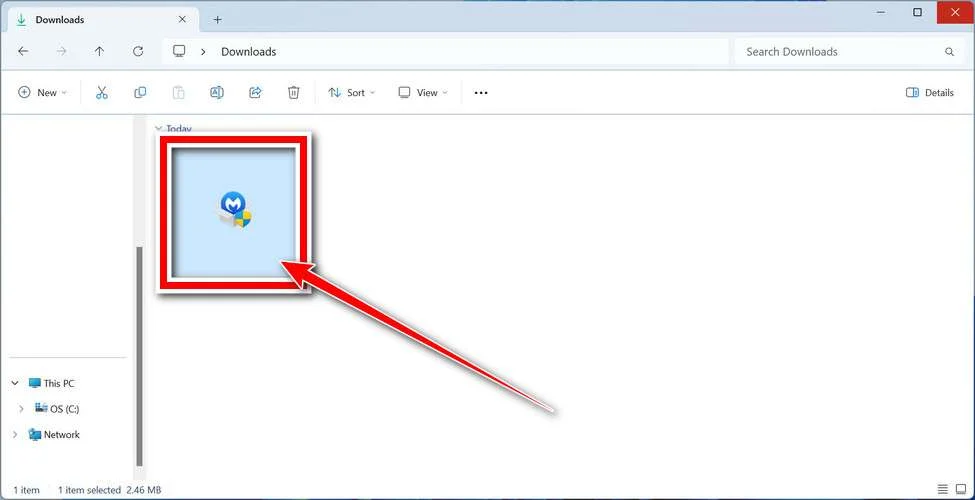
Follow the On-Screen Prompts to Install Malwarebytes
The setup wizard will walk you through a few quick screens:
-
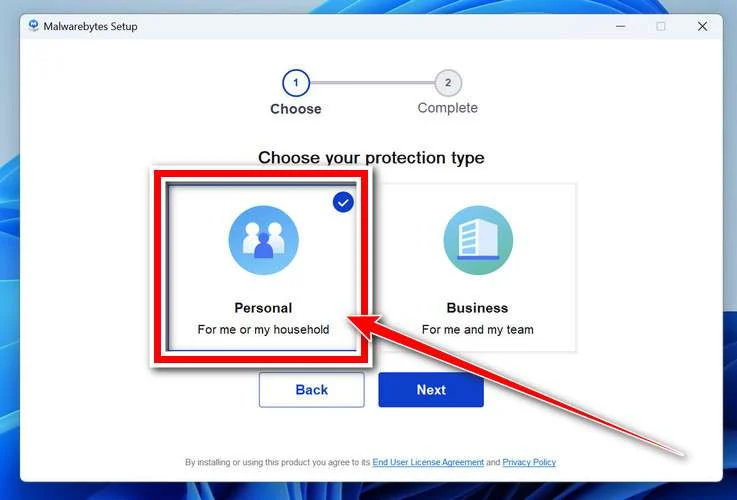
Choose where you’re installing the program — “Personal Computer” or “Work Computer” — then click Next.
-
Malwarebytes will now install on your device. This usually takes under a minute.

-
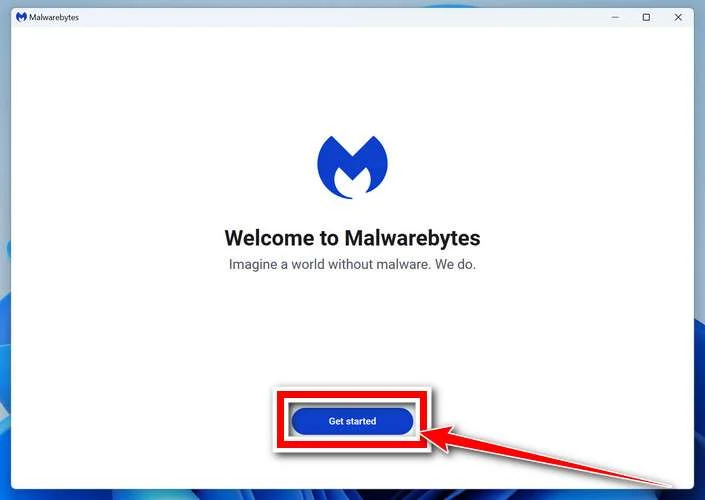
When installation is complete, the “Welcome to Malwarebytes” screen will open automatically.
-
On the final screen, click Open Malwarebytes to launch the program.

-
Enable “Scan for Rootkits”
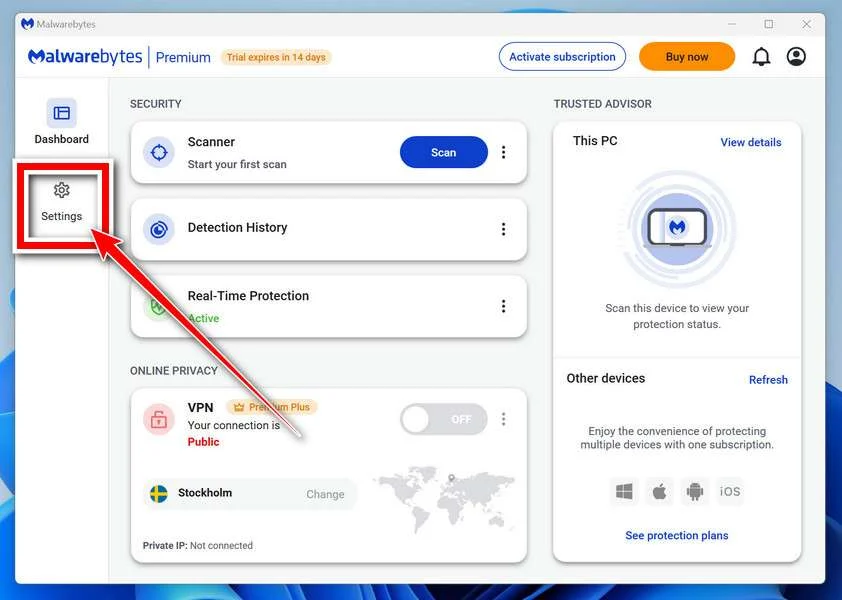
Before scanning, turn on rootkit detection so Malwarebytes can find even the most hidden threats. Click the Settings gear icon on the left side of the screen.
In the settings menu, find “Scan for rootkits” and click the toggle so it turns blue.

Done? Click “Dashboard” in the left pane to return to the main screen.
Start the Scan
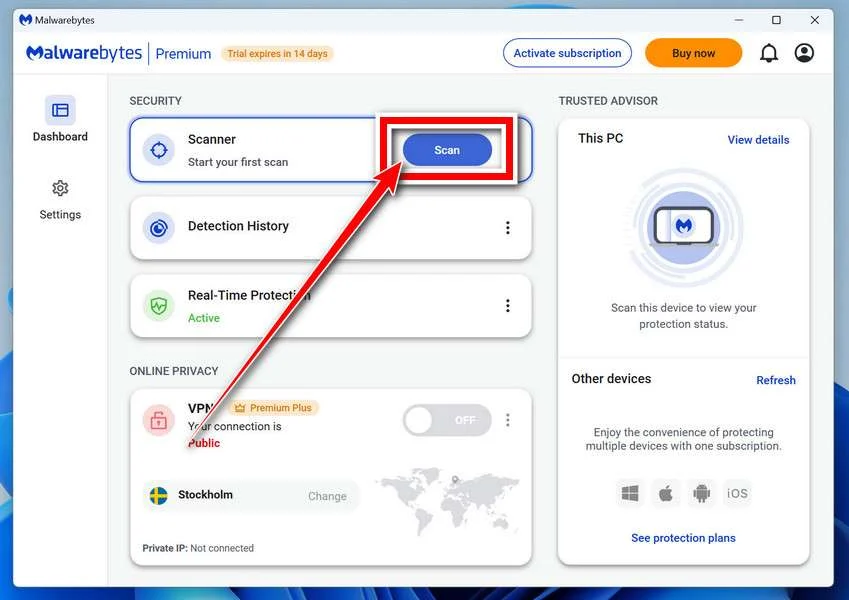
Click the blue Scan button. Malwarebytes will automatically update its virus database and start checking your computer for malware.
-
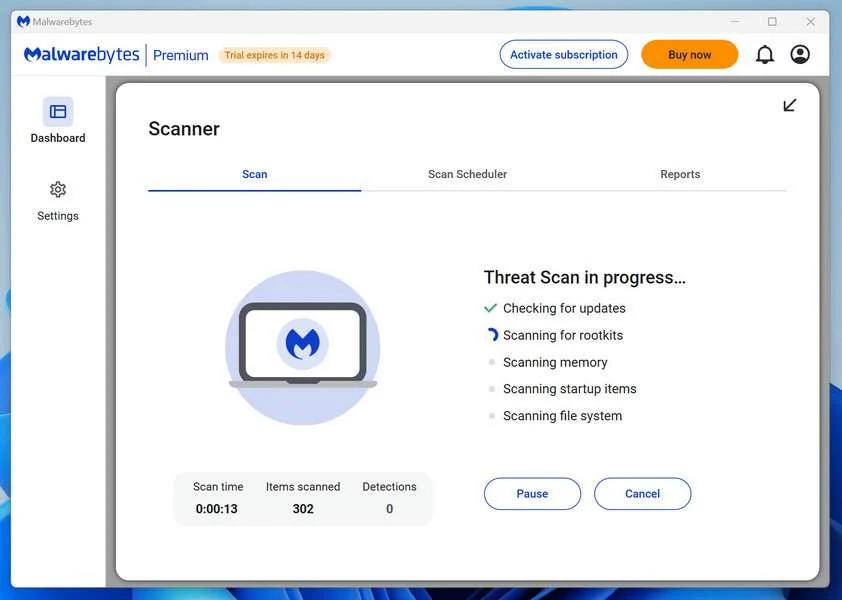
Wait for the Scan to Finish
The scan checks your entire system for browser hijackers and other malicious programs, so it can take 5 to 20 minutes depending on your computer. Feel free to do something else — just check back occasionally to see the progress.
-
Quarantine the Detected Threats
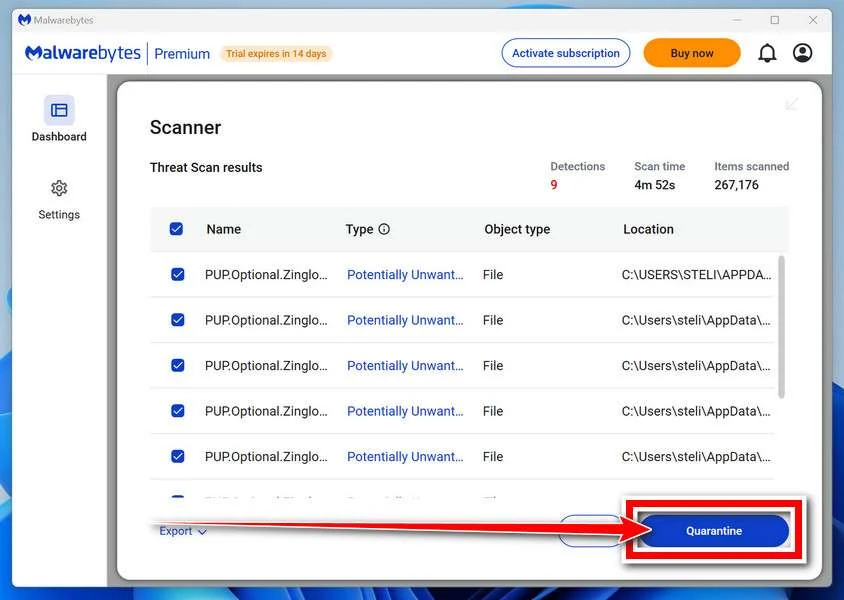
When the scan is done, you’ll see a list of everything Malwarebytes found — malware, adware, and potentially unwanted programs. Click the “Quarantine” button to remove all of them at once.
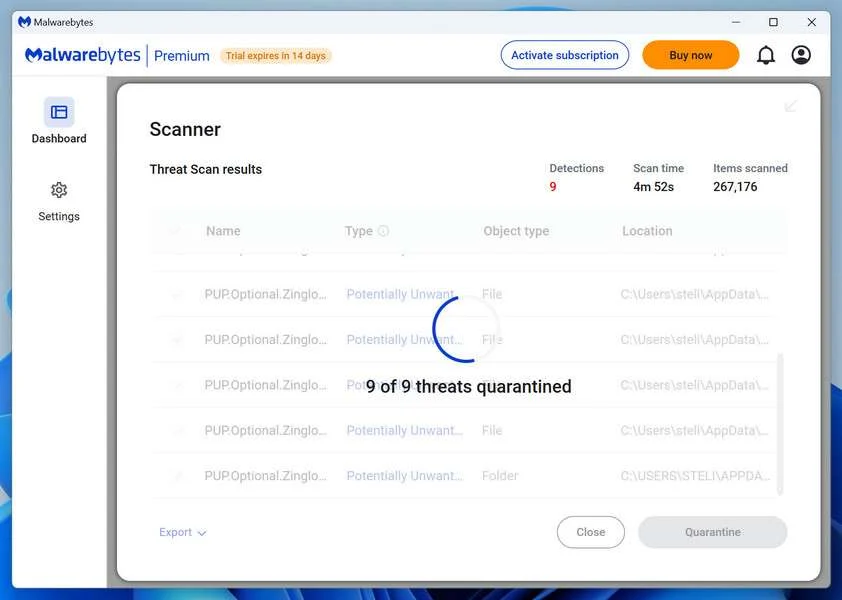
Malwarebytes will now remove the malicious files and registry entries and move them safely into quarantine.
-
Restart Your Computer
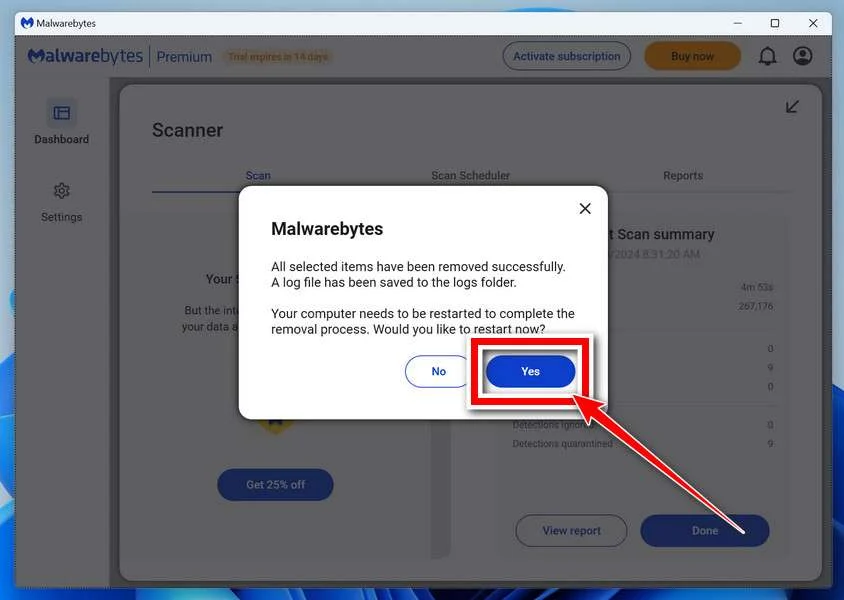
Some threats can only be fully removed after a reboot. If Malwarebytes asks you to restart, click Yes. Once you’re logged back in, Malwarebytes has finished removing the threats it found.
That’s it — your Windows PC is now clean of trojans, adware, and other malware, and should be back to running smoothly.
If you are still having problems with your computer after completing these instructions, then please follow one of the steps:
- Run a computer scan with ESET Online Scanner
- Ask for help in our Windows Malware Removal Help & Support forum.
Run a Malware Scan with Malwarebytes for Mac
Malwarebytes for Mac is a free on-demand scanner that removes the malware other security software tends to miss — adware, browser hijackers, and unwanted programs included. Cleaning an infected Mac with Malwarebytes has always been completely free, and it’s our go-to recommendation. Follow the steps below to scan and clean your Mac in just a few minutes.
-
Download Malwarebytes for Mac
Click the button below to download the latest version of Malwarebytes for Mac.
Download MalwarebytesOfficial installer for macOS. Your download starts right away.Want real-time protection? See Malwarebytes PremiumMalwarebytes Free for MacScans and removes malware at no cost -
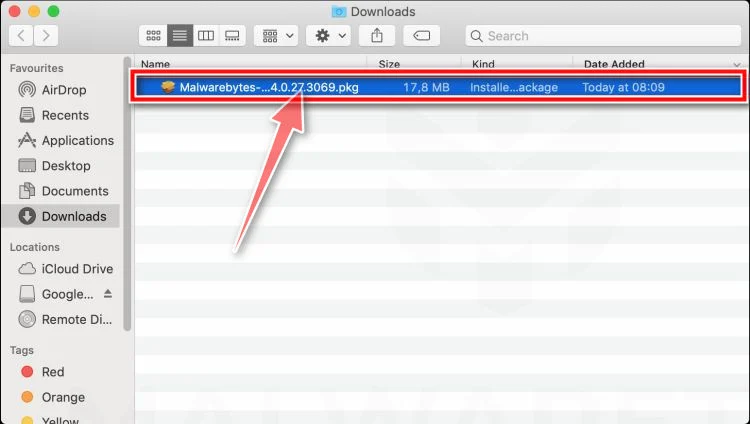
Open the Malwarebytes setup file
When the download finishes, open your Downloads folder and double-click the setup file to begin the installation.
-
Follow the On-Screen Prompts to Install Malwarebytes
The Malwarebytes for Mac Installer will guide you through a few quick screens. Click “Continue” and keep following the prompts until the installation completes.
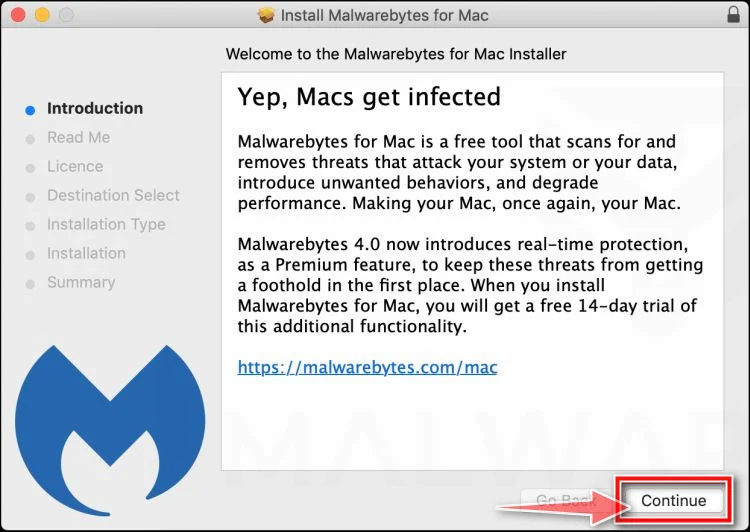
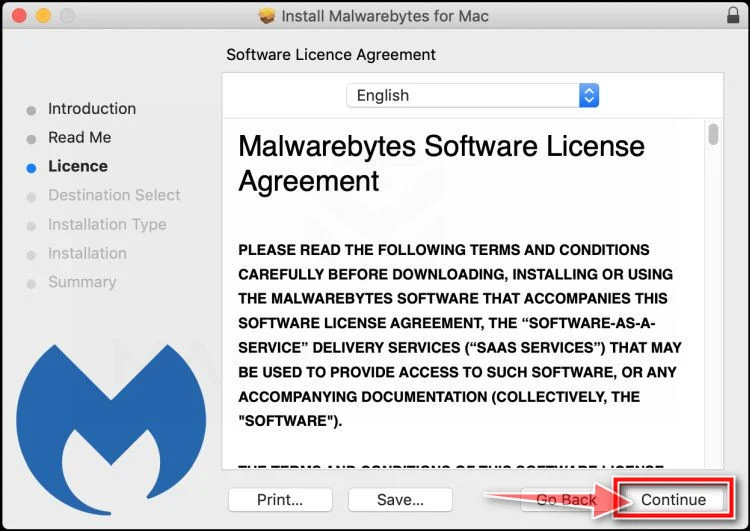
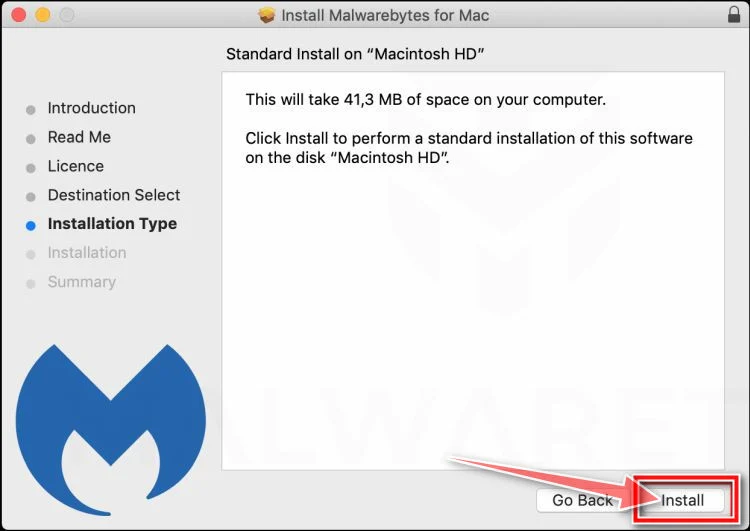
When the installation is complete, Malwarebytes opens to the Welcome to Malwarebytes screen. Click “Get started“.
-
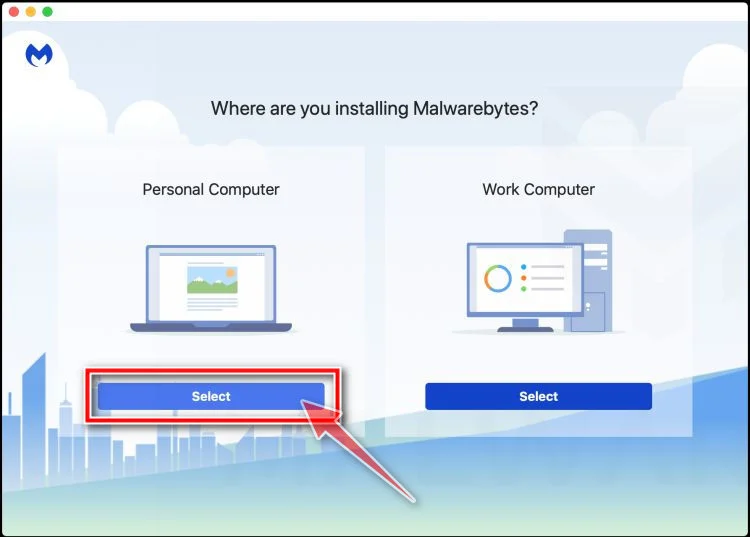
Select “Personal Computer” or “Work Computer”
Malwarebytes will ask what type of computer you’re installing it on. Click either Personal Computer or Work Computer, whichever applies.
-
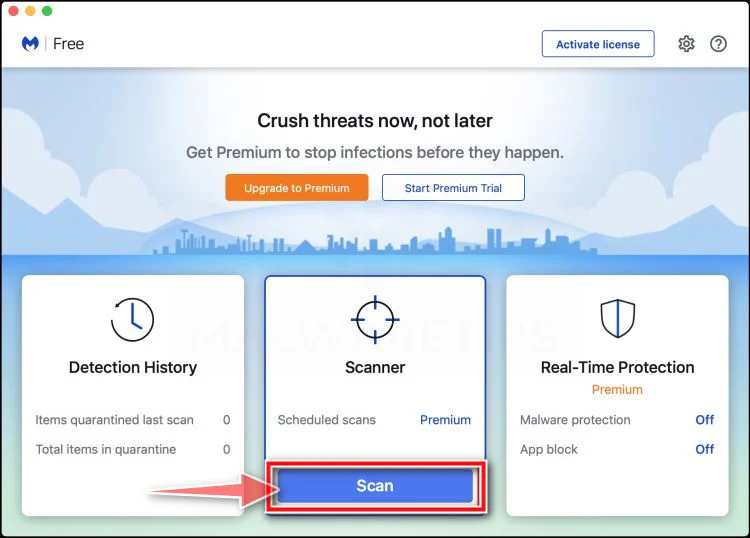
Start the Scan
Click the “Scan” button. Malwarebytes will automatically update its detection database and begin checking your Mac for malware.
-
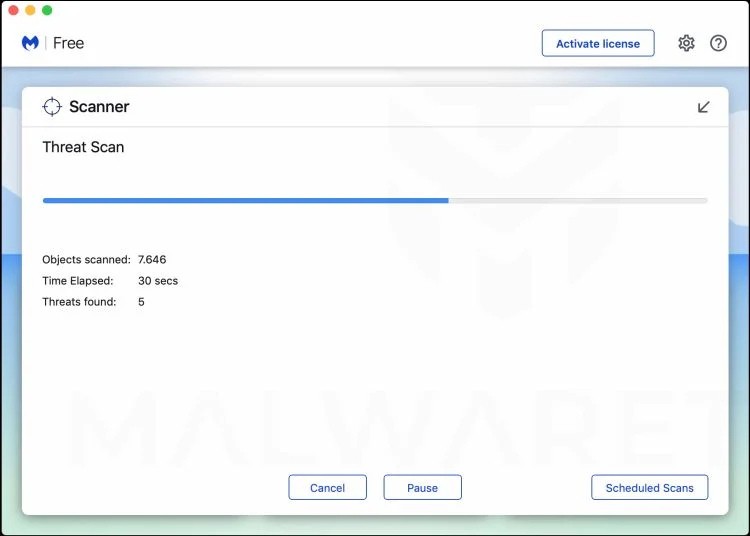
Wait for the Scan to Finish
Malwarebytes will scan your Mac for adware, browser hijackers, and other malicious programs. This can take a few minutes, so feel free to do something else — just check back occasionally to see the progress.
-
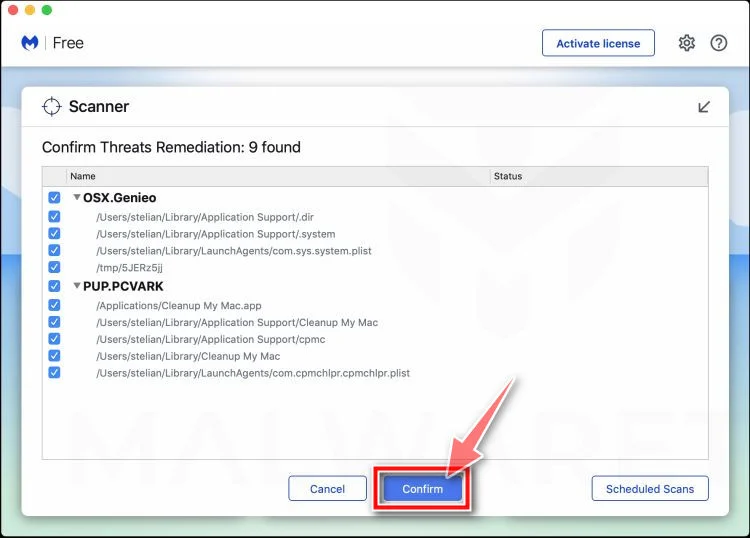
Quarantine the Detected Threats
When the scan is done, you’ll see a list of everything Malwarebytes found. Click the “Quarantine” button to remove all the threats at once.
-
Restart Your Mac
Malwarebytes will now remove all the malicious files it found. Some threats can only be fully removed after a reboot — if Malwarebytes asks you to restart, allow it. Once you’re logged back in, your Mac is clean.
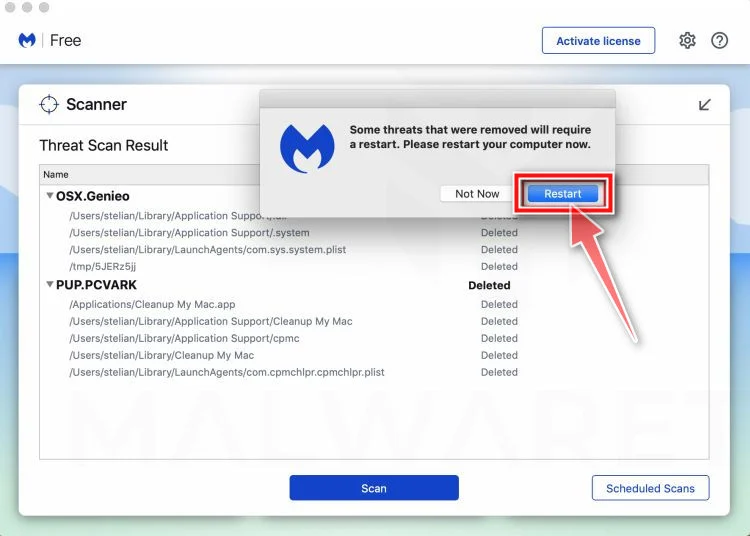
That’s it — your Mac is now free of adware, rogue browser extensions, and other potentially harmful software.
If you are still experiencing problems while trying to remove a malicious program from your computer, please ask for help in our Mac Malware Removal Help & Support forum.
Run a Malware Scan with Malwarebytes for Android
Malwarebytes for Android automatically detects and removes dangerous threats like malware and ransomware so you don’t have to worry about your most-used device being compromised. Aggressive detection of adware and potentially unwanted programs keeps your Android phone or tablet running smooth.
-
Download Malwarebytes for Android.
You can download Malwarebytes for Android by clicking the link below.
Get Malwarebytes for AndroidOpens Google Play in a new tab.Want real-time protection? See Malwarebytes Premium for AndroidMalwarebytes for AndroidScans your phone and removes malware at no cost -
Install Malwarebytes for Android on your phone.
In the Google Play Store, tap “Install” to install Malwarebytes for Android on your device.

When the installation process has finished, tap “Open” to begin using Malwarebytes for Android. You can also open Malwarebytes by tapping on its icon in your phone menu or home screen.

-
Follow the on-screen prompts to complete the setup process
When Malwarebytes will open, you will see the Malwarebytes Setup Wizard which will guide you through a series of permissions and other setup options.
This is the first of two screens that explain the difference between the Premium and Free versions. Swipe this screen to continue.
Tap on “Got it” to proceed to the next step.
Malwarebytes for Android will now ask for a set of permissions that are required to scan your device and protect it from malware. Tap on “Give permission” to continue.
Tap on “Allow” to permit Malwarebytes to access the files on your phone.
-
Update database and run a scan with Malwarebytes for Android
You will now be prompted to update the Malwarebytes database and run a full system scan.

Click on “Update database” to update the Malwarebytes for Android definitions to the latest version, then click on “Run full scan” to perform a system scan.

-
Wait for the Malwarebytes scan to complete.
Malwarebytes will now start scanning your phone for adware and other malicious apps. This process can take a few minutes, so we suggest you do something else and periodically check on the status of the scan to see when it is finished.

-
Click on “Remove Selected”.
When the scan has been completed, you will be presented with a screen showing the malware infections that Malwarebytes for Android has detected. To remove the malicious apps that Malwarebytes has found, tap on the “Remove Selected” button.

-
Restart your phone.
Malwarebytes for Android will now remove all the malicious apps that it has found. To complete the malware removal process, Malwarebytes may ask you to restart your device.
That’s it — your Android phone is now clean — no more malicious apps, adware, or browser redirects.
If you are still having problems with your phone after completing these instructions, then please follow one of the steps:
- Restore your phone to factory settings by going to Settings > General management > Reset > Factory data reset.
- Ask for help in our Mobile Malware Removal Help & Support forum.
Stay Protected: Block Ads and Malicious Sites
Now that your device is clean, keep it that way. Most infections start with a malicious ad or a fake download button — so blocking them at the source is your best defense.
We recommend AdGuard, which blocks malicious ads, phishing pages, and dangerous redirects before they can reach you.
👉 Download AdGuard and browse safely
Frequently Asked Questions About the Sweet Bonanza & MrBeast Casino Scam
1. Is Sweet Bonanza & MrBeast Casino a real app created by MrBeast?
No. Sweet Bonanza & MrBeast Casino does not actually exist.
The ads promoting it are a complete scam designed to mislead social media users and get them to download malware or hand over personal information. MrBeast has never built or endorsed any gambling apps. The deepfake videos in the ads are fabricated using AI technology.
2. How can you identify the Sweet Bonanza ads are fake?
Clear signs the ads are fake include:
- Deepfaked videos of celebs and news anchors endorsing the app
- MrBeast seeming to promote it despite no history of endorsing casinos
- Too good to be true claims like easy wins
- Urging viewers to download from a link instead of legitimate app stores
The unrealistic claims and manipulation tactics are red flags it’s a scam.
3. What happens if you click the download link in the Sweet Bonanza ads?
The links lead to fake websites designed to either infect your device with malware or phish for personal information.
You won’t get any real app. Instead, you may download data-stealing malware or input sensitive info on phishing sites that hackers can exploit.
4. What steps should you take if you downloaded malware from the scam links?
If you downloaded anything, immediately run a scan with anti-malware software like Malwarebytes.
This will detect and remove any viruses, trojans, spyware or other threats on your device. Also change passwords in case of potential account compromise from data theft.
5. Why does the scam center around MrBeast?
The scammers exploit MrBeast’s fame and reputation for crazy stunts to make the scam more believable.
His brand recognition and perceived trustworthiness helps convince people the leaked app could be real. Without such an influential figure, far fewer people would fall for it.
6. Are the celebrity endorsements in the ads real?
No. The videos of celebs are completely AI-fabricated deepfakes.
Advanced technology fakes their voices, mannerisms and lip movements to make fictional endorsements seem real. But the actual people never said anything about this scam app.
7. Is it possible to get your money back if you paid any fees?
Unfortunately, it is very unlikely to recover any lost money.
The scammers operate anonymously, making it almost impossible to identify or locate them. Avoid paying anything to suspicious links in the first place.
8. What can you do to help stop this scam?
Reporting the ads and warning others about this hoax helps curb the scam.
Prevent it from spreading by sharing it’s fake whenever you see promotions for Sweet Bonanza & MrBeast Casino. Also report the ads as scams to get the content removed from social platforms.
The Bottom Line
The Sweet Bonanza & MrBeast Casino scam reveals how deepfake technology can be exploited by online criminals to easily dupe social media users.
Creating fake but convincing videos lets scammers impersonate celebrities and fabricate endorsements. This tricks victims into downloading malware or surrendering personal data thinking they’re getting an exclusive deal.
To stay secure, always verify claims directly with sources. Watch for unbelievable viral scams, exercise caution with links, use security tools, and avoid oversharing personal information online.
With deepfakes becoming more prevalent, we must keep our guard up to avoid being manipulated and scammed through AI-powered deception tactics. Stay vigilant!

Join the discussion
0 commentsShare your experience or ask a question about this article.
Discussion
Start the conversation
Have a question or something useful to share? Add the first comment.