

Have you recently received an email that appears to be a PayPal invoice from Tamiya Inc. for $320? You’re not alone. This scam has been targeting Americans across the country. Read on to learn everything you need to know about how this scam works and how to protect yourself.
Overview of the Scam
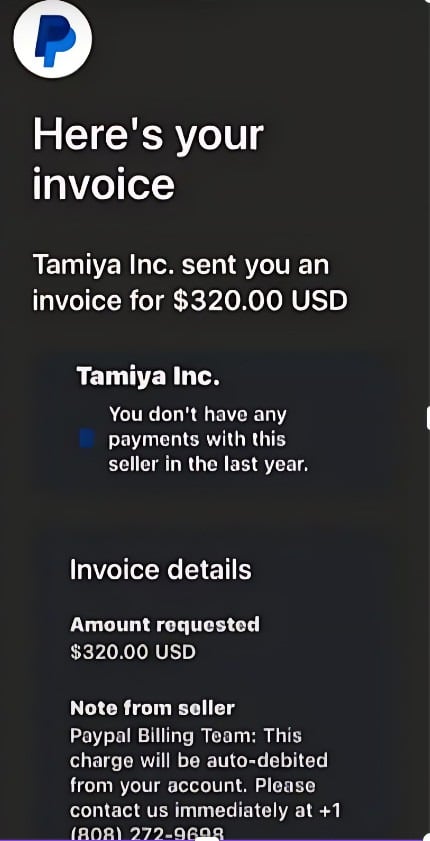
This scam starts with an email designed to look like it is from PayPal’s billing department. The email states that you have an outstanding invoice from Tamiya Inc. for $320 and provides detailed invoice information.
At first glance, the email appears legitimate. It contains PayPal branding and logos and mentions Tamiya Inc., a well-known Japanese manufacturer of plastic model kits and radio-controlled toys.
However, upon closer inspection, it becomes clear this is a scam. The phone number listed for PayPal’s billing department does not actually belong to PayPal. Additionally, most recipients never ordered or received anything from Tamiya Inc.
The email is a trick to get recipients to call the phone number. If you call, you will reach a fake PayPal representative who is actually a skilled scammer. Their goal is to steal your sensitive information and gain access to your PayPal account.
How the Scam Works
Here is a step-by-step breakdown of how the Tamiya Inc. PayPal invoice email scam operates:
1. You Receive an Email Pretending to be From PayPal
The scam email looks identical to a legitimate PayPal invoice. The from address appears to be from PayPal’s billing department. The email has PayPal branding and colors. It addresses you by name and provides an apparent account ID.
All of these details are designed to make the email look authentic. But subtle signs indicate it is fake, such as grammatical errors and a non-PayPal phone number.
2. The Email Claims You Have an Outstanding Invoice from Tamiya Inc.
The email states that you have an unpaid invoice from Tamiya Inc. for $320. It lists details like an invoice number, the date issued, and due date.
Of course, you never ordered or received anything from the company. The scammers use Tamiya Inc. to sound more convincing, since it is a real global brand.
3. You are Instructed to Call a Phone Number to Resolve the Issue
The email urges you to call a phone number for PayPal’s billing department to discuss the invoice. This is the core of the scam.
The number has a Hawaii area code, (808). If you call, you will not actually reach PayPal. Instead, you will be connected with a scammer posing as a PayPal representative.
4. Fake PayPal Reps Try to Steal Your Login and Financial Details
When you call the number, skilled scammers posing as PayPal agents answer. They confirm the $320 charge and claim the only way to remove it is to verify your account.
To “verify the account,” they ask you to log into your PayPal account through a website they provide, which is fake. If you input your username and password, the scammers gain access and can steal your money.
Even if you don’t fall for this, they have other tricks to try to get your financial information, account numbers, social security number, and more. They may claim they can refund your money if you confirm your details. Some even try to remotely access your computer to steal data.
5. The Scammers Drain Your PayPal Account and Commit Identity Theft
Once the scammers have your PayPal login credentials, they can transfer all your money out of your account. They can also gain access to any linked bank accounts or cards.
With your personal information, they can open fraudulent credit cards, take out loans in your name, file fake tax returns, and commit other identity theft.
You may not realize what happened until much later when you suddenly cannot access your accounts or find suspicious charges. By that time, the scammers have taken your money and disappeared without a trace.
What to Do If You Receive This Email
If this fake PayPal email lands in your inbox, take the following actions right away:
- Do not click any links or call the phone number: This gives the scammers access to you.
- Report the email as phishing to PayPal: Forward the scam email to phishing@paypal.com so they can investigate it.
- Mark the email as spam: This helps your email provider identify and block future scam emails.
- Scan your device for malware: Scam emails sometimes contain malware that is downloaded when you open them. Use antivirus software to detect and remove anything suspicious.
- Change your PayPal password: Pick a new secure password so scammers cannot access your account even if they already have your login info.
- Review your PayPal account activity: Log in to your real PayPal account and check recent transactions for any signs of unauthorized activity. Notify PayPal of any charges you did not make.
- Monitor your credit reports and bank accounts: Keep an eye out for any fraudulent accounts or charges and report them right away. Consider putting a credit freeze in place to block scammers from opening new accounts.
Red Flags to Identify This PayPal Invoice Scam
These warning signs indicate an email is not really from PayPal:
- You don’t have a PayPal account: PayPal would never send you an invoice if you don’t have an account with them.
- You never ordered from Tamiya Inc.: If you never bought anything from the company, they have no reason to bill you.
- Grammatical/spelling errors: Real PayPal emails do not contain typos or other obvious mistakes.
- Generic greeting: Genuine PayPal emails address you by your first and last name.
- Suspicious links: Don’t click links in emails from senders you don’t recognize. They could download malware.
- Non-PayPal phone number: PayPal’s real customer service numbers are readily available on their website.
- Requests for sensitive information: PayPal will never ask for your password, bank account details, or social security number over email.
- Sense of urgency: Scare tactics like threatening account suspension are used to make you act fast without thinking.
- Follow up spam emails: If you get repeated emails about the same invoice from different addresses, it’s definitely a scam.
Frequently Asked Questions About the Tamiya Inc. PayPal Invoice Scam
1. What is the Tamiya Inc. PayPal invoice scam?
This is a phishing scam where targets receive a fake email pretending to be a PayPal invoice from Tamiya Inc. charging them $320. The email looks real but is designed to trick people into calling a fake support number, allowing scammers to steal their personal and financial information.
2. How does the Tamiya PayPal scam work?
You get an email that appears to come from PayPal billing about an unpaid Tamiya Inc. invoice. It looks legitimate with PayPal branding and details. The email instructs you to call a phone number to resolve the fake invoice. If you call, scammers impersonating PayPal support agents answer and try to steal your PayPal login and bank details.
3. What is the phone number used in this scam?
The emails all list the same 808 area code number. This number connects you with skilled scammers pretending to be PayPal support, not real PayPal representatives.
4. What happens if you call the number?
The fake agents confirm the invoice and claim you must verify your account by logging in at a phishing site they provide. This gives them your PayPal password. They may also directly ask for banking information to issue a refund, allowing them to steal your money.
5. How much does the fake invoice claim you owe?
The PayPal scam emails state you owe Tamiya Inc. $320. The scammers use an odd specific amount like this hoping it seems more legitimate. There is no real outstanding invoice.
6. What is Tamiya Inc.? Are they involved?
Tamiya Inc. is a legitimate Japanese company that makes model kits and RC toys. They are not involved in this scam. The scammers just use the brand name without their knowledge or consent.
7. What are some red flags of this PayPal scam?
Non-PayPal phone number, urgent threats, grammar/spelling errors, unknown Tamiya order, requests for sensitive info, and repeat emails about the same fake invoice indicate it is a scam.
8. What should you do if you get this fake invoice email?
Do not click links or call the number. Report it to PayPal as phishing, mark it as spam in your email, scan for malware, change your PayPal password, and monitor your financial accounts.
9. How can you avoid falling for the Tamiya PayPal scam?
Know the warning signs of phishing. Never give info or access to your device to unsolicited callers. Confirm invoices directly with PayPal before taking action. Use unique secure passwords for all accounts.
10. How can you report this scam to help others avoid it?
Forward scam emails to phishing@paypal.com. Report the phone number to the FTC. Share this information online and with friends and family to spread awareness.
The Bottom Line
This PayPal invoice scam can be convincing and easy to fall for due to professional branding and urgent payment demands. But the email is completely fake.
Tamiya Inc. is not billing people at random for $320. And PayPal will never contact you out of the blue requesting sensitive information over email. The scammers’ only goal is to steal your money and identity.
If you receive this scam email, report it and take steps to protect your accounts right away. But whatever you do, never call the phone number in the email. This gives the criminals exactly what they want – direct access to you and your financial details.
With scam awareness and proper precautions, you can identify these malicious emails and avoid becoming the next victim. Share this guide to help spread awareness about the Tamiya Inc. PayPal invoice email scam targeting Americans.

Join the discussion
0 commentsShare your experience or ask a question about this article.
Discussion
Start the conversation
Have a question or something useful to share? Add the first comment.