

It is the kind of email that makes you pause.
You are trying to wrap up holiday shopping, everything is hectic, and then Target appears in your inbox with an apology and a promise: a $20 eGiftCard, sent to you “for your patience”.
If you have never received something like that before, the natural question is the right one:
Is the Target $20 eGiftCard email a scam, or is it legit?
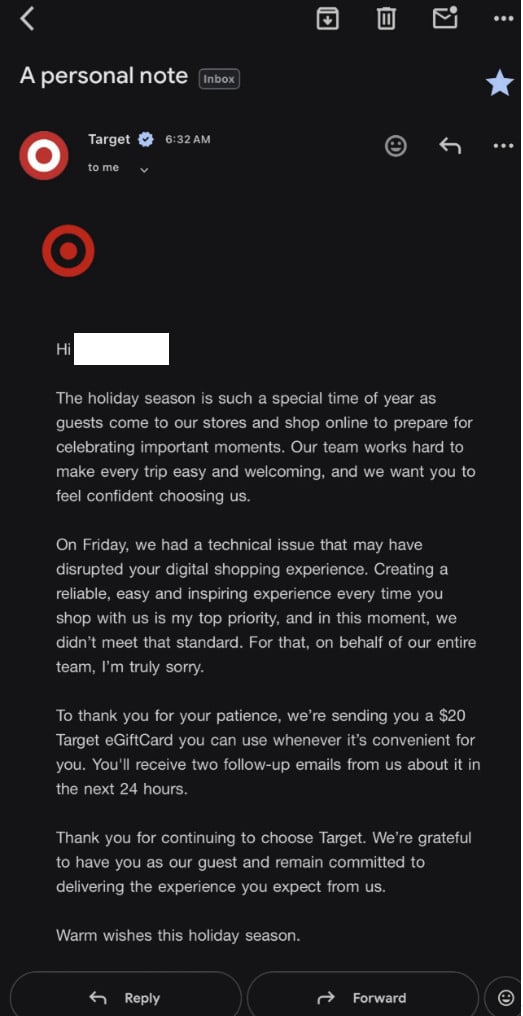
Here’s the practical answer: this specific $20 Target eGiftCard outreach is real, tied to a widely reported Target digital outage that disrupted online shopping and order management around Dec. 19. Target confirmed that gift cards were being sent to impacted guests as an apology and goodwill gesture.
The important catch is that scammers love moments like this.
Whenever a big brand is in the news, criminals quickly create lookalike versions to trick people into clicking links, “claiming” gift cards, entering login details, or handing over payment info. So even if the real Target email exists, you still need to verify your specific email safely before you interact with it.
This guide walks you through exactly how to do that.
The quick verdict
Is the Target $20 eGiftCard email legitimate?
Yes, Target did send $20 eGiftCards to some customers after a widespread digital disruption affected parts of its app and website, especially during a heavy holiday shopping period. News outlets reported that Target acknowledged the issue publicly and followed up with apology messaging and gift cards to affected guests.
Is every email like this legitimate?
No.
Scammers can copy the design, wording, and even the “apology” tone to create near-identical fake emails. The key is verifying the sender and the redemption method safely, without trusting the email itself.
What happened at Target on Dec. 19 (and why people got $20)
To understand why this email exists, it helps to understand the timing.
On Dec. 19, many shoppers reported issues with Target’s digital experience. People complained about problems with the app and website, including order visibility, processing, and other checkout-related functions. Outage reports spiked on Downdetector during that period, and Target publicly acknowledged intermittent issues while a fix was underway.
Target later posted updates indicating digital services were restored and that they were working through impacted orders.
After that, some shoppers received an apology email from a Target executive (Cara Sylvester, Executive Vice President and Chief Guest Experience Officer), explaining that Target did not meet its own standard for a reliable experience and offering a $20 eGiftCard as a thank-you to impacted guests.
Target also confirmed to media that gift cards were sent to impacted guests as a gesture of appreciation, not to every customer universally.
Who is Cara Sylvester, and why is her name on these emails?
A common “scam check” people do is: “Is this person real?”
In this case, yes. Cara Sylvester is a real Target executive and is listed on Target’s corporate leadership page as Executive Vice President and Chief Guest Experience Officer.
That said, scammers can use real names too. The presence of a real executive name does not prove your email is legitimate. It just means scammers have a believable template to copy.
What the legitimate Target $20 eGiftCard email usually looks like
Based on reports, the legitimate flow often looks like a short sequence rather than one single email:
1) The apology or “personal note” email
Common traits:
- A subject like “A personal note”
- A message referencing a technical issue that affected digital shopping
- A clear apology and explanation
- A mention that Target is sending a $20 eGiftCard
- A note that you may receive follow-up emails within about 24 hours
Media reporting describes this same structure and the “impacted guests” framing.
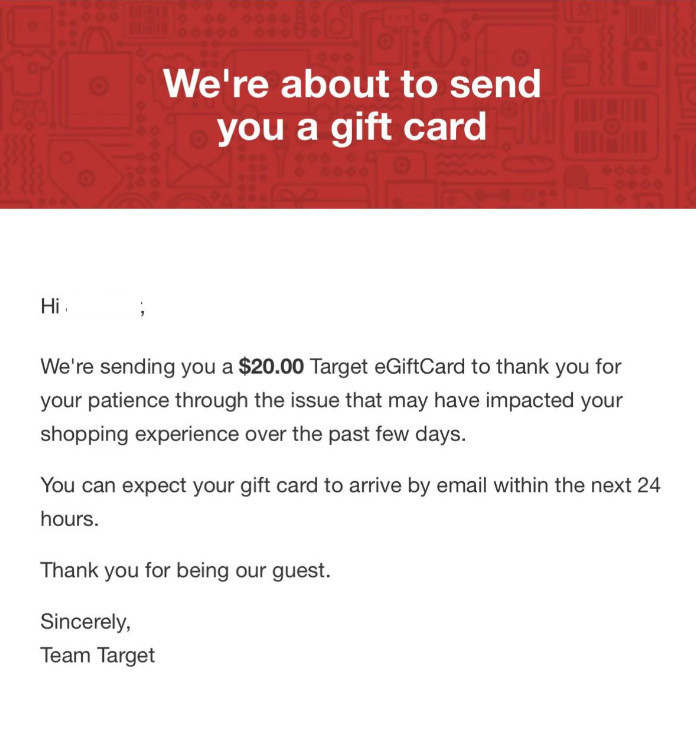
2) A brief heads-up email
This is often a short “we’re about to send you a gift card” style email.
It usually contains:
- Your first name
- The $20 amount
- A simple statement that the gift card will arrive by email soon
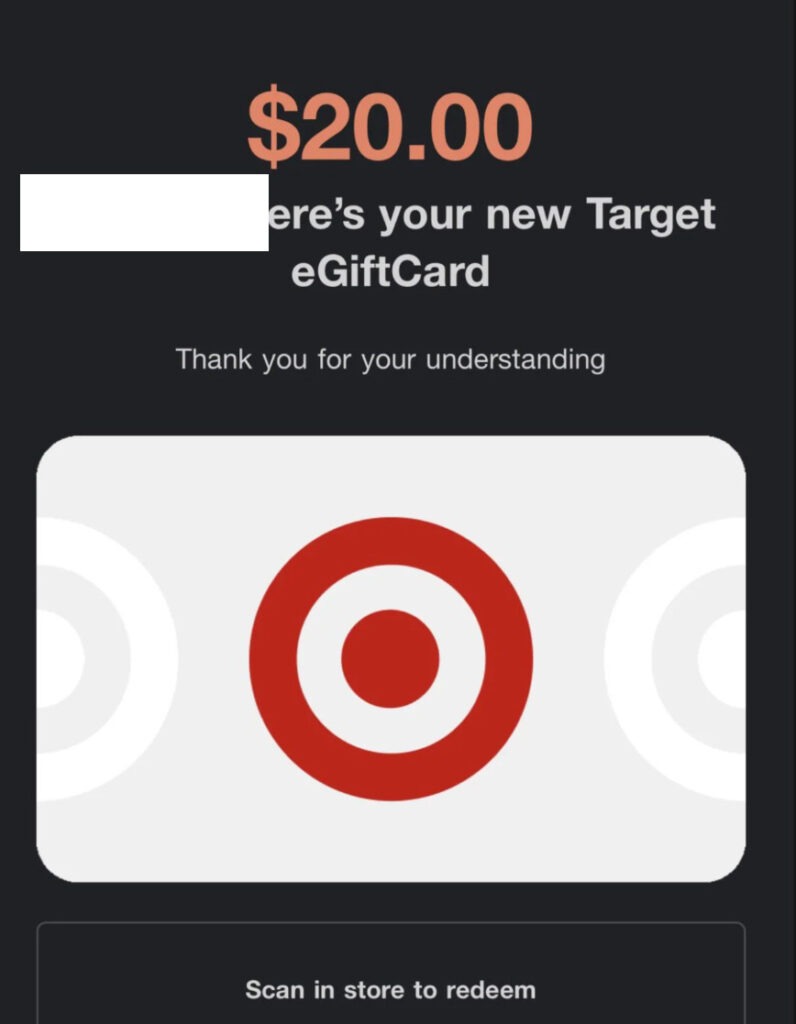
3) The actual eGiftCard delivery email
This is the one that typically includes:
- The “Here’s your new Target eGiftCard” language
- A gift card image
- A barcode or code, sometimes with “scan in store to redeem”
Is every Target customer getting a $20 eGiftCard?
No.
Target’s messaging to media described the recipients as “impacted guests”, meaning people whose experience was affected.
That could include things like:
- You tried to place an order during the disruption
- Your order status did not display correctly
- Curbside or pickup workflows were impacted
- A payment or gift card action glitched
- You contacted support about the issue
You do not need to perfectly understand Target’s internal criteria, because the safe approach is the same either way: verify the email and verify the gift card through official channels.
Why scammers will copy this email (and what they will change)
When a real brand sends real gift cards, scammers get three advantages:
- The story already sounds believable
People saw news about Target having issues, so “apology gift card” feels plausible. - Victims are less cautious
A gift card feels like a reward, and rewards lower defenses. - Templates are easy to clone
Colors, logos, and layout are easy to replicate.
What scammers change is the part that makes them money.
Instead of sending you a real Target eGiftCard, they try to get one of the following:
- Your Target login email and password
- Your credit card number “to verify”
- A small “processing fee” payment
- Access to your device (less common here, but possible if they route you into fake support)
- Your personal data for identity fraud
The most common scam variations to watch for
Here are patterns that show up again and again whenever scammers imitate big retailers.
“Claim your $20 gift card” with a fake login page
You click a button, it looks like Target, and it asks you to log in.
If you enter your credentials, the scammer now has your Target account access. That can be used to:
- Place orders
- Steal stored addresses
- Use saved payment methods (or try to)
- Abuse gift card balances
“Pay $1.95 shipping” or “small verification charge”
A real apology gift card does not require you to pay to receive it.
Any fee request is a huge red flag.
A “survey” that ends with a payment page
The email says you must answer a short survey to receive the gift card.
Real customer surveys exist, but when the “survey” ends in payment collection, it is usually a trap.
QR code scams
A QR code can hide a malicious link. The email looks clean because there is no visible URL.
If you scan a QR code from an email, you are still clicking a link. Treat it the same way you would treat a suspicious button.
Attachments (PDF, HTML file, “invoice”)
A real gift card email generally does not need you to open an attachment.
Attachments can be used for:
- Credential phishing (HTML files)
- Malware delivery (less common, but possible)
- Redirect tricks
“Call us to activate your gift card”
This is classic fake support behavior.
Target does not need you to call a number to activate an apology gift card. If the email pushes you toward a phone call, treat it as suspicious.
How to verify the Target $20 eGiftCard email safely
Do not try to “prove it’s real” by clicking the email’s links.
Instead, verify it in a way that does not depend on the email being honest.
Step 1: Check the sender address carefully
In most email apps, you can tap or click the sender name (like “Target”) to reveal the actual email address.
Things to look for:
- Misspellings: targét, tarqet, target-support, etc.
- Random domains: targetgiftcardsupport.com, target-rewards-now.com, and similar
- Strange country domains you do not associate with Target
A legit email will come from an official Target-controlled domain, not a lookalike.
Also check “mailed-by” and “signed-by” (Gmail displays these). If those do not match Target’s domain, be cautious.
Step 2: Hover over links without clicking (desktop)
If you are on desktop, hover your mouse over any button or link and look at the preview URL.
Red flags:
- A URL shortener
- A long random domain
- Misspellings of target.com
- A domain that ends in something unrelated (for example, a marketing tracker on an unfamiliar domain)
Step 3: Do not redeem from the email first
Instead, open Target using a trusted path:
- Type target.com into your browser manually, or use your bookmarked Target site
- Or open the official Target app
Once you are inside your account through a trusted entry point, check:
- Your account notifications
- Gift card balance section (if you already have the card number, you can add it there)
- Order history and messages
Step 4: Confirm the gift card details without giving away info
If the email contains a gift card number and access code, you can verify it inside the official Target app or website by adding it to your wallet or gift card section.
Do not paste the number into random “balance checker” sites you find via Google, and do not share the number with anyone.
If it is real, Target’s own systems will recognize it.
Step 5: Contact Target through official support, not the email
If you want a human confirmation:
- Go to target.com and navigate to help
- Or use the Target app support flow
- Or use official contact methods shown on Target’s website
Do not call numbers provided in the email if anything feels off.
Step 6: Look for consistency with your activity
Target said gift cards were for impacted guests.
Ask yourself:
- Did you try to shop online during the outage window?
- Did your app or website orders glitch?
- Were you charged but could not view an order?
- Did curbside pickup or returns get messy that day?
If yes, the email becomes more plausible.
If no, it does not automatically mean scam, but it raises the bar for verification.
A simple checklist: legit vs suspicious
Signs your email is more likely legitimate
- Sender domain matches Target-controlled domains
- No request for payment, bank info, or password
- Gift card can be verified in the official Target app/site
- The message matches the outage context and “impacted guests” framing reported by media
- No urgency tactics like “expires in 30 minutes” or “act now”
Signs your email is likely a scam
- The sender address is not clearly Target-owned
- You must “log in to claim” via a suspicious link
- You are asked to pay a fee, even a small one
- You are asked for personal or banking information
- The email pressures you with urgency or threats
- It includes a phone number to call to “activate” the card
- Attachments are included and pushed as required
What to do if you already clicked a link
Clicking is not automatically disastrous, but what you do next matters.
If you clicked but did not enter any information
- Close the tab
- Do not return to it
- Run a quick security scan on your device (Windows Security on Windows, or your trusted antivirus)
Then move on to verifying through the official Target site or app.
If you entered your Target password
Act quickly:
- Change your Target password immediately (using target.com or the app, typed manually)
- If you reused that password elsewhere, change it everywhere you used it
- Enable two-factor authentication if available on your account
- Review your account details: shipping addresses, phone number, saved payment methods
- Review recent orders and cancellations
If you entered credit card information
- Call the number on the back of your card (not a number from the email)
- Explain you may have entered your card details into a fraudulent site
- Ask about blocking the card, charge monitoring, and dispute steps
- Watch your statements closely for at least a few weeks
If you downloaded an attachment
- Do not open it again
- Scan your device
- If you ran a file and your computer starts acting strange, consider professional malware help
What to do if you received a real $20 eGiftCard
Even when it’s legitimate, treat gift cards like cash.
Best practices
- Add it to your Target app wallet so you control it
- Do not share the number or barcode screenshot
- Be careful with screenshots in public places or on social media
- Use it soon if you prefer, but do not feel forced by artificial urgency
Why “legit today” can still become risky tomorrow
This is the part many people miss.
A real corporate email campaign teaches scammers exactly what to copy.
They can learn:
- The subject line style
- The tone of apology
- The gift card image format
- The timing (multiple emails over 24 hours)
- Which phrases convince people
So the existence of a real Target $20 eGiftCard apology campaign increases the likelihood of future phishing waves using the same storyline.
That is why the verification steps above matter, even if your email looks perfect at first glance.
How to protect yourself from future “gift card” phishing
Use a password manager
Password managers make it harder to fall for fake sites because they will not autofill credentials on the wrong domain.
If the page is not actually target.com, autofill usually fails. That is a helpful warning.
Turn on account alerts
If your email provider supports it, turn on suspicious login alerts.
Also consider transaction alerts from your bank or credit card provider.
Be skeptical of “free money” emails
Sometimes brands do offer legitimate credits or gift cards.
But the safe pattern is always the same:
- Verify independently
- Never pay to receive a reward
- Never give passwords through an email flow
Keep your browser updated
A lot of phishing relies on outdated browsers and extensions.
Keep Chrome, Edge, Firefox updated, and remove extensions you do not trust.
FAQ
Is the Target $20 eGiftCard email real?
Target did send $20 eGiftCards to some customers as an apology after a widely reported digital outage affected online shopping functions.
Why did I get a $20 gift card from Target?
Reports indicate Target sent gift cards to impacted guests as a goodwill gesture after the disruption.
Is every Target customer receiving the $20 eGiftCard?
No. Target described recipients as impacted guests, not all customers.
What date was the Target outage connected to this email?
The messaging reported by media ties the apology gift card to issues that occurred around Dec. 19, when outage reports spiked and Target acknowledged intermittent digital problems.
How can I verify the email without clicking anything?
Open the Target app or type target.com manually, then check your account and gift card section from there. If the gift card is real, it should be recognized through official Target channels.
The email says I will get two follow-up emails. Is that normal?
Yes, that sequence has been described in reporting about the apology campaign.
What if the email asks me to pay a small fee to receive the gift card?
That is a strong scam signal. A legitimate apology eGiftCard should not require a payment, shipping fee, or verification charge.
What if the email asks me to log in to “claim” my gift card?
Be cautious. Do not log in through the email link. Instead, log in through the official app or by typing the site yourself, then check whether anything is waiting for you.
What if I already gave my Target password on a page from the email?
Change your Target password immediately, change the password anywhere else you reused it, and review your account for changes or orders.
Can scammers steal a gift card if I post a screenshot?
Yes. Gift cards function like cash. If someone gets the number and access code, they may be able to spend it. Avoid sharing screenshots of barcodes or codes.
I got a gift card email but I never shopped on Dec. 19. Does that mean scam?
Not automatically, but it means you should be extra strict about verification. Confirm the sender domain, then verify the gift card only through Target’s official site or app.
Where should I report a fake Target gift card email?
You can report it to your email provider as phishing, and you can forward suspicious messages to Target through their official fraud or support channels (found on target.com). If you are in the U.S., you can also report phishing to the FTC via their official reporting site.
Bottom line
The Target $20 eGiftCard apology emails tied to the Dec. 19 digital issues are legitimate, and Target confirmed gift cards were sent to impacted guests.
But scammers can and will imitate this campaign.
Your safest move is simple: do not trust the email to prove itself. Verify independently through the official Target app or by typing target.com yourself, and never enter passwords or payment details through gift-card-themed email links.

Join the discussion
0 commentsShare your experience or ask a question about this article.
Discussion
Start the conversation
Have a question or something useful to share? Add the first comment.