

A new text message scam has recently emerged, targeting unsuspecting victims with fake toll violation notices. The messages claim the recipient has an outstanding balance for New York tolls and directs them to a fraudulent website to pay the fees. This ingenious scam manages to dupe even skeptical users through clever social engineering and urgent calls-to-action.
In this comprehensive article, we will uncover everything there is to know about the “Tolls by Mail NY Services” text message scam. First, we will provide an in-depth overview of the scam operations. Next, we will do a step-by-step walkthrough of how the scam works to catch victims. We will also outline what you should do if you have fallen prey to this trickery. Finally, we will summarize the key takeaways in the bottom line.
An In-Depth Overview of The Scam
The “Tolls by Mail NY Services” scam starts with an unsolicited text message sent to the victim’s mobile phone. The message typically states:
“Tollsbymail: Take action now to clear your outstanding balance. Go to https://nytollservices.com to prevent $50.00 in additional fees.”
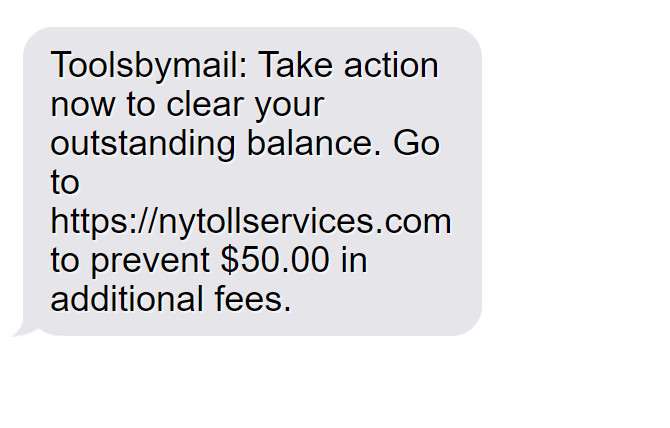
This text is carefully crafted to trigger urgency in the recipient. The first line tells them to “take action now”, implying they have to act fast. It then mentions an “outstanding balance”, making the recipient think they owe money.
The message goes on to provide a link to pay the balance. The domain name “nytollservices.com” contains “NY”, “toll”, and “services”, making it appear legitimate. The threat of “$50.00 in additional fees” motivates the user to click the link to avoid extra charges.
In reality, the text is completely fake. The scammers spoof the sender ID to make the message seem like it’s from a toll collection agency. The link actually directs to a fraudulent website designed to steal personal and financial information.
The Objectives of The Scam
The end goal of this scam is straightforward – to deceive users into entering sensitive information that can then be exploited.
Specifically, the scammers aim to:
- Trick recipients into believing they owe NY toll money
- Prompt urgent action by mentioning additional fees
- Direct victims to a fake website through social engineering
- Collect personal information like name, phone number, address
- Steal credit card details when users attempt to “pay balance”
- Use these details for identity theft or selling on the dark web
How Did The Scam Originate?
The original source of this scam is unclear. Text message scams have exponentially grown due to the accessibility of SMS marketing software. Scammers can now send thousands of texts rapidly without a trace.
Additionally, toll roads are universally hated. Most people have experienced annoying toll fees before. This makes them more inclined to believe a toll violation notice.
The New York locale adds legitimacy as NYC bridges and tunnels are notorious for their costly tolls. The MTA charges up to $16 for a single trip across its bridges and tunnels. This prime target earned NYC a spot in the scam.
The complex workings of E-ZPass billing also enable deceit. Many E-ZPass users don’t fully understand the system. Unexpected fees happen frequently due to equipment glitches. This makes fake toll charges more convincing.
Overall, the geography, payment complexity, and text broadcasting abilities intersected to birth the “Tolls by Mail NY Services” scam.
Scope and Scale of The Scam
This scam campaign reached its peak in mid-2023. The texts were blasted in mass waves across the New York metropolitan area. Staten Island residents were hit particularly hard.
Hundreds of fake toll collection websites like nytollservices.com popped up to support the scam. Security experts speculate that a single criminal entity could be behind the entire operation.
The campaign has since slowed due to media coverage and blacklisting of the domains. However, isolated incidents continue to be reported. Victims are spread across NY and surrounding states like New Jersey and Connecticut.
The true reach of this scam is difficult to quantify. Most recipients do not report texts to authorities. Only a fraction of successful attacks make the news. Some experts estimate tens of thousands have fallen prey in New York alone. The issue is likely seriously underreported.
How the Tolls by Mail NY Services Scam Works
Now that we have outlined the scam overview, let’s take a closer look at the step-by-step actions users are manipulated through:
Step 1: The Recipient Receives an Unsolicited Text
The scam begins with a text sent to the victim’s mobile phone number. The sender ID is usually a random 10 digit number or alphanumeric string.
The text follows this general template:
“Tollsbymail – Take action now to clear your outstanding balance. Go to [URL] to prevent $50 in additional fees.”
The URL links to a fake website, like nytollservices.com, instead of the official Tolls by Mail website.
Step 2: The Message Triggers Urgency in The Recipient
Everything about the text message is designed to trigger a sense of urgency in the recipient. The opening line “Take action now” pressures immediate action.
The mention of an “outstanding balance” implies the user owes money that must be paid off. Threat of “additional fees” further stresses urgency to avoid added costs.
These tactics exploit natural human tendencies. People are loss-averse and try to avoid penalties. The short text length adds abruptness. The scammers know how to elicit prompt responses.
Step 3: The Recipient Clicks The Link
By forcing urgency and implying financial consequences, the scammers achieve their goal of getting users to click the link.
Those worried about late toll payments will be inclined to follow the URL to resolve the issue. The domain name sounds legitimately related to tolls.
However, the sleight of hand is that the URL directs to a fake phishing site instead of the official Tolls by Mail portal. Victims are unknowingly being routed into a scam.
Step 4: The User Lands on The Phishing Website
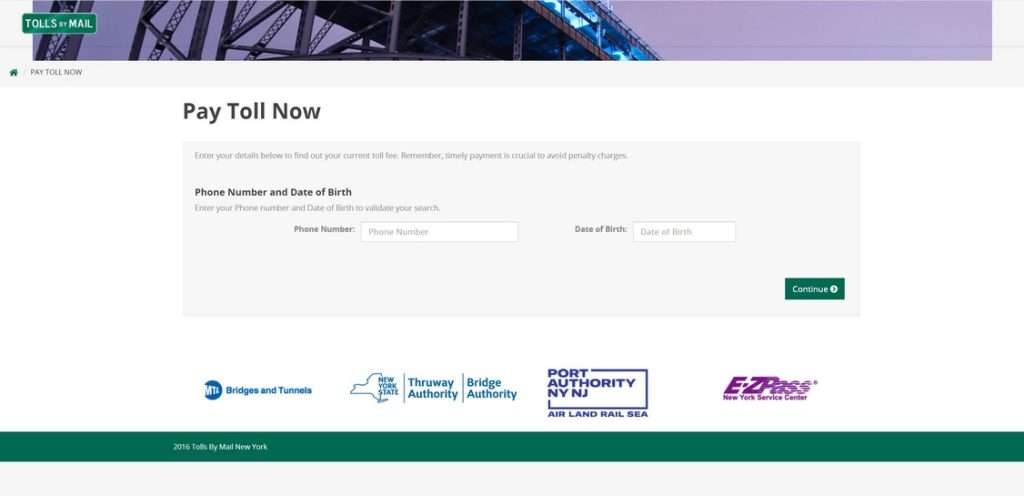
The scam link redirects to a fraudulent website dressed up to mimic Tolls by Mail. Everything from the logo, branding, web copy, and UI is ripped off.
Some examples of phishing sites used:
- nytollservices.com
- newyorktolls.org
- nytolls.co
To users, the site appears professional and real. The scam depends on the facade.
Step 5: The User Attempts to Pay The Fake Tolls
The phishing site displays an “unpaid balance” amount, often $10-$20. Scared of additional fees, the user will try to pay it.
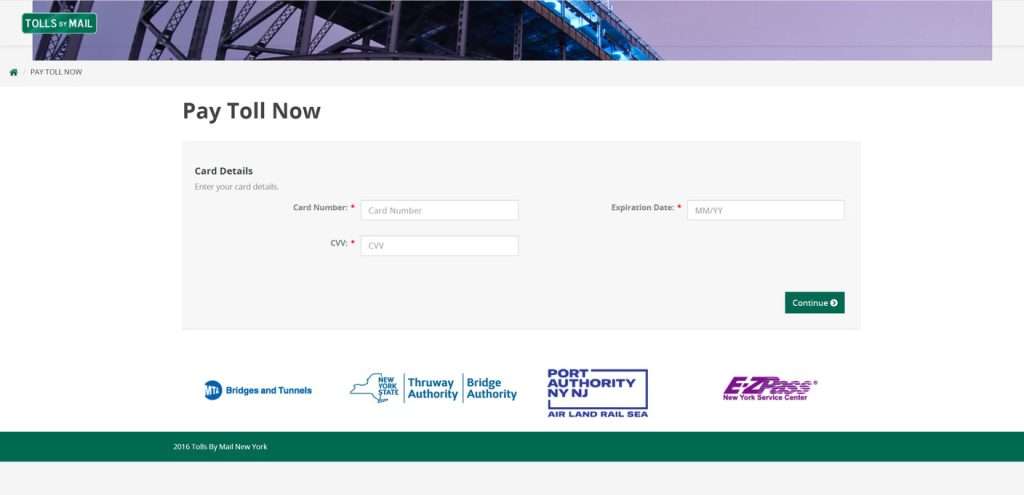
The site asks the victim to enter personal and payment details, including:
- Full Name
- Phone Number
- Home Address
- Credit Card Number
- CVV Security Code
- Expiration Date
All this data is needed for the scammers to commit financial fraud. But the distressed user complies in order to “pay their bill”.
Step 6: The Scammers Steal User Data
With the sensitive information submitted, the scammers can now steal the victim’s identity or sell the details online.
Credit card numbers can be used to make fraudulent purchases. Full name, address, and date of birth help commit identity theft.
The user is left confused when no Tolls by Mail confirmation comes. By then, the scammers have disappeared without a trace along with the data.
How to Spot the Tolls by Mail NY Services Scam
While the scammers are crafty at disguising their deceit, there are a few key signs that can tip you off to the “Tolls by Mail NY Services” scam:
Originating Text Contains Red Flags
- Text is unsolicited and comes from a random 10-digit or alphanumeric sender ID
- Message has threatening urgent language like “act now” and “prevent fees”
- Contains a suspicious link instead of official toll company domains
- Domain name includes “nytolls”, “tollsbymail” or other variations
Phishing Website Raises Concerns
- URL does not match legitimate toll provider (e.g. EZPass) domain
- Branding copies official logos/graphics but contains small errors
- Site asks for personal info like SSN, license details not needed for tolls
- Poor grammar/spelling errors demonstrate lack of professionalism
Payment Details Don’t Add Up
- The “unpaid balance” amount seems arbitrary or made up
- You don’t recall owing any unpaid tolls or receiving violation notices
- The toll provider referenced does not match where you drive regularly
- The site demands immediate payment of old tolls without proper notices
Lack of Confirmation Email Afterwards
- Official toll providers send receipt emails after payments
- Lack of confirmation suggests payment went to scammers
- Additionally, no follow up notices about penalties are received if unpaid
Trust your instincts. If anything seems fishy, avoid providing data and contact providers directly. Don’t let urgency or threats push you into potential traps. With vigilance, you can detect this scam before getting ensnared.
What To Do If You Are Targeted By This Scam
If you receive the “Tolls by Mail NY Services” text or fall victim to the phishing site, take the following steps immediately:
1. Do Not Click Any Links
If you get the scam text, do not click the URL within it no matter how legitimate it looks. The site is guaranteed to be fraudulent. Links should only be opened from official sources.
2. Call Your Phone Carrier
Contact your phone carrier and report the scam text. They can investigate the suspicious sender ID and block future texts. This helps disarm the scammers messaging abilities.
3. Check with Toll Providers
Reach out to legitimate toll providers servicing New York like E-ZPass to check if you actually owe anything. Verify directly rather than trusting texts or emails.
4. Notify Bank and Creditors
If you submitted payment information, call your credit card company and banks. Alert them about potential fraudulent charges or identity theft. They can freeze accounts, monitor for suspicious activity, and issue new cards.
5. Reset All Passwords
If you entered a password on the phishing site, assume it is compromised. Immediately reset passwords on all online accounts, especially financial services, to lock out the scammers. Enable two-factor authentication wherever possible.
6. Place Fraud Alert
Contact credit bureaus like Experian, Equifax, and Transunion to place a fraud alert on your name and Social Security number. This flags your credit reports to detect any theft.
7. File Police Complaint
Report the scam attempt to local law enforcement. Provide all details like the text, sender ID, and phishing site URL. They can potentially trace records and investigate. The complaints build cases against the scammers.
Frequently Asked Questions About The Tolls By Mail NY Services Scam Text
1. What exactly is the Tolls by Mail NY Services scam text?
The Tolls by Mail NY Services scam text is a fraudulent text message sent to trick users into paying fake toll fees. The text claims the recipient has an unpaid NY toll balance and must pay immediately to avoid additional penalty fees. It provides a phishing link that sends victims to a fake website to steal personal and payment information.
2. How does the Tolls by Mail NY Services scam text work?
The scam begins with an urgent text message containing a link to pay an outstanding toll balance. If the recipient clicks the link, they are taken to a convincing but fraudulent website and asked to enter personal details like name, address, phone number, and credit card information. The scammers then steal this data to commit identity theft or resell it online.
3. What toll providers are being impersonated in this scam?
The scammers impersonate legitimate New York toll services like E-ZPass, MTA Bridges and Tunnels, the New York State Bridge Authority, and the Port Authority of New York and New Jersey. The fake sites use copied logos and branding from these agencies to appear real.
4. What is the objective behind the Tolls by Mail NY Services scam?
The objective is to deceive recipients into providing sensitive personal and financial information. This includes credit card numbers, security codes, expiration dates, and full name and address. The scammers use the stolen data to make fraudulent purchases or sell it on the black market.
5. What tips off that a text is the Tolls by Mail NY Services scam?
Warning signs include an unsolicited text from an unknown 10-digit or alphanumeric sender ID, threats of additional fees, urgent calls-to-action, suspicious links, and domain names containing “nytolls” or variations. Legitimate toll providers will only communicate through official channels.
6. What should I do if I get the Tolls by Mail NY Services scam text?
If targeted, do not click any links within the text. Contact your cell carrier to report the scam text. Reach out to legitimate toll providers to check if you actually owe fees. Notify your bank of potential fraud. Change passwords and enable two-factor authentication everywhere.
7. What steps should I take if I entered info into a Tolls by Mail NY Services phishing site?
Immediately call banks and credit card companies to freeze accounts and report identity theft. Reset all passwords and security questions. Contact credit bureaus to place fraud alerts on your credit reports. File complaints with the FTC, IC3, and local law enforcement.
8. How can I protect myself from the Tolls by Mail NY Services scam going forward?
Avoid clicking links in unsolicited texts, no matter how realistic they appear. Verify payment notices directly with providers before taking action. Use unique passwords everywhere and enable two-factor authentication. Place fraud alerts on your credit reports to detect data theft.
9. How widespread is the Tolls by Mail NY Services scam?
This scam campaign hit a peak in mid-2023, affecting thousands of victims primarily in the NYC metro area. While it has slowed recently, isolated cases continue to occur. Evolving variants of the scam could arise at any time.
10. What should I do if a new toll services scam surfaces?
Research whether the communications are reported by others. Check with providers directly. Report suspicious texts or emails. If targeted, take preventative action by freezing accounts, resetting passwords, and contacting banks and law enforcement.
The Bottom Line
The “Tolls by Mail NY Services” scam leverages social engineering via text to trick users into entering personal data. By studying their tactics, we can avoid falling for the deception.
Key takeaways include:
- The scam starts with an urgent text forcing action to pay a fake toll balance
- Phishing links redirect to fraudulent websites dressed as legitimate payment pages
- Scammers steal entered credit card and identity info for financial fraud
- Report texts to carriers and ignore suspicious links to protect yourself
- Contact banks, toll providers and credit bureaus if you shared information
- Reset passwords, enable two-factor authentication, and file police reports
While this scam has cooled recently, new variants could arise. Always think critically before clicking links in messages. Verify any payment claims directly with providers. Finally, act swiftly if targeted to minimize damage. Stay vigilant.








