

Tornado Cash was created to provide privacy for crypto users — but now scammers are using its name to do the exact opposite.
In 2025, a wave of deceptive websites mimicking Tornado Cash surfaced across the internet, luring unsuspecting users into crypto drainers. These fake sites, designed with professional polish, are not just convincing — they’re dangerous. One wrong click could drain your entire wallet.
If you’re in crypto, you need to read this.
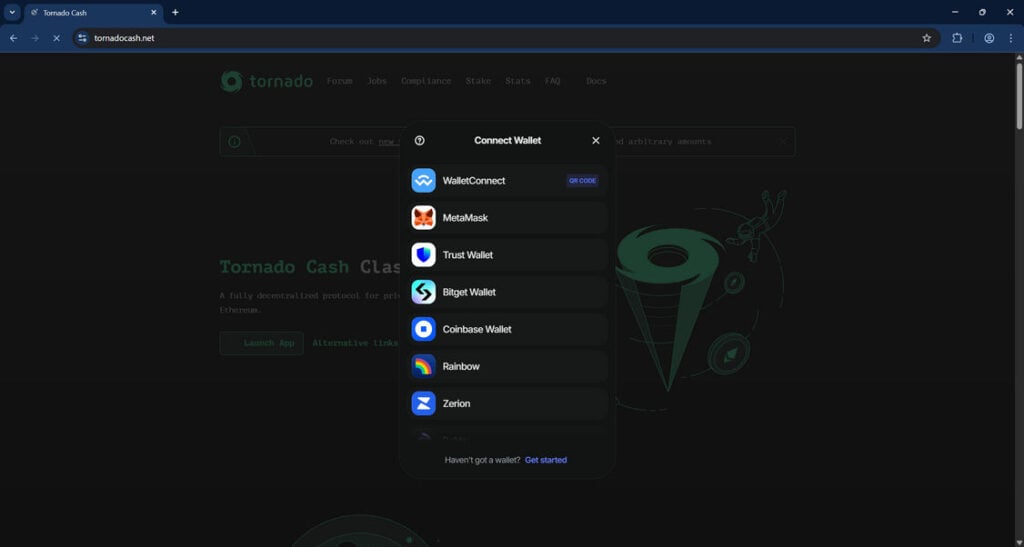
Scam Overview: What is the Tornado Cash Scam Website?
Tornado Cash: A Quick Background
Tornado Cash (also stylized as TornadoCash) is a decentralized, open-source crypto tumbler built for Ethereum and other EVM-compatible blockchains. It allows users to mix their crypto transactions to obscure the trail of ownership, offering much-needed privacy in a blockchain world where every move is public.
In August 2022, the U.S. Treasury’s Office of Foreign Assets Control (OFAC) blacklisted Tornado Cash, citing its alleged use in laundering over $1 billion in illicit funds. One of its developers was arrested, and the site was pulled offline — but the protocol lives on, given its decentralized nature.
And that’s where the scammers stepped in.
The Rise of Tornado Cash Impersonator Sites
In late 2024 and continuing into 2025, a network of scam websites began to surface, designed to impersonate the original Tornado Cash platform. These fraudulent pages aren’t just sloppily built phishing pages — they are sophisticated, highly convincing replicas that deceive even seasoned crypto users.
Their purpose? To trick users into connecting their digital wallets and authorizing malicious transactions.
Once connected, these sites deploy a crypto drainer — a script that executes malicious smart contract transactions to siphon funds directly from users’ wallets.
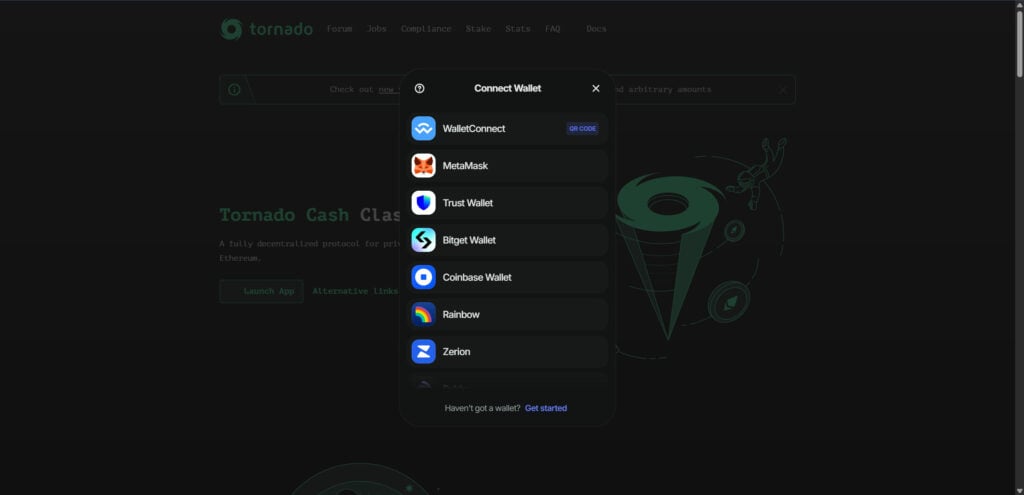
How They Trick Users
These scam sites use a combination of methods to appear legitimate:
- Typosquatting: Domains like
tornadocash[.]net,tornadocash[.]fun, ortornadoeth[.]cashclosely mimic the originaltornado.cashdomain. - Design Mimicry: The user interface is nearly identical to the original Tornado Cash UI.
- Fake “Wallet Connect” Interfaces: These include fake QR codes and connect buttons that trigger malicious wallet transactions.
- SEO Poisoning and Ads: Some scammers are even using paid ads or manipulating SEO to appear in Google searches above legitimate results.
Examples of Known Scam Domains
Here are just a few fake Tornado Cash domains that have been identified:
tornadocash[.]nettornadocash[.]funtornadoeth[.]cashtornadocash[.]socialtornadocash[.]networktornadocash-rpc[.]comtornadocash[.]exchange
These domains are not affiliated with the original Tornado Cash team or protocol in any way.
What Happens When You Interact With These Sites
Users visiting one of these scam domains are prompted to connect a wallet — typically via WalletConnect, MetaMask, or another common interface. What they’re really doing is giving permission to a smart contract that automatically initiates crypto transfers from their wallet to the scammers’ address.
The moment you sign that contract, it’s game over.
Even if you realize what’s happening, it’s often too late. The transactions are swift, automated, and irreversible — a nightmare for anyone who stores value in a self-custody wallet.
How The Scam Works
Step 1: Fake Website Creation
Cybercriminals launch a convincing clone of the Tornado Cash website. They replicate everything from UI components to copywriting. Even the “Connect Wallet” flow is functional — but entirely malicious.
Many of these scam domains are hosted using random TLDs like .network, .exchange, or .fun, and they use typos or slight variations of the original URL.
Step 2: SEO Poisoning and Link Spamming
To lure victims, scammers:
- Use search engine poisoning to rank high in crypto-related search queries.
- Purchase Google or Bing ads using keywords like “Tornado Cash connect wallet.”
- Post on forums, Discord channels, Telegram groups, and social platforms with fake “how-to” guides linking to the malicious pages.
These steps increase the chances of exposure, especially for users who are Googling how to use Tornado Cash after its official domain went dark.
Step 3: User Visits the Fake Page
The user, assuming the site is legitimate, clicks “Connect Wallet.” It looks identical to the original Tornado Cash interface.
Wallet options include:
- MetaMask
- WalletConnect
- Trust Wallet
- Bitget
- Coinbase Wallet
- Rainbow
- Zerion
- Rabby
- OKX Wallet
Once the wallet interface pops up, it requests standard permissions. But behind the scenes, a malicious smart contract is being prepared.
Step 4: The Drainer Deploys
Once a user approves the connection or signs a transaction (often disguised as a “connect approval”), the site triggers a crypto drainer.
This is an automated script built into the smart contract that:
- Reads the wallet’s token balances.
- Creates a series of transfer transactions to one or more scammer-controlled wallets.
- Executes them using the permissions granted.
There’s no “undo” button. Most victims realize what happened only after seeing their wallets emptied in real time.
Step 5: Obfuscation and Laundering
The stolen funds are then typically:
- Swapped via DEXs (like Uniswap) into ETH or stablecoins.
- Bridged across blockchains to evade tracking.
- Laundered using other crypto mixers or privacy coins.
By the time forensic investigators trace the transactions, the money is long gone.
What To Do If You’ve Fallen Victim to a Tornado Cash Scam
If you’ve been scammed by one of these fake Tornado Cash websites, act immediately. Here are the essential steps:
1. Revoke Permissions Immediately
Go to a token approval checker like:
Revoke all smart contract approvals tied to your wallet.
2. Move Remaining Funds to a New Wallet
Assume your wallet is compromised. Create a new wallet using a fresh seed phrase and immediately transfer any remaining funds to it.
Never reuse the compromised wallet.
3. Document the Attack
Save:
- Screenshots of the scam website.
- The transaction IDs (TX hashes) of unauthorized withdrawals.
- Any wallet addresses involved.
This documentation will be useful if you choose to file a report or work with investigators.
4. Report the Scam
You can report the scam to:
- Chainabuse – chainabuse.com
- EtherscamDB – A database of known scams.
- Your local cybercrime agency – Depending on your country.
- Crypto exchanges – If funds were bridged or cashed out to a CEX.
5. Notify the Community
Post about your experience (without doxing yourself) on Reddit, Twitter, Discord, or other platforms to warn others. This helps keep more people from falling into the trap.
6. Track the Funds (Optional)
Use tools like:
You might be able to follow the funds and identify wallet addresses involved, though recovering them is unlikely without law enforcement involvement.
The Bottom Line
The Tornado Cash scam websites are a clear example of how trust can be weaponized in the crypto space. These phishing sites are not just technically impressive — they’re dangerous, often draining users’ entire wallets in seconds.
If you’re ever interacting with DeFi tools or privacy platforms, double-check the domain. Bookmark official links. Use blockchain scanners before approving any wallet connections. And when in doubt — don’t connect.
Crypto can be empowering. But only if you stay alert.
Absolutely — here’s a detailed and SEO-optimized FAQ section for the Tornado Cash scam websites. This section is designed to provide quick answers to common questions while improving search visibility and user engagement.
FAQ: Tornado Cash Scam Websites
What is the Tornado Cash scam website?
The Tornado Cash scam website is a fraudulent clone of the legitimate Tornado Cash platform. It tricks users into connecting their crypto wallets and unknowingly authorizing malicious smart contracts. These contracts drain cryptocurrency from the victim’s wallet and transfer it to the scammer’s address.
Is Tornado Cash itself a scam?
No, Tornado Cash is not a scam. It’s a decentralized privacy protocol on Ethereum. However, it has been targeted by scammers who have created look-alike websites that impersonate the original Tornado Cash interface. These fake sites are the source of the scam — not the original Tornado Cash protocol.
How do these fake Tornado Cash websites work?
Fake Tornado Cash websites typically:
- Mimic the design of the real tornado.cash site.
- Use misleading domain names (like
tornadocash[.]net,tornadoeth[.]cash). - Prompt users to connect their crypto wallets.
- Trick users into signing malicious transactions.
- Drain the crypto funds from victims’ wallets via smart contract.
What wallets are targeted by the scam?
Scammers target all major Web3 wallets, including:
- MetaMask
- Trust Wallet
- WalletConnect
- Coinbase Wallet
- Bitget Wallet
- Zerion
- Rabby
- OKX Wallet
- Rainbow
Any wallet that connects to dApps and signs transactions can be compromised if permissions are granted to a malicious contract.
What are some of the fake Tornado Cash domain names to avoid?
Here are known scam domains impersonating Tornado Cash:
tornadocash[.]nettornadocash[.]funtornadoeth[.]cashtornadocash[.]socialtornadocash[.]networktornadocash-rpc[.]comtornadocash[.]exchange
These are not affiliated with the real Tornado Cash protocol and are likely scam sites.
How can I tell if a Tornado Cash site is fake?
Look for these red flags:
- Strange or unfamiliar domain name (not
tornado.cash) - Ads or search results promoting Tornado Cash with unusual URLs
- Typos or UI inconsistencies
- Requests to sign unexpected wallet transactions
- No verifiable GitHub or community links
Always double-check the domain and bookmark the real one. Use https://tornado.cash as your only trusted source (note: the original domain may be down due to sanctions, but it was the official one).
Can I recover my funds if I was scammed?
Unfortunately, once crypto is transferred out of your wallet, it cannot be reversed. The blockchain is immutable. However, you can:
- Revoke contract approvals to stop further loss
- Move remaining funds to a new wallet
- Report the scam to authorities and anti-scam databases
- Monitor the scammer’s wallet for activity
Recovery is extremely rare unless law enforcement gets involved and centralized exchanges are used.
What should I do immediately if I connected my wallet to a fake Tornado Cash site?
Take these steps fast:
- Revoke all token approvals at Revoke.cash
- Transfer any remaining crypto to a new wallet
- Do not reuse the compromised wallet
- Document everything: URLs, transaction hashes, wallet addresses
- Report the scam to Chainabuse.com and other platforms
Is it safe to use Tornado Cash now?
Legally, Tornado Cash is sanctioned in the U.S., meaning it’s illegal for U.S. citizens and entities to use it. Technically, the smart contracts are still live on Ethereum, but there is no official front-end as the original site was taken down by authorities.
Using Tornado Cash today involves legal and technical risk, especially with so many fakes in circulation. Proceed with caution and verify everything.
Why did scammers choose Tornado Cash for this type of attack?
Scammers chose Tornado Cash because:
- It already deals with privacy and anonymous crypto use
- The original site was taken down, leaving a vacuum
- Many people are still looking for it via search engines
- It has a high-risk user base, making targets more likely to act fast and overlook red flags
This creates the perfect opportunity for look-alike phishing scams.

Join the discussion
0 commentsShare your experience or ask a question about this article.
Discussion
Start the conversation
Have a question or something useful to share? Add the first comment.