

A text message says you have a Traffic Court Summons. It may include a case number, a judge’s name, a hearing date, and a QR code or link to pay immediately.
It is designed to feel urgent and official. That is what makes it so effective.
Scam Overview
The Traffic Court Summons scam text is a phishing campaign that impersonates courts, traffic divisions, DMVs, and toll authorities to scare people into paying fake fines or entering personal and financial information on fraudulent websites. Federal and state agencies have warned that these messages often claim you owe for a traffic ticket, parking violation, or toll and demand immediate action through a link or QR code.
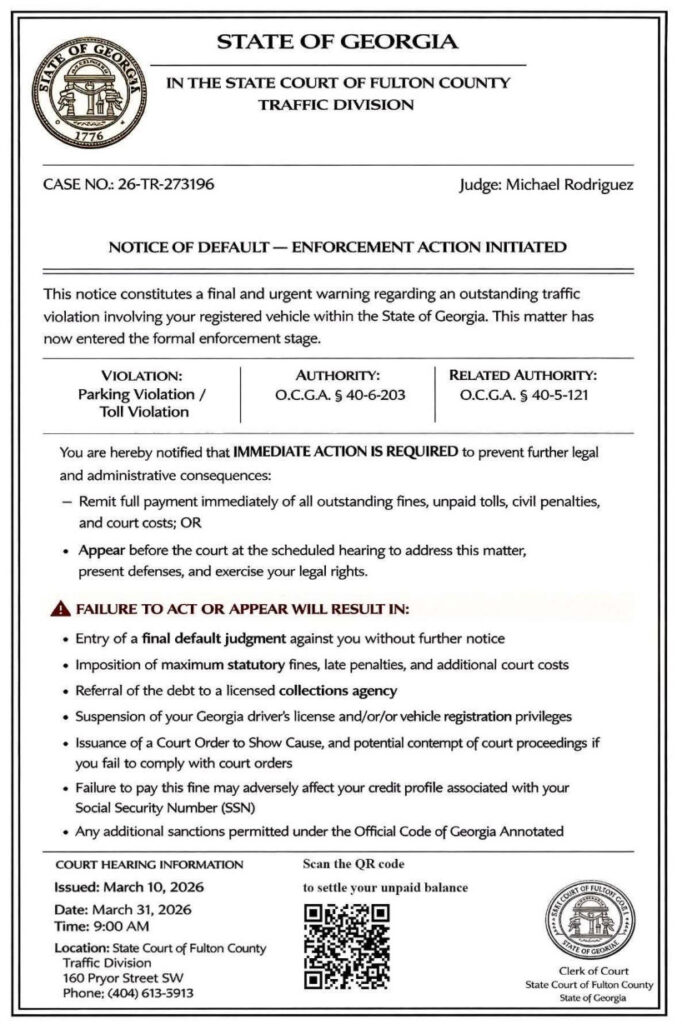
In Georgia, Fulton County has specifically warned residents about fake traffic and toll notices sent by text. County officials said the messages often include an official-looking document, a false case number, a fake hearing date, and a QR code labeled “Scan to pay.” Fulton County also said Georgia courts do not send unexpected text messages demanding payment and do not require payment by QR code or text link.
That matters because the scam works by borrowing the look and tone of a real legal notice.
The message usually includes some combination of:
- a court heading
- a state seal or official-looking emblem
- a case number
- a named judge or clerk
- a violation description
- a hearing date
- a list of penalties
- a QR code or payment link
At first glance, it can look persuasive. Most people do not study court paperwork every day. If a document looks formal and threatening, many recipients assume it must be legitimate.
That is exactly what scammers want.
Why this scam feels so real
The strongest feature of the scam is not the wording. It is the overall presentation.
The fake notice often imitates the structure of a real summons or default notice. It may use bold headers such as:
- Traffic Court Summons
- Notice of Default
- Enforcement Action Initiated
- Final Warning
- Mandatory Collection Notice
The text is usually packed with legal-style language about fines, license suspension, collections, default judgment, court costs, and registration holds. That language is meant to overwhelm the recipient and replace skepticism with fear. Official warnings from the FTC and FCC note that these scams rely on threats of immediate consequences to pressure people into acting before they verify the claim.
Scammers also know that people are more likely to trust something that looks specific.
So they often include:
- exact dates
- exact times
- specific case number formats
- state code references
- named judges or clerks
- local court addresses
Some of that information may be completely fabricated. Some may be loosely borrowed from real public information. Either way, it serves the same purpose: making the notice feel official enough to stop you from pausing.
The real objective is not the ticket
These messages may claim you owe for:
- a traffic citation
- a parking violation
- a toll violation
- an overdue court payment
- an unresolved vehicle violation
But the “debt” itself is usually just bait.
The actual goal is to move you to a fake payment portal and collect:
- your full name
- address
- phone number
- email address
- vehicle details
- credit card number
- expiration date
- CVV
- billing ZIP code
The FTC warns that when people click these scam links, the site may try to take personal information and even credit card data. California DMV and Iowa DOT have issued similar warnings, saying the linked websites are fake pages built to steal financial and personal information.
Why the QR code is such a powerful scam tool
A lot of people now hesitate before clicking suspicious links in text messages.
Scammers adapted.
Instead of always using a raw hyperlink, many fake court notices now include a QR code with instructions like:
- Scan to Pay
- Resolve Immediately
- Official Secure Portal
- Settle Your Balance
A QR code feels cleaner and more official than a random URL. It looks like something you might see on a parking receipt, municipal invoice, or government form.
But the function is the same.
When you scan it, you are still being sent to a website. If that site belongs to scammers, the QR code is simply a disguised phishing link. Fulton County specifically warned residents not to scan QR codes in these unsolicited traffic citation messages. The FCC has also advised consumers not to click links in toll and payment scam texts and to verify independently through official channels.
Why the scam uses aggressive language
One of the easiest ways to identify these texts is by tone.
They often say things like:
- final notice
- immediate action required
- enforcement active
- failure to comply will result in suspension
- payment due now to avoid legal action
- this matter has entered formal enforcement
That tone is not accidental.
The scam depends on creating a moment of panic. The more urgent the message feels, the less likely you are to slow down and check whether the court, case number, address, or payment portal is real.
Official warnings line up on this point. Georgia DDS has warned about fraudulent texts threatening license suspension for unpaid tickets. The FTC has warned that scam texts pressure people with short deadlines and frightening consequences. Fulton County has said official court notices will not threaten recipients into paying immediately to avoid arrest or other immediate legal consequences.
The “small amount” strategy
A surprising number of these scam portals do not ask for a huge sum.
Instead, they often show a relatively small amount due. That amount may look like a late fee, administrative penalty, or balance adjustment.
This is a calculated move.
A recipient might hesitate before paying $450 to an unknown website. But they may be tempted to pay $6.99, $9.99, or another modest fee just to make the problem disappear.
That is why the scam can be so effective. The payment amount is low enough to reduce resistance, but the real value to the scammer is not the fee. It is the card data and identity information collected during the process. The FTC’s warning about unpaid toll texts makes this exact point: if you pay, the scammer does not just get your money, they also get your credit card number.
Why this is not limited to one state
Although the version you shared resembles a Georgia court notice, the scam itself is much broader.
Federal agencies describe it as part of a wider national pattern of DMV, toll, and ticket smishing. The FTC has warned that scammers are pretending to be tolling agencies “from coast to coast.” The FCC has issued national guidance on toll road payment scam texts. California’s Attorney General recently warned about fake court notices demanding payment for traffic or toll issues. New York DMV and Georgia DDS have both warned about fake traffic-ticket or license-suspension texts.
That means the court name, state seal, judge name, and agency branding may change, but the core scam remains the same.
The pattern looks like this:
- Create a fake legal or DMV-style notice.
- Make it look local and urgent.
- Add a QR code or payment link.
- Threaten quick consequences.
- Capture money and personal data.
Clear red flags in a Traffic Court Summons scam text
If you want a fast checklist, these are the biggest warning signs:
- You receive a surprise traffic or court notice by text.
- The message pressures you to pay immediately.
- It includes a QR code or suspicious link.
- It threatens suspension, arrest, or legal action if you delay.
- It asks for card details on a site you did not independently navigate to.
- It gives you no realistic time to verify.
- It mixes court procedure with an instant online payment shortcut.
Fulton County’s guidance is especially clear here: Georgia courts do not send unexpected text messages demanding payment, and they do not require payment by QR code or text link.
How The Scam Works
The Traffic Court Summons scam follows a repeatable, high-conversion process. Once you know the steps, it becomes much easier to spot.
Step 1: The scammers send mass texts
These messages are sent in bulk to huge numbers of phone numbers.
They are not proof that you did anything wrong. They are not evidence that anyone checked your driving record. They are simply part of a high-volume campaign.
Scammers rely on volume, not precision.
That is why people receive these messages even if they:
- have never received a traffic ticket
- have never driven on a toll road
- do not live in the named jurisdiction
- have no current vehicle issues
Step 2: The fake notice establishes authority
The next part of the scam is about optics.
The message or attached image tries to look like it came from a real authority by using:
- a court heading
- a state name
- a department name
- a judge or clerk
- a case number
- a hearing date
- legal citations
This is where many people lower their guard. The document feels official enough that they stop asking whether the delivery method makes sense.
That is a mistake the scammers depend on.
Step 3: The message creates urgency
The notice quickly shifts from explanation to threat.
It may claim that:
- your case is now in default
- enforcement action has started
- you must pay immediately
- your license may be suspended
- your registration may be blocked
- you may face collections or legal action
This is a classic social-engineering move.
A calm recipient is dangerous to a scammer because a calm person verifies. A stressed recipient is profitable because a stressed person reacts.
Step 4: The QR code or link becomes the “solution”
After creating fear, the scam offers relief.
That relief is usually framed as:
- pay now
- resolve immediately
- scan to settle your balance
- access the official portal
- avoid further penalties
At this point, the victim feels like the fastest way to stop the problem is to comply.
This is the transition from emotional manipulation to data theft.
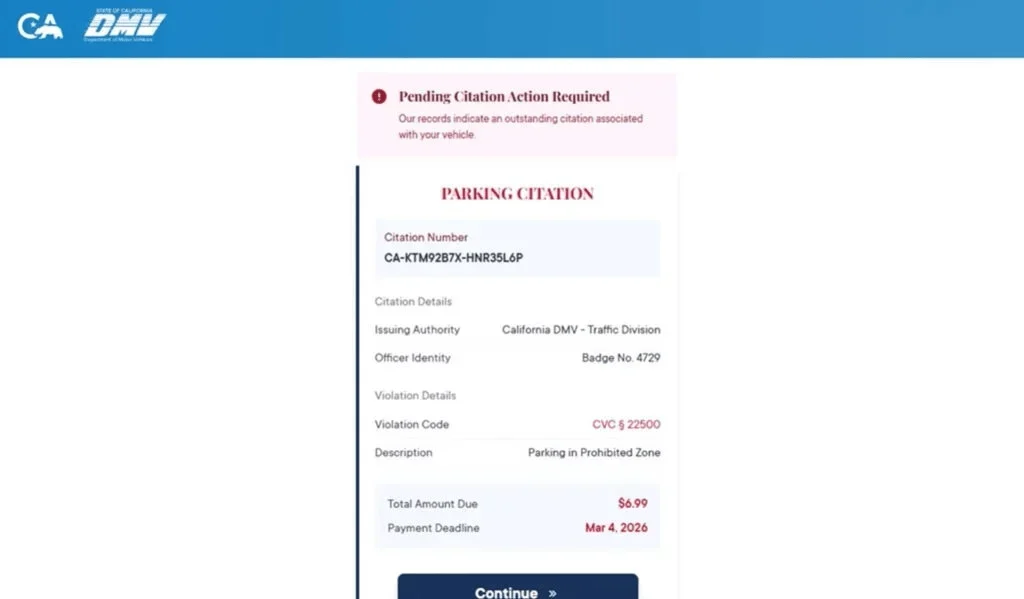
Step 5: The fake website takes over
Once the victim scans the code or clicks the link, they arrive at a website built to look official.
It may include:
- a case number
- a violation description
- a small amount due
- a deadline
- a “continue” or “pay now” button
- state-themed colors or logos
These sites are not there to adjudicate a ticket.
They are there to collect information.
Step 6: The site asks for identity details
Before the payment step, the fake site may ask you to verify information like:
- your full name
- your mailing address
- your phone number
- your email address
- vehicle details
- license-related details
This is not just about making the site feel real.
It also increases the value of the scam. Even if the card later gets replaced, the scammer may still have enough information to run more convincing phishing attacks later.
Step 7: The payment page steals the card data
Next comes the payment step.
The victim enters:
- card number
- expiration date
- CVV
- billing ZIP code
- billing address
This is the actual payoff for the scammer.
The amount charged may be small or the transaction may even “fail,” but the important part is that the card data has now been captured.
Step 8: The site shows a fake outcome
After the card data is entered, the site usually does one of two things:
- It shows a confirmation page that makes the victim think the issue is resolved.
- It shows a failure page and asks the victim to try again, sometimes with another card.
Both versions help the scammer.
The fake confirmation delays your response, because you believe the matter is settled.
The fake failure may lead to multiple payment attempts and more stolen card data.
Step 9: The victim becomes a better target
Once someone engages with the scam, their number becomes more valuable.
Scammers now know:
- the number is active
- the recipient reads messages
- the recipient may comply under pressure
That can lead to more messages, including:
- follow-up ticket scams
- fake refund offers
- fake bank alerts
- recovery scams
- other government-impersonation texts
Step 10: The financial harm may appear later
A lot of victims do not notice the scam immediately.
The original amount may have been small, and the site may have shown a “success” message. The fraud often becomes obvious later when:
- small test charges appear
- larger charges appear
- the bank flags suspicious activity
- new phishing attempts arrive using the victim’s real details
That delay is why fast action matters even if the original amount looked minor.
What To Do If You Have Fallen Victim to This Scam
If you clicked, scanned, paid, or entered personal details, move quickly.
1) Contact your bank or card issuer immediately
If you entered payment information, call the number on the back of your card right away.
Tell them:
- you entered your card details on a fraudulent payment site
- the site was linked from a scam court or traffic text
- you want the card blocked and replaced
- you want recent transactions reviewed for fraud
2) Review your recent transactions
Look for:
- small test charges
- online purchases you do not recognize
- new subscription charges
- repeated attempts from unfamiliar merchants
Dispute anything suspicious as soon as you see it.
3) Turn on real-time transaction alerts
Enable alerts for:
- every card purchase
- online transactions
- charges over $1
This is one of the best ways to catch abuse early.
4) Save screenshots and evidence
Capture:
- the original text
- the sender number or name
- the attached image
- the QR code
- the website pages
- any payment confirmation or error screen
5) Stop engaging with the message
Do not:
- reply
- click again
- scan the QR code again
- call any phone number in the notice
6) Verify independently if you are worried about a real case
If the notice scared you into thinking there could be a real court issue, verify the safe way.
Use only official websites and phone numbers you find yourself. Do not use the contact information inside the text.
7) Monitor your identity exposure
If you gave the site more than card details, including your address, email, phone number, or vehicle information, stay alert for:
- follow-up phishing texts
- suspicious emails
- password reset attempts
- unusual account activity
8) Report the scam
You can:
- mark the message as spam in your messaging app
- block the sender
- forward the message to 7726 (SPAM) if your carrier supports it
The Bottom Line
The Traffic Court Summons scam text is not a real legal notice. It is a pressure-based phishing scam that uses court-style language, threatening consequences, and QR code payment traps to steal money and personal information.
Official warnings from Fulton County, Georgia DDS, the FTC, the FCC, and other agencies all point in the same direction: courts do not handle serious traffic matters by sending surprise payment demands through random texts, QR codes, or suspicious links.
If you get one of these messages, do not click, do not scan, and do not pay.
FAQ
What is the Traffic Court Summons text scam?
It is a phishing scam where criminals send fake court or traffic violation notices by text message. The goal is to scare people into clicking a link, scanning a QR code, or paying a fake fine.
Is a Traffic Court Summons sent by text message real?
A surprise text demanding immediate payment or linking directly to a payment page is a major red flag. Real court matters should always be verified through official court, DMV, or toll agency channels.
Why do these scam messages look so official?
Scammers use court-style formatting, seals, case numbers, judge names, and legal language to make the notice feel legitimate and urgent.
What happens if I click the link or scan the QR code?
You are usually taken to a fake payment or case portal that looks official. The site may ask for personal details, vehicle information, and credit card data.
Why is the amount due often so small?
Small amounts make people less suspicious. Many victims think it is easier to pay a small fee than investigate. The real goal is to steal your card details and personal information.
What information are scammers trying to steal?
Usually:
- Full name
- Address and ZIP code
- Phone number and email
- Vehicle-related details
- Credit card number
- Expiration date and CVV
I clicked the link but did not enter anything. Am I still at risk?
Your risk is much lower if you did not submit information. Close the site, do not return, and watch for follow-up scam texts or calls.
I entered my card details. What should I do right away?
- Call your card issuer immediately
- Report that your card details were entered on a fraudulent site
- Freeze or replace the card
- Review recent transactions and dispute anything unfamiliar
- Turn on real-time alerts for new charges
Should I replace my card even if I do not see fraud yet?
Yes. Stolen card details are often used later or sold. Replacing the card quickly is the safest move after a phishing scam.
Can a real court demand payment through a QR code?
A QR code in an unexpected court or traffic text is a major warning sign. You should only make payments through official websites or portals you access independently.
How do I verify whether I really owe anything?
Do not use the link, QR code, or phone number in the message. Go directly to the official court, DMV, or toll agency website by typing it yourself, then verify through official support or case lookup tools.
How do I report the scam?
Report it through official fraud reporting channels and keep screenshots as evidenceVerify everything through official channels you access independently.
Mark the message as spam or junk in your messaging app
Block the sender
Forward it to 7726 (SPAM) if your carrier supports it








