


The name in the inbox belongs to a doctor you genuinely know. The message is unexpected, but the relationship is real, so opening a shared file feels more polite than risky.
A trusted doctor email scam turns that history into pressure. Behind the file link can be a fake Google login built to capture the password to your real account.
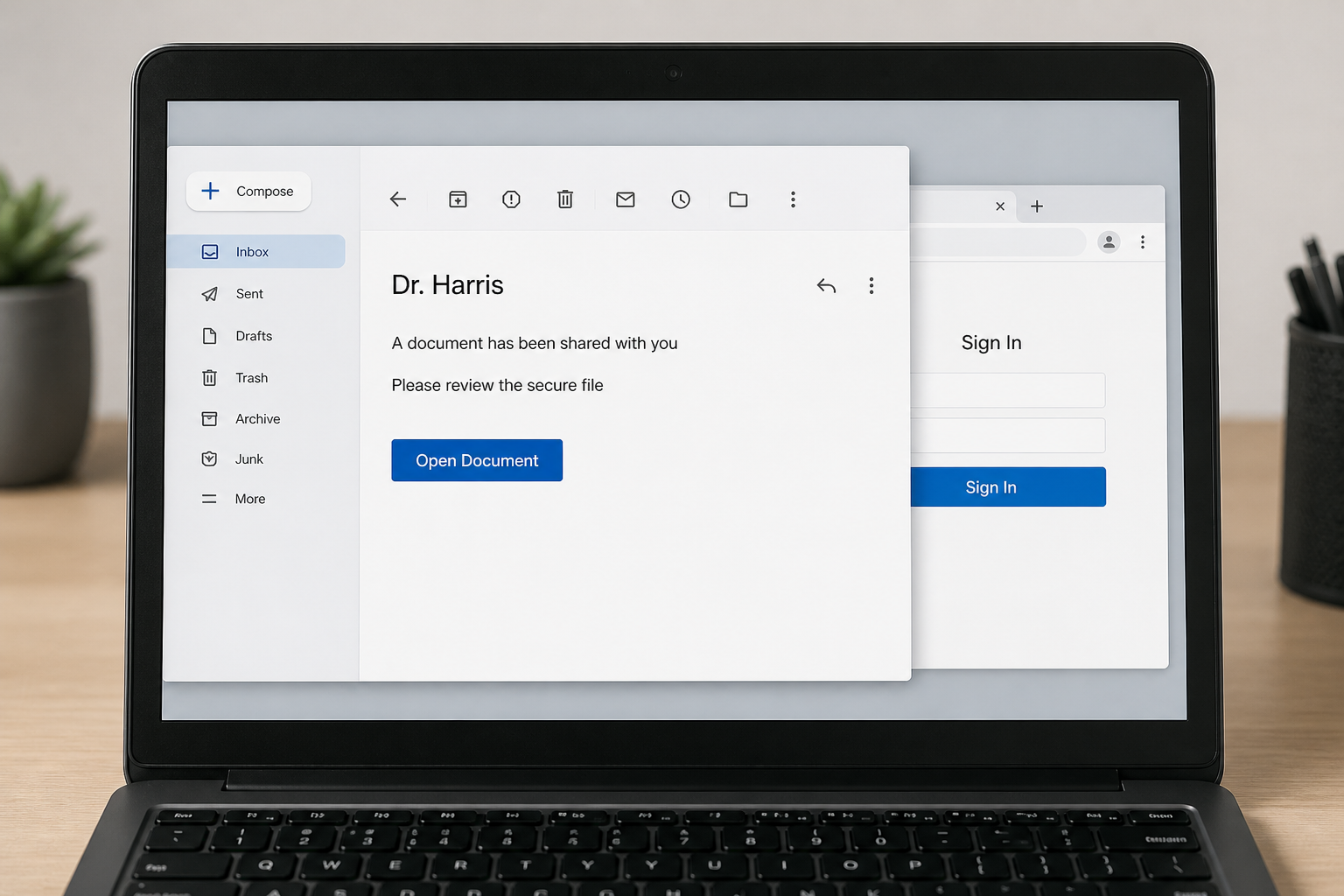
One recent recipient described receiving an email that appeared to come from a psychiatrist they had known years earlier. After opening the link, the person entered an email address to access a file and then saw what looked like a Google sign-in page.
The recipient became suspicious and closed the page before entering a password. That pause may have prevented the most serious part of the attack, but the entered email address can still be used for targeted follow-up messages.
The report does not prove the psychiatrist’s office was hacked. The visible sender could have been spoofed, a mailbox might have been compromised, or an old contact list could have been exposed elsewhere.
Overview
The relationship is real even when the message is not
Phishing works best when the recipient recognizes the sender. A doctor, therapist, accountant, lawyer, teacher, or former employer already occupies a position of trust. The attacker does not need a dramatic story if the familiar name does the convincing.
Google warns that phishing emails can impersonate people you know and trusted organizations. A correct name, old conversation subject, or professional signature is not enough to authenticate a new request.
The document link is only a bridge to the credential page
The email may claim to share a medical record, secure message, invoice, referral, voicemail, or confidential document. The first page asks for an email address, then forwards the visitor to a copied Google sign-in screen.
This two-stage design helps the fake page display the entered address and feel personalized. The true objective is usually the password, followed by a two-factor code or approval prompt.
The response depends on what was entered
If you typed only an email address, the attacker learned that the address is active and connected to the target. If you entered a password, approved a prompt, or downloaded a file, treat the account or device as compromised.
Key warning signs include:
- An old professional contact sends a file without context.
- The link opens a login page on an unrelated domain.
- The message creates confidentiality or urgency pressure.
- The page asks for a Google password after you already opened the file.
- A second page asks for a one-time code or device approval.
Was the Doctor’s Email Account Hacked?
Possibly, but the message alone cannot establish that. Email addresses and display names can be spoofed. A message can show a familiar name while arriving from a different address, and even the visible address can be forged in some situations.
A compromised mailbox is another possibility. Attackers who gain access can read previous conversations, learn professional relationships, and send phishing links from the real account. Replies may remain inside an existing thread, making the attack unusually difficult to spot.
There are also indirect routes. An old address book, patient portal contact, cloud file, marketing database, or another recipient’s mailbox might expose the relationship. The attacker may know that two people communicated without controlling the doctor’s account.
Only the practice and its email provider can examine sign-in logs, forwarding rules, sent mail, recovery changes, and administrative records. Recipients should report the message through a separate channel without accusing the doctor of negligence.
Why a Fake Google Login Looks So Convincing
Google’s sign-in design is familiar, simple, and easy to imitate visually. A phishing page can copy the logo, colors, spacing, password field, and “Forgot password?” text in minutes.
The address bar is harder to copy. A real Google account sign-in should occur on a Google-controlled domain. A padlock does not change ownership of the site. It only means the connection to that particular domain is encrypted.
The page may first ask for an email address and then display it on the password screen. That detail can feel like proof of a legitimate login flow, but the site simply repeats what the visitor typed.
More advanced campaigns forward the stolen password to the real service immediately. The victim then receives a genuine two-factor prompt. Approving it gives the attacker access, even though the prompt itself came from Google.
How the Trusted Doctor Email Scam Works
Step 1: The attacker identifies a believable relationship
The target may be connected to the sender through old emails, a contact list, public professional information, or stolen account data. Healthcare relationships are powerful because recipients expect privacy and may hesitate to question a confidential message.
The attacker does not necessarily know medical details. A generic “secure document” can work because the recipient supplies the missing context.
Step 2: The email creates curiosity without explaining much
The message may say a file, report, message, or invoice is waiting. Minimal wording can look normal for an automated sharing notification and gives the attacker fewer facts to get wrong.
An old or unexpected contact should provide context you can verify. If the document has no clear purpose, ask through a known phone number before opening it.
Step 3: The link leaves the email provider
The button can pass through a redirect, URL shortener, cloud-hosted page, or compromised website. The first destination may look like a file preview and show familiar productivity icons.
Hover over links on a computer or hold them on a phone to preview the destination. Do not open the page merely to see whether it looks real.
Step 4: The fake file gate asks for an email address
Collecting the address first confirms which account the visitor uses. It can also route the victim to a matching imitation of Google, Microsoft, or another provider.
Entering only the address is less damaging than entering a password, but it tells the attacker the target engaged. Expect more specific follow-up phishing.
Step 5: A copied Google page steals the password
The second screen asks for the account password. If submitted, the attacker can attempt a real login immediately. Reused passwords can expose additional services.
Google advises users not to enter a password after following a link in a message. Open the account directly in a new tab or through the official app instead.
Step 6: Two-factor authentication is attacked next
The fake flow may request a one-time code, tell the user to approve a prompt, or call as “support.” The attacker is trying to complete a live sign-in while the victim still believes they are opening the document.
Reject any unexpected prompt. A code should never be typed into a site reached from a suspicious email.
Step 7: The stolen mailbox becomes the next sender
After access, attackers may read contacts, create forwarding rules, hide replies, and send the same document lure to other trusted people. Each new victim recognizes a real name, allowing the chain to continue.
They may also search for financial records, password resets, medical messages, or identity documents. Email is often the recovery key for many other accounts.
Company, Address, and Fulfillment Checks
The display name is not an identity check
An inbox may show “Dr. Harris” while hiding the full address. Expand the sender details and compare every character with previous legitimate messages. A new free-mail address or subtle misspelling deserves verification.
Even an exact address is not conclusive if the mailbox was compromised. Content and independent confirmation still matter.
The link domain reveals where the file actually lives
A button label can say “Google Drive” while pointing anywhere. The complete destination should belong to the claimed provider, not contain its name inside a longer unrelated address.
Do not assume a cloud-hosting domain is safe. Criminals can place phishing content on legitimate hosting services or compromised websites.
The practice should be contacted through a known route
Call the number from the practice’s official website, a previous bill, or your saved records. Do not use the phone number inside the suspicious email. Ask whether the specific file was sent and notify them of the phishing page.
A careful warning helps the practice protect other patients without exposing private medical information in a reply to an unverified sender.
The document and account trail must remain traceable
A legitimate medical document should be delivered through an expected portal or a clearly explained secure system. The practice should identify the platform and help patients verify it.
Save the message as evidence, including headers, link address, timestamp, and any login alerts. Do not forward the live link broadly because another person may click it.
What If You Entered Only Your Email Address?
Closing the page before entering a password was the right move. An email address is often public and, by itself, does not let someone sign in. The immediate account-takeover risk is lower.
Still, the attacker now knows the address is active, the recipient clicked, and the relationship-based story worked. They may send a second message that refers to the failed file, claims a password reset is required, or places a fake support call.
Review recent account activity and confirm that no browser autofill or password manager submitted credentials automatically. Check downloads and browser history for unexpected files. Report the phishing page so the provider can block it.
If you entered a password at any point, do not wait for suspicious activity. Change it from the official account page, sign out other sessions, and examine recovery and forwarding settings immediately.
Healthcare Privacy and the Sender’s Responsibility
A phishing message that uses a doctor’s name can feel like proof that medical records were exposed. It may be, but that conclusion requires evidence. The attacker might know only a name and email relationship.
Report the incident to the practice’s privacy or security contact. Provide the time, sender address, subject, and link without including unnecessary medical details. The organization can determine whether its account, vendor, or patient portal was involved.
If the practice confirms a breach, follow its written instructions and any official notices. Watch for impersonators who claim to handle compensation or identity protection but request payment, passwords, or sensitive documents.
Do not reply angrily to the suspicious email. If the mailbox is compromised, the attacker may receive the response and learn more about your relationship with the sender.
Warning Signs in a Shared-Document Email
- The sender is real, but the message is out of context.
- The file name is vague, such as “Secure Document” or “Review.”
- The greeting does not fit the relationship or previous messages.
- The link opens a login page on a non-Google domain.
- The page asks twice for the same credentials.
- A two-factor prompt arrives when you did not start a login.
- The sender cannot confirm the file through a separate channel.
Do not use spelling as the main test. A message from a compromised real mailbox may contain the sender’s genuine signature and writing style. Independent verification is stronger than visual familiarity.
What to Do if You Have Fallen Victim to This Scam
- Close the page and stop responding. Do not enter additional details, approve prompts, or call numbers shown by the phishing site. Record the URL without revisiting it.
- Contact the doctor or practice separately. Use a known phone number or official website. Ask whether the file was sent and report the message so the organization can protect other recipients.
- Change any password you entered. Go directly to the official account, choose a unique password, sign out other sessions, remove unknown recovery methods, and review recent security events.
- Enable strong two-factor authentication. Prefer an authenticator app, passkey, or security key where available. Reject unexpected login approvals and never read a code to someone who contacted you.
- Check mailbox rules and connected apps. Remove unknown forwarding addresses, filters, app passwords, delegated access, and third-party sessions. Attackers use these to remain after a password change.
- Scan the device. If the link downloaded anything or you installed a viewer, run a full Malwarebytes scan. It can detect common credential stealers, malicious extensions, and unwanted software that a password reset will not remove.
- Block repeat phishing destinations. AdGuard can prevent many known malicious pages and deceptive ads from loading. It is useful against follow-up campaigns, but you should still verify every unexpected document independently.
- Report the phish and watch for recovery scams. Use your email provider’s phishing report, notify the practice, and report to the relevant national authority. Ignore anyone asking for money or codes to “clean” the account.
Frequently Asked Questions
Does this prove my doctor’s office was hacked?
No. Spoofing, a compromised mailbox, an exposed contact list, or another breached account could all produce a familiar sender story. The practice must inspect its own systems to determine the source.
Is entering only my email address dangerous?
It is less serious than entering a password. The attacker may now know the address is active and that you clicked, so be alert for targeted follow-up messages and review account activity.
What if I entered my Google password?
Change it immediately from Google’s official account page, sign out unknown sessions, review recovery information and forwarding rules, enable two-factor authentication, and secure any account using the same password.
Can a phishing email come from the doctor’s real address?
Yes. A compromised mailbox can send messages from the real account and may reuse existing conversations. That is why a real address does not replace confirmation through a known phone number.
Should I reply and ask whether the file is real?
Use another channel. If the mailbox is compromised, your reply may go to the attacker. Call a known number or open the practice’s official portal independently.
Could the fake page steal my password automatically?
A normal phishing form needs you or autofill to submit credentials. Risk increases if a file was downloaded or software installed. Review password-manager activity, downloads, browser extensions, and device security.
The Bottom Line
A trusted doctor email scam is persuasive because the relationship is authentic even when the request is not. Familiarity should prompt a safer verification route, not an automatic click.
Never enter a password on a page reached through an unexpected shared document. Call the practice independently, secure any exposed account, and warn the real sender without assuming how the message was created.

Join the discussion
0 commentsShare your experience or ask a question about this article.
Discussion
Start the conversation
Have a question or something useful to share? Add the first comment.