The Truth Behind the TV Smart Stick Scam: What You Need to Know
Written by: Lapain Epuran
Published on:
The TV Smart Stick, also marketed as TVSmart Stick, has been popping up across online ads with eye-catching claims like “access to all channels,” “no cable needed,” and even “AI-powered streaming.” But if you’re considering buying one, you should know this device isn’t the miracle product it pretends to be. In fact, it’s a textbook example of a misleading tech scam—and thousands of people are being duped.
A Closer Look at the False Claims
The ads for TV Smart Stick promise the impossible. They suggest that for a one-time purchase, you’ll get full access to premium services such as Netflix, Amazon Prime Video, HBO Max, Apple TV+, and more—completely free. They go even further by stating you can ditch your cable service and still watch all your favorite channels, with no subscriptions required.
But these claims don’t hold up. Not even close.
Fake Endorsements and a Phony News Site
The marketing funnel for the TVSmart Stick begins with fake credibility. Ads often direct users to what looks like a tech news article from a publication called TechTrends. But if you look at the URL, you’ll see it leads to tv-smart.co—not a legitimate news outlet.
There is no real publication called TechTrends backing this product. The entire article is a fabricated pitch disguised as a news story, designed to gain your trust and push you toward a purchase.
What You’re Really Buying
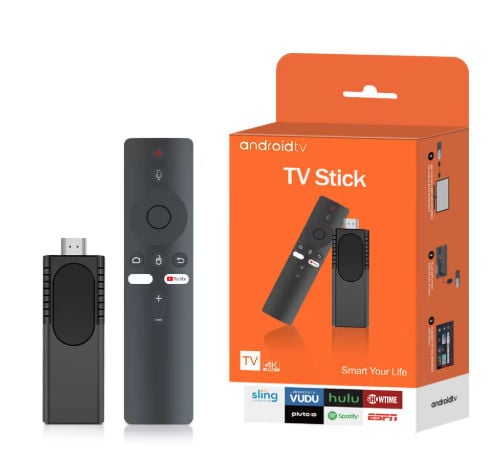
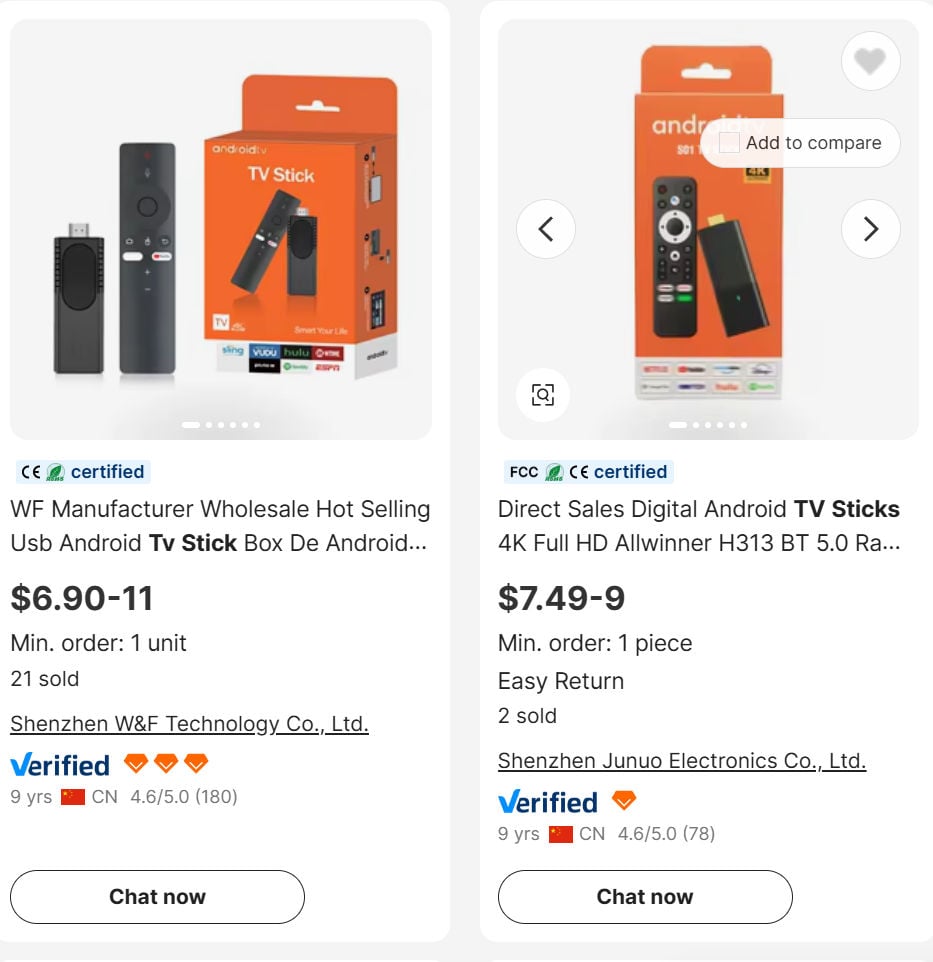
What’s actually being sold is a rebranded G96 TV Stick—a generic, low-cost device that’s widely available on bulk retail websites for a fraction of what TV Smart Stick sellers charge.
It’s not illegal to sell a media stick. What’s deceptive is:
Pretending it unlocks premium streaming platforms for free.
Misleading customers into thinking it’s a cable TV replacement.
Charging 5 to 10 times its actual value.
This is a dropshipping scam—the seller never touches the product, they just forward your order to a third-party supplier and pocket the markup.
The Reality of What It Can (and Can’t) Do
The TV Smart Stick cannot and does not provide free access to premium streaming content. You will still need to log in with valid accounts—and pay—if you want to use services like:
Netflix
Hulu
Disney+
HBO Max
Peacock
Apple TV+
As for “access to all channels,” what the device might provide are links to public domain or free ad-supported channels, like NBC News Now or Pluto TV. These are already accessible on any smart device and don’t require a special dongle.
A Classic Case of Deceptive Marketing
Let’s break down how this scam works:
Fake urgency – Phrases like “selling out fast” or “50% discount today only” pressure buyers into quick decisions.
Fabricated reviews – Many “customer reviews” on the site appear scripted or stolen from unrelated products.
Misleading features – Claims of “AI-powered tech” and “instant access to all channels” are pure fluff.
What You Should Do Instead
If you’re looking to cut the cord on cable, there are legitimate ways to do it:
Use a Roku, Amazon Fire Stick, or Google Chromecast, which are backed by reputable companies.
Subscribe to services like YouTube TV, Hulu Live, or Sling TV, which legally stream live TV.
Use a digital antenna to get over-the-air channels for free.
All of these options are safer, better supported, and far more transparent than the TVSmart Stick.
Final Thoughts
The TV Smart Stick is a clear example of deceptive tech marketing designed to exploit consumer confusion around streaming and subscriptions. It relies on fake endorsements, bogus promises, and inflated pricing to make a quick profit.
If something sounds too good to be true—especially in the world of streaming services—it probably is. Always verify claims, check reviews from real sources, and stick with trusted brands.
Don’t pay premium prices for a low-grade gadget wrapped in lies. Stay smart, stay skeptical, and share this information to help others avoid falling for the same trap.
10 Rules to Avoid Online Scams
Here are 10 practical safety rules to help you avoid malware, online shopping scams, crypto scams, and other online fraud. Each tip includes a quick “if you already got hit” action.
Stop and verify before you click, log in, download, or pay.
Most scams win by creating urgency. Verify using a trusted method: type the website address yourself, use the official app, or call a known number (not the one in the message).
If you already clicked: close the page, do not enter passwords, and run a malware scan.
Keep your operating system, browser, and apps updated.
Updates patch security holes used by malware and malicious ads. Turn on automatic updates where possible.
If you saw a scary “update now” pop-up: close it and update only through your device settings or the official app store.
Use layered protection: antivirus plus an ad blocker.
Antivirus helps block malware. An ad blocker reduces scam redirects, phishing pages, and malvertising.
If your browser is acting weird: remove unknown extensions, reset the browser, then run a full scan.
Install apps, software, and extensions only from official sources.
Avoid cracked software, “keygens,” and random downloads. During installs, choose Custom/Advanced and decline bundled offers you do not recognize.
If you already installed something suspicious: uninstall it, restart, and scan again.
Treat links and attachments as untrusted by default.
Phishing often impersonates delivery services, banks, and popular brands. If it is unexpected, do not open attachments or log in through the message.
If you entered credentials: change the password immediately and enable 2FA.
Shop safely: research the store, then pay with protection.
Be cautious with brand-new stores, “closing sale” stories, and prices that make no sense. Prefer credit cards or PayPal for dispute options. Avoid wire transfers, gift cards, and crypto payments.
If you already paid: contact your card issuer or PayPal quickly to dispute the transaction.
Crypto rule: never pay a “fee” to withdraw or recover money.
Common patterns include fake profits, then “tax,” “gas,” or “verification” fees. Another is a “recovery agent” who demands upfront crypto.
If you already sent crypto: stop paying, save evidence (wallet addresses, TXIDs, chats), and report the scam to the platform used.
Secure your accounts with unique passwords and 2FA (start with email).
Use a password manager and unique passwords for every account. Enable 2FA using an authenticator app when possible.
If you suspect an account takeover: change passwords, sign out of all devices, and review recent logins and recovery settings.
Back up important files and keep one backup offline.
Backups protect you from ransomware and device failure. Keep at least one backup on an external drive that is not always connected.
If you suspect infection: do not connect backup drives until the system is clean.
If you think you are a victim: stop losses, document evidence, and escalate fast.
Move quickly. Speed matters for disputes, account recovery, and limiting damage.
Stop payments and contact: do not send more money or respond to the scammer.
Call your bank or card issuer: block transactions, replace the card if needed, and start a dispute or chargeback.
Secure your email first: change the email password, enable 2FA, and remove unfamiliar recovery options.
Secure other accounts: change passwords, enable 2FA, and log out of all sessions.
Scan your device: remove suspicious apps or extensions, then run a full malware scan.
Save evidence: screenshots, emails, order pages, tracking pages, wallet addresses, TXIDs, and chat logs.
Report it: to the payment provider, marketplace, social platform, exchange, or wallet service involved.
These rules are intentionally simple. Most online losses happen when decisions are rushed. Slow down, verify independently, and use payment methods and account controls that give you recourse.
Hello! I'm Lapain Epuran, your go-to source for detailed and honest product reviews. From tech gadgets to miracle cures, I provide insights to help you make informed choices. Join me as we discover what's truly worth your time and money.