

It often starts with a simple message on Instagram: a job offer that seems too good to be true. For many, this turns into a financial nightmare. The Unity Crest Bank scam is one of the latest and most deceptive online frauds, combining fake job offers with a fictitious banking platform. Victims have lost hundreds—sometimes thousands—of dollars chasing promised paychecks that never arrive. If you’re here, you’re probably looking for answers, and you’re in the right place. Here’s everything you need to know about the Unity Crest Bank scam, including how it works, how to avoid it, and what to do if you’ve already fallen victim.
Scam Overview
The Unity Crest Bank scam is a complex and layered fraud operation, cleverly disguised through a combination of fake job opportunities and a counterfeit banking interface. It specifically targets job seekers—especially freelance translators—through platforms like Instagram and Telegram.
The Origins: Task Harbor
The first layer of the scam begins with Task Harbor, a seemingly legitimate recruitment service that reaches out to users via Instagram. Victims are typically approached with a freelance translator job offer, often framed as an urgent project requiring immediate assistance. The bait? A 30-page PDF file that must be translated within five days. The pay? A tempting $1,200.
Everything about the job appears legitimate. The files are provided, the deadlines are clear, and communication is prompt. Once the work is submitted, the scam kicks into high gear.
The “Linking Fee”
Victims are informed that in order to receive their payment, they must pay a $100 “linking fee.” This fee, they claim, is required to connect your account to their internal payroll system. The catch? The fee must be paid via cryptocurrency or wire transfer, not a standard bank transaction. This choice of payment method is a glaring red flag: crypto and wire transfers are virtually irreversible, making it easy for scammers to vanish without a trace.
Enter Unity Crest Bank
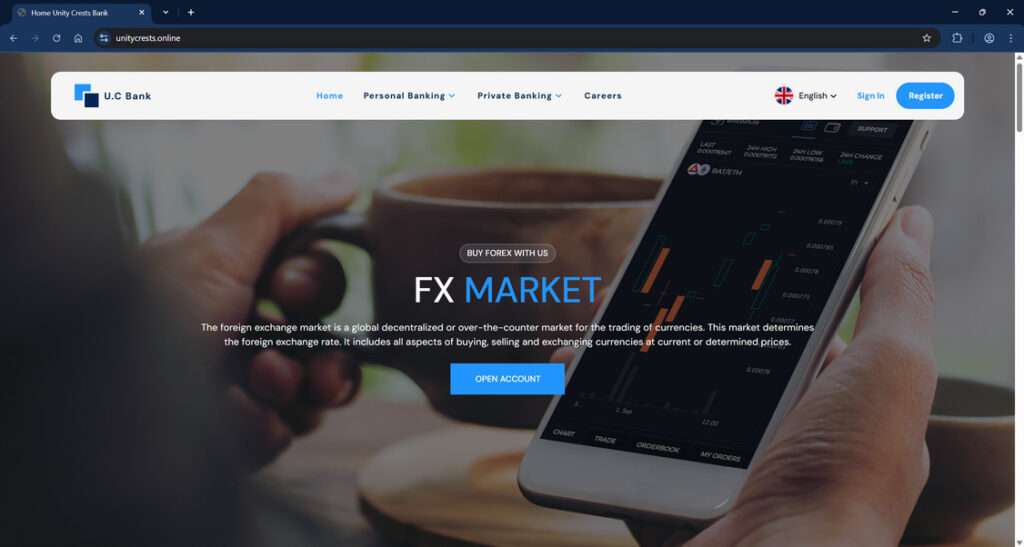
After the fee is paid, victims are directed to create an account at Unity Crest Bank (https://unitycrests.online). The website mimics a real banking interface but lacks critical features that would signify legitimacy:
- No requirement for legal identification or KYC verification
- No customer service phone number
- A generic, poorly written privacy policy
- Suspicious-looking URL and email domains (e.g., support@unitycrest.online)
Once the victim creates an account, they are told their $1,200 payment has been deposited. But here’s the catch: to transfer the money out, additional fees are required.
The Fee Spiral
Victims are asked to pay a $255 “IMS Code” fee, supposedly necessary for a one-time transaction. After this is paid, a new requirement surfaces: a $400 “withdrawal permit deposit.” Each fee is framed as “refundable” to reduce hesitation.
When victims inquire about the total cost upfront, scammers lie, assuring that the next fee is the last. Yet after each payment, a new fee emerges. The most outrageous? A $1,300 “One Time Password” that supposedly finalizes the transaction. At this point, most realize they’ve been scammed.
Social Engineering at Work
Throughout this process, the scam uses advanced social engineering techniques:
- Urgency: Tight deadlines and limited-time offers force hasty decisions.
- Professional Tone: Communications appear professional to build trust.
- Layered Roles: Multiple identities (translator recruiter, finance manager, bank support) give the illusion of a structured organization.
All communication is done through Telegram or email—never phone calls or video chats—ensuring anonymity.
The Financial Toll
Victims report losses ranging from $300 to over $2,000. In your case, the scam cost you $655. This includes the $100 linking fee, $255 IMS code, and $400 withdrawal permit deposit. These fees are strategically spaced out to make victims feel they are “too far in to quit.”
Why It Works
The scam succeeds because it capitalizes on:
- Desperation for remote work
- Professional-looking websites and documentation
- Lack of awareness about red flags in online job offers
- Emotional manipulation and false hope
How the Scam Works
Here is a detailed look at each phase of the Unity Crest Bank and Task Harbor scam, so you can identify it before it’s too late.
Step 1: Initial Contact
You receive a message on Instagram offering a freelance job. The message seems friendly, respectful, and professional. It often includes a detailed explanation of the work and compensation.
Red Flags:
- Contacted via social media, not a job platform like Upwork or LinkedIn
- No formal application process
- Immediate job offer
Step 2: Moving to Telegram
Once interest is shown, you’re asked to continue the conversation on Telegram. This app is favored by scammers due to its privacy features.
Red Flags:
- Refusal to use email or professional job platforms
- Vague user profiles with little verification
Step 3: Assigning the Task
You’re given a real document (30-page PDF) to translate. It feels like a genuine freelance gig. The deadline is tight, which builds urgency and discourages second-guessing.
Red Flags:
- Unrealistic deadline for a large task
- No contract or NDA
Step 4: Submission and “Linking Fee”
After you submit the translation, they inform you that a $100 linking fee is required before they can issue payment. They provide payment details (crypto or wire).
Red Flags:
- Pre-payment to receive payment
- Crypto-only or wire transfer payment methods
Step 5: Unity Crest Bank Registration
You’re told your paycheck has been deposited into a Unity Crest Bank account. You are directed to create an account on https://unitycrests.online.
Red Flags:
- No ID or verification required to open a “bank account”
- Poorly designed or templated website
- Non-standard URL and generic email domains
Step 6: IMS Code Fee
To transfer your money from Unity Crest Bank to your real bank account, you’re told to pay a $255 fee to obtain an IMS Code.
Red Flags:
- No such thing as a paid code required for bank transfers
- Refusal to deduct fees from your existing balance
Step 7: Withdrawal Permit Deposit
You’re now told you need to pay $400 for a “withdrawal permit deposit,” again labeled as refundable. They promise this is the last fee.
Red Flags:
- New fees introduced one after the other
- No transparent fee structure upfront
Step 8: One-Time Password Scam
After you pay the withdrawal fee, another message claims you need a $1,300 “One Time Password” to complete the transfer. This is the tipping point for most victims.
Red Flags:
- One-Time Passwords are not chargeable
- Scammers always promise it’s the last fee, but it never is
Step 9: Emotional Manipulation
When you question the fees or express doubt, the scammer becomes more persuasive, even emotional. You’re told that you’ll lose everything if you don’t comply.
Red Flags:
- High-pressure tactics
- Guilt-tripping or fear-based persuasion
Step 10: Ghosting or Continued Pressure
If you refuse to pay the final fee, communication may stop. In other cases, you may receive more messages urging you to reconsider. Sometimes, a “finance manager” steps in to try and close the deal.
Red Flags:
- Sudden switch in contact person
- Broken promises of refund
What to Do If You’ve Fallen Victim to the Scam
If you’ve already lost money to the Unity Crest Bank scam, here’s what you should do:
1. Cease All Communication Immediately
Block all contacts involved in the scam on Telegram, Instagram, and email. Don’t respond to any further messages.
2. Report the Incident
File a complaint with the following authorities:
- FTC (Federal Trade Commission): https://reportfraud.ftc.gov
- IC3 (FBI’s Internet Crime Complaint Center): https://www.ic3.gov
- Local police department: Bring copies of your communications and transaction details.
3. Notify Your Bank or Payment Provider
If you paid through wire transfer, contact your bank immediately. While crypto is harder to trace, your bank may offer guidance on additional steps.
4. Document Everything
Gather screenshots, receipts, emails, Telegram conversations, and website URLs. Save them in a secure folder.
5. Warn Others
Share your experience on:
- Reddit (e.g., r/scams)
- Scamwatch sites like ScamAdviser, Trustpilot
- Social media platforms where you were contacted
6. Check for Identity Theft
Even if you didn’t share legal documents, scammers may still try to misuse your email or impersonate you. Monitor your credit score and change your passwords.
7. Consider Legal Advice
If your loss was substantial, consider contacting a legal professional for potential civil remedies.
Frequently Asked Questions (FAQ) About the Unity Crest Bank Scam
What is the Unity Crest Bank scam?
The Unity Crest Bank scam is a fraudulent scheme that begins with a fake job offer—usually for freelance translation work—from a group posing as Task Harbor. Victims are then directed to open a fake bank account on a website called Unity Crest Bank, where they are charged escalating, fake fees under the pretense of receiving their payment.
How did Task Harbor contact victims?
Most victims report being contacted on Instagram by a recruiter offering a remote translation job. Communication then moves to Telegram, where the scam is orchestrated.
What kind of job was offered?
Victims are usually given a large PDF file to translate, often 30 pages long, with a five-day deadline and a promised payment of $1,200 upon completion.
Is Unity Crest Bank a real financial institution?
No. Unity Crest Bank is a fake online banking platform designed to deceive users into paying fake transaction and account fees. It has no physical presence, licensing, or regulatory oversight.
What fees were victims asked to pay?
Victims were asked to pay multiple fees, including a $100 linking fee, $255 IMS code fee, $400 withdrawal permit deposit, and finally, a $1,300 one-time password fee. These fees are falsely labeled as refundable.
Why are these fees red flags?
Legitimate employers do not ask job candidates or contractors to pay upfront fees. Additionally, no real bank requires payments for things like passwords, withdrawal permits, or transfer codes—especially not in cryptocurrency.
Why do scammers use cryptocurrency and wire transfers?
These payment methods are difficult to trace and nearly impossible to reverse, making them ideal for scammers. Victims are specifically denied the option to use bank transfers, which are more secure and potentially reversible.
What happens after I pay the fees?
Each time you pay a fee, another “required” payment appears. This cycle continues until the victim either runs out of money or realizes it’s a scam. Even after that, scammers may continue to pressure you to pay more.
What should I do if I already paid?
Stop communicating with the scammers immediately. Report the fraud to the appropriate authorities, notify your bank, and collect all documentation. See the “What to Do If You’ve Fallen Victim” section of the article for a detailed action plan.
Can I recover the money I lost?
Recovery depends on how the payment was made. Crypto and wire transfer payments are generally not recoverable. However, reporting the scam and documenting your loss is still important for legal and investigative purposes.
How do I report Unity Crest Bank and Task Harbor?
You can file reports with the FTC, FBI’s IC3, your local police department, and scam reporting websites. Share your story on forums like Reddit to help warn others.
The Bottom Line
The Unity Crest Bank and Task Harbor scam is a well-orchestrated fraud that has already stolen thousands from unsuspecting job seekers. It uses real tasks, fake banks, and escalating fees to manipulate victims. If you’ve been targeted or scammed, know that you’re not alone—and that speaking out can help protect others.
Always research job offers, avoid paying upfront fees, and never trust crypto-only transactions for employment. Real employers pay you—you should never pay them first.

Join the discussion
0 commentsShare your experience or ask a question about this article.
Discussion
Start the conversation
Have a question or something useful to share? Add the first comment.